
1. Uvod
Thank you for choosing the Xigmatek Lux M Micro-ATX Mini Tower PC Case. This manual provides detailed instructions for the installation, operation, and maintenance of your new PC chassis. Please read this manual carefully before beginning the assembly process to ensure proper installation and to maximize the performance and longevity of your system.
The Lux M case is designed to offer a robust and aesthetically pleasing housing for your computer components, featuring a tempered glass side panel, a metallic front panel with a unique cut-out pattern, and pre-installed fixed RGB fans for optimal cooling and visual appeal. It supports Micro-ATX and Mini-ITX motherboards and is compatible with various cooling solutions, including water cooling.
2. Sigurnosne informacije
Molimo Vas da se pridržavate sljedećih sigurnosnih mjera opreza tokom instalacije i rada:
- Always disconnect the power supply from the wall outlet before installing or removing any components to prevent electric shock.
- Handle all components with care. Avoid touching circuit boards directly; hold them by their edges.
- Wear an anti-static wrist strap when handling sensitive electronic components to prevent electrostatic discharge (ESD) damage.
- Keep the case and components away from liquids, excessive heat, and direct sunlight.
- Osigurajte odgovarajuću ventilaciju oko kućišta računara kako biste spriječili pregrijavanje.
- Držite male dijelove i vijke van dohvata djece.
3. Sadržaj paketa
Verify that all items are present in your package. If any items are missing or damaged, please contact your retailer.
- Xigmatek Lux M Micro-ATX Mini Tower PC Case
- Kutija s priborom (sadrži vijke, odstojnike, vezice za kablove itd.)
- Korisnički priručnik (ovaj dokument)
4. Proizvod je gotovview
Familiarize yourself with the various parts of your Xigmatek Lux M PC case.
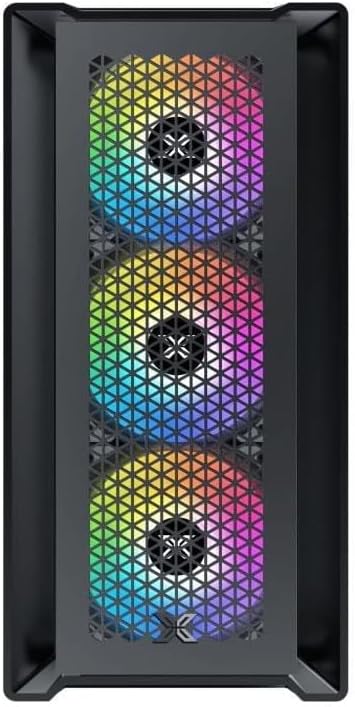
Slika 4.1: Prednja strana View. This image displays the front of the Xigmatek Lux M case, highlighting the metallic mesh panel with a triangular design and the three pre-installed 120mm fixed RGB fans.

Figure 4.2: Angled Top-Front View. This perspective shows the tempered glass side panel, offering a clear view of the interior, and the top panel with its I/O ports (USB, audio) and power button.
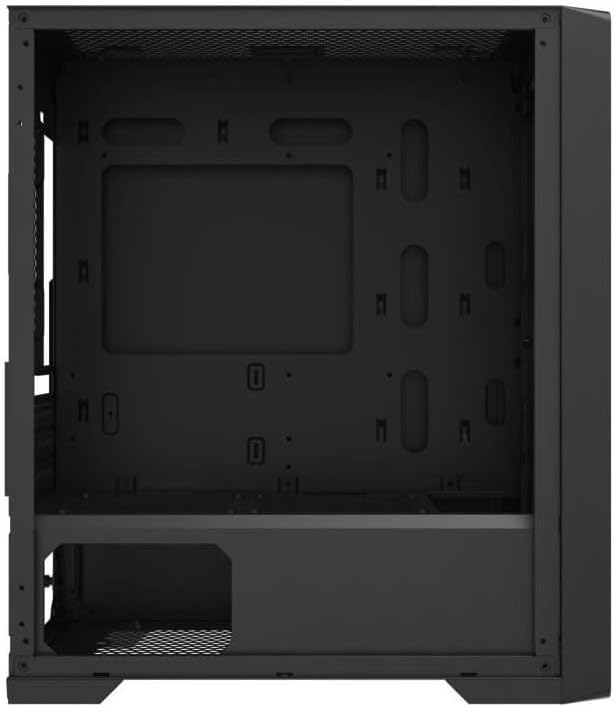
Figure 4.3: Interior Layout. The internal structure of the case, featuring the motherboard mounting tray, cutouts for cable management, and the power supply shroud at the bottom.
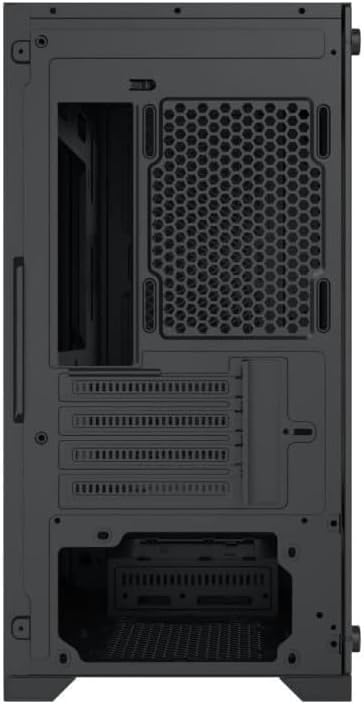
Slika 4.4: Pozadi View. This image illustrates the rear of the case, including the expansion slots for graphics cards and other add-in cards, the rear fan mounting area, and the power supply mounting bracket.
5. Postavljanje i instalacija
Follow these steps to install your computer components into the Xigmatek Lux M case.
5.1. Priprema slučaja
- Postavite kućište na ravnu, stabilnu površinu.
- Remove the tempered glass side panel by unscrewing the thumb screws and carefully lifting it off. Set it aside on a soft, non-abrasive surface.
- Uklonite suprotnu čeličnu bočnu ploču odvrtanjem vijaka s palcem i povlačenjem unazad.
5.2. Instalacija matične ploče
The Lux M supports Micro-ATX and Mini-ITX motherboards.
- Install the I/O shield (if not pre-installed on your motherboard) into the rear opening of the case.
- Poravnajte matičnu ploču s unaprijed postavljenim odstojnicima. Provjerite da se svi otvori za vijke na matičnoj ploči poklapaju s odstojnicima.
- Pričvrstite matičnu ploču pomoću priloženih vijaka za matičnu ploču. Nemojte previše zategnuti.
5.3. Instalacija jedinice za napajanje (PSU)
The PSU mounts at the rear bottom of the case.
- Slide the PSU into its designated compartment from the rear of the case.
- Align the PSU's screw holes with the holes on the case's rear panel.
- Secure the PSU with the provided screws.
5.4. Storage Drive Installation (2.5"/3.5" Drives)
The case supports 2x 2.5"/3.5" storage drives.
- Locate the drive cage beneath the PSU shroud or dedicated 2.5" mounting points behind the motherboard tray.
- For 3.5" HDDs, slide the drive into a drive tray (if applicable) and secure it with screws.
- For 2.5" SSDs, secure them directly to the mounting points using the provided screws.
5.5. Instalacija grafičke kartice (VGA) i kartice za proširenje
Kućište podržava grafičke kartice dužine do 320 mm.
- Uklonite potrebne poklopce za utore za proširenje sa stražnje strane kućišta.
- Insert your graphics card or other expansion card into the appropriate PCIe slot on your motherboard.
- Secure the card to the case using the expansion slot screws.
5.6. Cooling System Installation (Optional)
The Lux M comes with 4x 120mm X24F fixed RGB fans. It supports additional cooling options.
- CPU hladnjak: Max height of 160mm. Install your CPU cooler according to its manufacturer's instructions.
- Podrška radijatora: The case supports radiators of 360mm, 240mm, or 120mm. Refer to your radiator's manual for installation. Common mounting locations include the front and top panels.
5.7. Upravljanje kablovima
Iskoristite izreze za usmjeravanje kablova i tačke za vezivanje iza ležišta matične ploče da biste organizovali kablove. Ovo poboljšava protok vazduha i estetiku.
5.8. Završna skupština
- Once all components are installed and cables are managed, reattach the steel side panel and secure it with thumb screws.
- Carefully reattach the tempered glass side panel and secure it with thumb screws.
6. Uputstvo za upotrebu
After completing the installation, connect your peripherals (monitor, keyboard, mouse) and power cable to the PC. Press the power button located on the top panel of the case to start your system.
The pre-installed X24F RGB fans feature fixed RGB lighting, which will illuminate automatically upon system power-on. No additional software or controller is required for their basic operation.
Ensure that the case's ventilation is not obstructed to maintain optimal airflow and cooling performance.
7. Održavanje
Redovno održavanje pomaže u osiguravanju dugotrajnosti i optimalnih performansi komponenti vašeg računara.
- Čišćenje prašine: Periodically clean dust filters (if present) and the interior of the case using compressed air or a soft brush. Dust accumulation can hinder airflow and lead to overheating.
- Eksterijerno čišćenje: Obrišite vanjske površine mekom krpom, damp cloth. Avoid harsh chemicals that may damage the finish or tempered glass.
- kaljeno staklo: Clean the tempered glass panel with a glass cleaner and a microfiber cloth to avoid scratches and streaks.
8. Otkrivanje problema
If you encounter issues during or after installation, consider the following common troubleshooting steps:
- Nema napajanja:
- Provjerite je li kabel za napajanje sigurno spojen i na PSU i na zidnu utičnicu.
- Check that the PSU switch is in the 'ON' position.
- Provjerite je li kabel prekidača za napajanje na prednjoj ploči ispravno spojen na priključak na prednjoj ploči matične ploče.
- Fans Not Spinning / RGB Not Lighting:
- Ensure all fan power cables are securely connected to the motherboard or a fan controller.
- For RGB, confirm that any necessary RGB headers are connected to the motherboard (though the included fans are fixed RGB and should light up with power).
- Nema izlaza za prikaz:
- Verify that your monitor cable is connected to the graphics card (if installed) and not the motherboard's integrated graphics port.
- Ponovo umetnite grafičku karticu u njen PCIe slot.
- pregrijavanje:
- Provjerite da li se svi ventilatori kućišta okreću i pravilno orijentišu za optimalan protok zraka (usis/ispušavanje).
- Očistite sve filtere za prašinu i unutrašnje komponente.
- Verify that the CPU cooler is properly seated and making good contact with the CPU.
For more complex issues, consult your component manuals or seek assistance from Xigmatek support or a qualified technician.
9. Specifikacije
| Feature | Specifikacija |
|---|---|
| Brand | Xigmatek |
| Naziv modela | Lux M |
| Broj modela | EN48540 |
| Tip slučaja | Mini toranj |
| Kompatibilnost matične ploče | Micro-ATX, Mini-ITX |
| Materijal | Tempered Glass (side panel), Metal (front panel) |
| Boja | Crna |
| Unaprijed instalirani ventilatori | 4 x 120mm X24F Fixed RGB Fans |
| Podrška radijatora | 360 mm, 240 mm, 120 mm |
| Maksimalna visina CPU hladnjaka | 160mm |
| Maksimalna dužina VGA | 320mm |
| Max PSU Length | 165mm |
| Storage Bays | 2x 2.5"/3.5" |
| Posebne karakteristike | RGB Lighting, Triangular Mesh Front Design |
10. Garancija i podrška
Xigmatek products are manufactured to the highest quality standards. For warranty information and technical support, please refer to the warranty card included with your product or visit the official Xigmatek webMolimo sačuvajte dokaz o kupovini za potrebe reklamacije.
For further assistance, you may contact Xigmatek customer support through their official channels.