
LFF DAB Plus Digital FM Radio
LFF DAB Plus Digital FM Radio User Manual
Model: DAB Plus Digital FM Radio
Marka: LFF
1. Uvod
This manual provides detailed instructions for the LFF DAB Plus Digital FM Radio. It covers setup, operation, maintenance, and troubleshooting to ensure optimal performance and user experience. Please read this manual thoroughly before using the device.

Front view of the LFF DAB Plus Digital FM Radio, showing the speaker grille, color display, and extended antenna.
2. Sadržaj paketa
Molimo Vas da provjerite paket za sljedeće stavke:
- 1 x LFF DAB Plus Digital FM Radio
- 1 x adapter za naizmeničnu struju
- 1 x Vodič za brzi početak
3. Proizvod je gotovview
Upoznajte se sa komponentama i kontrolama radija.
3.1 Ključne karakteristike

This diagram illustrates the radio's key functions: DAB+ radio, 60 station presets, FM radio, sleep timer, headphone jack, Bluetooth connectivity, full-color screen, and dual alarm capability.
3.2 Kontrole i portovi

Odozgo i sa strane view of the radio, showing control buttons and knobs on the top panel, and the 3.5mm headphone jack located on the side.
Refer to the diagram above for the location of the following:
- Dugme za napajanje: Uključuje/isključuje radio.
- Dugme za način rada: Prebacuje se između DAB+, FM i Bluetooth načina rada.
- Dugme za podešavanje/odabir: Rotates to tune stations or navigate menus, press to select.
- Gumb za jačinu zvuka: Podešava jačinu zvuka.
- Unaprijed postavljena dugmad: For saving and recalling favorite stations.
- Alarm/Sleep Timer Button: Pristupa postavkama alarma i tajmera za spavanje.
- Prikaz u boji: Prikazuje informacije o stanici, vrijeme i opcije menija.
- Priključak za slušalice (3.5 mm): Za privatno slušanje.
- DC IN port: Za spajanje AC adaptera za napajanje.
- Teleskopska antena: Za poboljšani radio prijem.
4. Podešavanje
4.1 Uključivanje
The radio can be powered by the included AC adapter or by batteries.
- AC napajanje: Connect the AC power adapter to the DC IN port on the back of the radio and plug it into a wall outlet.
- Snaga baterije: Open the battery compartment on the back of the radio and insert 4 x 1.5V AA (LR6) batteries, ensuring correct polarity.
Nazad view of the radio, detailing the battery compartment for 4x AA batteries, the AC adapter input (5V/1000mA), and the 360° rotatable antenna. Product dimensions are also indicated.
4.2 Podešavanje antene
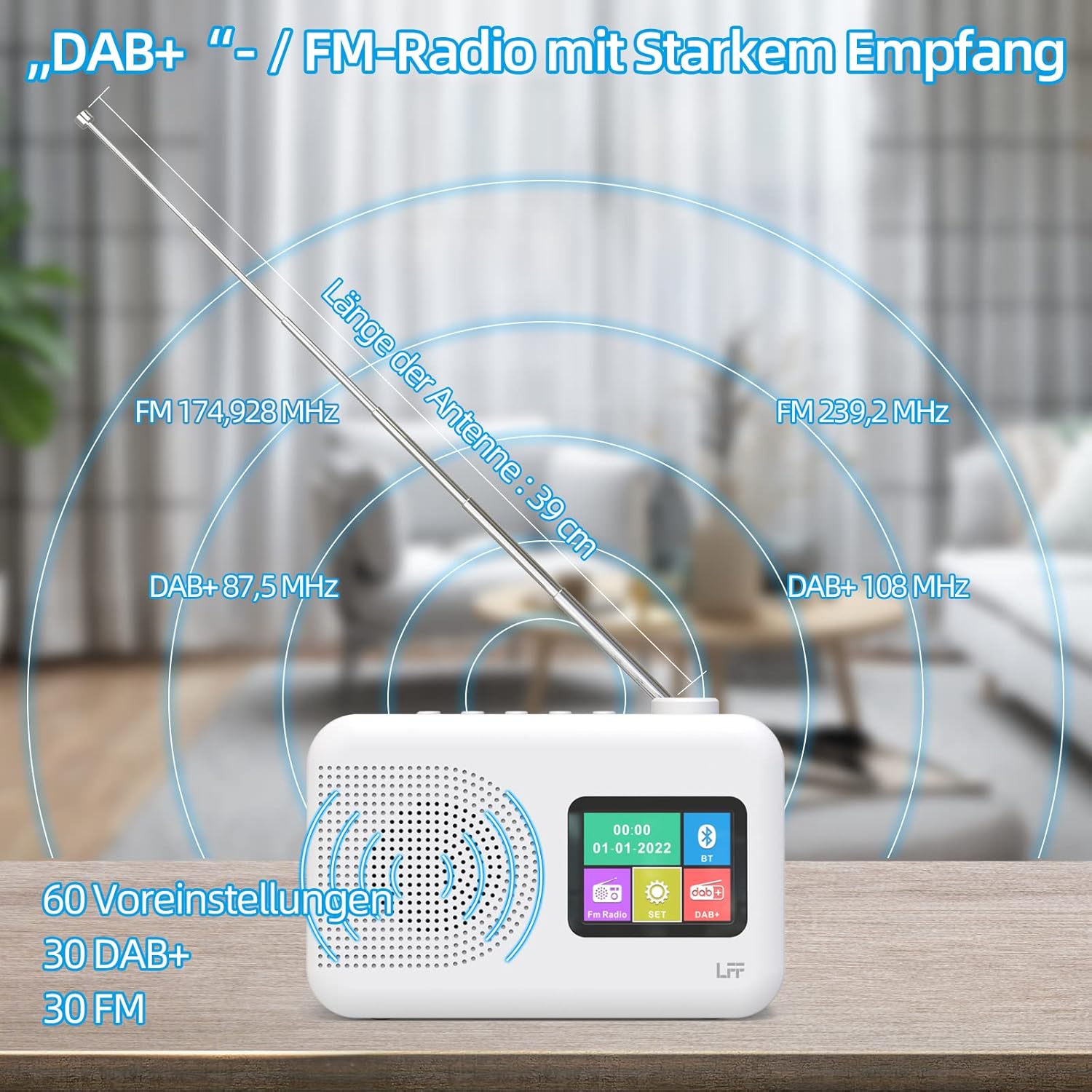
Extend the telescopic antenna fully (approximately 39 cm) and adjust its angle for optimal reception, especially for DAB+ and FM stations.

This diagram illustrates the radio's strong DAB+ and FM reception capabilities with the fully extended 39cm antenna, showing frequency ranges and the capacity for 60 total presets (30 DAB+, 30 FM).
4.3 Početno skeniranje (DAB+)
- Upali radio.
- Ensure the mode is set to DAB+. If not, press the Mode dugme za prebacivanje.
- The radio will automatically perform a full scan for available DAB+ stations. This may take a few minutes.
- Once the scan is complete, the radio will display a list of found stations.
5. Uputstvo za upotrebu
5.1 DAB+ radio način rada
- Pritisnite Mode dugme za odabir DAB+ režima.
- Rotirajte Tune/Select knob to browse through the available stations.
- Pritisnite Tune/Select dugme za odabir stanice.
- Čuvanje unaprijed postavljenih postavki: Da biste sačuvali stanicu, pritisnite i držite Preset button until the display confirms. To recall, briefly press the corresponding Preset button. Up to 30 DAB+ stations can be saved.
5.2 Režim FM radija
- Pritisnite Mode dugme za odabir FM moda.
- Rotirajte Tune/Select dugme za ručno podešavanje frekvencije.
- Pritisnite i držite Tune/Select knob for a few seconds to auto-scan for the next available station.
- Čuvanje unaprijed postavljenih postavki: Similar to DAB+ mode, press and hold a Preset button to save, and briefly press to recall. Up to 30 FM stations can be saved.
5.3 Bluetooth režim

This diagram illustrates the three primary playback options for the radio: through its internal speaker, via Bluetooth connection to an external device, or using headphones connected to the headphone jack.
- Pritisnite Mode button to select Bluetooth mode. The display will show "Bluetooth Pairing" or similar.
- Na vašem eksternom uređaju (npr. pametnom telefonu) omogućite Bluetooth i potražite dostupne uređaje.
- Select "LFF Radio" (or similar name) from the list to pair.
- Once paired, you can play audio from your device through the radio's speaker.
- Napomena: This radio acts as a Bluetooth receiver. It does not support connecting to Bluetooth headphones or other Bluetooth speakers.
5.4 Tajmer za spavanje
Tajmer za spavanje omogućava da se radio automatski isključi nakon određenog perioda.

This image depicts the sleep timer function, offering selectable durations of 15, 30, 45, 60, 90, and 120 minutes before the radio automatically powers off.
- Pritisnite Alarm/Sleep Timer button repeatedly to cycle through sleep timer options (15 min, 30 min, 45 min, 60 min, 90 min, 120 min, OFF).
- Select your desired duration. The radio will turn off automatically after this time.
5.5 Budilnik
The radio features a dual alarm function.
- Pritisnite i držite Alarm/Sleep Timer button to enter alarm settings.
- Koristite Tune/Select knob to set the alarm time, alarm source (DAB+, FM, or buzzer), and volume.
- Pritisnite Tune/Select knob to confirm each setting.
- Repeat the process for the second alarm if needed.
5.6 Korištenje slušalica
Plug 3.5mm headphones into the headphone jack on the side of the radio for private listening. The internal speaker will automatically mute.
6. Održavanje
6.1 Čišćenje
- Wipe the radio's surface with a soft, dry cloth.
- Ne koristite abrazivna sredstva za čišćenje, voskove ili rastvarače jer mogu oštetiti završnu obradu.
6.2 Zamjena baterije
When using battery power, replace all four AA batteries when the low battery indicator appears on the display or when performance degrades.
- Ensure the radio is turned off and disconnected from AC power.
- Otvorite poklopac odeljka za baterije na poleđini.
- Uklonite stare baterije i pravilno ih odložite.
- Insert new 4 x 1.5V AA (LR6) batteries, observing correct polarity (+/-).
- Čvrsto zatvorite poklopac odeljka za baterije.
6.3 Screen Protection Film
The radio's display comes with a transparent protective film. For optimal clarity, gently peel off this film before first use.
7. Otkrivanje problema
Ako naiđete na probleme, pogledajte sljedeće uobičajene probleme i rješenja:
| Problem | Mogući uzrok | Rješenje |
|---|---|---|
| Nema struje | AC adapter not connected, batteries depleted or incorrectly inserted. | Provjerite priključak AC adaptera. Zamijenite baterije ili provjerite ispravan polaritet. |
| Loš radio prijem | Antenna not extended, weak signal area, interference. | Fully extend and adjust the telescopic antenna. Move the radio to a different location. Avoid sources of interference. |
| Bluetooth se ne povezuje | Radio not in Bluetooth mode, device too far, already paired with another device. | Ensure radio is in Bluetooth mode. Keep devices within range. Disconnect from other devices. |
| Nema zvuka | Volume too low, headphones connected, mute activated. | Increase volume. Disconnect headphones. Check if mute is active. |
8. Specifikacije
- Brand: LFF ekstenzija
- Model: DAB Plus Digital FM Radio
- Boja: Bijelo
- Tehnologija povezivanja: Bluetooth
- Dimenzije (D x Š x V): 16.1 cm x 5.9 cm x 10.9 cm
- Tehnologija podešavanja: DAB
- Izvor napajanja: AC Adapter (5V/1000mA) or 4 x 1.5V AA (LR6) Batteries
- Podržani radio bendovi: DAB+, FM
- DAB+ Frekvencijski raspon: 174.928 - 239.2 MHz
- FM frekvencijski raspon: 87.5 - 108 MHz
- Unaprijed postavljene postavke: 30 DAB+, 30 FM
- Dužina antene: 39 cm (extendable)
- Posebne karakteristike: DAB Plus Radio, Sleep Timer, Dual Alarm, Headphone Jack, Color Display
- Uključene komponente: DAB Digital Radio, AC Power Adapter, Quick Start Guide
9. Garancija i podrška
For any quality-related issues or technical support, please contact the seller directly. We are committed to resolving any problems you may encounter with your LFF DAB Plus Digital FM Radio.
Ask a question about this manual
Ask about setup, troubleshooting, compatibility, parts, safety, or missing instructions. Manuals+ will review the question and use this page’s manual context to help answer it.