
TZT NanoVNA-F V3.1
NanoVNA-F V3.1 Vector Network Analyzer User Manual
Model: NanoVNA-F V3.1 | Brand: TZT
1. Uvod
The TZT NanoVNA-F V3.1 is a compact and versatile Vector Network Analyzer (VNA) designed for measuring RF circuits and antenna performance. It operates within a wide frequency range of 10KHz to 1.5GHz, making it suitable for various applications including amateur radio, antenna tuning, and general RF circuit analysis. This manual provides essential information for the proper setup, operation, and maintenance of your NanoVNA-F V3.1.

Figure 1: The NanoVNA-F V3.1 Vector Network Analyzer with its 4.3-inch IPS display showing S-parameter measurements.
2. Ključne karakteristike
- Široki raspon mjerenja: Covers 10KHz to 1.5GHz, with excellent dynamic range: >70dB for 10K-300MHz, >60dB for 300M-900MHz, and >40dB for 900M-1.5GHz.
- Baterija velikog kapaciteta: Equipped with a 5000mAh battery for extended operation. Can also function as a mobile power source via its extended USB interface.
- Očisti ekran: Features a 4.3-inch IPS TFT LCD with a resistive touch screen for clear data and curve visualization.
- Moćne funkcije: Capable of measuring S-parameters, Voltage Standing Wave Ratio (SWR), phase map, group delay, Smith chart, DELAY, POLAR, and LINEAR. Supports firmware upgrades via virtual U disk.
- PC and Android Phone Connectivity: Compatible with PC software (e.g., NanoVNA Saver) for data display and Touchstone (.snp) file export. Supports Android mobile phones for control.
3. Sadržaj paketa
Prilikom otvaranja paketa, molimo Vas da provjerite da li se nalaze svi sljedeći artikli:
- NanoVNA-F V3.1 Vector Network Analyzer Unit
- USB kabel tipa C
- 2 x SMA Male to Male RG316 RF Cables
- Calibration Kit (OPEN, SHORT, LOAD)
- SMA Male to Female Adapters (various types)
- Stylus Pen
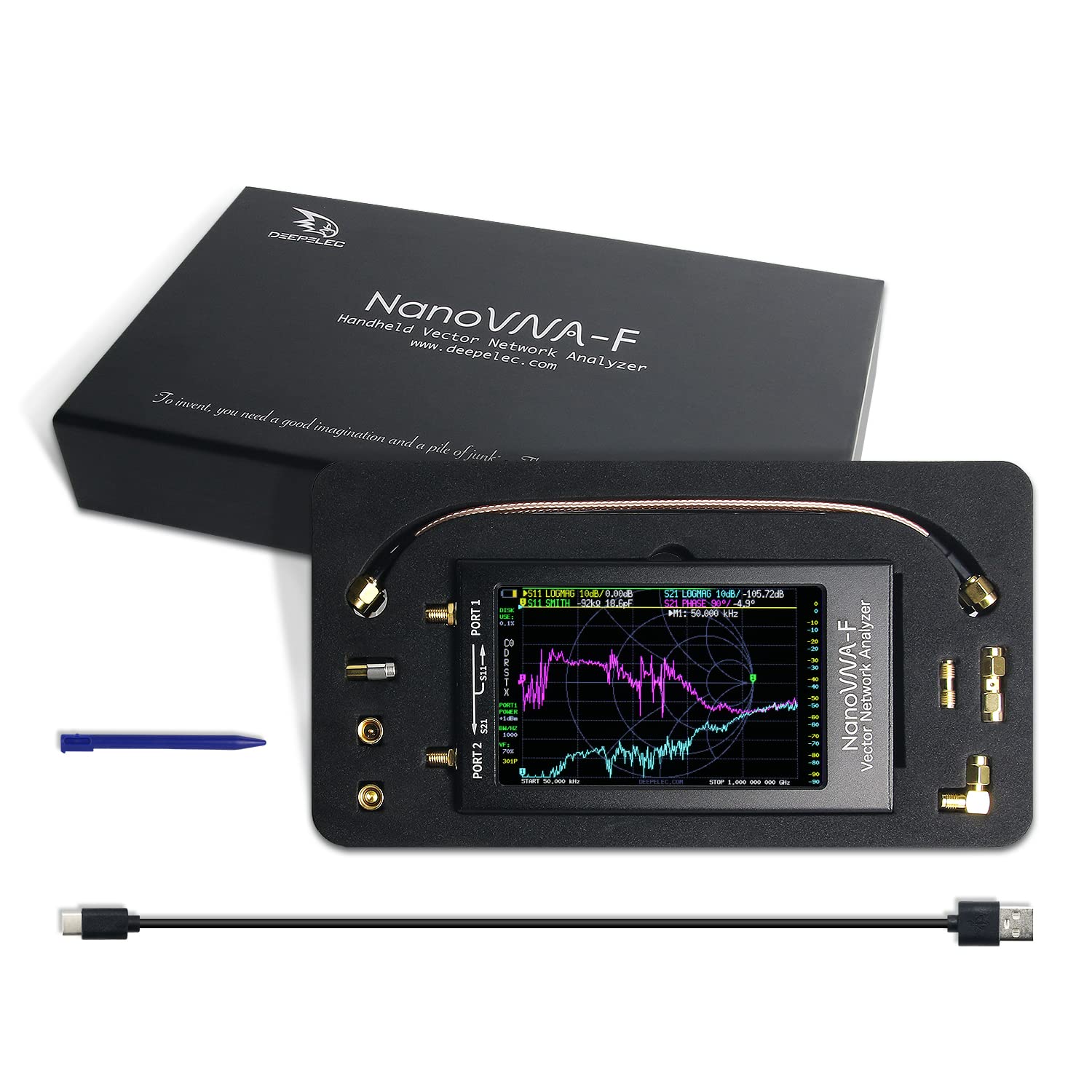
Figure 2: All components included in the NanoVNA-F V3.1 package.
4. Vodič za postavljanje
4.1 Početno punjenje
Before first use, fully charge the NanoVNA-F V3.1. Connect the provided USB Type-C cable to the device's USB-C port and the other end to a standard USB power adapter (5V, 1A recommended) or a computer's USB port. The charging indicator will show the charging status.
4.2 Uključivanje/isključivanje
Locate the power switch on the side of the device. Slide the switch to the "ON" position to power on the unit. To power off, slide the switch to the "OFF" position.
4.3 Connecting to a Device Under Test (DUT)
The NanoVNA-F V3.1 has two SMA ports: PORT 1 (S11) and PORT 2 (S21). Use the provided SMA cables and adapters to connect your DUT. For reflection measurements (S11), connect the DUT to PORT 1. For transmission measurements (S21), connect the input of the DUT to PORT 1 and the output to PORT 2.

Figure 3: Schematic representation of S-parameter measurement connections on the NanoVNA-F V3.1.
5. Operacija
5.1 Navigacija korisničkim interfejsom
The NanoVNA-F V3.1 features a resistive touch screen and a wheel button for navigation. Use the stylus or your finger to interact with the touch screen menus. The wheel button can be used for fine adjustments or menu selection in some modes.
5.2 Kalibracija
Calibration is crucial for accurate measurements. Perform a full two-port calibration (OPEN, SHORT, LOAD, THRU) for the desired frequency range before taking measurements. Access the calibration menu from the main screen.
- Connect the OPEN standard to PORT 1 and perform the OPEN calibration.
- Connect the SHORT standard to PORT 1 and perform the SHORT calibration.
- Connect the LOAD standard to PORT 1 and perform the LOAD calibration.
- Connect PORT 1 and PORT 2 directly using a THRU cable and perform the THRU calibration.
- Save the calibration data.
5.3 Načini mjerenja
The device supports various measurement modes, including:
- S11 (Reflection Coefficient): Measures the reflection characteristics of a device connected to PORT 1. Useful for SWR, Return Loss, and Smith Chart analysis.
- S21 (Transmission Coefficient): Measures the transmission characteristics between PORT 1 and PORT 2. Useful for gain/loss and phase measurements of filters, ampliferi itd.
- SWR (Omjer stojnih valova): Indicates the impedance match of an antenna or transmission line.
- Smith Chart: Graphical representation of complex impedance.
- faza: Displays the phase response of the DUT.
- Group Delay: Measures the time delay of signals through the DUT.
5.4 PC Software Connectivity
For advanced analysis and data logging, connect the NanoVNA-F V3.1 to a PC using the USB Type-C cable. Download and install compatible software like NanoVNA Saver. This software allows for larger display, detailed analysis, and export of Touchstone (.snp) files for use in other RF simulation tools.
6. Održavanje
6.1 Čišćenje
Za čišćenje uređaja koristite meku, suhu krpu. Za tvrdokornu prljavštinu, laganoamp cloth can be used. Avoid using harsh chemicals or abrasive materials, as they may damage the screen or casing.
6.2 Skladištenje
When not in use, store the NanoVNA-F V3.1 in a cool, dry place, away from direct sunlight and extreme temperatures. Keep it in its original packaging or a protective case to prevent physical damage.
6.3 Njega baterija
Da biste produžili vijek trajanja baterije, izbjegavajte često potpuno pražnjenje baterije. Ako je skladištite duži period, napunite bateriju do otprilike 50% i punite je svakih nekoliko mjeseci.
7. Otkrivanje problema
| Problem | Mogući uzrok | Rješenje |
|---|---|---|
| Uređaj se ne uključuje. | Low battery or power switch in OFF position. | Charge the device. Ensure the power switch is in the ON position. |
| Netačna mjerenja. | Improper calibration or faulty cables/adapters. | Perform a full calibration for the current frequency range. Check cables and connectors for damage. |
| Ekran ne reaguje. | Softverski kvar ili fizičko oštećenje. | Ponovo pokrenite uređaj. Ako problem i dalje postoji, kontaktirajte podršku. |
| Ne mogu se povezati s računarom. | Incorrect USB cable, driver issues, or software settings. | Ensure you are using the correct USB Type-C cable. Install necessary drivers. Check PC software settings. |
8. Specifikacije
| Feature | Detalj |
|---|---|
| Frekvencijski opseg | 10KHz - 1.5GHz |
| Display | 4.3-inch IPS TFT LCD, Resistive Touch Screen |
| Dynamic Range | >70dB (10K-300MHz), >60dB (300M-900MHz), >40dB (900M-1.5GHz) |
| Kapacitet baterije | 5000mAh |
| Luke | 2 x SMA (PORT 1, PORT 2), 1 x USB Type-C |
| Dimenzije | Approximately 127mm x 74mm x 21mm (5in x 2.9in x 0.8in) |
| Težina | Otprilike 1 funta |
| Proizvođač | SAD |
| Zemlja porijekla | Kina |

Figure 4: Physical dimensions of the NanoVNA-F V3.1.
9. Garancija i podrška
Za informacije o garanciji i tehničkoj podršci, molimo pogledajte dokumentaciju koja je priložena uz kupovinu ili se direktno obratite proizvođaču. Sačuvajte dokaz o kupovini za potrebe reklamacije.
Za ovaj model nisu pronađeni službeni videozapisi proizvoda od prodavca.
Ask a question about this manual
Ask about setup, troubleshooting, compatibility, parts, safety, or missing instructions. Manuals+ will review the question and use this page’s manual context to help answer it.