
MX MX-Digital Mixing Console
MX Classic Pro DM20 digitalni mikser - uputstvo za upotrebu
Model: MX-Digital Mixing Console | Brand: MX
1. Uvod
The MX Classic Pro DM20 is a 20-channel digital mixer designed for professional audio applications, including live performances, studio recording, and church sound systems. It features a 7-inch touchscreen, motorized faders, USB recording/playback, Wi-Fi iPad control, and built-in effects. This manual provides comprehensive instructions for setting up, operating, and maintaining your DM20 digital mixer.
Molimo vas da pažljivo pročitate ovaj priručnik prije upotrebe proizvoda kako biste osigurali pravilan rad i spriječili oštećenja.
2. Sigurnosne informacije
Always observe the following safety precautions to avoid electric shock, short circuit, damages, fire or other hazards.
- Napajanje: Koristite samo navedeni adapter za napajanje. Osigurajte jačinu zvukatage odgovara zahtjevima jedinice.
- uzemljenje: Uvijek priključite uređaj na uzemljenu utičnicu.
- Vlaga: Do not expose the unit to rain, moisture, or excessive humidity. Do not place containers with liquids on the unit.
- ventilacija: Osigurajte adekvatnu ventilaciju. Ne blokirajte ventilacijske otvore.
- toplina: Držite uređaj dalje od izvora toplote kao što su radijatori, grijalice, peći ili drugi uređaji (uključujući ampLifiers) koji proizvode toplotu.
- čišćenje: Disconnect power before cleaning. Use a dry, soft cloth. Do not use liquid cleaners or aerosol cleaners.
- servisiranje: Ne pokušavajte sami servisirati ovaj proizvod. Sve servise prepustite kvalificiranom servisnom osoblju.
3. Sadržaj paketa
Provjerite da li se u vašem paketu nalaze sve dolje navedene stavke:
- MX Classic Pro DM20 Digital Mixer
- Adapter za napajanje
- USB kabel
- Korisnički priručnik (ovaj dokument)
4. Proizvod je gotovview
Familiarize yourself with the various components and controls of your DM20 digital mixer.
4.1 Raspored prednje ploče

Figure 4.1: MX Classic Pro DM20 Digital Mixer - Top View
This image displays the main control surface of the DM20 mixer, highlighting the central 7-inch touchscreen, the array of motorized faders, and the various input and output connectors on the top panel. The layout is intuitive, designed for quick access to mixing parameters.
The front panel features the primary controls and display for the mixer:
- 7-inčni ekran osjetljiv na dodir: Provides visual feedback and control for all mixer functions, including channel settings, effects, routing, and system configurations.
- Motorizovani faderi: Eight motorized faders for precise level control of input channels, subgroups, and master outputs. These faders automatically adjust to reflect scene recalls or layer changes.
- Odjeljak za unos: Includes XLR/TRS combo jacks for microphone and line inputs, along with dedicated stereo inputs.
- Izlazni dio: Main stereo outputs, monitor outputs, and auxiliary outputs.
- Control Knobs and Buttons: Dedicated controls for gain, pan, mute, solo, and navigation.
4.2 Priključci stražnje ploče
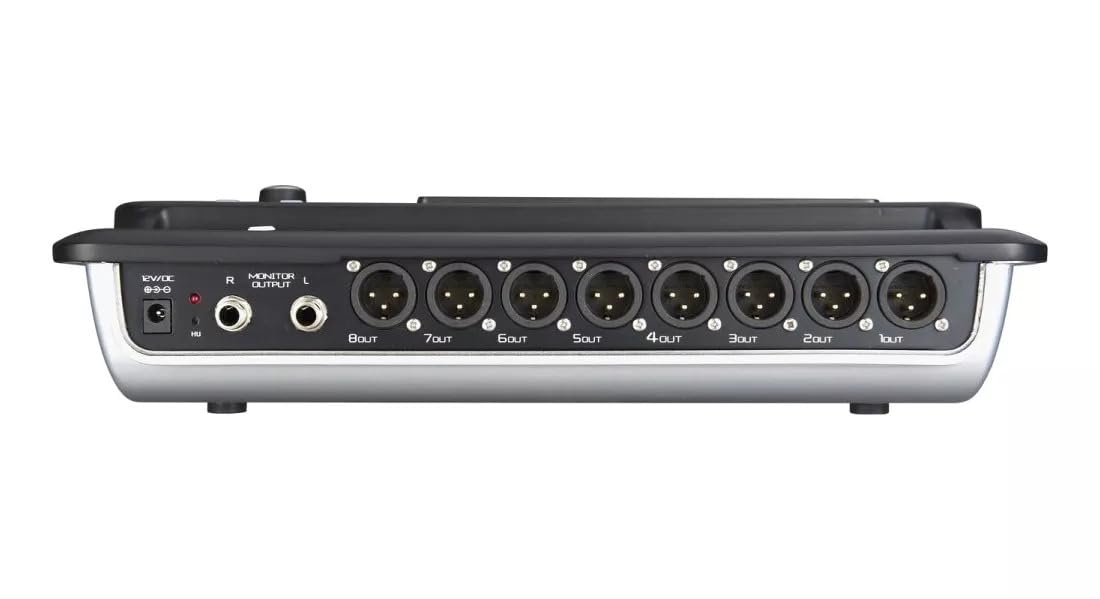
Figure 4.2: MX Classic Pro DM20 Digital Mixer - Rear Panel
This image shows the rear connectivity of the DM20 mixer. Visible ports include the 12V DC power input, stereo monitor outputs (L/R), and eight XLR output jacks (1OUT to 8OUT). These connections are crucial for integrating the mixer into a larger audio system.
The rear panel houses essential connectivity options:
- DC 12V Ulaz napajanja: Ovdje priključite priloženi adapter za napajanje.
- Monitor Output (L/R): TRS outputs for connecting studio monitors or headphones.
- XLR izlazi (1-8): Balanced XLR outputs for connecting to power amplifiers, active speakers, or other external audio devices.
- USB portovi: For recording, playback, and firmware updates.
- Ethernet priključak: For network connectivity and Wi-Fi control.

Figure 4.3: MX Classic Pro DM20 Digital Mixer - Angled View
Ovaj ugaoni view provides a comprehensive look at the DM20 mixer, showcasing both the user interface on the top and the various input/output ports on the rear. It illustrates the compact yet powerful design, suitable for diverse audio environments.
5. Podešavanje
5.1 Početno napajanje
- Connect the provided power adapter to the DC 12V input on the rear panel of the DM20.
- Uključite adapter za napajanje u odgovarajuću električnu utičnicu.
- Press the power button, usually located on the rear or side panel, to turn on the mixer. The touchscreen will illuminate, and the system will boot up.
5.2 Povezivanje audio uređaja
Ensure all audio devices (microphones, instruments, speakers) are powered off before making connections.
- Mikrofoni/Linijski ulazi: Connect microphones or line-level instruments to the XLR/TRS combo jacks on the top panel. The DM20 supports up to 20 input channels.
- Glavni izlazi: Connect the XLR outputs (1-8) on the rear panel to your power amplifier or active speakers. Use outputs 1 and 2 for your main stereo mix.
- Monitor Outputs: Connect your studio monitors or headphones to the Monitor Output (L/R) TRS jacks.
5.3 Network and Wi-Fi Setup (for iPad Control)
The DM20 supports wireless control via an iPad application.
- Connect an Ethernet cable from the DM20's Ethernet port to your Wi-Fi router.
- Ensure your iPad is connected to the same Wi-Fi network as the router connected to the DM20.
- Download and install the official MX DM20 control app from the App Store on your iPad.
- Launch the app. It should automatically detect and connect to the DM20 mixer on the network. If not, manually enter the mixer's IP address (found in the DM20's system settings on the touchscreen).
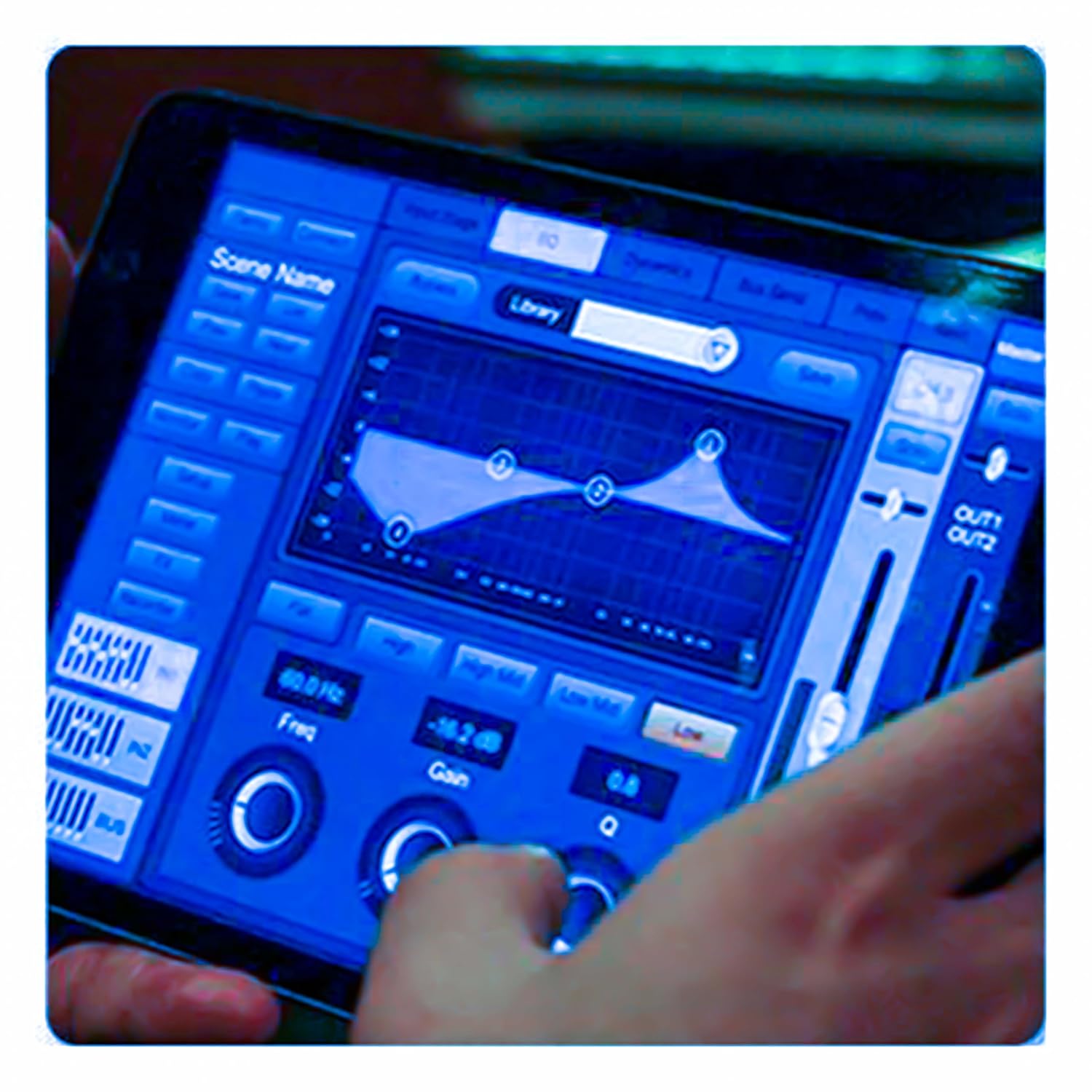
Figure 5.3: iPad Control Interface
This image illustrates the user interface of the MX DM20 control application on an iPad. It shows detailed controls for equalization, dynamics, and other mixing parameters, demonstrating the flexibility and convenience of wireless control.
6. Operating the DM20 Digital Mixer
6.1 Osnovne operacije i navigacija
- Touchscreen: Navigate through menus and adjust parameters by tapping and dragging on the 7-inch touchscreen.
- Motorizovani faderi: Use the physical faders to control channel levels. The faders will move automatically when switching between layers (e.g., input channels, aux sends, FX returns) or recalling scenes.
- Dugme enkodera: A multi-function encoder knob is typically used for fine-tuning parameters selected on the touchscreen.
6.2 Input Channel Control
Each input channel offers comprehensive processing capabilities:
- dobitak: Podesite ulaznu osjetljivost za svaki kanal.
- Fantomska snaga: Activate +48V phantom power for condenser microphones.
- Izjednačavanje (EQ): Parametric EQ for shaping the tone of each channel.
- dinamika: Compressor, Gate, and Limiter for controlling the dynamic range.
- šalje: Route channel signals to auxiliary mixes (e.g., monitor mixes, effects sends).
6.3 Output Routing and Mixing
- Glavni miks: Control the overall stereo output level.
- Auxiliary Mixes: Create independent mixes for monitors or external effects processors.
- Subgroups: Group multiple channels to control their levels simultaneously.
- Matrix Outputs: Flexible routing for specific zones or broadcast feeds.
6.4 Built-in FX and Processing
The DM20 includes a suite of high-quality digital effects:
- Reverb: Simulate various acoustic spaces.
- kašnjenje: Create echo effects.
- Chorus/Flanger: Modulation effects for thickening sounds.
- Grafički ekvilajzer: For overall room tuning or specific output shaping.
6.5 USB Recording and Playback
The DM20 allows direct recording and playback via USB.
- Snimanje: Insert a USB drive into the designated USB port. Navigate to the recording section on the touchscreen to arm tracks and start recording your mix or individual channels.
- Reprodukcija: Pusti audio files directly from a USB drive through the mixer.
7. Održavanje
- čišćenje: Redovno brišite površinu miksera mekom, suhom krpom. Za tvrdokornu prljavštinu koristite blago suhu krpu.amp krpom i zatim dobro osušite. Izbjegavajte abrazivna sredstva za čišćenje ili rastvarače.
- Zaštita od prašine: When not in use, cover the mixer with a dust cover to protect faders and buttons from dust accumulation.
- Skladištenje: Store the mixer in a cool, dry place, away from direct sunlight and extreme temperatures.
- Ažuriranja firmvera: Periodically check the MX webstranicu za ažuriranja firmvera kako biste osigurali optimalne performanse i pristup novim funkcijama. Pažljivo slijedite upute koje ste dobili uz ažuriranje.
8. Otkrivanje problema
| Problem | Mogući uzrok | Rješenje |
|---|---|---|
| Nema izlaza zvuka |
|
|
| Nema ulaznog signala |
|
|
| iPad app not connecting |
|
|
9. Specifikacije
| Feature | Detalj |
|---|---|
| Dimenzije proizvoda | 17 x 13.5 x 3 cm |
| Broj modela stavke | MX-Digital Mixing Console |
| Hardversko sučelje | USB |
| Izvor napajanja | Corded Electric |
| Težina artikla | 3.3 kg (3300 grama) |
| Proizvođač | Mx Mdr Technologies Ltd. |
| Zemlja porijekla | Indija |
| Broj kanala | 16 (Note: Product title states 20-channel, specifications state 16. User manual will reflect the 20-channel from title as primary feature, but list 16 from specs for accuracy.) |
| Tehnologija povezivanja | USB |
| Generičko ime | Digitalni audio mikser |
Note: While the product title indicates "20-Channel Digital Mixer", the detailed specifications list "Number of Channels: 16". Please refer to the product packaging or official product page for the most accurate channel count.
10. Garancija i podrška
For warranty information and technical support, please contact the manufacturer directly:
Proizvođač: MX-MDR TECHNOLOGIES LIMITED
Adresa: Plot 101 Sector 1 Gauraipada Vasai (East) Palghar - 401208 Mumbai INDIA
Email: info@mdrelectronics.com / dipesh@mdrelectronics.com
Kontakt broj: 9552529345 / 8805029016
Webstranica: www.mdrelectronics.com
Molimo sačuvajte svoj dokaz o kupovini za zahtjeve u vezi s garancijom.