
1. Uvod
This manual provides detailed instructions for the safe and efficient operation of your InFocus P120 INL412 Multimedia Projector (Model INL4128). Please read this manual thoroughly before using the projector and keep it for future reference. This projector is designed for high-quality image projection, suitable for various applications including presentations, home entertainment, and gaming.
2. Sigurnosne informacije
Pridržavajte se sljedećih sigurnosnih mjera opreza kako biste spriječili oštećenje projektora i osigurali sigurnost korisnika:
- ventilacija: Osigurajte adekvatnu ventilaciju oko projektora. Ne blokirajte ventilacijske otvore. Održavajte minimalnu udaljenost od 30 cm (12 inča) od zidova ili drugih predmeta.
- Izvor napajanja: Koristite samo navedeno napajanje i jačinu zvukatage. Connect the power cord securely.
- toplina: The projector generates heat during operation. Do not touch the projector's vents or exhaust areas directly after use.
- Izlaz svjetlosti: Ne gledajte direktno u sočivo projektora kada je lamp je uključen, jer intenzivno svjetlo može uzrokovati oštećenje oka.
- plasman: Place the projector on a stable, level surface. Avoid placing it in direct sunlight, near heat sources, or in areas with high humidity or dust.
- čišćenje: Isključite kabel za napajanje prije čišćenja. Koristite meku, suhu krpu. Ne koristite tekuća ili aerosolna sredstva za čišćenje.
- servisiranje: Ne pokušavajte sami servisirati projektor. Za sve servisne radove obratite se kvalifikovanom servisnom osoblju.
3. Proizvod je gotovview
3.1 Top Panel and Lens Area
The top panel features the control buttons for basic operation and the lens area with focus and zoom adjustments.

Slika 3.1: Vrh view of the InFocus P120 INL412 projector, highlighting the control panel on the right and the lens adjustment area on the left. The InFocus logo is visible on the top surface.
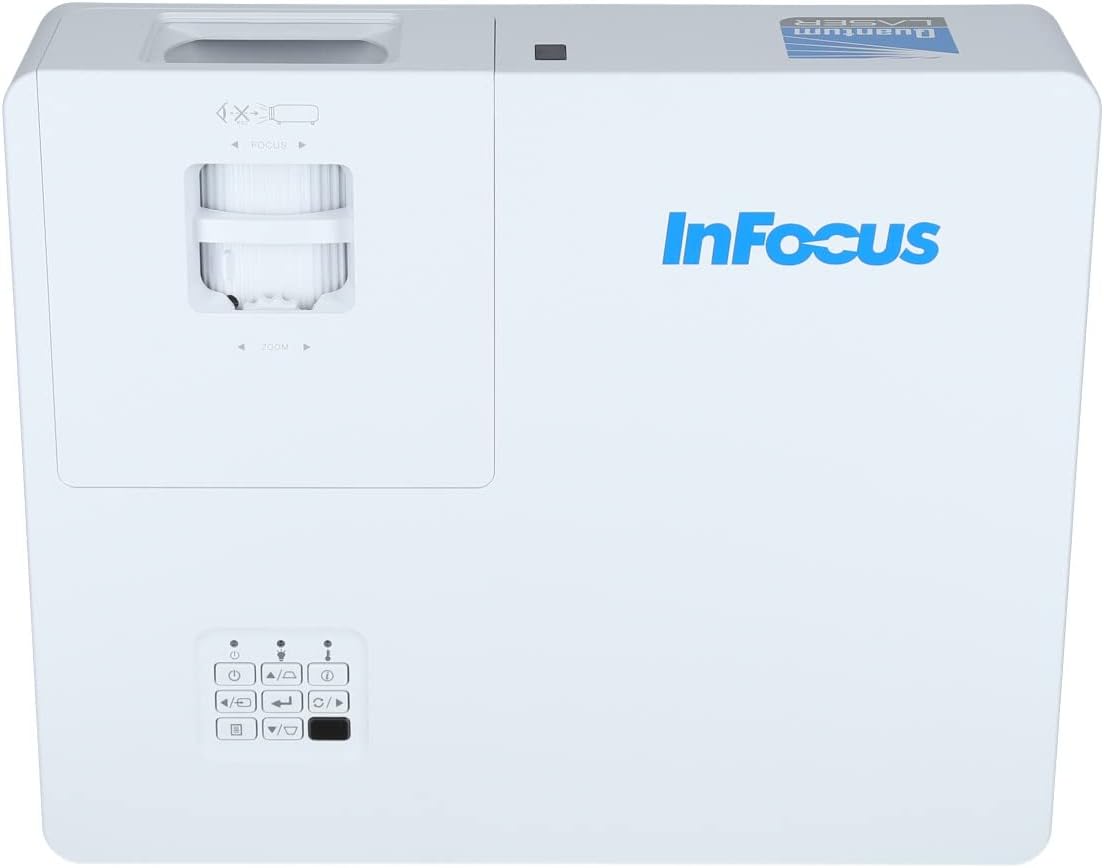
Slika 3.2: Zatvarač view of the projector's top panel, showing the focus and zoom rings near the lens opening and the array of control buttons for power, menu, source selection, and navigation.
3.2 Priključci stražnje ploče
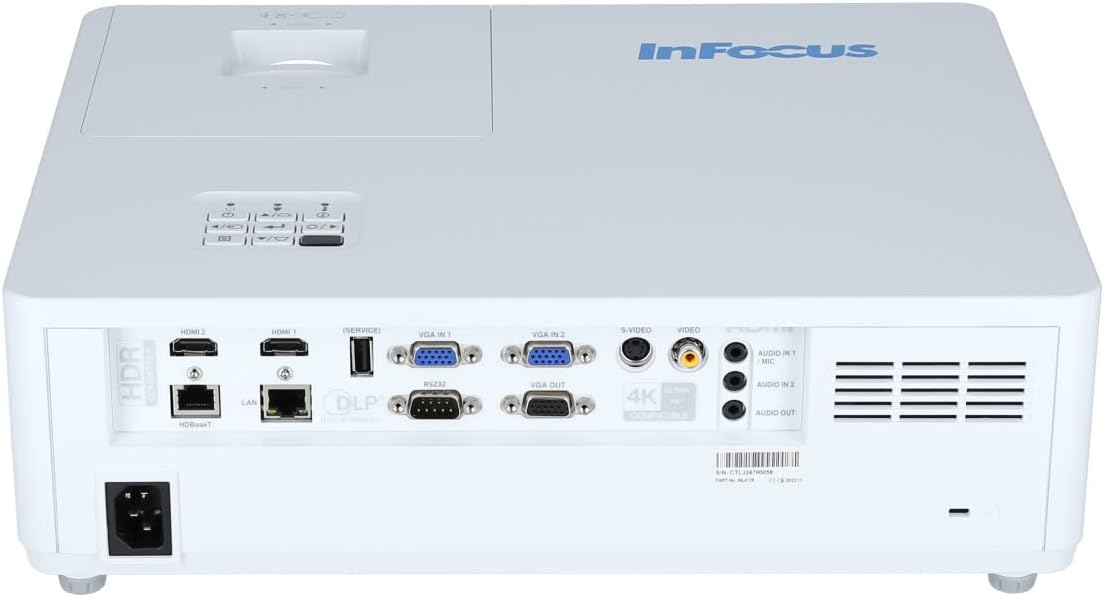
The rear panel provides various input and output ports for connecting external devices.

Figure 3.3: Rear panel of the InFocus P120 INL412 projector, displaying a comprehensive array of connectivity options including HDMI (x2), USB, S-Video, Ethernet (LAN), VGA In (x2), VGA Out, RS232, and Audio In/Out ports. The power input is located on the bottom left.
Ključni portovi uključuju:
- HDMI 1 i 2: For connecting high-definition digital video and audio sources.
- USB: For connecting USB devices, potentially for media playback or firmware updates.
- S-Video: For connecting older video sources.
- VGA IN 1 & 2: For connecting computers or other devices with VGA output.
- VGA IZLAZ: For connecting to an external monitor.
- Ethernet (LAN): Za mrežnu povezanost i kontrolu.
- Audio IN 1 & 2 / Audio OUT: Za analogne audio veze.
- RS232: Za serijsku kontrolu.
- Ulazna snaga: Za spajanje AC kabla za napajanje.
3.3 Front and Side Panels
The front panel houses the projection lens and front ventilation, while the side panels feature additional ventilation grilles.

Slika 3.4: Prednja strana view of the InFocus P120 INL412 projector, displaying the main projection lens on the right and the extensive front ventilation grille on the left, crucial for heat dissipation.
Slika 3.5: Bočna strana view of the InFocus P120 INL412 projector, illustrating the side ventilation grilles that contribute to maintaining optimal operating temperature.
4. Podešavanje
4.1 Postavljanje projektora
Position the projector on a stable, flat surface or mount it securely. Ensure the projector is within the optimal projection distance for your screen size. Maintain clear space around the projector for proper ventilation.
4.2 Povezivanje uređaja
Before connecting any cables, ensure the projector and all source devices are powered off.
- HDMI veza: Connect an HDMI cable from your source device (e.g., laptop, Blu-ray player, gaming console) to either the HDMI 1 or HDMI 2 port on the projector.
- VGA konekcija: Connect a VGA cable from your computer to either VGA IN 1 or VGA IN 2. For audio, connect a separate audio cable from your computer's audio output to the corresponding Audio IN port on the projector.
- USB veza: Insert a USB drive into the USB port for media playback (if supported by firmware) or service functions.
- Ethernet (LAN) veza: Connect an Ethernet cable to the LAN port for network control or updates.
- Audio izlaz: If using external speakers, connect an audio cable from the Audio OUT port on the projector to your audio system.
4.3 Priključak za napajanje
Connect the power cord to the projector's power input and then plug the other end into a grounded electrical outlet.
5. Uputstvo za upotrebu
5.1 Uključivanje/isključivanje
- Uključeno: Pritisnite Snaga button on the projector's control panel or the remote control. The power indicator light will change.
- Iskljuciti: Pritisnite Snaga button again. A confirmation message may appear. Press the button a second time to confirm shutdown. Allow the projector to cool down before unplugging it.
5.2 Podešavanje fokusa i zumiranja
Okrećite prsten za fokusiranje oko objektiva dok slika ne postane oštra i jasna. Koristite prsten za zumiranje da biste prilagodili veličinu slike veličini ekrana.
5.3 Odabir ulaznog izvora
Pritisnite Izvor button on the control panel or remote control to cycle through available input sources (HDMI 1, HDMI 2, VGA 1, VGA 2, S-Video, USB). Select the input corresponding to your connected device.
5.4 Navigacija izbornikom
Koristite Meni button to access the on-screen display (OSD) menu. Use the arrow buttons to navigate through menu options and the Enter dugme za odabir. Pritisnite Meni ponovo za izlaz.
6. Održavanje
6.1 Čišćenje objektiva
Gently wipe the lens with a soft, lint-free cloth specifically designed for optical surfaces. Do not use abrasive cleaners or excessive force, as this can scratch the lens.
6.2 Cleaning the Projector Exterior
Use a soft, dry cloth to clean the projector's casing. Za tvrdokornu prljavštinu, dampen the cloth slightly with water, then wipe dry immediately. Avoid getting liquids into the projector's openings.
6.3 Ventilation Care
Regularly check the projector's ventilation grilles for dust accumulation. Use a soft brush or a vacuum cleaner with a brush attachment to gently remove dust from the vents to ensure proper airflow and prevent overheating.
7. Otkrivanje problema
7.1 Nema prikazane slike
- Ensure the projector is powered on and the power indicator light is solid.
- Verify that the video cable (HDMI, VGA, etc.) is securely connected to both the projector and the source device.
- Provjerite je li na projektoru odabran ispravan ulazni izvor.
- Confirm that the source device (laptop, player) is powered on and outputting a signal.
7.2 Slika je mutna ili van fokusa
- Podesite prsten za fokusiranje na objektivu projektora dok slika ne bude oštra.
- Provjerite da li je projektor na ispravnoj udaljenosti od platna.
- Očistite sočivo projektora ako izgleda prljavo.
7.3 Nema zvuka
- If using HDMI, ensure the source device's audio output is set to HDMI.
- If using VGA, ensure a separate audio cable is connected from the source to the projector's Audio IN port.
- Provjerite postavke jačine zvuka i na projektoru i na izvornom uređaju.
- If using external speakers, ensure they are properly connected to the Audio OUT port and powered on.
8. Specifikacije
| Feature | Detalj |
|---|---|
| Brand | InFocus |
| Proizvođač | U fokusu |
| Naziv modela | P120 INL412 |
| Broj modela | INL4128 |
| Godina | 2023 |
| Hardversko sučelje | Ethernet, HDMI, S-Video, USB |
| Broj stavki | 1 |
| Aspect Ratio | 16:9 |
| Wattage | 341 vati |
| Baterije uključene | br |
| Baterije su potrebne | br |
| Form Factor | Desktop |
| Vrsta montaže | Stolni nosač |
| Daljinski upravljač uključen | Da |
| Dimenzije proizvoda | 56.13 x 46.48 x 25.15 cm |
| Težina artikla | 5.5 kg |
| Maksimalna veličina slike | 308.28 inča |
| Minimalna veličina slike | 910.63 milimetara |
| Prvi raspoloživi datum | 5. januara 2022 |
9. Garancija i podrška
For warranty information and technical support, please refer to the documentation included with your purchase or visit the official InFocus webSačuvajte dokaz o kupovini za slučaj reklamacije.