
1. Proizvod je gotovview
The XTAR VC4H is a smart LCD display universal battery charger designed for efficient and safe charging of various rechargeable batteries. It features four independent charging slots and supports both 3.6V/3.7V Li-ion (IMR/INR/ICR) and 1.2V Ni-MH/Ni-CD battery types. The charger provides fast charging capabilities and a clear LCD screen to monitor charging status.
2. Ključne karakteristike
- Široka kompatibilnost: Supports 3.6V/3.7V Li-ion/IMR/INR/ICR batteries (10440, 14500, 14650, 16340, 17335, 17500, 17670, 18350, 18490, 18500, 18650, 18700, 20700, 21700, 22650, 25500, 26650, 32650) and 1.2V Ni-MH/Ni-CD batteries (AAAA, AAA, AA, A, SC, C, D). Note: Can charge protected 21700 batteries.
- Pametni LCD ekran: A 170 ° view angle colorful VA LCD screen provides real-time information on charging current, voltage, capacity, battery type, and channel.
- Tehnologija brzog punjenja: Features Type-C QC3.0 input (5V/3A, 9V/2A) and offers optional charging currents (2A/1A/0.5A/0.25A). Can charge up to 2A in two slots simultaneously.
- Višestruke zaštite: Includes overcharge protection, overvoltage protection, overcurrent protection, short-circuit protection, overheating protection, and reverse polarity protection.
- Temperature Monitoring Design: Integrated design for effective heat dissipation during charging.

Image: The XTAR VC4H charger's display showing its compatibility with a wide range of Li-ion and Ni-MH/Ni-CD batteries.

Image: Visual representation of the XTAR VC4H's multiple protection features, including overcharge, overvoltage, overcurrent, short-circuit, overheating, and reverse polarity protection.
3. Upute za postavljanje
3.1 Sadržaj paketa
Before using the charger, ensure all items are present in the package:
- XTAR VC4H Charger Unit
- Kabl za napajanje tipa C
- Uputstvo za upotrebu
- Torba za pohranu

Image: The XTAR VC4H package contents, showing the charger, Type-C power cord, manual, and storage bag.
3.2 Povezivanje napajanja
- Connect the provided Type-C power cord to the charger's Type-C input port.
- Connect the other end of the USB cable to a compatible power source (e.g., a QC3.0 USB wall adapter, car charger, power bank, or computer USB port). The charger requires a 5V/3A or 9V/2A input for optimal performance.
- The LCD screen will illuminate, indicating the charger is powered on and in standby mode.

Image: The XTAR VC4H charger connected to a laptop, illustrating its versatility with different power sources like car chargers, USB adapters, mobile power banks, and notebooks.
4. Uputstvo za upotrebu
4.1 Umetanje baterija
Carefully insert rechargeable batteries into the charging slots, ensuring correct polarity (+/-). The charger can accommodate up to four batteries simultaneously. The LCD screen will automatically detect the battery type and begin charging.
Video: This video demonstrates the XTAR VC4H charger's features, including its ABS fire-retardant material, Type-C port, 170° view angle LCD screen, temperature monitoring design, and compatibility with various battery sizes. It also shows how to adjust charging current and switch display content between channels, highlighting its ability to charge four 21700 batteries simultaneously.
4.2 Razumijevanje LCD ekrana
The LCD screen provides detailed information for each charging channel:
- Charging Current Gear: Displays the selected charging current (e.g., 0.5A, 1.0A, 2.0A).
- U realnom vremenu Voltage: Prikazuje trenutni volumentage baterije.
- Kapacitet punjenja: Indicates the accumulated mAh charged into the battery.
- Vrsta baterije: Identifies whether the battery is Li-ion or Ni-MH.
- Battery Channel: Shows the active charging slot (CH1, CH2, CH3, CH4).
Slika: Detaljna view of the XTAR VC4H's LCD screen, illustrating the display of charging current, real-time voltage, charging capacity, battery type, and channel. It also highlights the 'Curr' button for current adjustment and 'Mode' button for switching display content.
4.3 Podešavanje struje punjenja
To adjust the charging current for a specific channel:
- Pritisnite 'Curr' button (Current Button) to cycle through available charging currents (2A/1A/0.5A/0.25A).
- The selected current will be applied to the active channel.
4.4 Switching Display Content
To view details for different channels:
- In charging mode, press the 'Mode' button (Slot Button) to switch the display content between CH1, CH2, CH3, and CH4.

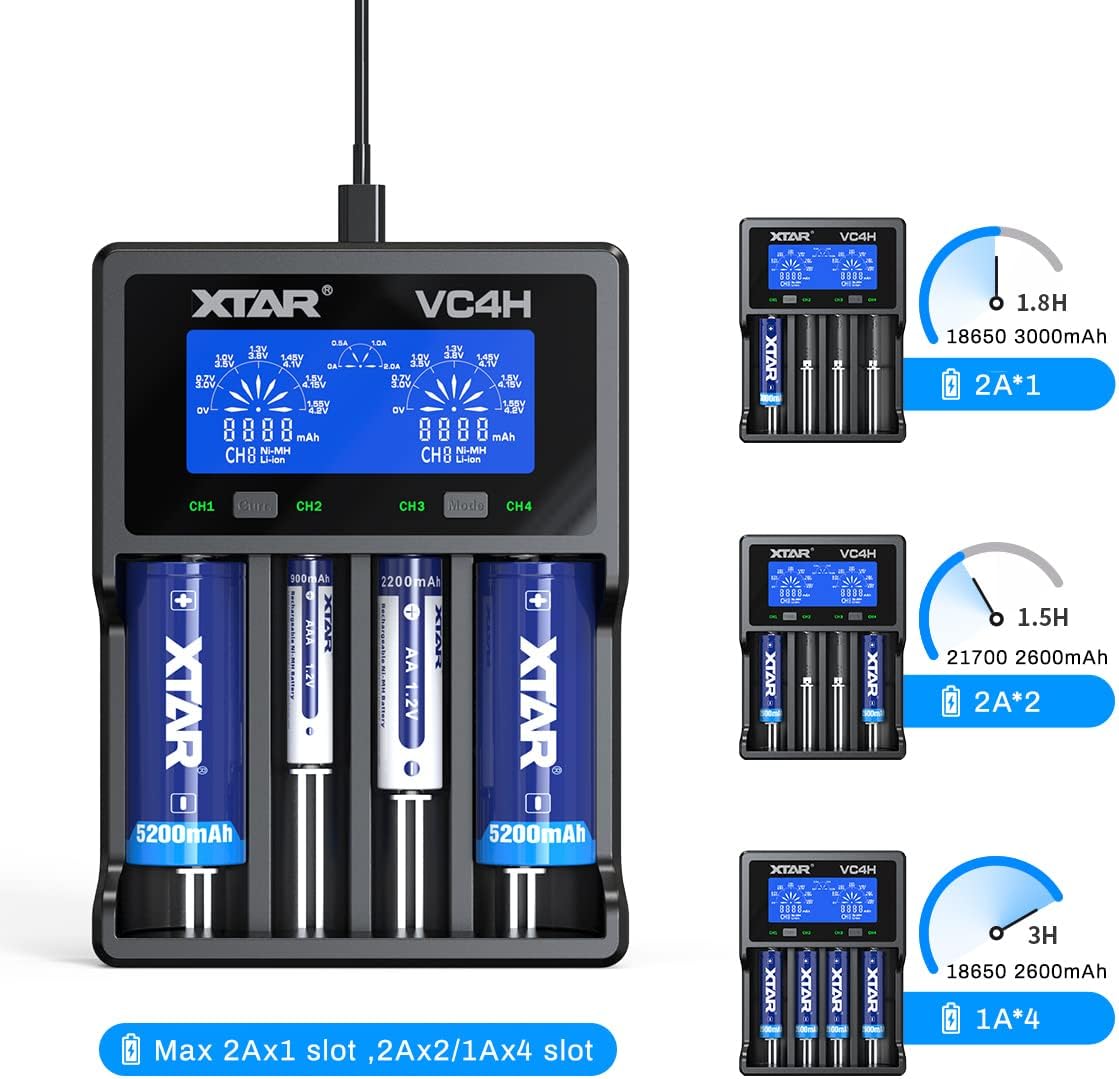
Image: The XTAR VC4H charger demonstrating various charging scenarios, including charging two 18650 3000mAh batteries at 2A, two 21700 2600mAh batteries at 2A, and four 18650 2600mAh batteries at 1A, with estimated charging times.
5. Održavanje
- čišćenje: Regularly clean the charger's slots and contacts with a dry, soft cloth to ensure optimal conductivity. Do not use liquid cleaners.
- Skladištenje: Čuvajte punjač na hladnom i suvom mestu dalje od direktne sunčeve svetlosti i ekstremnih temperatura.
- Rukovanje: Izbjegavajte ispuštanje punjača ili njegovo izlaganje jakim udarcima.
- Isključivanje struje: Always disconnect the power cord when the charger is not in use or during cleaning.
6. Otkrivanje problema
6.1 Charger Not Powering On
- Ensure the Type-C power cord is securely connected to both the charger and the power source.
- Verify that the power source (e.g., wall adapter, USB port) is functional and providing adequate power (5V/3A or 9V/2A recommended).
- Pokušajte s drugim Type-C kabelom ili adapterom za napajanje.
6.2 Baterija se ne puni
- Check that the battery is inserted with correct polarity (+/-).
- Ensure the battery contacts are clean and free from debris.
- Confirm the battery type is compatible with the charger (refer to specifications).
- If the battery is deeply discharged, it may take a few minutes for the charger to detect and initiate charging.
- If the charger displays an error, remove and reinsert the battery. If the error persists, the battery may be faulty.
6.3 Inaccurate Display Readings
- Ensure the charger is on a stable, flat surface.
- If readings seem inconsistent, try removing and reinserting the battery.
- Environmental factors like extreme temperature can affect sensor accuracy. Use the charger within its specified operating temperature range.
7. Specifikacije proizvoda
| Feature | Detalj |
|---|---|
| Model | VC4H |
| Kompatibilne baterije | 3.6V/3.7V Li-ion/IMR/INR/ICR (10440-32650), 1.2V Ni-MH/Ni-CD (AAAA, AAA, AA, A, SC, C, D) |
| Input | QC3.0 (5V/3A, 9V/2A) |
| Constant Current (Li-ion) | 4.2V === 2Ax1 / 1Ax2 / 0.5Ax2 |
| Constant Current (Ni-MH/Ni-CD) | 1.45V === 1Ax1 / 1Ax2 / 1Ax4 / 0.5Ax4 |
| Cut-Off Voltage | 4.2 ± 0.05V (Li-ion), 1.45 ± 0.1V (Ni-MH/Ni-CD) |
| Cut-Off Current | ≤150mA |
| Radna temperatura | 0-40°C |
| Proizvođač | XTAR |

Image: A detailed table outlining the XTAR VC4H's compatibility with various battery models and its technical specifications, including input, constant current, cut-off voltage, cut-off current, and operating temperature.
8. Garancija i podrška
For warranty information and customer support, please refer to the official XTAR webweb-mjesto ili kontaktirajte prodavača od kojeg ste kupili proizvod. Sačuvajte dokaz o kupovini za bilo kakve reklamacije u vezi s garancijom.
Kontakt informacije:
- Official XTAR Webstranica: www.xtar.cc
- Customer Service Email: Refer to the product packaging or official webstranicu za najnovije kontakt podatke.