
Uvod
Thank you for choosing the SOMIC GS510 Cat Ear Wireless Gaming Headset. This manual provides detailed instructions on how to set up, operate, and maintain your new headset. Please read this manual thoroughly before use to ensure optimal performance and longevity of your device.
Šta je u kutiji
Carefully unpack your SOMIC GS510 headset and ensure all items are present:
- Bežične slušalice x 1
- Zvučnik Tags x 4 (2 pre-installed, 2 extra)
- USB Transmitter x 1
- 3.5MM Audio Cable x 1
- Type-C kabl za punjenje x 1

Image: The SOMIC GS510 headset in black with its detachable cat ears and the included USB wireless transmitter.
Product Overview
Familiarize yourself with the key components and controls of your SOMIC GS510 headset:
- Podesiva traka za glavu: Za udobno pristajanje na različitim veličinama glave.
- Soft PU Earpads: Dizajnirano za produženu udobnost nošenja.
- Flexible Earcaps: Allow for slight rotation to conform to your ears.
- Mikrofon koji se uvlači: An omnidirectional microphone that can be extended or retracted as needed.
- Kontrole na uhu: Located on the earcups for easy access to power, volume, mode switching, and microphone mute.
- Magnetic Speaker Tags: Customizable outer earcup covers that can be easily swapped.

Slika: Detaljna view of the headset's comfort features, including the adjustable headband, soft PU earpads, flexible earcaps, and the retractable microphone.
Setup
1. Punjenje slušalica
Prije prve upotrebe, potpuno napunite slušalice. Potpuno punjenje traje otprilike 2 sata.
- Spojite priloženi kabel za punjenje tipa C na priključak za punjenje na slušalicama.
- Drugi kraj kabla priključite na USB izvor napajanja (npr. USB priključak računara, USB adapter za zid).
- The LED indicator on the headset will show charging status and turn off or change color when fully charged.
2. Wireless Connection (2.4GHz USB Transmitter)
For wireless use with PS4, PS5, PC, or Laptop:
- Insert the USB transmitter into an available USB port on your console or computer.
- Power on the SOMIC GS510 headset by pressing and holding the power button.
- The headset will automatically pair with the USB transmitter. A stable indicator light on both devices confirms a successful connection.
- Ensure the headset is selected as the audio output and input device in your system's sound settings.

Image: The SOMIC GS510 headset demonstrating its 2.4GHz wireless connection to a laptop using the USB transmitter, indicating up to 8 hours working time and 33 feet transmission distance.
3. Žičana veza (3.5 mm audio kabel)
For wired use with PS5 Controller, PS4 Controller, Xbox Series X/One Controller, and other mobile devices:
- Spojite jedan kraj 3.5 mm audio kabela na 3.5 mm priključak na slušalicama.
- Drugi kraj priključite na 3.5 mm audio priključak na vašem uređaju.
- For older Xbox One controllers, a Microsoft adapter (not included) may be required.
Uputstvo za upotrebu
Uključivanje/isključivanje
- Da biste uključili uređaj, pritisnite i držite dugme za napajanje dok se indikatorska lampica ne upali.
- Za isključivanje, pritisnite i držite dugme za napajanje dok se indikatorska lampica ne ugasi.
Audio modovi
The headset features three professional sound modes for different scenarios:
- Način igre: Optimized for immersive gaming audio, enhancing footsteps, gunfire, and explosions.
- Audio način: Profesionalni uravnoteženi zvukfile for music and general listening.
- Način rada uživo: Clearer voice reproduction, ideal for live streaming or voice chat.
Press the 'Mode Switch' button on the earcup to cycle through these modes.

Image: The headset's earcup controls with labels for ON/OFF, Mode Switch, Mic Mute Button, and Volume Wheel, illustrating the three distinct audio modes: Gaming, Audio, and Live.
Virtuelni 7.1 surround zvuk
Experience enhanced spatial awareness with virtual 7.1 surround sound, allowing you to pinpoint audio cues like footsteps and gunfire in games.

Image: The headset positioned above a graphic representing virtual 7.1 surround sound, highlighting its ability to render distinct audio details such as footsteps, gunfire, explosions, and general surround sound.
Upotreba mikrofona
- Extend the retractable microphone for use.
- Press the 'Mic Mute Button' on the earcup to toggle microphone mute on or off. The microphone may have an indicator light to show its status.
- The omnidirectional microphone is designed to capture clear voice communication while reducing background noise.
RGB svjetlosni efekti
The headset features 8 RGB lighting effects and a multi-color cycling mode.
- Press the light touch key on the earcup to switch between different RGB colors and modes.
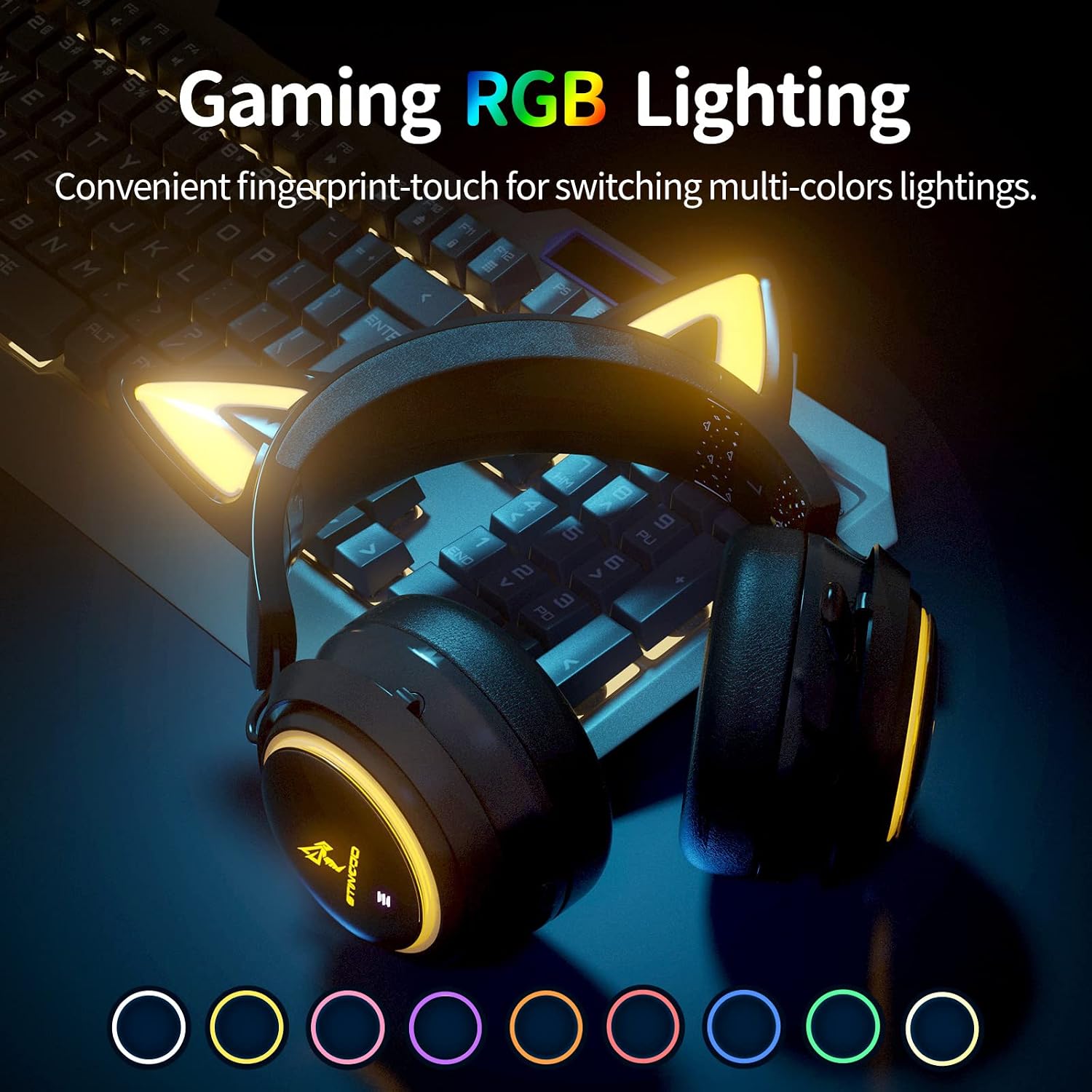
Image: The SOMIC GS510 headset showcasing its vibrant RGB lighting on the earcups and cat ears, with a row of colored circles indicating the available lighting options.
Kontrola jačine zvuka
- Adjust the volume using the 'Volume Wheel' located on the earcup.
Kompatibilnost
The SOMIC GS510 headset offers wide compatibility:
- Wireless (2.4GHz USB Transmitter): PC, Laptop, PS4, PS5.
- Žični (3.5 mm audio kabel): PS5 Controller, PS4 Controller, Xbox Series X Controller, Xbox One Controller, Nintendo Switch, MAC, and other mobile devices with a 3.5mm jack.
Note: This headset does not have Bluetooth functionality. Xbox consoles only support wired mode.

Image: The SOMIC GS510 headset displayed alongside icons representing its wide compatibility with devices such as Nintendo Switch, PS4/PS5, Laptops, PCs, Mobile devices, and Xbox One/S/X.
Održavanje
Da biste osigurali dugotrajnost i optimalne performanse svojih slušalica, slijedite ove smjernice za održavanje:
- čišćenje: Use a soft, dry cloth to wipe down the headset. For earpads, a slightly damp Može se koristiti krpa, ali izbjegavajte prekomjernu vlagu. Ne koristite jake hemikalije ili abrazivna sredstva za čišćenje.
- Skladištenje: Slušalice čuvajte na hladnom i suhom mjestu, dalje od direktne sunčeve svjetlosti i ekstremnih temperatura.
- Održavanje kablova: Avoid sharp bends or kinks in the charging and audio cables. Disconnect cables by pulling the plug, not the cord.
- Izbjegavajte kapi: While durable, repeated drops can damage internal components.
Rješavanje problema
If you encounter issues with your SOMIC GS510 headset, refer to the following common problems and solutions:
| Problem | Mogući uzrok | Rješenje |
|---|---|---|
| Nema zvuka ili je mala jačina zvuka | Headset not powered on; Volume too low; Incorrect audio output selected; Loose connection. | Ensure headset is powered on and charged. Increase volume on headset and device. Check system audio settings to ensure SOMIC GS510 is selected. Reconnect USB transmitter or 3.5mm cable. |
| Mikrofon ne radi | Microphone muted; Incorrect audio input selected; Microphone not fully extended. | Press the mic mute button to unmute. Check system audio settings to ensure SOMIC GS510 is selected as input. Ensure microphone is fully extended. |
| Wireless connection unstable or disconnected | Out of range; Interference; Low battery. | Move closer to the USB transmitter. Avoid strong electromagnetic interference. Recharge the headset. Re-pair the headset with the USB transmitter if necessary. |
| RGB osvjetljenje ne radi ili je zaglavljeno | Software glitch; Low battery; Wired mode (RGB may not work in wired mode). | Ensure headset is sufficiently charged. Try cycling through lighting modes. If in wired mode, RGB functionality may be limited or unavailable. |
| Kratko trajanje baterije | RGB lighting enabled; High volume usage; Battery degradation over time. | Disable or reduce RGB lighting effects. Lower volume if possible. Ensure full charge before use. |
Specifikacije
Key technical specifications for the SOMIC GS510 Cat Ear Wireless Gaming Headset:
| Feature | Detalj |
|---|---|
| Naziv modela | GS510-2.4G-BlACK |
| Tehnologija povezivanja | Wireless (2.4GHz USB Transmitter), Wired (3.5mm Jack) |
| Veličina audio drajvera | 50 milimetara |
| Frekvencijski odziv | 20 Hz - 20,000 Hz |
| Osetljivost mikrofona | 36 dB |
| Trajanje baterije | Up to 10 Hours (Wireless) |
| Vrijeme punjenja | 2 sata |
| Materijal | Koža, Plastika |
| Težina artikla | 630 grama (1.39 funte) |
| Dimenzije proizvoda | 8.66 x 4.33 x 10.24 inča |
| Tip kontrole | On-ear audio controls (Touch) |
| Postavljanje uha | Preko uha |
Garancija i podrška
SOMIC provides a warranty for its products. For specific warranty terms, duration, and to register your product, please refer to the warranty card included in your product packaging or visit the official SOMIC website. If you require technical support or have questions not covered in this manual, please contact SOMIC customer service through their official channels.
Za dodatne resurse, možete posjetiti SOMIC Store on Amazon.