
Uvod
This manual provides comprehensive instructions for the safe and efficient use of your Coby True Wireless Earbuds (Model CETW535). Please read this manual thoroughly before using the product and retain it for future reference.
The Coby True Wireless Earbuds offer a seamless audio experience with Bluetooth 5.3 technology, a smart battery display, and intuitive controls for music and calls. They are designed for comfort and convenience, featuring a built-in microphone for hands-free communication.
Sadržaj paketa
- Coby True Wireless Earbuds (Left and Right)
- Charging Case with Smart Battery Display
- USB kabl za punjenje
- Korisnički priručnik (ovaj dokument)
Setup
1. Početno punjenje
Before first use, fully charge the earbuds and the charging case. Connect the charging case to a USB power source using the provided USB cable. The digital display on the case will indicate the charging status and battery level.

Image: The Coby True Wireless Earbuds are shown inside their open charging case, which displays "100%" on its digital screen, indicating a full charge. The earbuds are black and fit snugly into their respective slots.
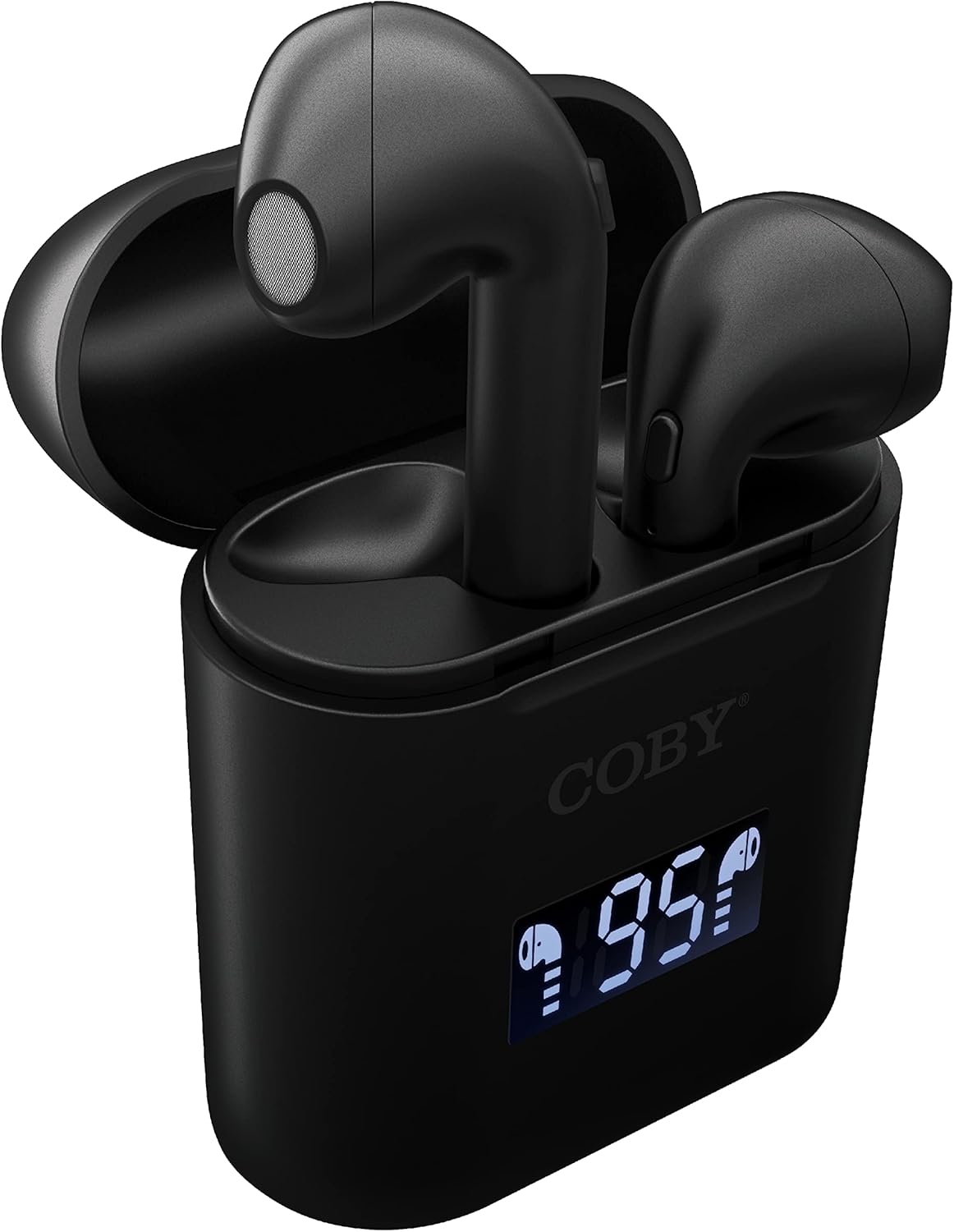
Slika: Krupni plan view of the Coby True Wireless Earbuds resting in their open charging case. The case features a digital display showing "95%", indicating the current battery level of the case. The black earbuds are visible, with their microphones facing upwards.
2. Uparivanje sa Bluetooth uređajem
- Provjerite jesu li slušalice napunjene i unutar kućišta za punjenje.
- Otvorite kutijicu za punjenje. Slušalice će se automatski uključiti i ući u način rada za uparivanje.
- Na svom uređaju (pametnom telefonu, tabletu itd.) omogućite Bluetooth.
- Traži "CETW535" or "Coby Earbuds" in the list of available Bluetooth devices.
- Select the device name to connect. Once connected, you will hear a confirmation tone.
- The earbuds will automatically re-pair with the last connected device when removed from the case, if Bluetooth is enabled on the device.
3. Postavljanje slušalica
Gently insert each earbud into the corresponding ear (L for left, R for right). Adjust them slightly until they feel secure and comfortable. A proper fit ensures optimal sound quality and comfort.

Image: A woman is shown smiling while wearing a black Coby True Wireless Earbud in her right ear, demonstrating a comfortable and secure fit.
Uputstvo za upotrebu
Uključivanje/isključivanje
- Uključeno: Open the charging case, or press and hold the touch control area on each earbud for 3 seconds.
- Iskljuciti: Place the earbuds back into the charging case and close the lid, or press and hold the touch control area on each earbud for 5 seconds.
Kontrole muzike
The earbuds feature touch-sensitive controls for easy management of your audio playback.
- Pusti/pauza: Jednom dodirnite bilo koju slušalicu.
- Sljedeća pjesma: Dvaput dodirnite desnu slušalicu.
- Prethodni zapis: Dvaput dodirnite lijevu slušalicu.
- Povećavanje glasnoće: Triput dodirnite desnu slušalicu.
- Smanjivanje jačine zvuka: Triput dodirnite lijevu slušalicu.

Image: A man is shown wearing a Coby True Wireless Earbud in his right ear, taking a drink from a water bottle, illustrating the earbuds' use during active moments.
Kontrole poziva
Manage your calls effortlessly with the built-in microphone and touch controls.
- Odgovori/Završi poziv: Jednom dodirnite bilo koju slušalicu.
- odbiti poziv: Pritisnite i držite bilo koju slušalicu 2 sekunde.

Image: A man is depicted wearing a Coby True Wireless Earbud in his left ear while concentrating on a laptop screen, highlighting the earbuds' suitability for work or study environments.
Aktivacija glasovnog pomoćnika
Activate your device's voice assistant (Siri or Google Assistant) for hands-free commands.
- Aktivirajte glasovnog asistenta: Press and hold either earbud for 3 seconds (after powering on, before powering off gesture).
Intelligent Digital Battery Display
The charging case features a digital display that shows the remaining battery percentage of the case and individual charging status of the earbuds.
- The large number indicates the charging case's battery percentage.
- Small icons next to the percentage indicate the charging status of the left and right earbuds.

Image: The Coby True Wireless Earbuds are shown in their open charging case, with the digital display indicating "95%" battery life for the case. The black earbuds are visible, ready for use or charging.
Održavanje
- čišćenje: Za čišćenje slušalica i kućišta za punjenje koristite meku, suhu krpu koja ne ostavlja dlačice. Nemojte koristiti jake hemikalije ili abrazivne materijale.
- Skladištenje: Kada se ne koriste, slušalice čuvajte u njihovoj kutijici za punjenje kako biste ih zaštitili i održali napunjenima. Čuvajte ih na hladnom i suhom mjestu, dalje od ekstremnih temperatura.
- Punjenje: To prolong battery life, avoid fully discharging the battery frequently. Charge the case and earbuds regularly, even if not in constant use.
Rješavanje problema
| Problem | Moguće rješenje |
|---|---|
| Slušalice se ne uparuju s uređajem. |
|
| Samo jedna slušalica reprodukuje zvuk. |
|
| Kućište za punjenje se ne puni. |
|
| Loš kvalitet zvuka ili prekidi veze. |
|
Specifikacije
| Feature | Detalj |
|---|---|
| Brand | Coby |
| Naziv modela | Prave bežične slušalice |
| Broj modela | CETW535 |
| Tehnologija povezivanja | Bluetooth 5.3 |
| Boja | Crna |
| Vrijeme reprodukcije slušalica | Do 6.5 sati (sa punim punjenjem) |
| Ukupno vrijeme reprodukcije (sa kutijom) | Do 22 sati |
| Mikrofon | Ugrađeni |
| Podrška glasovnog asistenta | Siri, Google Asistent |
| Dimenzije (D x Š x V) | 0.99 x 1.85 x 2.44 inča (kućište za punjenje) |
| Težina artikla | 6.1 unce |
| UPC | 643620020982 |
| Proizvođač | Summit Electronics, LLC |
Garancija i podrška
Specific warranty information for the Coby True Wireless Earbuds (Model CETW535) is not provided within this manual. For details regarding warranty coverage, terms, and conditions, please refer to the warranty card included with your product packaging or visit the official Coby website.
For technical support or further assistance, please contact Coby customer service through the contact information provided on their official weblokacija ili ambalaža proizvoda.