
Uvod
The XTAR VC8 Plus is an advanced 8-bay smart battery charger designed for a wide range of rechargeable batteries. It features a high-definition VA LCD screen that displays real-time charging status, allowing independent monitoring of each slot. This charger supports various battery chemistries and sizes, offering multiple charging modes and safety features to optimize battery lifespan and ensure safe operation.
Ključne karakteristike uključuju:
- 8 independent charging bays.
- Compatibility with Li-ion (3.6V/3.7V) and Ni-MH/Ni-CD (1.2V) batteries.
- Adjustable charging currents (3A/2A/1A/0.5A/0.25A).
- Multi-functional VA LCD display for real-time information.
- Grade mode for testing actual battery capacity (CH1-CH4).
- Store mode for optimal battery storage voltage (CH1-CH4).
- Comprehensive safety protections: overcurrent, overcharge, short circuit, overvoltage, 0V activation, reverse polarity.

Figure 1: XTAR VC8 Plus Smart Charger with batteries and LCD display.
Setup
- Povežite adapter za napajanje: Connect the provided DC 12V 3A adapter to the charger's DC input port. Plug the adapter into a suitable power outlet. The charger's LCD display will illuminate.
- Umetnite baterije: Carefully insert rechargeable batteries into the desired charging bays (CH1-CH8). Ensure correct polarity (+ and - ends) as indicated on the charger and battery. The charger will automatically detect the battery type and begin charging.

Figure 2: Connecting the DC 12V 3A power adapter to the XTAR VC8 Plus charger.
The charger is compatible with the following battery types and sizes:
- Li-ion / IMR / INR / ICR (3.6V/3.7V): 10440, 14500, 14650, 16340, 17335, 17500, 17670, 18350, 18490, 18500, 18650, 18700, 20700, 21700, 22650, 25500, 26650, 32650.
- Ni-MH / Ni-CD (1.2V): AAAA, AAA, AA, A, SC, C.
Note: The charger can charge protected 20700/21700 batteries and can accommodate 8pcs of 21700 batteries simultaneously.
Video 1: Demonstrates connecting the DC power adapter and inserting batteries into the XTAR VC8 Plus charger.
Uputstvo za upotrebu
Informacije o LCD ekranu
The high-definition VA LCD screen provides real-time information for each battery slot independently. You can view:
- Voltage: Current voltage baterije.
- trenutno: Charging/discharging current.
- Način rada: Current operating mode (Charge, Grade, Store).
- Vrsta baterije: Detected battery chemistry (Li-ion, Ni-MH).
- Internal Resistance (IR): Battery's internal resistance.
- Kapacitet: Charged/discharged capacity.

Figure 3: Real-time charging status displayed on the VA LCD screen.
Podešavanje struje punjenja
The charger can automatically select the optimal charging current. You can also manually adjust the current for each battery. Press the "Curr." button to cycle through the available current options:
- 3A (Max 1-2 bays)
- 2A (Max 2-4 bays)
- 1A (Max 4-8 bays)
- 0.5A
- 0.25A

Figure 4: Manual current adjustment options on the XTAR VC8 Plus.
Operating Modes (CH1-CH4 Only)
For bays CH1-CH4, you can long-press the "Mode" button to switch between three specialized modes:
- Način punjenja: Standardni način punjenja.
- Grade Mode: To determine the real capacity of a battery. The charger will perform a charge-discharge-charge cycle and display the actual capacity.
- Način trgovine: To prepare batteries for long-term storage. The charger will charge or discharge the battery to its rated storage voltage to maximize its lifespan.
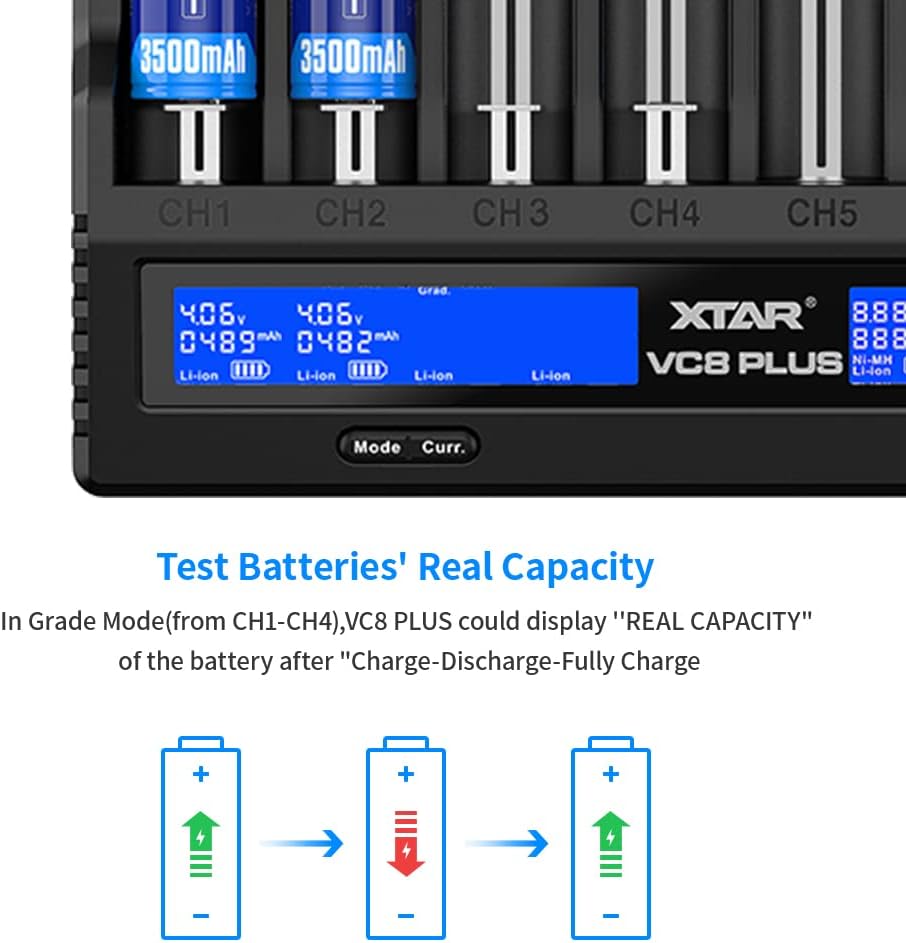
Figure 5: Grade Mode for testing real battery capacity.
Video 2: Krajview of the XTAR VC8 Plus charger's features, including mode selection and display information.
Održavanje i sigurnost
- Aktivacija baterije: The smart charger can activate over-discharged batteries. If a battery is severely discharged, the charger will attempt to activate it before regular charging.
- Automatsko isključivanje: The charger automatically stops charging when batteries are full to prevent overcharging.
- Rasipanje topline: The charger is designed with excellent heat dissipation. Ensure proper ventilation during operation.
- Materijal: Constructed from PC fire-retardant material for enhanced safety.
- Skladištenje: For long-term storage of Li-ion batteries, use the "Store Mode" (CH1-CH4) to bring them to an optimal voltage nivo.
Rješavanje problema
- Error Symbol on Display: If an error symbol appears, it indicates a reversed or short-circuited battery. Remove the battery, check its orientation, and reinsert it. If the error persists, the battery may be damaged.
- Charger Not Responding: Ensure the power adapter is securely connected to both the charger and the power outlet. Try a different outlet or adapter if available.
- Baterija se ne puni: Verify the battery is inserted with correct polarity. Check if the battery is severely over-discharged; the charger may be attempting 0V activation. If the battery is damaged, the LCD will show an error and stop charging.
Specifikacije
| Feature | Detalj |
|---|---|
| Dimenzije proizvoda | 1.34 x 5.39 x 7.64 inča (3.4 x 13.7 x 19.4 cm) |
| Težina artikla | 1.41 funti (0.64 kilograma) |
| Output Voltage | 3.7 volti (DC) |
| Input | DC 12V 3A |
| Opcije struje punjenja | 3A, 2A, 1A, 0.5A, 0.25A |
| Kompatibilne vrste baterija | Li-ion (3.6V/3.7V), Ni-MH/Ni-CD (1.2V) |
| Broj zaliva | 8 |
| Display Type | High-definition VA LCD |
| Boja | Crna |
Garancija i podrška
For warranty information and technical support, please refer to the official XTAR webweb-mjesto ili kontaktirajte prodavača. Sačuvajte račun za kupovinu u slučaju reklamacije.