
Uvod
Thank you for choosing the SOMIC MS300 Over-Ear Wireless Bluetooth Headphones. This manual provides essential information for setting up, operating, and maintaining your headphones to ensure optimal performance and longevity. Please read this manual thoroughly before using the product.
Sadržaj paketa
- SOMIC MS300 Over-Ear Wireless Bluetooth Headphones
- USB kabl za punjenje
- 3.5 mm audio kabl
- Korisnički priručnik (ovaj dokument)
Product Overview
Familiarize yourself with the various components and controls of your SOMIC MS300 headphones.
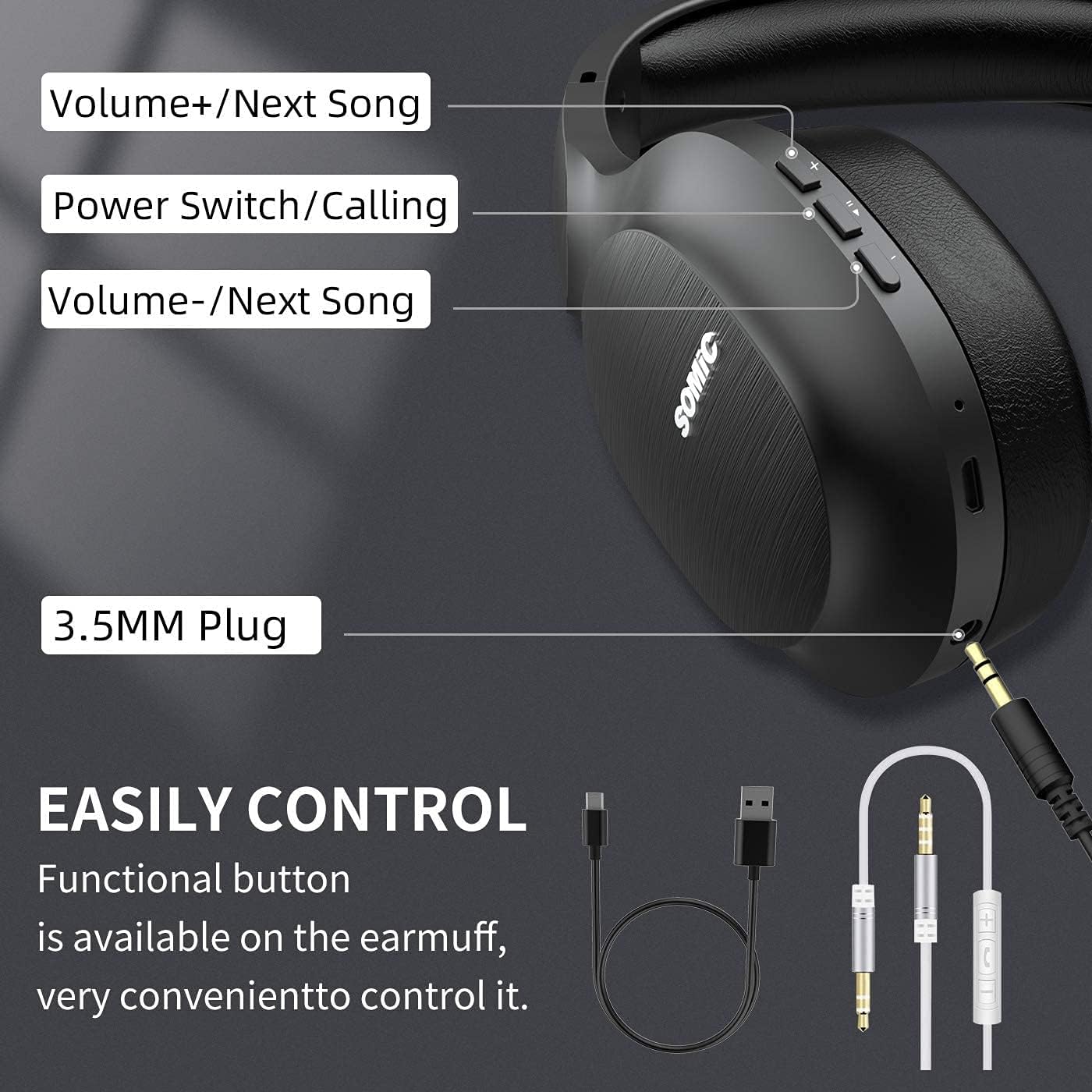
slika: Gotovoview of the SOMIC MS300 headphone controls, including volume buttons, power switch, and 3.5mm audio jack.
Kontrole i portovi
- Jačina zvuka + / Sljedeća pjesma: Press briefly to increase volume, press and hold to skip to the next song.
- Power Switch / Calling: Press and hold to power on/off. Briefly press to play/pause music. During a call, press to answer/end a call.
- Jačina zvuka - / Prethodna pjesma: Press briefly to decrease volume, press and hold to go to the previous song.
- 3.5 mm audio priključak: Za žičano povezivanje pomoću priloženog 3.5 mm audio kabla.
- USB priključak za punjenje: For charging the headphones using the included USB cable.
- mikrofon: Ugrađeno za hands-free pozive.
Setup
Punjenje slušalica

slika: The SOMIC MS300 headphones illustrating the fast charging capability: 5 minutes of charge provides 2 hours of playback.
- Spojite manji kraj USB kabela za punjenje na USB priključak za punjenje na slušalicama.
- Povežite veći kraj USB kabla za punjenje na USB adapter za napajanje (nije uključen) ili USB priključak računara.
- LED indikator će prikazivati status punjenja (npr. crvena za punjenje, plava za potpuno napunjeno).
- A full charge takes approximately 2-3 hours. For quick use, a 5-minute charge provides up to 2 hours of playtime.

slika: The SOMIC MS300 headphones highlighting their strong endurance with up to 72 hours of playtime on a single charge.
Uključivanje/isključivanje
- Za uključivanje: Press and hold the Power Switch button for approximately 3 seconds until the LED indicator flashes blue.
- Za isključivanje: Press and hold the Power Switch button for approximately 3 seconds until the LED indicator turns off.
Bluetooth uparivanje
- Uvjerite se da su slušalice isključene.
- Press and hold the Power Switch button for about 5-7 seconds until the LED indicator flashes red and blue alternately, indicating pairing mode.
- Na svom uređaju (pametnom telefonu, tabletu, računaru) omogućite Bluetooth i potražite dostupne uređaje.
- Select "SOMIC MS300" from the list of devices.
- Kada se poveže, LED indikator će polako treptati plavo.
Žičana veza (3.5 mm audio kabel)

slika: The SOMIC MS300 headphones demonstrating their versatility with both wireless Bluetooth connectivity and a wired option via a 3.5mm audio cable.
The SOMIC MS300 headphones can also be used with a wired connection, even if the battery is depleted.
- Spojite jedan kraj 3.5 mm audio kabela na 3.5 mm audio priključak na slušalicama.
- Connect the other end of the 3.5mm audio cable to the audio output port of your device.
- Slušalice će se automatski prebaciti u žični način rada. Bluetooth funkcionalnost će biti onemogućena.
Uputstvo za upotrebu
Reprodukcija muzike
- Pusti/pauza: Briefly press the Power Switch button.
- Povećavanje glasnoće: Briefly press the Volume + button.
- Smanjivanje jačine zvuka: Briefly press the Volume - button.
- Sljedeća pjesma: Pritisnite i držite dugme za povećanje jačine zvuka.
- Prethodni zapis: Pritisnite i držite dugme za jačinu zvuka -.
Telefonski pozivi
- Odgovori/Završi poziv: Briefly press the Power Switch button.
- odbiti poziv: Press and hold the Power Switch button for 2 seconds.
- Ponovno biranje zadnjeg broja: Double-press the Power Switch button.
Dual Device Connection
The SOMIC MS300 headphones support connecting to two Bluetooth devices simultaneously.
- Connect the headphones to the first device as described in the "Bluetooth Pairing" section.
- Isključite Bluetooth na prvom uređaju. Slušalice će ponovo ući u način rada za uparivanje.
- Spojite slušalice s drugim uređajem.
- Re-enable Bluetooth on the first device. The headphones should automatically reconnect to both devices.
- Zvuk će se reproducirati s uređaja koji aktivno reproducira medijski sadržaj ili prima poziv.
Poništavanje buke (CVC 8.0)

slika: A person wearing SOMIC MS300 headphones in a public setting, demonstrating the effectiveness of CVC Noise Cancelling Technology in reducing ambient noise.
The SOMIC MS300 headphones feature CVC 8.0 noise cancelling technology, which helps reduce ambient noise during calls for clearer communication. This feature is automatically active when using the built-in microphone.
Održavanje
Čišćenje
- Obrišite slušalice mekom, suhom krpom koja ne ostavlja dlačice.
- Do not use abrasive cleaners, solvents, or spray cleaners.
- Izbjegavajte ulazak vlage u bilo kakve otvore.
Skladištenje
- Slušalice čuvajte na hladnom i suhom mjestu, dalje od ekstremnih temperatura i direktne sunčeve svjetlosti.
- Kada se ne koriste duži period, punite slušalice barem jednom svaka tri mjeseca kako biste produžili vijek trajanja baterije.
Battery Care
- Ne pokušavajte sami zamijeniti bateriju. Za probleme vezane za bateriju obratite se korisničkoj podršci.
- Izbjegavajte često potpuno pražnjenje baterije, jer to može smanjiti njen ukupni vijek trajanja.
Rješavanje problema
| Problem | Moguće rješenje |
|---|---|
| Slušalice se ne uključuju. | Provjerite jesu li slušalice napunjene. Spojite ih na izvor napajanja pomoću USB kabela. |
| Nije moguće uparivanje s uređajem. | Ensure headphones are in pairing mode (LED flashing red and blue). Turn off and on Bluetooth on your device. Move headphones closer to the device. |
| Nema zvuka ili je jačina zvuka niska. | Check volume levels on both headphones and the connected device. Ensure headphones are properly paired or the 3.5mm cable is fully inserted. |
| Kvalitet zvuka je loš. | Move closer to the connected device to avoid interference. Ensure there are no obstacles between the headphones and the device. |
| Mikrofon ne radi. | Ensure the headphones are connected via Bluetooth. Check microphone settings on your device. |
Specifikacije

slika: Eksplodirao je view of the 40mm dynamic driver and the Qualcomm QCC Bluetooth 5.0 chip, highlighting the audio technology within the SOMIC MS300 headphones.
| Feature | Detalj |
|---|---|
| Model | MS300 |
| Brand | SOMIC |
| Povezivanje | Wireless (Bluetooth 5.0), Wired (3.5mm Audio Jack) |
| Bluetooth čip | Qualcomm QCC Bluetooth 5.0 |
| Driver Size | 40mm dinamički drajveri |
| Kontrola buke | CVC 8.0 Poništavanje buke |
| Kapacitet baterije | 1000mAh |
| Vrijeme igranja | Do 72 sati |
| Brzo punjenje | 5 minuta punjenja za 2 sata reprodukcije |
| Materijal jastučića za uši | Memory Foam Protein |
| Težina | 208g |
| Boja | Crna |
| Otpornost na vodu | Nije vodootporan |
Garancija i podrška
Informacije o garanciji
SOMIC products are designed and manufactured to the highest quality standards. This product is covered by a limited warranty from the date of purchase. Please refer to the warranty card included in your package for specific terms and conditions. Keep your proof of purchase for warranty claims.
Korisnička podrška
If you encounter any issues or have questions regarding your SOMIC MS300 headphones, please contact our customer support team. Contact details can typically be found on the warranty card or the official SOMIC website. Please have your model number (MS300) and purchase information ready when contacting support.