
1. Uvod
This manual provides essential information for setting up, operating, maintaining, and troubleshooting your Alienware X17 R1 Gaming Laptop. Please read this manual thoroughly to ensure optimal performance and longevity of your device.

Figure 1: Alienware X17 R1 Gaming Laptop
2. Sadržaj paketa
Ensure all items are present in your Alienware X17 R1 package:
- Alienware X17 R1 Notebook
- Adapter za napajanje
- Kabl za napajanje
- Korisnički priručnik (ovaj dokument)
3. Proizvod je gotovview
3.1 Design and Dimensions
The Alienware X17 R1 features a sleek, thin design in Lunar Light (white) with Dark Side of the Moon (black) accents for the keyboard and deck. Its dimensions are approximately 11.79 x 15.72 x 0.82 inches (LxWxH) and it weighs around 7.05 pounds.

Figure 2: Alienware X17 R1 Side Profile
3.2 Portovi i konektori
The Alienware X17 R1 is equipped with a comprehensive set of ports, primarily located at the rear for efficient cable management and thermal performance.
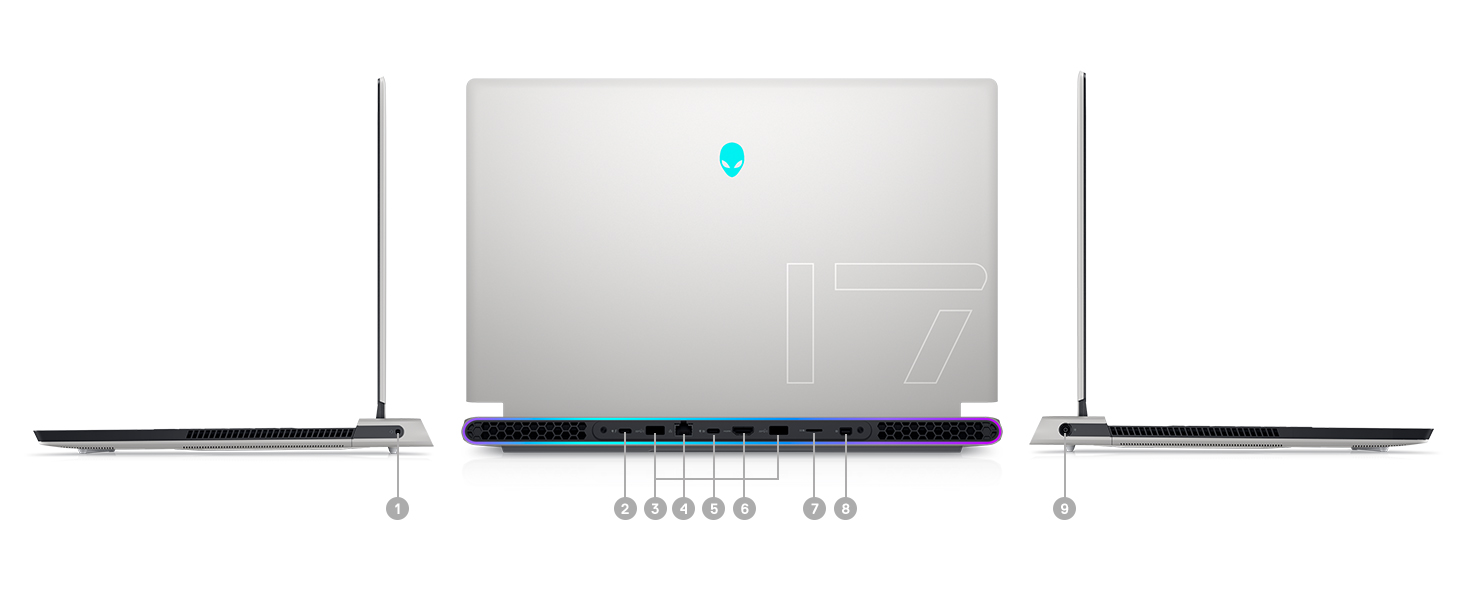
Figure 3: Rear Ports and Connectors
- Power/DC-in Port
- Mini Display Port 1.4
- HDMI 2.1 (for up to 4K/120Hz output)
- Type-C USB 3.2 Gen 2 Port with Power Delivery (5V/3A)
- Killer E3100 RJ-45 2.5G Ethernet
- Čitač mikro SD kartica
- USB 3.2 Gen 1 Type-A with Powershare
- Type-C Thunderbolt™ 4/USB 3.2 Gen 2 Port with Power Delivery (5V/3A)
- Global Headset Jack
3.3 Tastatura i tačped
The laptop features an AlienFX keyboard with per-key RGB lighting and an AlienFX Lighting design supporting 16.8 million colors. The touchpad is glass, offering solid tracking and responsive gestures.

Figure 4: AlienFX Keyboard and Touchpad
3.4 Prikaz
The 17.3-inch Full HD (1920 x 1080) display boasts a 360Hz refresh rate and 1ms response time, enhanced with ComfortView Plus, NVIDIA G-SYNC, and Advanced Optimus for a smooth visual experience.

Figure 5: 360Hz Display
3.5 Sistem hlađenja
The Alienware X17 R1 incorporates advanced thermal management with its Cryo-Tech™ Technologies. This includes an exclusive Quad Fan design and Element 31, an encapsulated gallium-silicone thermal interface material, to ensure efficient heat dissipation during intensive use.

Figure 6: Cryo-Tech Cooling System
Video 1: Official Alienware X17 R1 Product Overview, highlighting key features including the cooling system.
4. Podešavanje
4.1 Početno uključivanje
- Unpack your Alienware X17 R1 laptop and all accessories.
- Spojite adapter za napajanje na priključak za napajanje laptopa, a zatim na utičnicu.
- Open the laptop lid and press the power button (Alienware head logo) to turn on the device.
- Slijedite upute na ekranu da biste dovršili proces instalacije sustava Windows 11.
4.2 Povezivanje perifernih uređaja
Utilize the various ports on the rear and sides of the laptop to connect external monitors, keyboards, mice, and other accessories. For optimal display performance, use the HDMI 2.1 or Mini Display Port 1.4 for external monitors.

Figure 7: Connecting External Peripherals
5. Upravljanje laptopom
5.1 Upravljanje napajanjem
The Alienware X17 R1 offers tailored power states to optimize performance or battery life. These can be managed through the Alienware Command Center software:
- tihi način rada: Reduces fan noise and power consumption.
- Uravnoteženi način rada: Offers a balance between performance and acoustics.
- Način rada pune brzine: Maximizes fan speed for peak performance.
- Način rada uštede baterije: Optimizes settings for extended battery life.
- Način rada: Prioritizes performance for demanding tasks.
5.2 Windows Hello
The laptop supports Windows Hello for secure and convenient login using facial recognition via the integrated webNarandžasta.
5.3 Alienware Command Center
This software allows you to customize various aspects of your laptop, including RGB lighting, power profiles, and overclocking settings. It is recommended to keep the software updated for the best experience.

Figure 8: Alienware Command Center
6. Održavanje
6.1 Čišćenje
- Za čišćenje ekrana i vanjskih površina koristite meku krpu koja ne ostavlja dlačice.
- Za tvrdokorne mrlje, lagano dampobrišite krpu vodom ili sredstvom za čišćenje ekrana.
- Regularly clean the air vents to prevent dust buildup, which can affect cooling performance.
6.2 Ažuriranja softvera
Keep your operating system, drivers, and Alienware Command Center software updated to ensure optimal performance, security, and compatibility. Use the Alienware Update utility or visit the Dell support webweb mjesto za najnovija ažuriranja.
6.3 Upgradable Components
The Alienware X17 R1 offers upgradable slots for memory and storage:
- 2 x RAM Slots (DDR4)
- 1 x M.2 PCIe Gen 4 SSD Slot
- 1 x M.2 PCIe Gen 3 SSD Slot
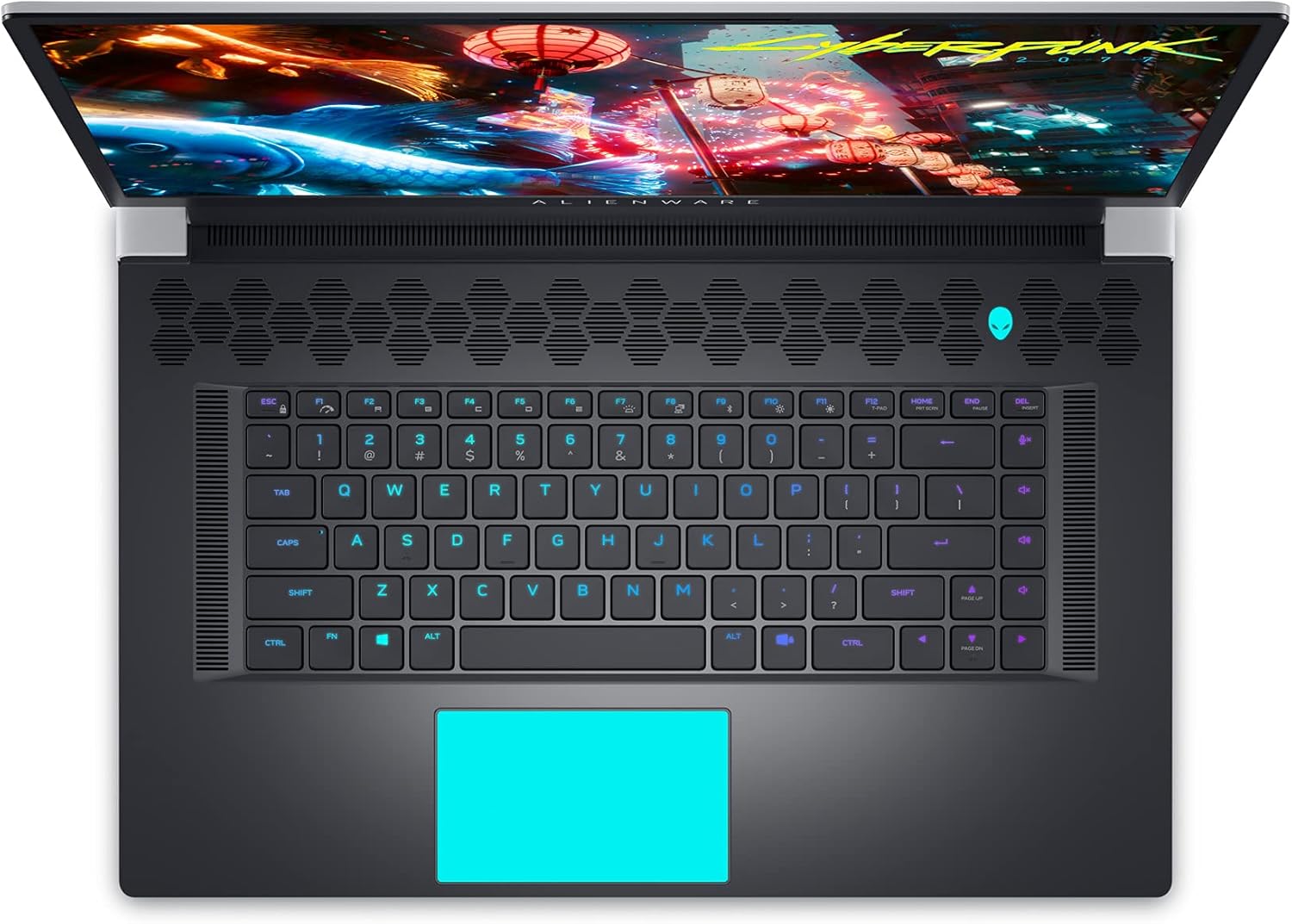
Figure 9: Internal Components and Upgradable Slots
7. Otkrivanje problema
If you encounter issues with your Alienware X17 R1, try the following basic troubleshooting steps:
- Nema napajanja: Provjerite je li adapter za napajanje sigurno priključen i na laptop i na utičnicu. Pokušajte s drugom utičnicom.
- Problemi s prikazom: If the screen is blank, try connecting an external monitor to verify if the issue is with the laptop's display or the graphics card. Update graphics drivers.
- Kašnjenje performansi: Check your power management settings in Alienware Command Center. Ensure all drivers are up to date. Monitor temperatures to prevent thermal throttling.
- Problemi s povezivanjem: For Wi-Fi or Ethernet issues, restart your router and the laptop. Check network adapter drivers.
- Softverske greške: Restart the application or the laptop. Ensure your operating system and applications are updated.
For more advanced troubleshooting or persistent issues, refer to the Dell support websajtu ili kontaktirajte korisničku podršku.
8. Specifikacije
| Feature | Specifikacija |
|---|---|
| Naziv modela | Alienware x17 R1 |
| Procesor | 11th Generation Intel Core i7-11800H (8 Cores, up to 4.6 GHz) |
| RAM | 32 GB DDR4 3200MHz |
| Skladištenje | 1 TB M.2 PCIe NVMe Solid State Drive |
| Graficka kartica | NVIDIA GeForce RTX 3080 16GB GDDR6 |
| Display | 17.3-inch FHD (1920 x 1080) 360Hz 1ms with ComfortView Plus, NVIDIA G-SYNC and Advanced Optimus |
| Operativni sistem | Windows 11 Home |
| Bežično povezivanje | Killer AX 1675 + Bluetooth 5.2 |
| Luke | 3x USB 3.0, 2x Type-C (Thunderbolt 4/USB 3.2 Gen 2), HDMI 2.1, Mini DisplayPort 1.4, Ethernet, Micro SD, Headset Jack |
| Težina artikla | 7.05 funte |
| Dimenzije proizvoda | 11.79 x 15.72 x 0.82 inča |
| Boja | Lunar Light (White) |
9. Garancija i podrška
Your Alienware X17 R1 laptop is covered by Dell's standard warranty. For detailed warranty information, technical support, or service requests, please visit the official Dell support webweb-mjesto ili kontaktirajte njihovu korisničku službu. Držite račun za kupovinu i serijski broj proizvoda pri ruci za bržu pomoć.
Dell podrška Webstranica: www.dell.com/support