
Uvod
Welcome to the user manual for your Naztech NXT-700 Trucker Headset. This guide provides detailed instructions on how to set up, operate, maintain, and troubleshoot your new wireless headset. Please read this manual thoroughly to ensure optimal performance and longevity of your device.
Product Overview
Uključene komponente
- Naztech NXT-700 Headset
- USB-C kabl za punjenje
- 2x Mikrofon vjetrobransko staklo
- Headset Hanging Hook
Ključne karakteristike
- Crystal-Clear Calls & Music: Features HD Sound and patented NoiseHush technology for 96% background noise cancellation.
- Bežična pogodnost: Bluetooth 5.0 for untethered movement, ideal for hands-free communication.
- Cjelodnevna udobnost: Designed with an extra-wide adjustable headband and ultra-soft memory foam ear cups.
- Produženi vijek trajanja baterije: Do 32 sati razgovora i 550 sati u stanju pripravnosti.
- Besprijekorna povezivost više uređaja: Multipoint connectivity with an impressive 300 ft Bluetooth range.
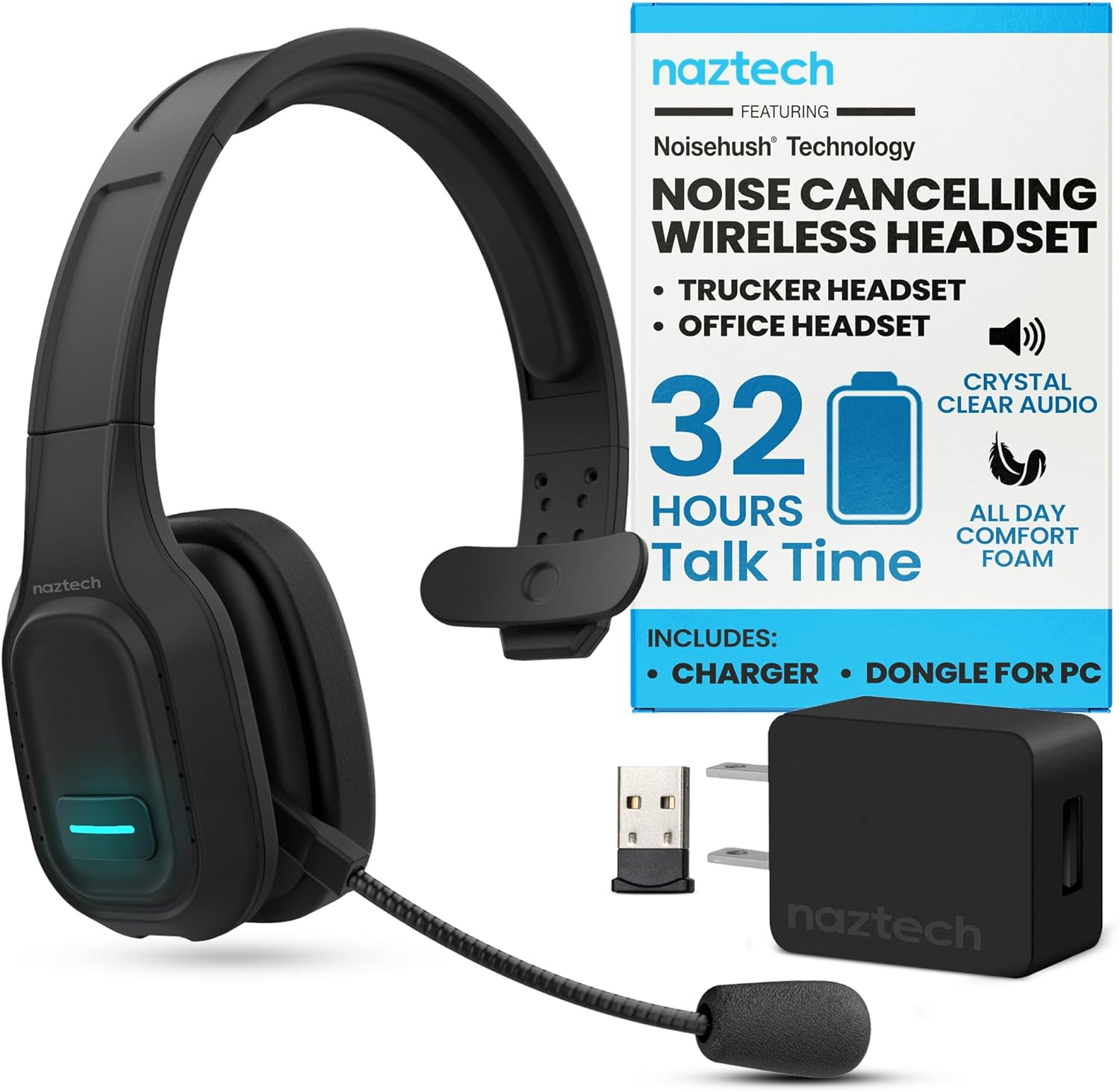
Image: The Naztech NXT-700 headset shown with its included accessories: a USB-C charging cable, a USB wall adapter, and a USB dongle for PC connectivity. This image highlights the complete package for the user.

Image: The Naztech NXT-700 headset displayed alongside icons representing its key features: HD Definition Audio, Voice Assistant, lightweight design (4.8 oz), GPS Navigation, Caller ID Announcement, and Extreme Comfort. This visual summary helps users quickly grasp the headset's capabilities.
Setup
Punjenje slušalica
- Spojite USB-C kabel za punjenje na priključak za punjenje na slušalicama.
- Drugi kraj kabla priključite na kompatibilni USB izvor napajanja (npr. adapter za struju, USB priključak računara).
- The LED indicator on the headset will show charging status. A full charge takes approximately 90 minutes.
- Once fully charged, the headset provides up to 32 hours of talk time and 550 hours of standby time.
Uparivanje s uređajem
- Provjerite jesu li slušalice isključene.
- Press and hold the Multi-function button until the LED indicator flashes blue and red alternately, indicating pairing mode.
- Na svom uređaju (pametnom telefonu, tabletu, laptopu) omogućite Bluetooth i potražite dostupne uređaje.
- Select "NXT-700" from the list of found devices.
- Nakon povezivanja, LED indikator će svijetliti stalno plavo ili će polako treptati plavo.
- For multipoint connectivity, repeat the pairing process with a second device. The headset can maintain a connection with two devices simultaneously.
Podešavanje slušalica
- Podesite traku za glavu za udobno i sigurno prianjanje na glavi.
- Position the flexible, rotatable microphone boom close to your mouth for optimal voice pickup.
- Attach one of the included microphone windscreens to reduce breath noise and environmental sounds.
Uputstvo za upotrebu
Uključivanje/isključivanje
- Za uključivanje: Pritisnite i držite dugme za napajanje dok se LED indikator ne upali.
- Za isključivanje: Pritisnite i držite dugme za napajanje dok se LED indikator ne ugasi.
Upravljanje pozivima
- Answer/End Call: Press the Multi-function button once.
- Reject Call: Press and hold the Multi-function button for 2 seconds.
- Redial Last Number: Double-press the Multi-function button.
- Mute/Unmute Microphone: Press the Mute button on the microphone boom.
Audio reprodukcija
- Reprodukcija/pauza: Pritisnite višefunkcionalno dugme jednom.
- Next Track: Press and hold the Volume Up button.
- Previous Track: Press and hold the Volume Down button.
- Volume Up: Press the Volume Up button.
- Volume Down: Press the Volume Down button.
Glasovni asistent
- Activate Voice Assistant: Press the dedicated Voice Control button (if available) or double-press the Multi-function button (refer to specific model instructions).

Image: A woman wearing the Naztech NXT-700 headset while driving a truck, demonstrating its use for crystal-clear audio during extended journeys. The image emphasizes the headset's design for eliminating road noise.

Image: A woman wearing the Naztech NXT-700 headset while working on a laptop in an office environment, illustrating its suitability for clear calls and productive meetings.
Održavanje
Čišćenje
- Obrišite slušalice mekom, suvom krpom.
- For the ear cups, use a slightly damp krpom ako je potrebno i ostavite da se potpuno osuši na zraku prije upotrebe.
- Regularly replace the microphone windscreen to maintain optimal sound quality and hygiene.
- Izbjegavajte korištenje jakih kemikalija ili abrazivnih materijala za čišćenje.
Skladištenje
- Slušalice čuvajte na hladnom i suhom mjestu, dalje od direktne sunčeve svjetlosti i ekstremnih temperatura.
- Use the included headset hanging hook for convenient and safe storage when not in use.
Rješavanje problema
| Problem | Mogući uzrok | Rješenje |
|---|---|---|
| Slušalice se ne uključuju. | Niska baterija. | Charge the headset fully using the provided USB-C cable. |
| Nije moguće uparivanje s uređajem. | Slušalice nisu u načinu rada za uparivanje; Bluetooth isključen na uređaju; uređaj je previše udaljen. | Ensure headset is in pairing mode (flashing blue/red). Turn on Bluetooth on your device. Move headset closer to the device. |
| Loš kvalitet zvuka ili prekidi veze. | Izvan dometa Bluetooth-a; smetnje; slaba baterija. | Stay within the recommended 300 ft Bluetooth range. Avoid strong electromagnetic interference. Charge the headset. |
| Microphone not picking up voice clearly. | Microphone muted; improper positioning; worn windscreen. | Ensure microphone is unmuted. Adjust microphone boom closer to your mouth. Replace the microphone windscreen. |
| Nema zvuka iz slušalica. | Volume too low; headset not selected as audio output. | Increase headset volume. Check your device's audio settings to ensure NXT-700 is selected as the output device. |
If you continue to experience issues, please refer to the support section or visit the Naztech websajt za dalju pomoć.
Specifikacije
| Feature | Detalj |
|---|---|
| Naziv modela | NXT-700 |
| Broj modela stavke | 15443 |
| Tehnologija povezivanja | bežični (Bluetooth) |
| Bluetooth verzija | 5.0 |
| Bluetooth domet | Do 300 stope (100 metara) |
| Trajanje baterije (vrijeme razgovora) | Do 32 sati |
| Trajanje baterije (vrijeme pripravnosti) | Do 550 sati |
| Vrijeme punjenja | Pribl. 90 minuta |
| Kontrola buke | Active Noise Cancellation (NoiseHush Technology) |
| Postavljanje uha | Preko uha |
| Form Factor | Preko uha |
| Boja | Crna |
| Težina artikla | 14.4 unce |
| Dimenzije proizvoda | 8.08 x 9.45 x 2.76 inča |
| Proizvođač | NAZTECH |
| UPC | 633755154430, 633755155048 |
Garancija i podrška
Naztech products are backed by warranties, ensuring quality and performance. For specific warranty details regarding your NXT-700 headset, please refer to the warranty card included in your product packaging or visit the official Naztech website.
For technical support, troubleshooting assistance beyond this manual, or to inquire about replacement parts, please contact Naztech customer service through their official webweb-mjesto ili kontakt informacije koje ste dobili uz proizvod.
Official Naztech Webstranica: www.naztech.com
Važne informacije o sigurnosti
- Ne izlažite slušalice ekstremnim temperaturama, vlazi ili tekućinama.
- Izbjegavajte ispuštanje ili izlaganje slušalica jakim udarcima.
- Ne pokušavajte rastavljati ili modificirati slušalice. To će poništiti garanciju.
- Čuvati van domašaja djece.
- Dispose of the headset and its components responsibly according to local regulations.
No Official Product Videos Available
Na osnovu dostavljenih podataka o proizvodu, ne postoje zvanični videozapisi proizvoda od prodavca dostupni za ugradnju u ovaj priručnik.