
1. Uvod
Thank you for choosing the Greadio MD-T26 Portable AM/FM/SW Radio. This manual provides detailed instructions for the proper setup, operation, and maintenance of your radio. Please read this manual thoroughly before use to ensure optimal performance and longevity of your device.
The Greadio MD-T26 is a versatile portable radio featuring AM, FM, and Shortwave (SW) bands, an LCD display for clear frequency and time viewing, and dual power options for both indoor and outdoor use. It is designed for ease of use with large, accessible controls and a built-in speaker for clear audio.

Slika 1: Prednja strana view of the Greadio MD-T26 Portable AM/FM/SW Radio.
2. Značajke proizvoda
- Višefrekventni prijem: Receives AM, FM, and Shortwave (SW) frequencies.
- LCD ekran: Clear digital display for frequency and time settings.
- Opcije dvostrukog napajanja: Operates via AC power or 4 x D cell batteries (not included).
- Visokokvalitetni zvučnik: Integrated 2W speaker for clear sound output.
- Kontrola tonova: Adjustable tone settings (Low/High) for personalized audio.
- Priključak za slušalice: 3.5mm stereo earphone jack for private listening.
- Prijenosni dizajn: Equipped with a sturdy handle for easy transport.
3. Podešavanje
3.1 Uključivanje radija
The Greadio MD-T26 radio offers two methods for power supply:
- Napajanje naizmeničnom strujom: For indoor use, connect the included AC power cable to the radio's AC input jack and then plug it into a standard wall outlet.
- Napajanje iz baterije: For portable use, insert four (4) D cell batteries (not included) into the battery compartment located on the back of the radio. Ensure correct polarity (+/-) as indicated inside the compartment.
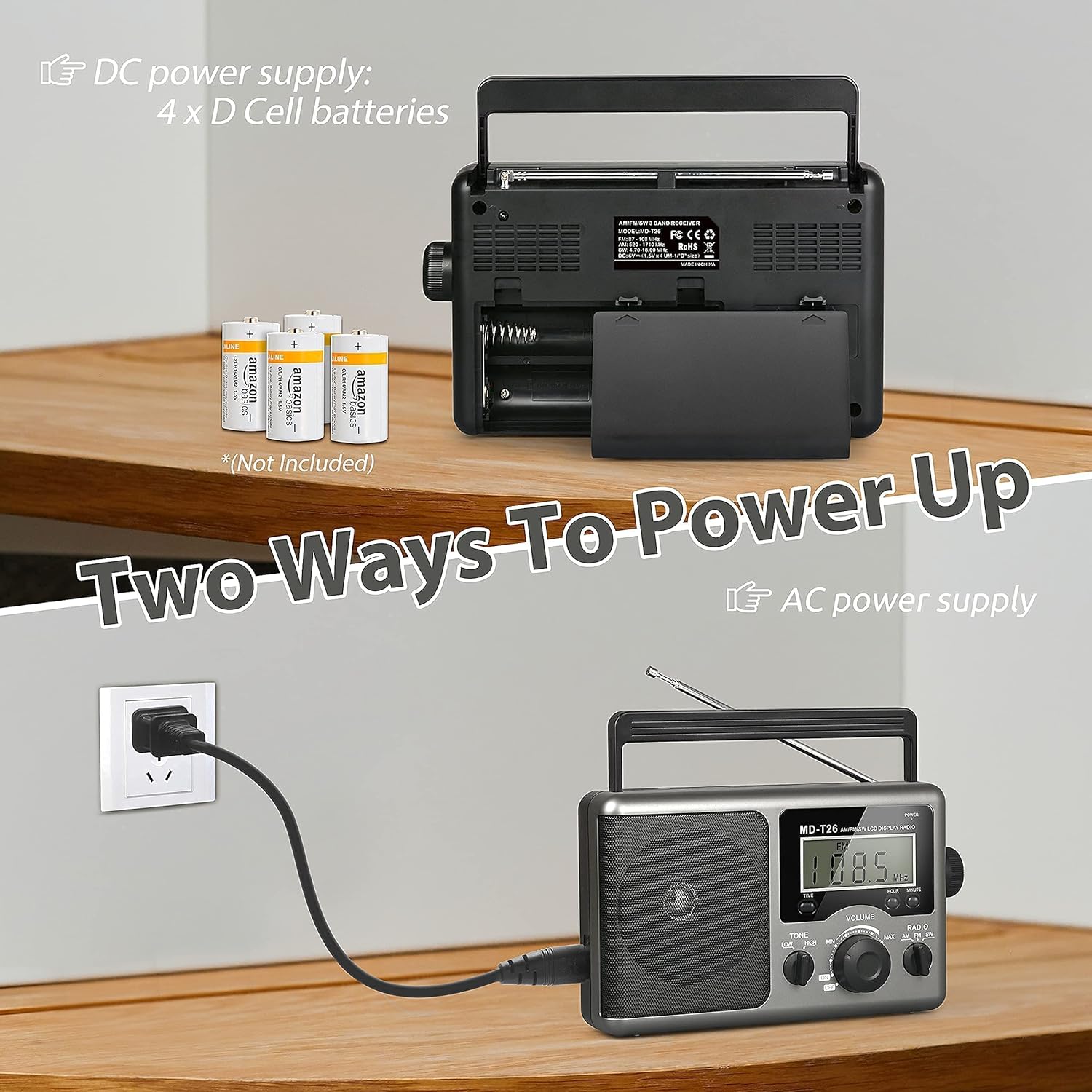
Figure 2: Illustration of AC power connection and battery compartment for D cell batteries.
3.2 Podešavanje antene
For optimal reception, adjust the antenna as follows:
- FM/SW Reception: Extend the telescopic antenna fully and adjust its angle for the clearest signal.
- Jutarnji prijem: The radio uses a built-in ferrite rod antenna for AM. Rotate the entire radio unit to find the strongest signal.
4. Uputstvo za upotrebu
4.1 Kontrole prekoview

Slika 3: Detaljno view of the radio's control panel.
- Dugme POWER: Located on the top right, press to turn the radio ON/OFF.
- Dugme za ŠTIMANJE: Located on the right side, rotate to select radio stations.
- Dugme za jačinu zvuka: Located on the front panel, rotate to adjust the sound level.
- RADIO Band Selector: Switch between AM, FM, and SW bands.
- TONE Switch: Select between LOW and HIGH tone settings.
- TIME/HOUR/MINUTE Buttons: Used for setting the time on the LCD display.
4.2 Turning On and Selecting a Band
- Pritisnite POWER button to turn on the radio. The LCD display will illuminate.
- Koristite RADIO band selector switch to choose your desired band: AM, FM, or SW.
4.3 Podešavanje stanice
Once a band is selected, slowly rotate the TUNING knob on the right side of the radio. Observe the frequency displayed on the LCD screen. Stop rotating when you hear your desired station clearly.
4.4 Podešavanje jačine i tona
- Volumen: Rotirajte VOLUME dugme na prednjoj ploči u smjeru kazaljke na satu za povećanje jačine zvuka i suprotno od kazaljke na satu za smanjenje.
- ton: Koristite TONE switch to select between 'LOW' for a warmer sound or 'HIGH' for a brighter sound, according to your preference.
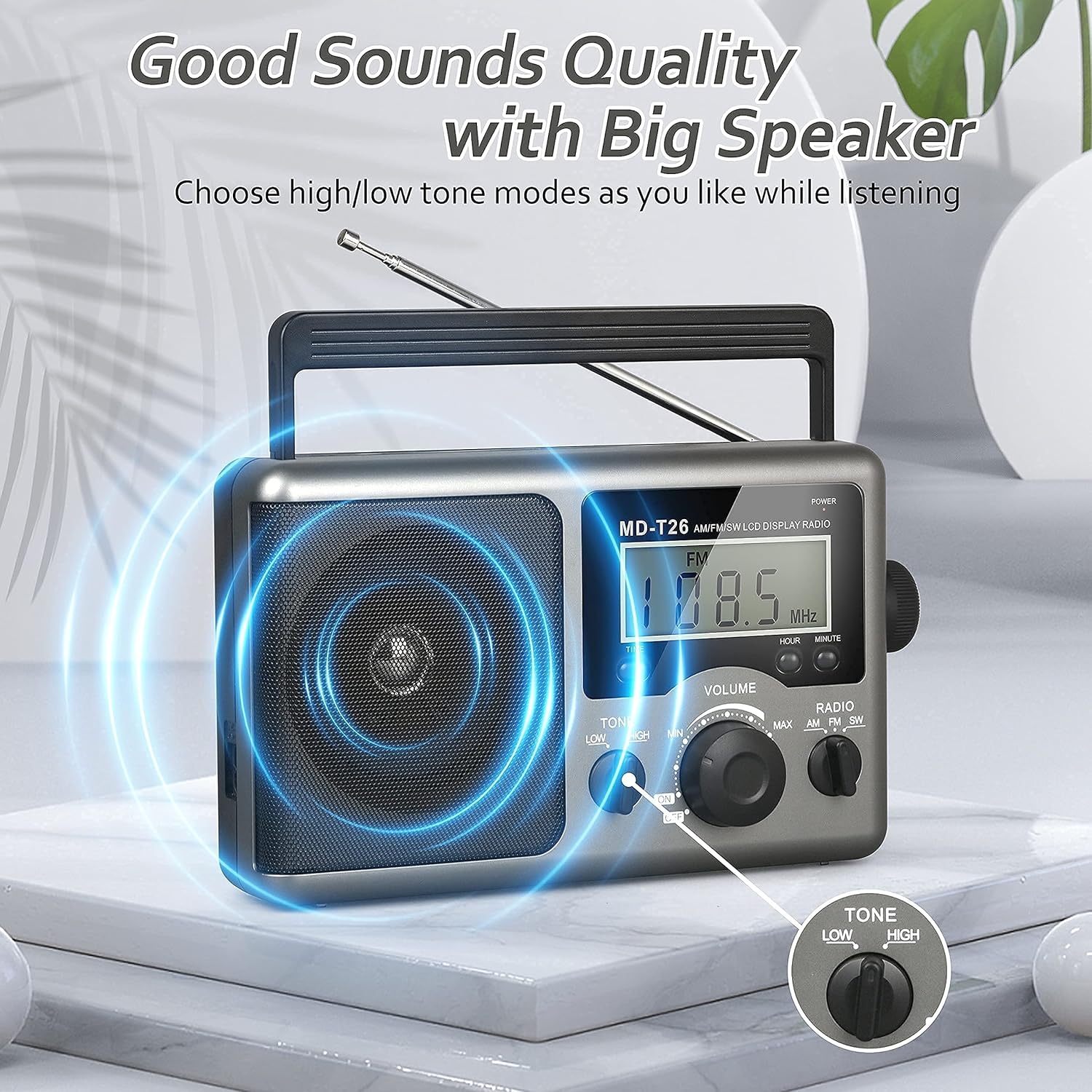
Figure 4: Speaker and Tone control detail.
4.5 Postavljanje vremena
The LCD display can also show the current time. To set the time:
- Pritisnite VRIJEME button once to enter time setting mode.
- Koristite HOUR dugme za podešavanje sata.
- Koristite MINUTE dugme za podešavanje minuta.
- The time system is 24-hour format.
4.6 Using the Earphone Jack
For private listening, plug any standard 3.5mm stereo earphones (not included) into the PRIKLJUČAK ZA EARPHONE located on the side of the radio. The internal speaker will automatically mute when earphones are connected.
5. Održavanje
- čišćenje: Obrišite vanjski dio radija mekom, suhom krpom. Ne koristite abrazivna sredstva za čišćenje ili rastvarače.
- Održavanje baterije: If the radio will not be used for an extended period, remove the D cell batteries to prevent leakage and damage.
- Skladištenje: Radio čuvajte na hladnom i suhom mjestu, dalje od direktne sunčeve svjetlosti i ekstremnih temperatura.
- Otpornost na vodu: Ovaj radio je nije vodootporan. Avoid exposure to rain, moisture, or splashing water.
6. Otkrivanje problema
| Problem | Mogući uzrok | Rješenje |
|---|---|---|
| Nema struje | AC cable not connected, batteries depleted or incorrectly inserted. | Check AC cable connection. Replace batteries or ensure correct polarity. |
| Loš prijem / Statički signal | Antenna not extended/adjusted, weak signal area, interference. | Extend and adjust telescopic antenna (FM/SW). Rotate radio for AM. Move to an area with better signal. Avoid sources of electronic interference. |
| Nema zvuka iz zvučnika | Jačina zvuka je preniska, slušalice su priključene. | Increase volume. Disconnect earphones if not intended for private listening. |
| LCD ekran ne radi | Problem sa napajanjem, unutrašnji kvar. | Provjerite napajanje. Ako problem i dalje postoji, obratite se korisničkoj podršci. |
7. Specifikacije
| Feature | Detalj |
|---|---|
| Brand | Greadio |
| Broj modela | MD-T26 |
| Tehnologija povezivanja | Auxiliary (for earphone) |
| Tehnologija tjunera | AM, FM, JZ |
| Izvor napajanja | AC Power, 4 x D Cell Batteries |
| Kompatibilni uređaji | Slušalica |
| Display Type | LCD |
| Hardversko sučelje | 3.5-milimetarski audio priključak |
| Nivo vodootpornosti | Nije vodootporan |
8. Garancija i podrška
8.1 Informacije o garanciji
Greadio provides a 12-mjesečna garancija for this product, covering manufacturing defects from the date of purchase. Additionally, a 30-dnevna garancija povrata novca se nudi.
This warranty does not cover damage caused by misuse, accident, unauthorized modification, or normal wear and tear.
8.2 Korisnička podrška
For any questions, technical assistance, or warranty claims, please contact Greadio customer service. We offer 24/7 korisnička služba da vam pomognem.
Please refer to the product packaging or the retailer's webstranicu za najnovije kontakt informacije.