
Uvod
The Macally BTBLZKEYSG is a full-size backlit Bluetooth keyboard designed specifically for Mac and iOS devices. It features a MacOS-specific layout with 107 scissor-switch keys and 14 convenient shortcuts, enhancing workflow and productivity. This keyboard allows seamless pairing and switching between up to three Bluetooth-enabled devices, including MacBooks, iMacs, iPhones, and iPads. The integrated white LED backlighting offers three adjustable brightness levels for comfortable typing in various lighting conditions. Powered by a built-in 1500mAh rechargeable battery, it provides extended usage time between charges.
Sadržaj paketa
- Macally BTBLZKEYSG Backlit Bluetooth Keyboard
- USB-C kabl za punjenje
- Uputstvo za upotrebu
Karakteristike proizvoda
- Tasteri sa pozadinskim osvetljenjem: Crisp white LEDs with 3 brightness levels for typing in low-light environments. Backlight can be turned off.
- MacOS Specific Layout: 107 scissor-switch keys with 14 macOS shortcuts for familiar and efficient use.
- Multi-Device Bluetooth: Easily pair and switch between up to 3 Bluetooth-enabled devices (Mac, iPhone, iPad) within a 30 ft wireless range.
- Punjiva baterija: Built-in 1500mAh battery provides 1 to 4 weeks of runtime with backlighting on. USB-C charging cable included.
- Tanak i udoban dizajn: Only 0.87 inches thin with an integrated kickstand for ergonomic typing.
Setup
1. Punjenje tastature
Before initial use, fully charge the keyboard. Connect the supplied USB-C charging cable to the keyboard's USB-C port and the other end to a USB power source (e.g., computer USB port, USB wall adapter). The LED indicator will show charging status.
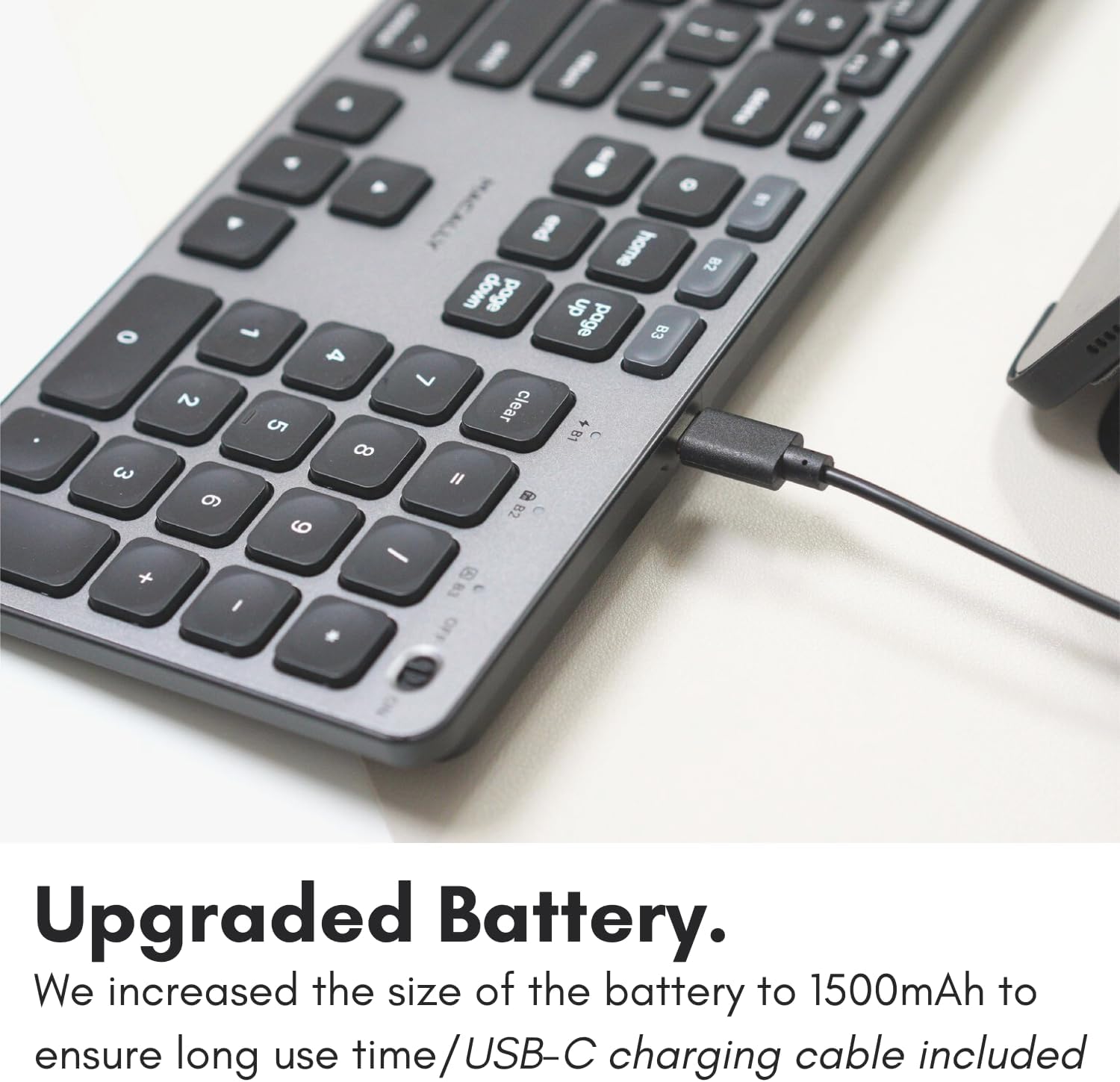
Image: The USB-C charging port on the side of the Macally BTBLZKEYSG keyboard, with the charging cable inserted.
2. Uključivanje
Locate the power switch on the keyboard, usually on the top right edge. Slide the switch to the 'ON' position.
3. Uparivanje sa uređajem
- Uvjerite se da je tastatura uključena.
- Press and hold one of the Bluetooth pairing keys (B1, B2, or B3) for 3-5 seconds until the corresponding LED indicator above the key starts blinking rapidly. This indicates the keyboard is in pairing mode.
- On your Mac or iOS device, go to System Settings (ili Sistemske postavke) > Bluetooth.
- Look for "Macally BTBLZKEYSG" (or similar name) in the list of available devices and click/tap to connect.
- Ako se to od vas zatraži, unesite kod za uparivanje prikazan na ekranu pomoću tastature i pritisnite Enter.
- Once connected, the LED indicator for the selected Bluetooth channel will stop blinking and remain solid for a few seconds before turning off.

Image: The Macally BTBLZKEYSG keyboard shown with a MacBook and an iPad, illustrating its multi-device capability.
Uputstvo za upotrebu
MacOS Specific Keys and Shortcuts
The keyboard features a standard MacOS layout, including function keys (F1-F12) that double as media and system control shortcuts. Use the Fn key in combination with these keys to access their secondary functions.
- Fn+F1: Smanjite svjetlinu ekrana
- Fn+F2: Povećajte svjetlinu ekrana
- Fn+F3: Kontrola misije
- Fn+F4: Launchpad
- Fn+F7: Previous Track
- Fn+F8: Pusti/Pauza
- Fn+F9: Next Track
- Fn+F10: Isključi zvuk
- Fn+F11: Smanjite jačinu zvuka
- Fn+F12: Povećajte jačinu zvuka
Kontrola pozadinskog osvetljenja
The keyboard's backlight can be adjusted to three brightness levels or turned off completely. Use the dedicated backlight control keys, typically located near the function keys or arrow keys, to cycle through the brightness settings.

Image: The Macally BTBLZKEYSG keyboard with its white LED backlighting illuminated at different intensity levels.
Prebacivanje između uparenih uređaja
To switch between your paired Bluetooth devices, simply press the corresponding Bluetooth pairing key (B1, B2, or B3) that your device is connected to. The keyboard will automatically connect to the selected device.
Održavanje
Da biste osigurali dugotrajnost i optimalne performanse vaše tastature, slijedite ove smjernice za održavanje:
- čišćenje: Koristite meku krpu koja ne ostavlja dlačiceampened with water or a mild cleaning solution to wipe the keyboard surface. Avoid harsh chemicals or abrasive materials.
- Uklanjanje prašine: Koristite komprimirani zrak za uklanjanje prašine i ostataka između tipki.
- Skladištenje: When not in use for extended periods, store the keyboard in a dry, cool place.
- Izbjegavajte tečnosti: Do not expose the keyboard to excessive moisture or spill liquids on it.
Rješavanje problema
| Problem | Rješenje |
|---|---|
| Tastatura se ne uključuje. | Ensure the power switch is in the 'ON' position. Charge the keyboard using the supplied USB-C cable. |
| Tastatura se ne uparuje sa uređajem. | Ensure the keyboard is in pairing mode (LED blinking). Check your device's Bluetooth settings to ensure Bluetooth is enabled and the keyboard is visible. Try restarting both the keyboard and your device. |
| Tastatura se često isključuje. | Ensure the keyboard is within the 30 ft wireless range of your device. Check for interference from other wireless devices. Ensure the keyboard battery is sufficiently charged. |
| Pozadinsko osvjetljenje ne radi. | Press the backlight control keys to cycle through brightness levels. Ensure the keyboard battery is charged, as low battery may disable backlighting. |
| Ključevi ne reagiraju. | Check the Bluetooth connection. If connected, try restarting the keyboard. Ensure no debris is lodged under the keys. |
Specifikacije
| Feature | Detalj |
|---|---|
| Broj modela | BTBLZKEYSG |
| Povezivanje | Bluetooth, bežični |
| Kompatibilni uređaji | Mac Mini / Pro Studio, iMac, Macbook Air, MacBook Pro, iPhone, iPad |
| Opis tastature | Backlit Keyboard for Mac |
| Posebne karakteristike | Backlit, Multi-Device Bluetooth, Rechargeable |
| Boja | Grey |
| Pozadinsko osvetljenje tastature | Single Color (White), 3 Brightness Levels |
| Dimenzije proizvoda | 16.8 cm D x 4.6 cm Š x 0.87 cm V |
| Broj ključeva | 107 |
| Izvor napajanja | Napajanje baterijom (1500mAh punjiva) |
| Tip prekidača | Tactile Scissor Keys |
| Raspored tipkovnice | QWERTY (MacOS) |
| Materijal | Aluminijum |
| UPC | 701107500362 |
Zvanični video proizvoda
Video: Prekorview of the Macally Backlit Bluetooth Keyboard for Mac & iOS, highlighting its features and compatibility.
Garancija i podrška
The Macally BTBLZKEYSG Backlit Bluetooth Keyboard comes with a warranty of up to two years. For technical support, warranty claims, or further assistance, please visit the official Macally webstranice ili kontaktirajte njihov odjel za korisničku podršku.