
1. Uvod
Hvala na kupoviniasing the Kimwood Bluetooth Headset. This manual provides detailed instructions on how to set up, operate, and maintain your headset. Please read this manual carefully before use to ensure optimal performance and longevity of your device.

Figure 1.1: Kimwood Bluetooth Headset with its charging case.
2. Sigurnosne informacije
- Ne izlažite slušalice ekstremnim temperaturama, vlazi ili korozivnim supstancama.
- Izbjegavajte ispuštanje ili izlaganje slušalica jakim udarcima.
- Do not disassemble or modify the headset. This will void the warranty and may cause damage.
- Držite slušalice dalje od djece i kućnih ljubimaca.
- Koristite samo priloženi kabel za punjenje i kompatibilni adapter za napajanje.
3. Sadržaj paketa
Molimo Vas da provjerite paket za sljedeće stavke:
- Kimwood Bluetooth Headset
- Futrola za punjenje
- USB kabel za punjenje tipa C
- Uputstvo za upotrebu

Slika 3.1: Sadržaj paketa.
4. Proizvod je gotovview
Familiarize yourself with the components of your Kimwood Bluetooth Headset:
| br. | Komponenta | Funkcija |
|---|---|---|
| 1 | Dugme za napajanje/više funkcija | Power On/Off, Play/Pause, Answer/End Call, Voice Assistant |
| 2 | Pojačavanje zvuka/sljedeća pjesma | Increase volume, skip to next track (long press) |
| 3 | Smanjivanje zvuka/prethodna pjesma | Decrease volume, go to previous track (long press) |
| 4 | Mikrofon | Picks up your voice for calls |
| 5 | priključak za punjenje (tip-C) | Connects to charging cable |
| 6 | LED indikator | Shows power, pairing, and charging status |
5. Podešavanje
5.1 Punjenje slušalica i futrole
Prije prve upotrebe, potpuno napunite slušalice i njihovu kutijicu za punjenje.
- Connect the USB Type-C cable to the charging port on the case.
- Povežite drugi kraj kabla na USB izvor napajanja (npr. računar, zidni adapter).
- Digitalni displej na kućištu za punjenje prikazaće procenat baterijetage. When fully charged, it will display "100".
- Place the headset into the charging case. The headset will automatically begin charging.
The charging case has a 500mAh battery, and the earphone has a 100mAh battery. A full charge takes approximately 1.5 hours.

Figure 5.1: Charging the headset and case.
5.2 Uparivanje s Bluetooth uređajem
The headset supports Bluetooth 5.1 for stable and automatic connections.
- Take the headset out of the charging case. It will automatically power on and enter pairing mode (LED indicator will flash blue).
- Na vašem uređaju (pametnom telefonu, tabletu, računaru) omogućite Bluetooth.
- Traži available Bluetooth devices and select "VYK-B26" from the list.
- Once connected, the LED indicator on the headset will stop flashing and remain solid blue. A voice prompt will confirm the connection.
After the initial pairing, the headset will automatically connect to the last paired device when taken out of the case.

Figure 5.2: Automatic pairing process.
5.3 Nošenje slušalica
The ear-hook design allows for comfortable wear on either the left or right ear. The microphone and ear hook can be rotated to fit your preference.
- Podesite kuku za uho da sigurno prianja oko vašeg uha.
- Rotate the microphone arm up to 180 degrees and the ear hook up to 360 degrees to find the optimal position for comfort and clear voice pickup.

Figure 5.3: Adjusting the headset for left or right ear use.
6. Uputstvo za upotrebu
6.1 Uključivanje/isključivanje napajanja
- Uključeno: Take the headset out of the charging case, or long-press the Multi-function Button for 3 seconds.
- Iskljuciti: Place the headset back into the charging case, or long-press the Multi-function Button for 5 seconds.
6.2 Funkcije poziva
- Odgovori/Završi poziv: Kratko pritisnite višenamensko dugme.
- odbiti poziv: Dugo pritisnite višenamjenski taster 2 sekunde.
- Isključi/Uključi mikrofon: During a call, long press the Volume Up or Volume Down button for approximately 3 seconds.

Figure 6.1: Mute function and unidirectional microphone for clear calls.
6.3 Reprodukcija muzike
- Pusti/pauza: Kratko pritisnite višenamensko dugme.
- Sljedeća pjesma: Kratko pritisnite dugme za pojačavanje jačine zvuka.
- Prethodni zapis: Kratko pritisnite dugme za smanjenje jačine zvuka.
6.4 Kontrola jačine zvuka
- Povećajte jačinu zvuka: Kratko pritisnite dugme za pojačavanje jačine zvuka.
- Smanji jačinu zvuka: Kratko pritisnite dugme za smanjenje jačine zvuka.
6.5 Glasovni asistent
Activate your device's voice assistant (Siri, Google Assistant, etc.) directly from the headset.
- Aktivirajte glasovnog asistenta: While the headset is connected and in standby mode, long press the Multi-function Button for 2 seconds.
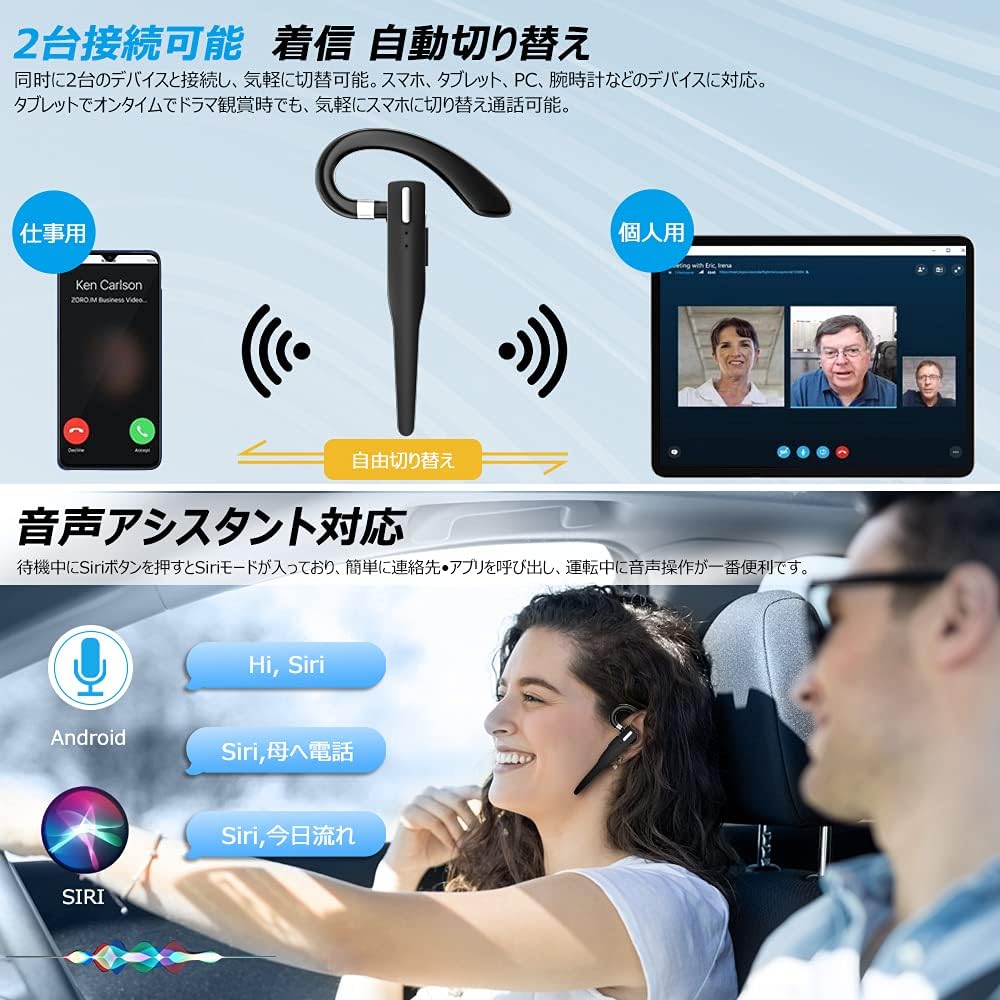
Figure 6.2: Multi-device connectivity and voice assistant features.
6.6 Povezivanje više uređaja
The headset can connect to two Bluetooth devices simultaneously, allowing for seamless switching between them.
- Pair the headset with the first device as described in Section 5.2.
- Isključite Bluetooth na prvom uređaju. Slušalice će ponovo ući u način rada za uparivanje.
- Uparite slušalice s drugim uređajem.
- Turn on Bluetooth on the first device. The headset should now be connected to both devices.
- The headset will automatically switch audio output to the device that is actively playing media or receiving a call.
7. Održavanje
7.1 Čišćenje
- Obrišite slušalice i kućište za punjenje mekom, suhom krpom koja ne ostavlja dlačice.
- Nemojte koristiti jake hemikalije, rastvarače za čišćenje ili jake deterdžente.
7.2 Skladištenje
- When not in use, store the headset in its charging case to protect it from dust and damage.
- Uređaj čuvajte na hladnom i suhom mjestu, dalje od direktne sunčeve svjetlosti i ekstremnih temperatura.

Figure 7.1: The compact charging case provides convenient storage.
8. Otkrivanje problema
Ako imate problema sa slušalicama, pogledajte sljedeće uobičajene probleme i rješenja:
| Problem | Mogući uzrok | Rješenje |
|---|---|---|
| Slušalice se ne uključuju. | Niska baterija. | Charge the headset and charging case. |
| Nije moguće uparivanje s uređajem. | Bluetooth is off on device; headset not in pairing mode; too far from device. | Ensure Bluetooth is on; take headset out of case to enter pairing mode; keep within 10 meters. |
| Nema zvuka ili je jačina zvuka niska. | Volume too low; headset not connected; sound output set to another device. | Increase volume on headset and device; re-pair headset; check device's audio output settings. |
| Mikrofon ne radi. | Microphone muted; incorrect audio input settings on device. | Unmute microphone (long press Volume Up/Down); check device's audio input settings. |
| Connection unstable or drops. | Smetnje; previše udaljen od uređaja; slaba baterija. | Move closer to device; avoid strong electromagnetic interference; charge headset. |
9. Specifikacije
| Feature | Detalj |
|---|---|
| Model | VYK-B26 |
| Bluetooth verzija | 5.1 |
| Poništavanje buke | CVC8.0 |
| Kapacitet baterije slušalica | 100mAh |
| Futrola za punjenje Kapacitet baterije | 500mAh |
| Vrijeme razgovora | Do 12 sati |
| Vrijeme reprodukcije muzike | Do 12 sati |
| Ukupno vrijeme korištenja (s kutijom) | Do 72 sati |
| Vrijeme pripravnosti | Do 400 sati |
| Vrijeme punjenja | Pribl. 1.5 sati |
| Port za punjenje | USB Type-C |
| Waterproof Rating | IPX7 (otporan na znoj) |
| Kompatibilnost | iOS, Android, Windows (uređaji s omogućenim Bluetoothom) |

Figure 9.1: Advanced Bluetooth 5.1 and CVC8.0 Noise Cancelling features.
10. Garancija i podrška
Kimwood products are designed for reliability and performance. For warranty information and technical support, please refer to the contact details provided on the product packaging or visit the official Kimwood webMolimo sačuvajte dokaz o kupovini za potrebe reklamacije.