
1. Uvod
The G-MARK G4000IEM is a professional UHF wireless in-ear monitor system designed for stage performances, studio recording, band rehearsals, and live events. It provides reliable, high-quality audio monitoring with features such as broad frequency response, low latency, strong anti-interference capabilities, and stable signal transmission over a wide coverage area.
Ključne karakteristike:
- Premium Monitoring System: Offers a broad frequency response of 50Hz-20KHz and less than 5ms latency for real-time audio monitoring.
- Jaka zaštita od smetnji: UHF receiver with PLL phase-locked frequency synthesis, covering 550 MHz-580 MHz with 100 adjustable frequencies.
- Stable Signal & Broad Coverage: Dual-antenna receiver with advanced digital signal processing for enhanced signal and extended range up to 160-320 feet.
- Practical & Durable Design: Constructed with high-quality brushed metal for longevity, featuring an intuitive LCD display and operation buttons.
- Proširivi sistem: Designed to be an expandable wireless monitoring system.
- Poništavanje buke: Built-in noise cancellation for focused audio monitoring.
2. Sigurnosne informacije
Molimo vas da pročitate i razumjete sva sigurnosna uputstva prije upotrebe ovog uređaja. Sačuvajte ovaj priručnik za buduću upotrebu.
- Napajanje: Use only the specified power adapter for the transmitter. Ensure the voltage odgovara zahtjevima uređaja.
- baterije: The bodypack receiver requires two AA batteries (not included). Ensure correct polarity when inserting batteries. Do not mix old and new batteries, or different types of batteries. Remove batteries if the device will not be used for an extended period.
- Vlaga: Do not expose the device to rain, moisture, or extreme humidity.
- toplina: Držite uređaj dalje od izvora toplote kao što su radijatori, grijalice, peći ili drugi uređaji koji proizvode toplotu.
- ventilacija: Ensure proper ventilation for the transmitter unit, especially if rack-mounted. Do not block ventilation openings.
- čišćenje: Čistite samo suhom krpom. Ne koristite tekuća sredstva za čišćenje ili aerosole.
- servisiranje: Ne pokušavajte sami servisirati ovaj proizvod. Sve servise prepustite kvalificiranom servisnom osoblju.
- Zaštita sluha: Prolonged exposure to high volume levels can cause permanent hearing damage. Set the volume to a comfortable level before placing earphones in your ears.
3. Sadržaj paketa
Carefully unpack your G-MARK G4000IEM system and verify that all items listed below are present and in good condition.
- G-MARK G4000IEM Transmitter Unit
- 2 x G-MARK G4000IEM Bodypack Receivers
- 2 x In-Ear Earphones
- 2 x Transmitter Antennas
- Adapter za napajanje odašiljača
- Audio Cables (e.g., 1/4" to 1/4" or XLR to 1/4")
- Korisnički priručnik (ovaj dokument)

Figure 3.1: G-MARK G4000IEM System Product List
4. Komponente proizvoda iznadview
4.1. Bodypack Receiver
The bodypack receiver is a compact unit designed for personal monitoring. It features an antenna for signal reception, a frequency display, IR pairing window, battery compartment, volume adjustment knob, and a 3.5mm earphone input.

Figure 4.1: Bodypack Receiver Components
- antena: Receives wireless signals from the transmitter.
- Prikaz frekvencije: Shows the current operating frequency.
- IR Pairing Window: Used for infrared synchronization with the transmitter.
- Pretinac za baterije: Holds two AA batteries (not included).
- Dugme za podešavanje jačine zvuka: Controls the output volume to the earphones.
- 3.5mm ulaz: Connects to the included in-ear earphones.
4.2. Predajna jedinica
The transmitter unit is the central hub of the system, sending audio signals wirelessly to the bodypack receivers. It features input jacks for audio sources, controls for channel selection, and a damping adjustment knob.

Figure 4.2: Transmitter Unit Front Panel
- Damping Adjustment Knob: Reduces clicking sounds and provides a softer button feel.
- LCD ekran: Prikazuje frekvenciju, kanal i ostale operativne informacije.
- Channel Controls (CH-A, CH-B): Buttons for selecting and adjusting frequencies for each channel.
- Dugme SET: Enters adjustment state for frequency selection.
- IR prozor: For infrared synchronization with bodypack receivers.
- Dugme za napajanje: Turns the transmitter unit on or off.
- Antenski portovi: Connect the included antennas for signal transmission.
- Audio ulazi: (Typically XLR or 1/4" combo jacks on the rear, not visible in this image) Connect audio sources like mixing consoles.
5. Vodič za postavljanje
5.1. Transmitter Connection
- Connect the provided antennas to the antenna ports on the rear of the transmitter unit.
- Connect the power adapter to the transmitter's DC input and plug it into a suitable power outlet.
- Connect your audio source (e.g., mixing console, audio interface) to the audio input jacks on the transmitter using appropriate cables.
- Pritisnite dugme za napajanje da biste uključili predajnik.
5.2. Bodypack Receiver Setup
- Open the battery compartment on the bodypack receiver.
- Umetnite dvije AA baterije, pazeći na ispravan polaritet.
- Zatvorite odeljak za baterije.
- Connect the included in-ear earphones to the 3.5mm input jack on the bodypack receiver.
5.3. IR Pairing (Frequency Synchronization)
To ensure the bodypack receiver receives audio from the transmitter, you must synchronize their frequencies using the IR pairing function.

Figure 5.1: IR Match Process
- On the transmitter, press the SET button to enter the adjustment state for the desired channel (CH-A or CH-B).
- Koristite ▲ (gore) ili ▼ (down) buttons to select the desired frequency.
- Turn on the bodypack receiver.
- Align the IR pairing window on the bodypack receiver with the IR window on the transmitter.
- Hold them in alignment until you hear a beep sound, indicating that the frequencies of the transmitter and the bodypack receiver are successfully matched. The frequency displayed on the bodypack should now match the transmitter.
6. Operacija
6.1. Uključivanje/isključivanje
- predajnik: Pritisnite POWER dugme na prednjoj ploči. Displej će se osvijetliti.
- Prijemnik za tijelo: Okrenite ON/OFF/Jačina zvuka knob clockwise to power on. The display will illuminate. Turn counter-clockwise until it clicks to power off.
6.2. Odabir frekvencije
The G4000IEM system offers 100 adjustable frequencies within the 550 MHz-580 MHz range to avoid interference.
- On the transmitter, press the SET button for the channel you wish to adjust (CH-A or CH-B). The frequency display will blink.
- Koristite ▲ (gore) ili ▼ (down) buttons to cycle through available frequencies.
- Once the desired frequency is selected, press SET again to confirm, or wait a few seconds for it to automatically save.
- After changing the transmitter frequency, re-perform the IR pairing process (Section 5.3) to synchronize the bodypack receiver.
6.3. Podešavanje jačine zvuka
Adjust the monitoring volume using the Dugme za podešavanje jačine zvuka on the bodypack receiver. Start with a low volume and gradually increase it to a comfortable listening level to prevent hearing damage.
6.4. Wireless Range and Performance
The system provides a stable signal range of 160-320 feet (approximately 50-100 meters) in optimal conditions. Obstacles such as walls and other wireless devices can affect performance.

Figure 6.1: Wireless Range and Dual Antenna System
6.5. Bluetooth funkcionalnost
The G4000IEM system supports wireless Bluetooth transmission, allowing for additional connectivity options. Refer to the transmitter's display for Bluetooth pairing indicators.
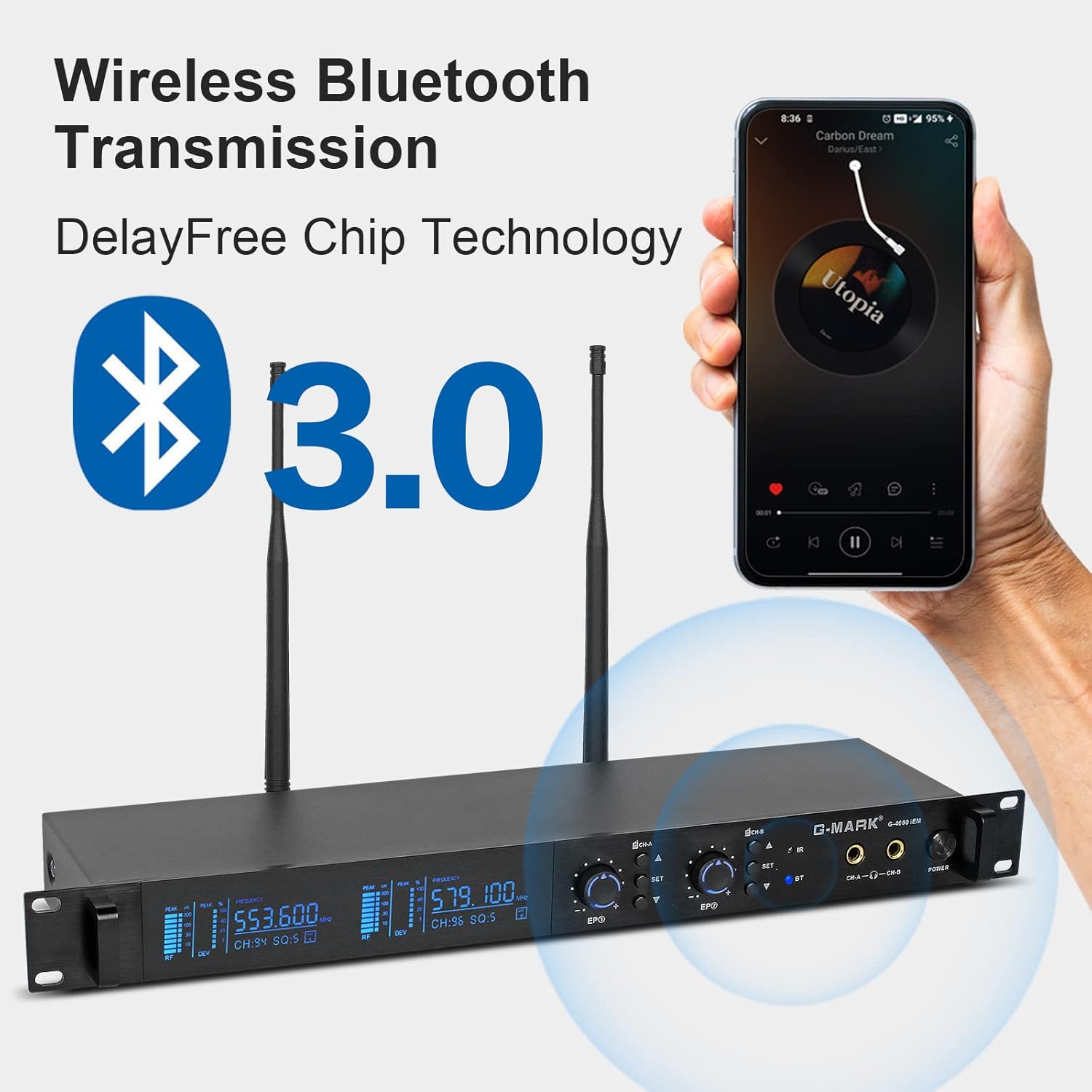
Figure 6.2: Wireless Bluetooth Transmission
7. Održavanje
- čišćenje: Use a soft, dry cloth to clean the surfaces of the transmitter and bodypack receivers. Do not use abrasive cleaners, solvents, or chemical sprays.
- Skladištenje: Sistem čuvajte na hladnom i suhom mjestu, dalje od direktne sunčeve svjetlosti i ekstremnih temperatura kada se ne koristi.
- Održavanje baterije: Remove batteries from the bodypack receivers if they will not be used for an extended period to prevent leakage and damage.
- Upravljanje kablovima: Avoid sharp bends or kinks in audio and power cables to prevent damage.
8. Otkrivanje problema
If you encounter issues with your G-MARK G4000IEM system, refer to the following common problems and solutions:
- No Sound from Earphones:
- Ensure the bodypack receiver is powered on and has fresh batteries.
- Check that the earphones are securely plugged into the 3.5mm jack.
- Verify the bodypack receiver's volume knob is turned up.
- Confirm the transmitter is powered on and receiving an audio input signal.
- Perform IR pairing again to ensure frequencies are synchronized (Section 5.3).
- Interferencija ili statika:
- Change the operating frequency on the transmitter (Section 6.2) and re-pair the bodypack.
- Ensure the transmitter and receiver antennas are fully extended and unobstructed.
- Move the transmitter and receiver away from other wireless devices, Wi-Fi routers, or large metal objects.
- Check for strong local RF interference sources.
- Kratki bežični domet:
- Ensure antennas on both transmitter and receiver are properly connected and oriented.
- Minimizirajte prepreke između predajnika i prijemnika.
- Check battery levels in the bodypack receiver.
- Predajnik se ne uključuje:
- Verify the power adapter is securely connected to both the transmitter and a working power outlet.
- Provjerite je li utičnica aktivna.
9. Tehničke specifikacije
| Feature | Specifikacija |
|---|---|
| Broj modela | G4000IEM |
| Brand | G-MARK |
| Tehnologija povezivanja | Bežično (RF) |
| Bežične komunikacijske tehnologije | RF |
| Frekvencijski odziv | 50Hz - 20kHz |
| UHF Frequency Coverage | 550 MHz - 580 MHz |
| Podesive frekvencije | 100 |
| Latencija | Manje od 5ms |
| bežični domet | 160FT - 320FT (approx. 50-100 meters) |
| Postavljanje uha | U uhu |
| Form Factor | U uhu |
| Kontrola buke | Aktivno poništavanje buke |
| Priključak za slušalice | 3.5 mm Jack |
| Izvor napajanja za bodypack | 2 x AA baterije (nisu uključene) |
| Materijal kućišta | Metal (Transmitter) |
| Broj stavki | 2 (Bodypacks) |
10. Garancija i podrška
Genuine G-MARK audio products come with a 1-godišnja garancija proizvođača. This warranty covers defects in materials and workmanship under normal use. For troubleshooting, replacement of discontinuous/defective parts, or any other customer service inquiries, please contact G-MARK customer support through your retailer or the official G-MARK website.