
1. Uvod
Thank you for choosing the Hoco W27 Cat Ear Bluetooth Headphones. These headphones combine advanced Bluetooth 5.0 technology with a unique glowing cat ear design, offering a versatile audio experience. They support Bluetooth, TF card, and AUX playback modes, making them compatible with a wide range of mobile phones and tablets. This manual provides detailed instructions for setup, operation, maintenance, and troubleshooting to ensure you get the most out of your device.
2. Proizvod je gotovview
Familiarize yourself with the components of your Hoco W27 headphones.
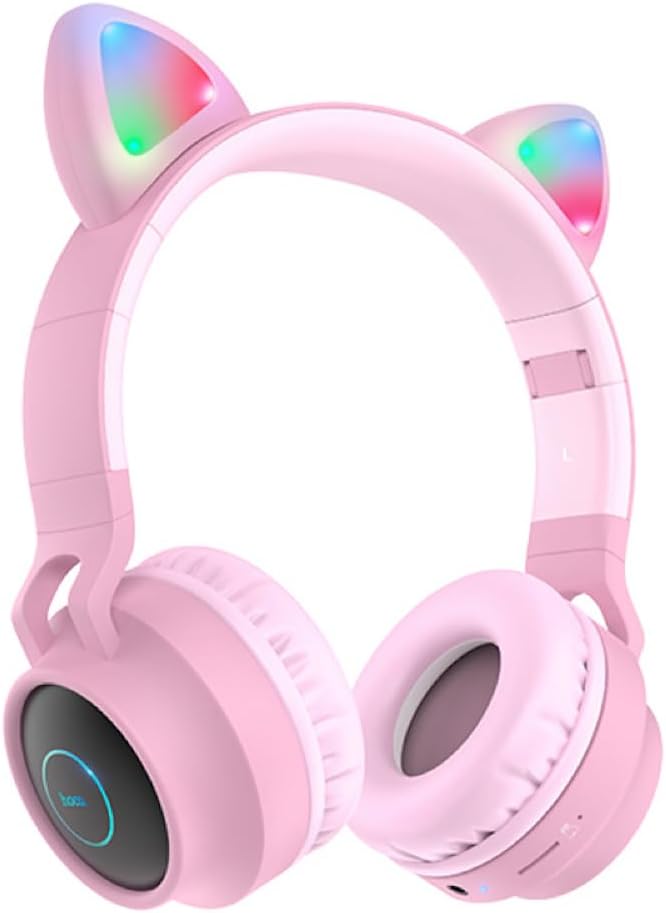
Slika 2.1: Front view of the Hoco W27 Cat Ear Bluetooth Headphones in pink, showcasing the glowing cat ears and over-ear design.

Slika 2.2: Side view of the Hoco W27 headphones, highlighting the control buttons on the left earcup, including volume, track control, and mode switch.

Slika 2.3: Odozgo view of the Hoco W27 headphones, showing the adjustable headband and the placement of the control panel on the earcup.
3. Podešavanje
3.1 Punjenje slušalica
Before first use, fully charge the headphones. The built-in 300mAh battery requires approximately 2 hours for a full charge.
- Connect the charging cable (usually USB-C or Micro-USB, depending on model) to the charging port on the headphones.
- Drugi kraj kabla priključite na USB izvor napajanja (npr. USB priključak računara, adapter za struju).
- The indicator light will show charging status (e.g., red light while charging, off or blue when fully charged).
3.2 Bluetooth uparivanje
The Hoco W27 headphones feature Bluetooth 5.0 for stable and efficient wireless connection.
- Uvjerite se da su slušalice isključene.
- Press and hold the Power button until the indicator light flashes blue and red alternately, indicating pairing mode.
- Na svom uređaju (pametnom telefonu, tabletu, računaru) omogućite Bluetooth i potražite dostupne uređaje.
- Select "Hoco W27" or a similar name from the list of found devices.
- Once connected, the indicator light will typically flash blue slowly or turn off, and you will hear a confirmation tone.
3.3 Režim TF kartice
The headphones support TF (MicroSD) card playback.
- Insert a TF card with your desired audio files into the TF card slot on the headphones.
- The headphones should automatically switch to TF card playback mode. If not, press the Mode button to cycle through modes until TF card mode is active.
3.4 AUX način rada
For wired connection, use the AUX mode.
- Connect one end of a 3.5mm audio cable (not always included) to the AUX port on the headphones.
- Drugi kraj priključite na audio izlaz vašeg uređaja.
- The headphones will automatically switch to AUX mode. Note that controls on the headphones may be limited in this mode, and playback is controlled by the connected device.
4. Uputstvo za upotrebu
4.1 Uključivanje/isključivanje napajanja
- Uključeno: Press and hold the Power button for approximately 3 seconds until the indicator light turns on and you hear a power-on prompt.
- Iskljuciti: Press and hold the Power button for approximately 3-5 seconds until the indicator light turns off and you hear a power-off prompt.
4.2 Reprodukcija muzike
- Pusti/pauza: Press the Multi-function button (often the Power button or a dedicated Play/Pause button) once.
- Sljedeća pjesma: Press and hold the Volume Up (+) button or a dedicated Next Track button.
- Prethodni zapis: Press and hold the Volume Down (-) button or a dedicated Previous Track button.
- Povećavanje glasnoće: Kratko pritisnite dugme za pojačavanje zvuka (+).
- Smanjivanje jačine zvuka: Kratko pritisnite dugme za smanjenje jačine zvuka (-).
The headphones offer up to 5 hours of continuous music playback on a full charge.
4.3 Funkcije poziva
- Odgovori/Završi poziv: Pritisnite višefunkcionalno dugme jednom tokom dolaznog poziva.
- odbiti poziv: Press and hold the Multi-function button for approximately 2 seconds during an incoming call.
- Ponovno biranje zadnjeg broja: Dvaput pritisnite višenamjensko dugme kada niste u toku poziva.
4.4 Promena načina rada
Press the 'M' (Mode) button to cycle between Bluetooth, TF Card, and AUX playback modes.
4.5 Cat Ear Lights
The glowing cat ear design adds a unique aesthetic. The lights typically activate automatically when the headphones are powered on. Refer to the product packaging or specific model features for details on controlling the lights, if a dedicated button exists.
4.6 Voice Prompt Switch
To switch the voice prompt language or disable prompts:
- When the headphones are nije povezan to a device, double-click the 'M' (Mode) button. You will hear a beep, indicating a change in the voice prompt setting.
5. Održavanje
Pravilna njega osigurava dugotrajnost vaših slušalica.
- čišćenje: Use a soft, dry, lint-free cloth to clean the surfaces of the headphones. Do not use abrasive cleaners, solvents, or spray directly onto the headphones.
- Skladištenje: Store the headphones in a cool, dry place away from direct sunlight and extreme temperatures. If storing for an extended period, ensure they are partially charged.
- Održavanje baterije: To preserve battery life, avoid fully discharging the headphones frequently. Charge them regularly, even if not in use for a long time.
- Izbjegavajte vlagu: Ne izlažite slušalice vodi ili prekomjernoj vlazi.
6. Otkrivanje problema
If you encounter issues with your Hoco W27 headphones, try the following solutions:
| Problem | Mogući uzrok | Rješenje |
|---|---|---|
| Slušalice se ne uključuju. | Niska baterija. | Charge the headphones for at least 30 minutes. |
| Nije moguće uparivanje putem Bluetootha. | Slušalice nisu u načinu rada za uparivanje; Bluetooth uređaja isključen; previše udaljeno od uređaja. | Ensure headphones are in pairing mode (flashing red/blue). Turn device Bluetooth off and on. Move headphones closer to device. |
| Nema zvuka iz slušalica. | Volume too low; incorrect mode; loose AUX cable; corrupted TF card files. | Increase volume on headphones and device. Ensure correct mode (Bluetooth, TF, AUX). Re-insert AUX cable. Check TF card files. |
| Loša kvaliteta zvuka. | Interference; low battery; distance from device. | Move away from sources of interference. Charge headphones. Reduce distance between headphones and device. |
| Cat ear lights not working. | Headphones off; specific light control setting. | Ensure headphones are powered on. Check if there's a dedicated button for lights (refer to product specifics). |
7. Specifikacije
Key technical specifications for the Hoco W27 Cat Ear Bluetooth Headphones:
| Feature | Specifikacija |
|---|---|
| Bluetooth verzija | 5.0 (JL AC6925F chip) |
| Kapacitet baterije | 300mAh |
| Vrijeme punjenja | Približno 2 sata |
| Call / Music Time | Do 5 sati |
| Vrijeme pripravnosti | Do 200 sati |
| Prečnik zvučnika | 40mm |
| Dimenzije (D*Š*V) | 203 x 175 x 80 mm (8 x 6.9 x 3.1 inča) |
| Težina | 182 g (6.4 oz) |
| Podržani načini rada | Bluetooth, TF kartica, AUX |
| Dizajnerska karakteristika | Glowing cat ear shape |
| Postavljanje uha | Preko uha |
| Kontrola buke | Nema |
8. Sigurnosne informacije
Please read and follow these safety guidelines for safe operation:
- Ne rastavljajte, ne popravljajte niti modificirajte proizvod. To može uzrokovati požar, strujni udar ili potpuno oštećenje proizvoda.
- Keep the headphones away from extreme temperatures, direct sunlight, and high humidity.
- Avoid exposing the headphones to water or other liquids.
- Do not use the headphones at excessively high volumes for prolonged periods, as this may cause hearing damage.
- Čuvati van domašaja djece.
9. Garancija i podrška
For warranty information and customer support, please refer to the documentation provided with your purchase or contact the retailer where you purchased the Hoco W27 headphones. Keep your proof of purchase for any warranty claims.