
1. Uvod
Thank you for choosing the MEBUS Model 11908 Weather Station. This device provides accurate indoor and outdoor temperature and humidity readings, a weather forecast, moon phase display, and an alarm clock function. Please read this manual carefully to ensure proper setup and operation.
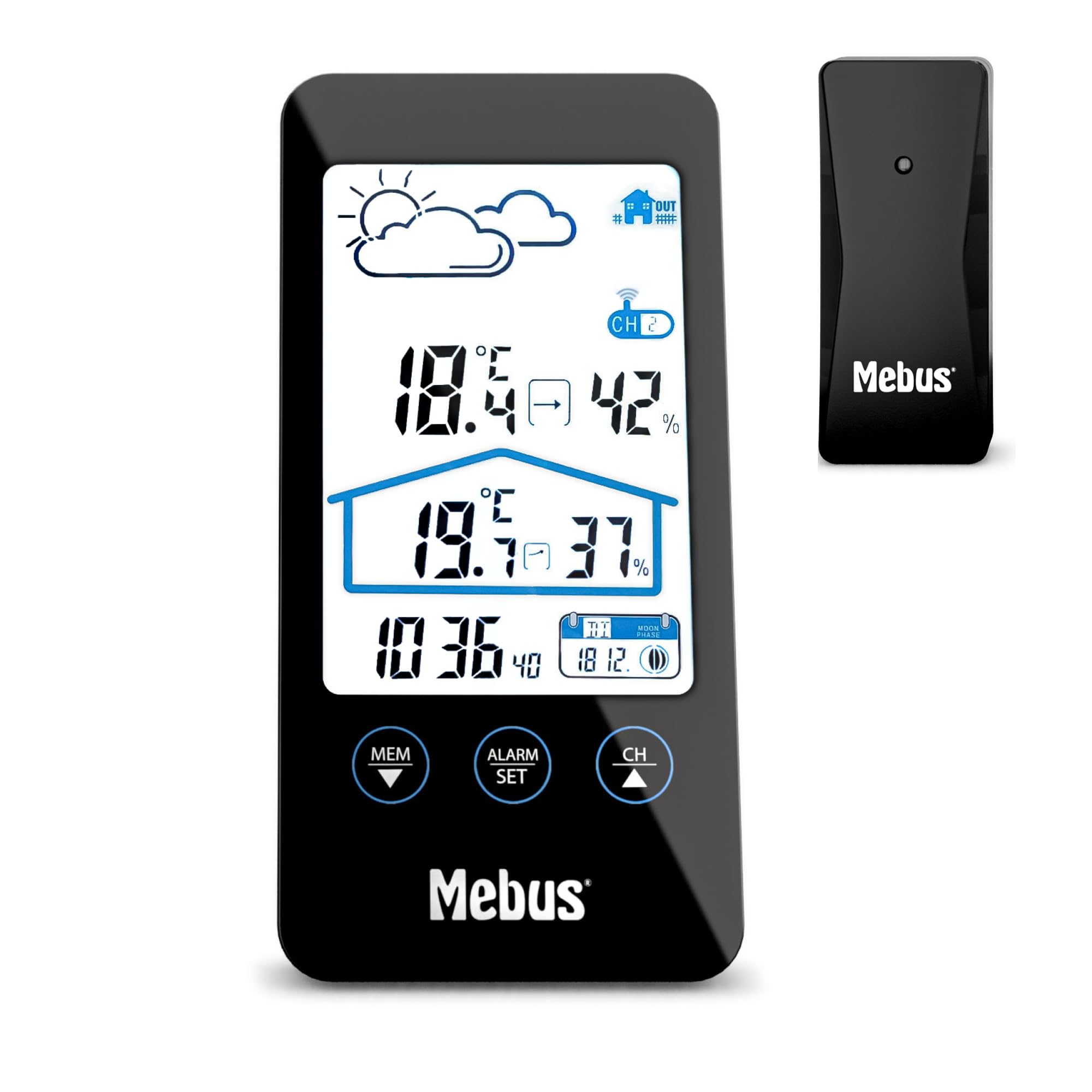
Image 1.1: The MEBUS Model 11908 Weather Station main unit and its wireless outdoor sensor.
2. Sadržaj paketa
- MEBUS Model 11908 Weather Station (Main Unit)
- Bežični vanjski senzor
- 4 x AAA Batteries (for both units)
- Korisnički priručnik (ovaj dokument)
3. Podešavanje
3.1 Instalacija baterije
Both the main unit and the outdoor sensor require batteries for operation. Use the provided 4x AAA batteries.
- Otvorite poklopac pretinca za baterije na stražnjoj strani glavne jedinice.
- Umetnite 2 AAA baterije, pazeći na ispravan polaritet (+/-).
- Zatvorite poklopac odeljka za baterije.
- Otvorite poklopac pretinca za baterije na stražnjoj strani vanjskog senzora.
- Umetnite 2 AAA baterije, pazeći na ispravan polaritet (+/-).
- Zatvorite poklopac odeljka za baterije.

Slika 3.1: Pozadi view of the main unit and outdoor sensor, indicating battery compartment locations.
3.2 Postavljanje senzora
For accurate outdoor readings, place the wireless sensor in a sheltered location away from direct sunlight and rain. Ensure it is within the effective transmission range of the main unit (typically up to 30 meters in open air).
3.3 Početna sinhronizacija
After inserting batteries, the main unit will automatically search for the outdoor sensor and the DCF77 radio signal for time synchronization. This process may take a few minutes. Ensure both units are close to each other during initial setup.
- If the outdoor temperature/humidity does not appear, press the "CH" button on the main unit to cycle through channels or initiate a new search.
- The radio-controlled time signal (DCF77) will automatically set the time. If reception is poor, manual time setting is possible (see Section 4.2).
4. Uputstvo za upotrebu
4.1 Prikaz prekoview
LCD ekran prikazuje različite informacije:
- Na vrhu lijevo: Ikone vremenske prognoze (sunčano, oblačno, kišovito).
- Gore desno: Vanjska temperatura i vlažnost.
- sredina: Temperatura i vlažnost u zatvorenom prostoru.
- Dolje lijevo: Trenutno vrijeme.
- Dolje desno: Date and Moon phase.

Slika 4.1: Detaljno view of the weather station's LCD display.
4.2 Podešavanje vremena i datuma
The time is automatically set via the DCF77 radio signal. If manual adjustment is needed:
- Pritisnite i držite "ALARM SET" button (or similar, referring to the image of buttons) for a few seconds to enter time setting mode.
- Koristite "MEM ▼" i "CH ▲" dugmad za podešavanje vrednosti.
- Pritisnite "ALARM SET" again to confirm and move to the next setting (e.g., hour, minute, year, month, day).
- Pritisnite "ALARM SET" repeatedly to exit setting mode.
Za prebacivanje između 12-satnog i 24-satnog formata, pritisnite "ALARM SET" button briefly in normal display mode.
4.3 Funkcija alarma
Meteorološka stanica uključuje budilnik s funkcijom odgode alarma.
- Pritisnite "ALARM SET" jednom pritisnite dugme da biste prikazali vrijeme alarma.
- Pritisnite i držite "ALARM SET" za ulazak u način podešavanja alarma.
- Koristi "MEM ▼" i "CH ▲" to set the desired alarm hour and minute.
- Pritisnite "ALARM SET" za potvrdu svake postavke.
- Da biste aktivirali/deaktivirali alarm, pritisnite dugme "ALARM SET" kratko pritisnite dugme kada se prikaže vrijeme alarma. Ikona alarma će se pojaviti/nestati.
- When the alarm sounds, press the top button (often labeled "SNOOZE" or similar, or the main unit's top surface) to activate the snooze function. The alarm will sound again after approximately 5 minutes.
- To stop the alarm completely, press any other button.

Image 4.2: Control buttons on the MEBUS weather station for settings and alarm.
4.4 Izbor temperaturne jedinice (°C/°F)
Za prebacivanje između Celzijusa (°C) i Fahrenheita (°F), pritisnite "MEM ▼" button briefly in normal display mode.
4.5 Pozadinsko osvetljenje ekrana
The display features a backlight for improved readability in low light conditions. Press the top button (often the snooze button) to activate the backlight temporarily.
4.6 Vremenska prognoza
The weather station provides a forecast based on atmospheric pressure changes. The icons (sunny, cloudy, rainy) indicate the predicted weather for the next 12-24 hours. This is an estimation and may not always be perfectly accurate.
4.7 Prikaz mjesečevih mijena
The bottom right of the display shows the current moon phase, which changes automatically with the date.
5. Održavanje
5.1 Zamjena baterije
When the battery indicator appears on the display, replace the batteries in the respective unit (main unit or sensor). Always replace all batteries at the same time with new ones of the same type (AAA).
5.2 Čišćenje
Očistite meteorološku stanicu i senzor mekom krpom.amp cloth. Do not use abrasive cleaners or solvents. Avoid getting moisture into the battery compartments or other openings.
5.3 Skladištenje
If the device will not be used for an extended period, remove the batteries from both units to prevent leakage and damage.
6. Otkrivanje problema
| Problem | Mogući uzrok | Rješenje |
|---|---|---|
| Nema očitavanja vanjske temperature/vlažnosti. |
|
|
| Prikazano je netačno vrijeme. |
|
|
| Ekran je taman ili prazan. |
|
|
7. Specifikacije
| Feature | Detalj |
|---|---|
| Broj modela | 11908 |
| Brand | Mebus |
| Dimenzije (glavna jedinica) | Approx. 8 cm (Depth) x 2.5 cm (Width) x 16 cm (Height) |
| Težina | 290 grama |
| Izvor napajanja | 4 x AAA batteries (2 for main unit, 2 for sensor) |
| Display Type | LCD |
| Tehnologija povezivanja | Radio frekvencija (RF) |
| Posebne karakteristike | Alarm, Thermometer, Radio Clock, Hygrometer, Moon Phase Calendar, Display Backlight |
| Temperature Range (Upper) | 40.3°C |
| Uključene komponente | Weather station, outdoor sensor, batteries |
| Materijal | Plastika |
| Broj kanala | 3 (for outdoor sensors, though only one is included) |
8. Garancija i podrška
8.1 Informacije o garanciji
This MEBUS product comes with a 2 godine garancije from the date of purchase. This warranty covers manufacturing defects and material faults. It does not cover damage caused by improper use, accidents, unauthorized repairs, or normal wear and tear.
8.2 Korisnička podrška
For technical assistance, warranty claims, or further inquiries, please contact your retailer or the MEBUS customer service department. Refer to the packaging or the official MEBUS webweb mjesto za kontakt detalje.