
Uvod
Thank you for choosing the Heyday Round Portable Bluetooth Speaker with Loop. This manual provides essential information for setting up, operating, and maintaining your speaker. Please read it thoroughly before use and retain it for future reference.
This portable speaker is designed for on-the-go audio, offering Bluetooth connectivity for seamless music streaming from your compatible devices. Its water-resistant construction makes it suitable for various environments, and the integrated loop provides convenient portability.
Sigurnosne informacije
- Ne izlažite zvučnik ekstremnim temperaturama ili direktnoj sunčevoj svjetlosti duži vremenski period.
- Izbjegavajte ispuštanje ili izlaganje zvučnika jakim udarcima.
- Ne rastavljajte, ne popravljajte niti modificirajte zvučnik sami. Za sve popravke obratite se kvalifikovanom servisnom osoblju.
- Keep the speaker away from water and liquids, despite its water-resistant design. Do not submerge it.
- Za punjenje koristite samo priloženi USB kabl.
- Bateriju i zvučnik odložite u skladu s lokalnim propisima.
Sadržaj paketa
- Heyday Round Portable Bluetooth Speaker with Loop
- USB kabl za punjenje
- Korisnički priručnik (ovaj dokument)
Product Overview
Upoznajte se sa komponentama zvučnika:
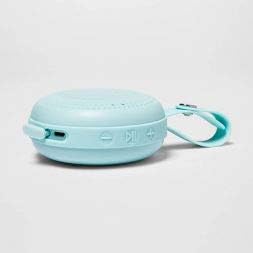
Slika: Sa strane view of the Heyday Round Portable Bluetooth Speaker. This image displays the USB charging port, the power button, and the volume/track control buttons on the side of the speaker.
- Dugme za napajanje: Pritisnite i držite da biste uključili ili isključili zvučnik.
- USB priključak za punjenje: Connect the USB cable here to charge the speaker.
- Dugme za smanjivanje jačine zvuka / prethodnu pjesmu: Pritisnite za smanjenje jačine zvuka. Pritisnite i držite za prelazak na prethodnu pjesmu.
- Dugme za reprodukciju/pauzu/poziv: Press to play or pause music. Press to answer or end a call. Press and hold to reject a call.
- Dugme za pojačavanje zvuka / sljedeću pjesmu: Pritisnite za povećanje jačine zvuka. Pritisnite i držite za prelazak na sljedeću pjesmu.
- LED indikator: Prikazuje napajanje, punjenje i status Bluetooth veze.
- Integrisana petlja: For convenient carrying or hanging.
Setup
1. Punjenje zvučnika
Prije prve upotrebe, potpuno napunite zvučnik.
- Connect the small end of the included USB charging cable to the USB charging port on the speaker.
- Povežite veći kraj USB kabla na USB adapter za napajanje (nije uključen) ili USB port računara.
- LED indikator će svijetliti tokom punjenja i ugasiti se kada se uređaj potpuno napuni.
- Potpuno punjenje obično traje otprilike 2-3 sata.
2. Uključivanje / isključivanje napajanja
- To turn on: Press and hold the Power Button for approximately 3 seconds. You will hear an audible prompt, and the LED indicator will flash.
- To turn off: Press and hold the Power Button for approximately 3 seconds. You will hear an audible prompt, and the LED indicator will turn off.
3. Bluetooth uparivanje
Uparite zvučnik s uređajem koji podržava Bluetooth (npr. pametnim telefonom, tabletom).
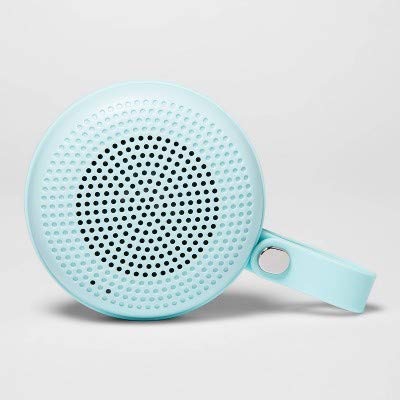
Image: The Heyday Round Portable Bluetooth Speaker in its light teal color, showcasing its compact, round design and integrated loop.
- Ensure the speaker is charged and powered on. The LED indicator will flash rapidly, indicating it's in pairing mode.
- Na svom uređaju idite na Bluetooth postavke i omogućite Bluetooth.
- Traži available devices. The speaker will appear as "HEYDAY SPEAKER" or similar.
- Select the speaker from the list to connect.
- Once successfully paired, the LED indicator will stop flashing and remain solid, and you will hear a confirmation tone.
- Zvučnik će automatski pokušati ponovo da se poveže sa poslednjim uparenim uređajem kada se uključi.
Upravljanje zvučnikom
Reprodukcija zvuka
- After pairing, open your music app or audio source on your device and begin playback.
- Pritisnite Dugme za reprodukciju/pauzu za pauziranje ili nastavak reprodukcije.
- Pritisnite Dugme za pojačavanje (+). to increase volume. Press and hold to skip to the next track.
- Pritisnite Dugme za smanjenje jačine zvuka (-) to decrease volume. Press and hold to go back to the previous track.
Rukovanje telefonskim pozivima
- When a call comes in, the music will pause. Press the Dugme za reprodukciju/pauzu da odgovorite na poziv.
- Da biste prekinuli poziv, pritisnite Dugme za reprodukciju/pauzu opet.
- Da odbijete dolazni poziv, pritisnite i držite Dugme za reprodukciju/pauzu otprilike 2 sekunde.
Otpornost na vodu
The speaker features a water-resistant design, making it suitable for outdoor use and protection against splashes. However, it is ne waterproof. Do not submerge the speaker in water or expose it to heavy rain for extended periods.
Održavanje
- čišćenje: Obrišite zvučnik mekom, suhom ili blago natopljenom krpomamp krpu. Ne koristite abrazivna sredstva za čišćenje, alkohol ili hemijske rastvarače.
- Skladištenje: Kada se zvučnik ne koristi duži period, čuvajte ga na hladnom i suhom mjestu, dalje od direktne sunčeve svjetlosti.
- Održavanje baterije: To prolong battery life, avoid fully discharging the speaker frequently. Recharge it regularly, even if not in constant use.
Rješavanje problema
| Problem | Rješenje |
|---|---|
| Zvučnik se ne uključuje. | Provjerite je li zvučnik napunjen. Spojite ga na izvor napajanja pomoću USB kabela. |
| Nije moguće upariti s Bluetooth uređajem. |
|
| Nema zvuka ili je jačina zvuka niska. |
|
| Loš kvalitet zvuka. |
|
Specifikacije
| Naziv modela | Round Portable Bluetooth Speaker with Loop |
| Brand | Zdravo |
| Tehnologija povezivanja | Bluetooth, USB |
| Izvor napajanja | Battery Powered |
| Trajanje baterije | Približno 5 sata |
| Vrijeme punjenja | Otprilike 2-3 sata |
| Otpornost na vodu | Yes (Water-resistant) |
| ASIN | B091P75C5L |
| UPC/GTIN | 191907191868 |
Informacije o garanciji
Heyday products are designed for quality and reliability. For specific warranty details, please refer to the warranty card included with your purchase or visit the official Heyday webstranica. Obično ograničena garancija pokriva proizvodne nedostatke za određeni period od datuma kupovine.
Korisnička podrška
If you encounter any issues or have questions not covered in this manual, please contact Heyday customer support. Refer to your product packaging or the official Heyday website for contact information, including phone numbers, email addresses, or support portals.
Za online resurse, možete posjetiti Heyday official page (Note: Heyday is a Target brand).