
1. Uvod
The Magewell Ultra Encode SDI (Model 53050) is a versatile live stream encoder designed for professional AV applications. It supports high-quality H.264, H.265 (HEVC), and NDI|HX encoding, along with multiple streaming protocols. This manual provides detailed instructions for setting up, operating, maintaining, and troubleshooting your Ultra Encode SDI device.
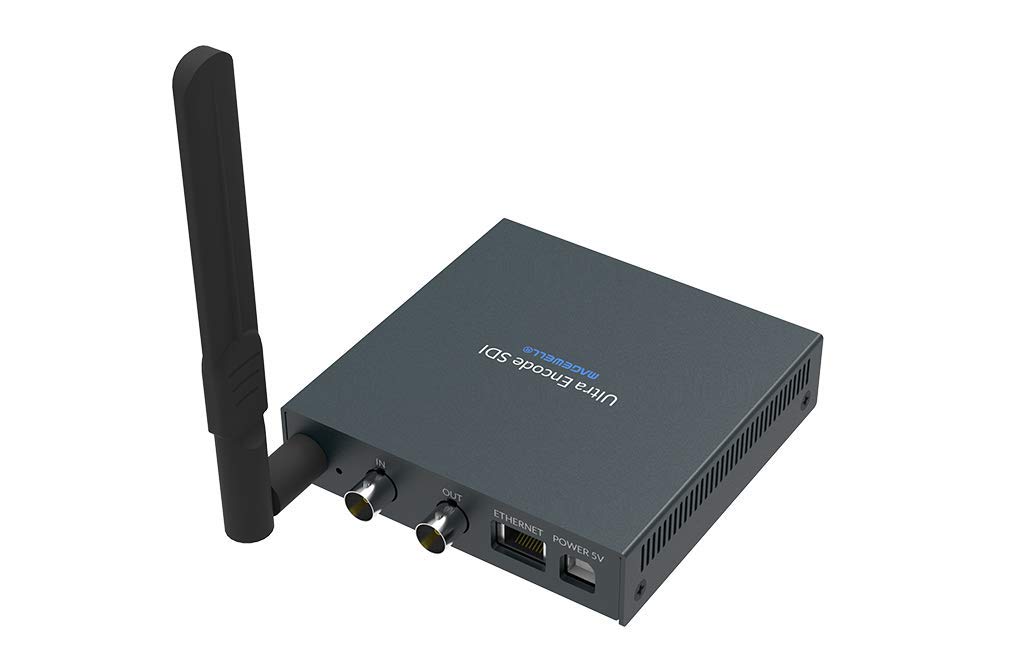
Figure 1.1: Magewell Ultra Encode SDI (Model 53050) device.
2. Sadržaj paketa
Please verify that all items listed below are included in your package. If any items are missing or damaged, contact your vendor or Magewell support.
- Magewell Ultra Encode SDI (Model 53050) Unit
- Power Adapter (with regional plugs)
- USB 2.0 Type B cable
- Wi-Fi antena
- T-nosač
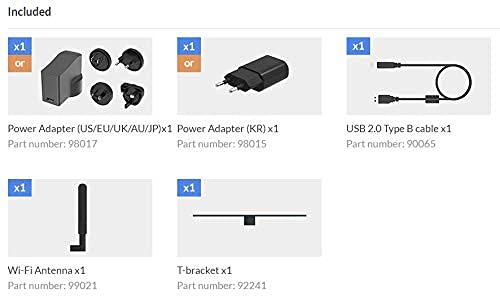
Figure 2.1: Included accessories with the Ultra Encode SDI.
3. Proizvod je gotovview
The Ultra Encode SDI features various ports and indicators for connectivity and status monitoring. Familiarize yourself with these components before setup.
3.1 Front/Side Panel

Figure 3.1: Front/Side panel with audio ports, status LEDs, and USB port.
- LINE OUT: 3.5 mm audio izlaz.
- POSTROJI SE: 3.5 mm audio ulaz.
- PWR LED: Indikator napajanja.
- IN LED: Input signal status.
- LIVE LED: Streaming status.
- ETH LED: Ethernet connection status.
- Wi-Fi LED: Status Wi-Fi veze.
- OPCIJA: USB port for optional accessories or configuration.
3.2 Zadnja ploča

Figure 3.2: Rear panel with video, network, and power connections.
- IN (SDI): SDI/3G video input.
- OUT (SDI): SDI/3G loop-through output.
- ETHERNET: RJ45 port za žičanu mrežnu vezu.
- NAPAJANJE 5V: Ulaz za napajanje.
3.3 Dijagram porta

Figure 3.3: Comprehensive port and indicator diagram.
4. Podešavanje
Follow these steps to set up your Magewell Ultra Encode SDI device.
4.1 Fizičke veze
- Priključite napajanje: Uključite priloženi adapter za napajanje u NAPAJANJE 5V port on the rear panel and then into a power outlet. The Pwr LED on the front panel should illuminate.
- Spojite video ulaz: Connect your SDI/3G video source to the IN (SDI) port on the rear panel. If you need to loop the signal through, connect a cable from the OUT (SDI) port to your monitoring device.
- Povežite audio (opcionalno): If using analog audio, connect your audio source to the LINE IN port and your audio monitoring device to the LINE OUT luka.
- Povežite mrežu:
- Ožičeno: Connect an Ethernet cable from your network router or switch to the ETHERNET port on the rear panel. The ETH LED should illuminate.
- bežični: Screw the provided Wi-Fi antenna onto the antenna socket. You will configure the Wi-Fi connection via the web interfejs. The Wi-Fi LED will indicate connection status.
4.2 Početna konfiguracija (Web Sučelje)
The Ultra Encode SDI is configured via a web-bazirani interfejs. Da biste mu pristupili:
- Ensure your computer is on the same network as the Ultra Encode SDI.
- Use a network scanning tool or check your router's connected devices list to find the IP address of the Ultra Encode SDI. Alternatively, some devices may have a default IP or a discovery tool.
- Otvori a web preglednik i unesite IP adresu uređaja u adresnu traku.
- Log in using the default credentials (refer to the device's quick start guide or Magewell documentation for default username and password).
- Od web interface, you can configure network settings (including Wi-Fi), video/audio input parameters, encoding settings, and streaming destinations.
5. Uputstvo za upotrebu
The Ultra Encode SDI offers flexible encoding and streaming capabilities.
5.1 Postavke kodiranja
- The device supports H.264 and H.265 (HEVC) video encoding. Select the desired codec and adjust parameters such as bitrate (up to 16Mbps), resolution, and frame rate via the web interfejs.
- Audio encoding options are also available for optimal quality and compatibility.
5.2 Streaming Protocols
The Ultra Encode SDI supports various streaming protocols:
- RTMP/RTMPS: Commonly used for live streaming to platforms like YouTube, Facebook, and Twitch. Configure the server URL and stream key in the web interfejs.
- HLS: HTTP Live Streaming for adaptive bitrate delivery.
- SRT: Secure Reliable Transport protocol for low-latency, high-quality video transport over unreliable networks.
- NDI|HX: NewTek's NDI|HX encoding for IP production workflows. Enable and configure NDI|HX output in the web interfejs.
5.3 Configurable Presets
The device includes configurable presets for easy streaming to popular platforms:
- Access the presets section in the web interfejs.
- Select a platform (e.g., Facebook, Twitch, YouTube) and enter your stream key or login details as prompted.
- Activate the preset to begin streaming.
6. Održavanje
Proper maintenance ensures the longevity and optimal performance of your Ultra Encode SDI.
- čišćenje: Za čišćenje vanjštine uređaja koristite meku, suhu krpu. Izbjegavajte tekuća sredstva za čišćenje ili abrazivne materijale.
- ventilacija: Osigurajte da je uređaj postavljen u dobro prozračenom prostoru kako biste spriječili pregrijavanje. Ne blokirajte ventilacijske otvore.
- Ažuriranja firmvera: Periodically check the Magewell official website for firmware updates. Updating the firmware can provide new features, performance improvements, and bug fixes. Follow the instructions provided by Magewell for safe firmware updates.
- Skladištenje: Kada se uređaj ne koristi duži period, čuvajte ga na hladnom i suhom mjestu, dalje od direktne sunčeve svjetlosti i ekstremnih temperatura.
7. Otkrivanje problema
Ovaj odjeljak se bavi uobičajenim problemima s kojima se možete susresti.
- Nema napajanja:
- Provjerite je li adapter za napajanje sigurno priključen na uređaj i ispravnu utičnicu.
- Verify the power adapter is the correct one supplied with the device.
- Nema video ulaza:
- Check the SDI cable connection between the source and the device's IN (SDI) luka.
- Confirm the video source is active and outputting a compatible SDI signal.
- Provjerite IN LED status.
- Nema mrežne veze:
- For wired connection, ensure the Ethernet cable is properly connected and the ETH LED is active.
- For Wi-Fi, ensure the antenna is attached, and Wi-Fi settings are correctly configured in the web interface. Check the Wi-Fi LED diode.
- Verify your network router is functioning correctly.
- Ne mogu pristupiti Web Interfejs:
- Provjerite je li vaš računar na istoj mreži kao i koder.
- Verify the IP address of the encoder.
- Pokušajte obrisati keš memoriju preglednika ili koristiti drugi preglednik.
- Streaming Issues (Buffering, Disconnections):
- Provjerite brzinu i stabilnost vaše internet veze.
- Reduce the encoding bitrate in the web interface if your network bandwidth is limited.
- Verify streaming server URL and stream key are correct.
- Provjerite LIVE LED status.
For further assistance, refer to the Magewell support webstranice ili kontaktirajte njihov tim za tehničku podršku.
8. Specifikacije
| Feature | Specifikacija |
|---|---|
| Brand | Magewell |
| Model | 53050 |
| Dimenzije proizvoda | 10.5 x 10.6 x 2.5 cm |
| Težina artikla | 596 g (0.6 kilograma) |
| Video ulaz | SDI/3G Input |
| Video izlaz | SDI/3G Loop |
| Audio ulaz | Line-In (3.5mm) |
| Audio izlaz | Line-Out (3.5mm) |
| Formati kodiranja | H.264, H.265 (HEVC), NDI|HX |
| Max Bitrate | Do 16Mbps |
| Streaming Protocols | RTMP, RTMPS, HLS, SRT |
| Mrežna povezanost | Ethernet (RJ45), Wi-Fi (802.11ac) |
| Napajanje | 12 volti (DC) |
| Kompatibilni uređaji | Laptop (za konfiguraciju) |
| Posebne karakteristike | Wireless connectivity, Configurable presets for streaming platforms |
9. Garancija i podrška
For information regarding product warranty, technical support, and service, please refer to the official Magewell website or contact your authorized Magewell dealer. Keep your purchase receipt as proof of purchase for warranty claims.
Magewell Official Webstranica: www.magewell.com