
1. Uvod
Hvala na kupoviniasing the QFX E-B3 Bluetooth Professional High-Power Speaker. This manual provides essential information for the safe and efficient operation of your speaker. Please read it thoroughly before use and retain it for future reference.
The QFX E-B3 is designed to deliver powerful audio with features including Bluetooth connectivity, FM radio, USB/SD card playback, LED party lights, and a 250W power amplifier. It also supports True Wireless System (TWS) for stereo pairing with another compatible speaker.
2. Sigurnosne informacije
- Izvor napajanja: Zvučnik priključite samo na navedeno napajanje kako je naznačeno na uređaju.
- ventilacija: Osigurajte odgovarajuću ventilaciju oko zvučnika. Ne blokirajte ventilacijske otvore.
- Voda i vlaga: This speaker is not waterproof. Do not expose it to rain, moisture, or any liquids to prevent electric shock or fire.
- toplina: Držite zvučnik dalje od izvora toplote kao što su radijatori, grijalice, peći ili drugi uređaji koji proizvode toplotu.
- čišćenje: Unplug the speaker from the power outlet before cleaning. Use a dry cloth for cleaning. Do not use liquid cleaners or aerosol cleaners.
- servisiranje: Ne pokušavajte sami servisirati ovaj proizvod. Sve servise prepustite kvalificiranom servisnom osoblju.
- plasman: Postavite zvučnik na stabilnu, ravnu površinu kako biste spriječili njegov pad.
3. Sadržaj paketa
Provjerite da li su sve stavke prisutne u paketu:
- QFX E-B3 High-Power Speaker
- Mikrofon
- Daljinski upravljač
- Kabel za naizmjeničnu struju
- Korisnički priručnik (ovaj dokument)
4. Proizvod je gotovview
The QFX E-B3 speaker features dual 15-inch woofers and a 1-inch tweeter, protected by a metal grill. It includes integrated handles and wheels for portability.

Slika 4.1: Prednja strana view of the QFX E-B3 Speaker.
Rear Panel Controls and Ports
The rear panel houses all input/output connections and control knobs.
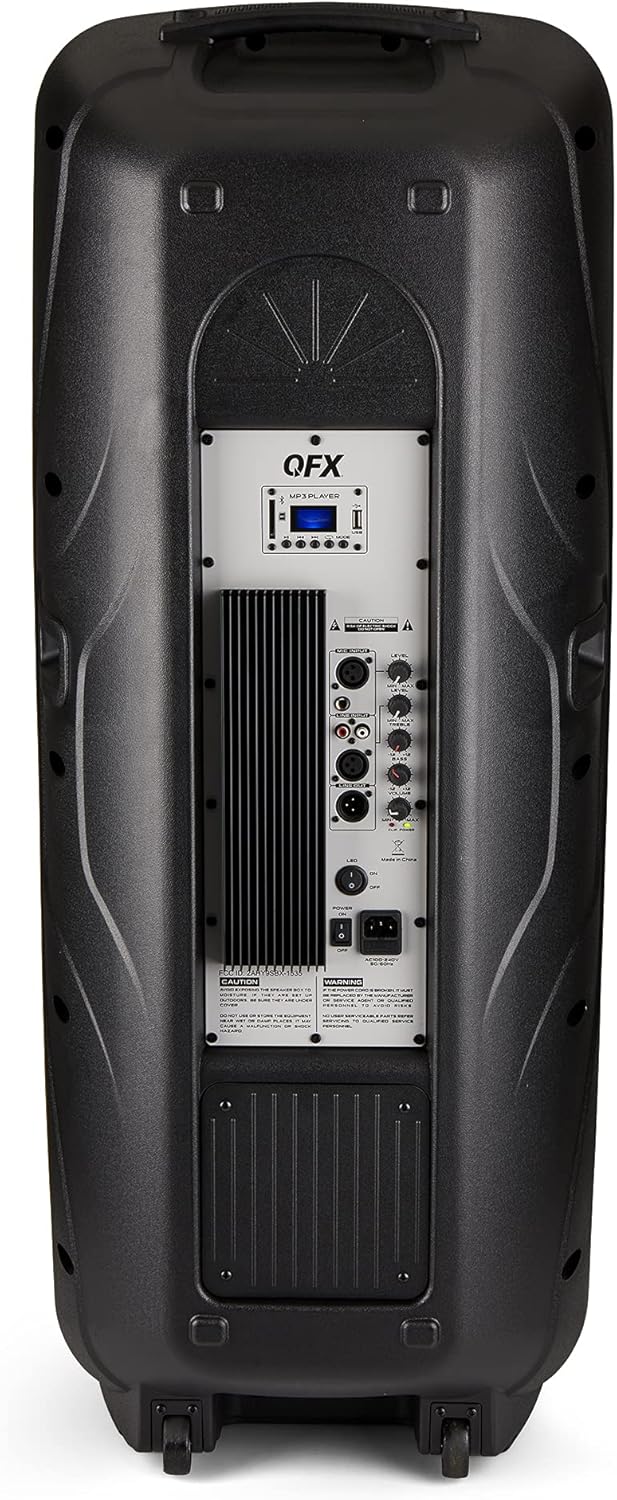
Figure 4.2: Rear panel with controls and ports.
- Prekidač: Uključuje/isključuje zvučnik.
- AC ulaz: Connects the AC power cable.
- USB/SD Card Ports: Za reprodukciju zvuka files USB diskova ili SD kartica.
- Zaslon: Prikazuje trenutni način rada i informacije o stazi.
- Dugme za način rada: Switches between input modes (Bluetooth, FM, USB, SD, RCA).
- Dugme za reprodukciju/pauzu: Controls playback for USB/SD/Bluetooth.
- Dugmad za prethodnu/sljedeću numeru: Navigacija kroz pjesme ili FM stanice.
- Glavno dugme za jačinu zvuka: Podešava ukupnu jačinu zvuka.
- Bass/Treble Control Knobs: Adjusts low and high frequencies.
- XLR ulaz za mikrofon: Connects a wired microphone.
- Microphone Volume/Echo Knobs: Adjusts microphone volume and echo effect.
- RCA ulaz (L/R): Connects external audio devices via RCA cables.
- XLR Line Input/Output: For connecting to other audio equipment.
5. Podešavanje
Početno smještaj
Place the speaker on a stable, flat surface. For optimal sound, position it in a central location within the listening area. The integrated wheels and handle allow for easy transport.

Figure 5.1: Speaker being moved with handle and wheels.
Power Connection
- Provjerite je li prekidač za napajanje zvučnika u položaju ISKLJUČENO.
- Connect the AC power cable to the AC input on the rear panel of the speaker.
- Uključite drugi kraj AC kabela za napajanje u standardnu zidnu utičnicu.
- Flip the power switch to the ON position. The display screen will illuminate.
6. Uputstvo za upotrebu
Bluetooth uparivanje
- Turn on the QFX E-B3 speaker.
- Pritisnite MODE button on the speaker or remote control until "BLUE" appears on the display screen, indicating Bluetooth mode.
- Omogućite Bluetooth na svom mobilnom uređaju (pametnom telefonu, tabletu itd.).
- Traži available Bluetooth devices and select "QFX E-B3" from the list.
- Once paired, the speaker will emit a confirmation sound. You can now play audio from your device through the speaker.
Uparivanje putem pravog bežičnog sistema (TWS)
TWS allows two QFX E-B3 speakers to connect wirelessly for a stereo sound experience. This feature works only in Bluetooth mode.
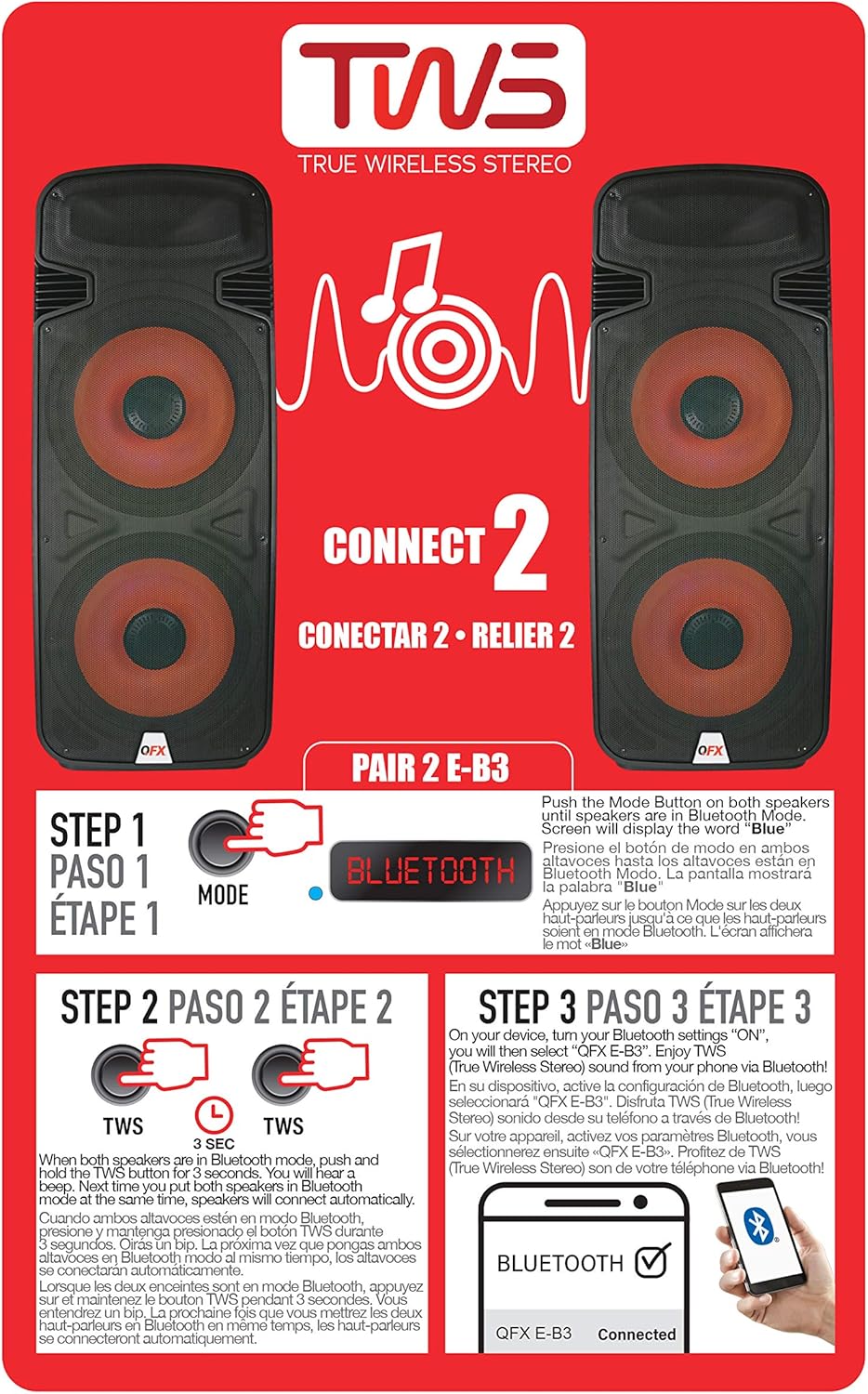
Figure 6.1: TWS Pairing Instructions.
- Ensure both QFX E-B3 speakers are powered on and in Bluetooth mode. The display on both speakers should show "BLUE".
- Na jednom od zvučnika (ovo će biti vaš primarni zvučnik) pritisnite i držite TWS button for approximately 3 seconds. The speakers will attempt to connect to each other.
- Once successfully paired, you will hear a confirmation sound, and the display on the primary speaker will show "BLUE" while the secondary speaker will show "BLUE" as well.
- On your Bluetooth-enabled device, search for and select "QFX E-B3". The two speakers will now play audio in stereo.
Rad FM radija
- Pritisnite MODE button to switch to FM radio mode. The display will show the FM frequency.
- Pritisnite i držite Pusti/Pauza button to initiate an automatic scan for FM stations. The speaker will save all found stations.
- Koristite Prethodna/sljedeća pjesma dugmad za navigaciju kroz sačuvane FM stanice.
Reprodukcija sa USB/SD kartice
- Umetnite USB fleš disk ili SD karticu (sa kompatibilnim audio uređajem) files) into the respective port on the rear panel.
- Zvučnik će se automatski prebaciti u USB/SD način rada i početi reproducirati zvuk files. Ako ne, pritisnite MODE dugme za odabir USB ili SD načina rada.
- Koristite Pusti/Pauza i Prethodna/sljedeća pjesma dugmad za kontrolu reprodukcije.
Ulaz za mikrofon
- Connect a microphone to the XLR Microphone Input on the rear panel.
- Adjust the Microphone Volume and Echo knobs to achieve the desired sound.
RCA ulaz
- Connect an external audio source (e.g., CD player, mixer) to the RCA Input (L/R) ports using appropriate RCA cables.
- Pritisnite MODE button to select RCA input mode.
- Adjust the master volume on the speaker and the volume on your external audio source.
LED svetla za zabavu
The speaker features integrated LED party lights that activate automatically when the speaker is powered on. There are no specific controls for the LED lights mentioned; they are designed to enhance the audio experience.
7. Održavanje
Čišćenje
- Always unplug the speaker before cleaning.
- Za brisanje vanjskih površina zvučnika koristite meku, suhu krpu.
- Ne koristite abrazivna sredstva za čišćenje, voskove ili rastvarače jer mogu oštetiti završnu obradu.
- Održavajte ventilacijske otvore čistim od prašine i otpada.
Skladištenje
When not in use for extended periods, store the speaker in a cool, dry place, away from direct sunlight and extreme temperatures. Cover the speaker to protect it from dust.
8. Otkrivanje problema
If you encounter issues with your QFX E-B3 speaker, refer to the following common problems and solutions:
| Problem | Mogući uzrok | Rješenje |
|---|---|---|
| Nema struje | Power cable not connected; Power outlet not active; Speaker power switch off. | Ensure AC cable is securely connected to speaker and outlet. Check if outlet is working. Turn speaker power switch ON. |
| Nema zvuka | Volume too low; Incorrect input mode selected; Audio source not playing. | Increase master volume. Press MODE button to select correct input. Ensure audio source is playing and its volume is up. |
| Bluetooth se ne povezuje | Speaker not in Bluetooth mode; Device Bluetooth off; Speaker already paired to another device; Device too far. | Ensure speaker is in Bluetooth mode ("BLUE" on display). Turn on device Bluetooth. Disconnect from other devices. Move device closer to speaker (within 30 feet). |
| TWS uparivanje nije uspjelo | Speakers not in Bluetooth mode; TWS button not held long enough. | Ensure both speakers are in Bluetooth mode. Press and hold the TWS button on one speaker for 3 seconds. |
| Reprodukcija s USB-a/SD-a ne radi | Netačan način rada; Nekompatibilno file format; Corrupted USB/SD card. | Press MODE to select USB/SD. Ensure audio files are in a compatible format (e.g., MP3). Try a different USB/SD card. |
9. Specifikacije
| Feature | Specifikacija |
|---|---|
| Brand | QFX |
| Broj modela | E-B3 |
| Maksimalna izlazna snaga zvučnika | 250 Watts |
| Tehnologija povezivanja | USB, Bluetooth |
| Način audio izlaza | Stereo |
| Vrsta montaže | Montaža na utikač, montaža na kotač |
| Vrsta zvučnika | Woofer (Dual 15 Inches) |
| Tip kontrolera | Daljinski upravljač |
| Boja | Party LED |
| Je vodootporan | False |
| Kontrolni metod | Daljinski |
| Woofer Diameter | 15 inča |
| Broj audio kanala | 2.0 |
| Bežična tehnologija | Bluetooth |
| Connectivity Protocol | Bluetooth |
| Izvor napajanja | Corded Electric |
| Vrsta audio drajvera | Dynamic Driver |
| Veličina audio drajvera | 15 inča |
| Dimenzije artikla (D x Š x V) | 16.77"D x 13.98"Š x 23.74"H |
| Težina artikla | 13.2 funti |
| Kompatibilni uređaji | Laptop, MP3 plejer, pametni telefon, tablet, televizor |
| UPC | 606540039618 |
10. Informacije o garanciji
This product is covered by a limited warranty. For specific details regarding warranty coverage and terms, please refer to the warranty information provided at the point of purchase or contact QFX customer support directly. The warranty is typically per contract with the retailer.
11. Podrška
For technical assistance, troubleshooting beyond this manual, or inquiries about your QFX E-B3 speaker, please contact QFX customer support or your retailer. Contact information can usually be found on the manufacturer's webweb stranici ili na vašem računu za kupovinu.