
1. Uvod
This manual provides detailed instructions for the safe and efficient use of your Hoco HC3 Bounce Sports Wireless Speaker. Please read this manual thoroughly before operating the device and retain it for future reference. The Hoco HC3 is a versatile portable speaker supporting Bluetooth, FM radio, TF card, USB, AUX, and TWS modes.

Figure 1: Hoco HC3 Bounce Sports Wireless Speaker. This image displays the speaker in a vertical orientation, showcasing its black mesh grille, the 'hoco' logo at the bottom right, and a braided carrying strap attached to the top left side. The control buttons are visible on the side panel.
2. Sadržaj paketa
Provjerite da li su svi artikli prisutni prilikom raspakivanja:
- Hoco HC3 Bounce Sports Wireless Speaker
- USB kabl za punjenje
- Korisnički priručnik (ovaj dokument)
- AUX Audio Cable (if included with your model)
3. Proizvod je gotovview
Komponente 3.1 zvučnika

Figure 2: Rear panel of the Hoco HC3 speaker. This image highlights the various input ports and control buttons located on the back of the speaker. Visible elements include the power switch, USB port, TF card slot, AUX input, and LED indicator.
Upoznajte se s kontrolama i priključcima zvučnika:
- Dugme za napajanje: Dugi pritisak za uključivanje/isključivanje. Kratki pritisak za promjenu načina rada.
- Dugme za reprodukciju/pauzu: Reprodukcija ili pauziranje zvuka. Odgovaranje/završavanje poziva.
- Dugme za pojačavanje zvuka / sljedeću pjesmu: Kratki pritisak za sljedeću pjesmu, dugi pritisak za pojačavanje zvuka.
- Dugme za smanjivanje jačine zvuka / prethodnu pjesmu: Kratki pritisak za prethodnu pjesmu, dugi pritisak za smanjenje jačine zvuka.
- Dugme za način rada (M): Short press to cycle through Bluetooth, FM, TF card, USB, and AUX modes.
- USB port: Za reprodukciju sa USB memorije.
- Utor za TF karticu: Za reprodukciju sa TF (MicroSD) kartice.
- AUX ulaz: 3.5 mm priključak za žičanu audio vezu.
- Port za punjenje: Mikro USB priključak za punjenje zvučnika.
- LED indikator: Displays charging status and operating mode.
3.2 Ključne karakteristike
- Bluetooth V5.0: Pruža stabilnu i efikasnu bežičnu vezu.
- Više načina reprodukcije: Supports Bluetooth, FM radio, TF card, USB drive, and AUX input.
- Pravi bežični stereo (TWS): Allows two HC3 speakers to connect wirelessly for a stereo sound experience.
- Dug vijek trajanja baterije: 2400mAh battery capacity offers up to 5 hours of music playback.
- Dvostruki zvučnici: Equipped with two 45mm speaker units, each with 5W power output.
- Kompaktan i prenosiv: Dimensions of 202*60*60mm and weight of 561g for easy transport.
4. Podešavanje
4.1 Punjenje zvučnika
- Spojite priloženi USB kabel za punjenje na priključak za punjenje zvučnika.
- Drugi kraj USB kabla priključite na 5V USB adapter za napajanje (nije uključen) ili na USB port računara.
- The LED indicator will illuminate to show charging status. It typically takes about 3 hours for a full charge.
- Once fully charged, the LED indicator will change or turn off (refer to specific LED behavior in the troubleshooting section if unsure).
Napomena: Za optimalno trajanje baterije, potpuno napunite zvučnik prije prve upotrebe.
4.2 Uključivanje/isključivanje
- Za uključivanje: Long press the Power button until you hear an audible prompt and the LED indicator lights up.
- Za isključivanje: Long press the Power button again until you hear an audible prompt and the LED indicator turns off.
5. Uputstvo za upotrebu
5.1 Bluetooth uparivanje
- Ensure the speaker is powered on and in Bluetooth mode (the LED indicator will typically flash blue, indicating it's ready for pairing). If not, short press the Mode (M) button to switch to Bluetooth mode.
- Omogućite Bluetooth na svom mobilnom uređaju (pametnom telefonu, tabletu, računaru).
- Traži available Bluetooth devices. You should see "HC3" or "Hoco HC3" in the list.
- Select "HC3" to connect. Once paired, the speaker will emit an audible confirmation, and the LED indicator will stop flashing and remain solid blue.
- Sada možete reproducirati zvuk sa svog uređaja putem zvučnika.
Napomena: Zvučnik će automatski pokušati ponovo da se poveže sa poslednjim uparenim uređajem kada se uključi, ako je Bluetooth tog uređaja aktivan i unutar dometa.
5.2 Režim FM radija
- Uključite zvučnik.
- Short press the Mode (M) button repeatedly until you enter FM radio mode.
- To auto-scan and save available FM stations, short press the Play/Pause button. The speaker will scan and store stations.
- Use the Volume Up / Next Track and Volume Down / Previous Track buttons to navigate between saved stations.
Reprodukcija sa 5.3" TF kartice / USB-a
- Uključite zvučnik.
- Insert a TF (MicroSD) card into the TF card slot or a USB flash drive into the USB port.
- The speaker should automatically switch to TF card or USB mode and begin playing audio files. If not, short press the Mode (M) button to select the correct mode.
- Use the Play/Pause, Volume Up / Next Track, and Volume Down / Previous Track buttons to control playback.
Note: Ensure your TF card or USB drive contains compatible audio files (e.g., MP3 format).
5.4 AUX način rada
- Uključite zvučnik.
- Connect one end of a 3.5mm audio cable (if included) to the speaker's AUX input port.
- Connect the other end of the audio cable to the audio output jack of your external device (e.g., MP3 player, computer).
- The speaker should automatically switch to AUX mode. If not, short press the Mode (M) button to select AUX mode.
- Control playback from your external device. Volume can be adjusted on both the speaker and the external device.
5.5 TWS (Pravi bežični stereo) funkcija
The TWS function allows you to pair two Hoco HC3 speakers together for a true stereo sound experience.
- Ensure both HC3 speakers are powered off.
- Power on both speakers simultaneously. They should both enter Bluetooth pairing mode.
- On jedan of the speakers (this will become the primary speaker), long press the Mode (M) button or a dedicated TWS button (if present, otherwise try the Play/Pause button for 3-5 seconds) until you hear a pairing tone. The speakers will attempt to connect to each other.
- Once successfully paired, you will hear a confirmation tone, and one speaker's LED will indicate it's the primary (e.g., flashing slowly), while the other's LED will be solid.
- Now, connect your mobile device to the primarni speaker via Bluetooth as described in section 5.1.
- Zvuk će se sada reprodukovati u stereo formatu preko oba zvučnika.
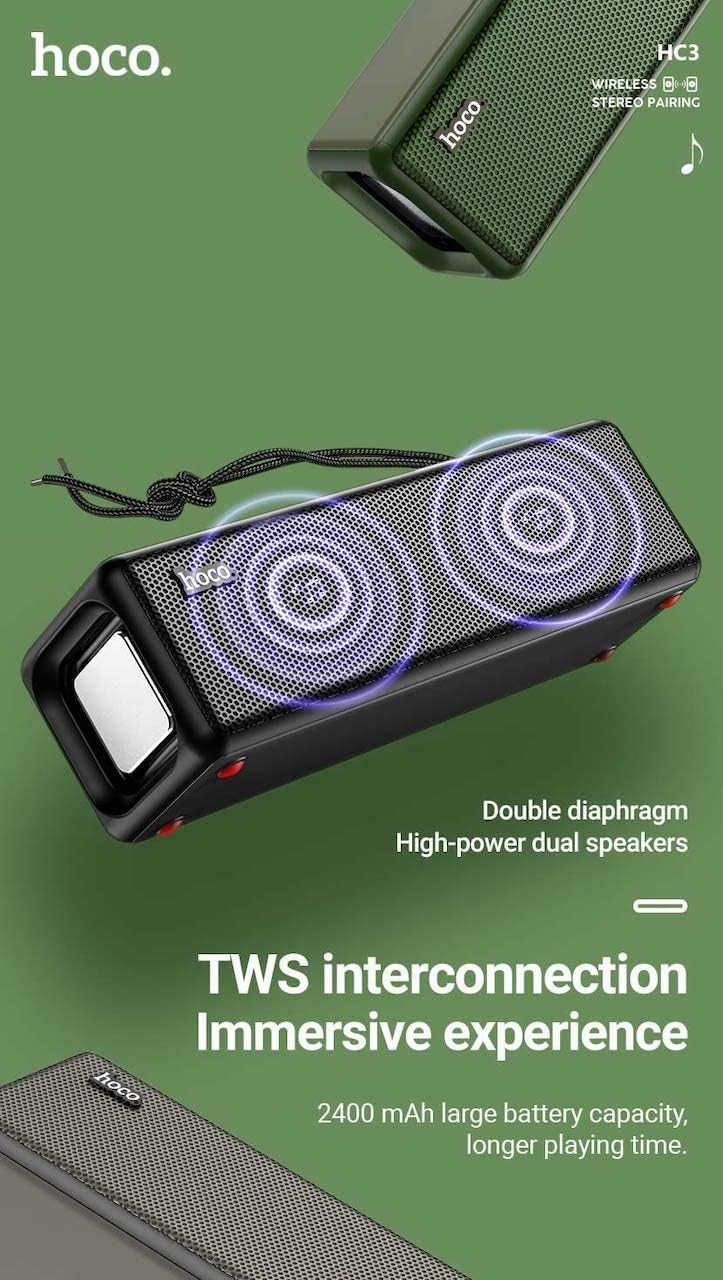
Figure 3: TWS Interconnection. This image illustrates the concept of two Hoco HC3 speakers wirelessly connected to provide a stereo audio experience, highlighting the dual speaker setup and the 2400 mAh battery capacity.
5.6 Upravljanje pozivima
Kada je povezan putem Bluetootha sa pametnim telefonom:
- Odgovori na poziv: Kratko pritisnite dugme Play/Pause.
- Završi poziv: Kratko pritisnite dugme Reprodukuj/Pauziraj tokom poziva.
- odbiti poziv: Dugo pritisnite dugme Reprodukuj/Pauziraj kada zvoni dolazni poziv.
- Ponovno biranje zadnjeg broja: Dvaput pritisnite dugme Play/Pause.
6. Održavanje
- čišćenje: Use a soft, dry cloth to clean the speaker's surface. Do not use abrasive cleaners, alcohol, or other chemical solvents.
- Skladištenje: Čuvajte zvučnik na hladnom i suhom mjestu, dalje od direktne sunčeve svjetlosti i ekstremnih temperatura.
- Održavanje baterije: To prolong battery life, charge the speaker regularly, even if not in use for extended periods (e.g., once every 3 months). Avoid fully discharging the battery frequently.
- Otpornost na vodu: While designed for sports, avoid submerging the speaker in water. Refer to product specifications for any IP rating.
- Izbjegnite udar: Protect the speaker from drops and strong impacts.
7. Otkrivanje problema
If you encounter issues with your Hoco HC3 speaker, refer to the following table for common problems and solutions:
| Problem | Mogući uzrok | Rješenje |
|---|---|---|
| Zvučnik se ne uključuje. | Niska baterija. | Punite zvučnik najmanje 30 minuta. |
| Nije moguće uparivanje putem Bluetootha. | Bluetooth nije omogućen na uređaju; zvučnik nije u načinu uparivanja; previše udaljen od uređaja. | Ensure Bluetooth is on, speaker is in pairing mode (flashing blue LED), and devices are within 10 meters. Forget "HC3" on your device and try pairing again. |
| Nema zvuka. | Jačina zvuka je preniska; odabran je pogrešan način rada; uređaj ne reproducira zvuk. | Increase volume on both speaker and connected device. Verify correct mode (Bluetooth, AUX, TF, USB). Ensure audio is playing on the source device. |
| Prijem FM radija je slab. | Slab signal; smetnje iz okoline. | Move the speaker to a location with better reception. Re-scan for stations. |
| TF card/USB playback not working. | Card/drive not inserted correctly; incompatible file format; oštećen files. | Ensure card/drive is fully inserted. Check file formats (MP3 recommended). Try another card/drive. |
| Uparivanje TWS-a nije uspjelo. | Zvučnici nisu u TWS modu uparivanja; previše su udaljeni. | Ensure both speakers are powered on and in TWS pairing mode. Keep them close during pairing. Refer to section 5.5. |
8. Specifikacije
| Feature | Detalj |
|---|---|
| Model | HC3 |
| Dimenzije | 202 x 60 x 60 mm |
| Težina | 561 g |
| Bluetooth verzija | V5.0 (Chip: JLAC6928B) |
| Kapacitet baterije | 2400mAh |
| Vrijeme punjenja | Približno 3 sata |
| Vrijeme za razgovor/muziku | Do 5 sati |
| Speaker Unit | 45 mm * 2 |
| Izlazna snaga zvučnika | 5 W * 2 |
| Načini povezivanja | Bluetooth, FM, TF card, USB, AUX, TWS |
| Način audio izlaza | Surround |
| Proizvođač | Hoco |
| Zemlja porijekla | Kina |
9. Garancija i podrška
Hoco products are manufactured to high quality standards. For information regarding warranty coverage, please refer to the warranty card included with your purchase or contact your local Hoco distributor or retailer. Keep your proof of purchase for any warranty claims.
For technical support or further assistance, please visit the official Hoco website or contact their customer service department. Contact details are typically available on the product packaging or the official website.