
1. Uvod
Thank you for choosing the HOCO ES40 Genial TWS Bluetooth Wireless Headset. This manual provides detailed instructions for the proper use, setup, and maintenance of your new wireless earbuds. Please read this manual thoroughly before using the product to ensure optimal performance and longevity. This headset is designed for use with various Bluetooth-enabled devices, including mobile phones.
2. Proizvod je gotovview
The HOCO ES40 headset consists of two wireless earbuds and a portable charging case. Familiarize yourself with the components for ease of use.
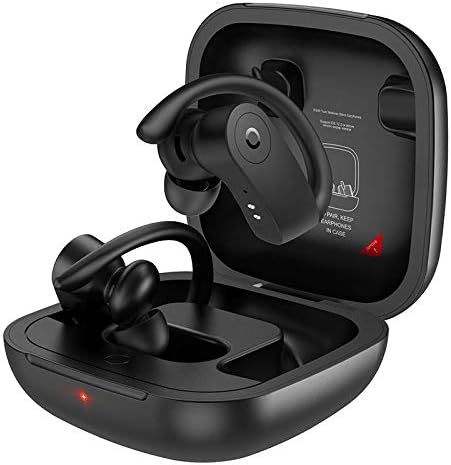
Image 2.1: HOCO ES40 earbuds placed inside their open charging case, showing the ear hook design and charging indicators.

Slika 2.2: Krupni plan view of a single HOCO ES40 earbud, highlighting the ergonomic ear hook and the control button area.
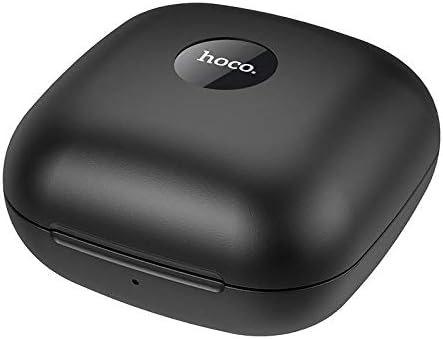
Image 2.3: The HOCO ES40 charging case in a closed position, displaying the 'hoco.' brand logo on the top surface.
3. Sadržaj paketa
Upon opening your HOCO ES40 package, please verify that all the following items are included:
- HOCO ES40 TWS Bluetooth Wireless Earbuds (Left and Right)
- Futrola za bežično punjenje
- USB Charging Cable (typically included with such devices)
- Korisnički priručnik (ovaj dokument)
4. Podešavanje
4.1. Punjenje slušalica
Before initial use, it is recommended to fully charge both the charging case and the earbuds.
- Punjenje kućišta: Connect the USB charging cable to the charging port on the case and to a suitable USB power source. The charging indicator on the case will illuminate to show charging status. The charging case takes approximately 2 hours to fully charge.
- Punjenje slušalica: Place the earbuds into their respective slots in the charging case. Ensure they are correctly seated. The earbuds will begin charging automatically. The headset charging time is approximately 1 hour.
4.2. Bluetooth uparivanje
Follow these steps to pair your HOCO ES40 headset with your device:
- Uključeno: Otvorite kutijicu za punjenje i izvadite obje slušalice. One će se automatski uključiti i ući u način rada za uparivanje.
- Aktivirajte Bluetooth: On your smartphone or other Bluetooth-enabled device, navigate to the Bluetooth settings and ensure Bluetooth is turned on.
- Odaberite uređaj: In the list of available Bluetooth devices, locate and select "HOCO ES40".
- Potvrdite uparivanje: Once selected, your device should confirm that the headset is connected. You may hear an audible confirmation from the earbuds.

Image 4.1: A smartphone screen showing the Bluetooth settings with "HOCO ES40" listed as a connected device, next to the open charging case with earbuds.
The headset uses Bluetooth V5.0 for a stable and efficient connection.
5. Uputstvo za upotrebu
Once paired, you can control various functions of your HOCO ES40 headset.
5.1. Uključivanje/isključivanje
- Uključeno: Slušalice se automatski uključuju kada se izvade iz kućišta za punjenje.
- Iskljuciti: Vratite slušalice u kutijicu za punjenje. One će se automatski odspojiti i isključiti.
5.2. Reprodukcija muzike
The earbuds feature touch-sensitive controls for music management:
- Pusti/pauza: Jednom dodirnite bilo koju slušalicu.
- Sljedeća pjesma: Dvaput dodirnite desnu slušalicu.
- Prethodni zapis: Dvaput dodirnite lijevu slušalicu.
5.3. Upravljanje pozivima
Manage your phone calls directly from the earbuds:
- Odgovori/Završi poziv: Tap either earbud once during an incoming call or an active call.
- odbiti poziv: Pritisnite i držite bilo koju slušalicu otprilike 2 sekunde tokom dolaznog poziva.
6. Održavanje
Proper care and maintenance will extend the life of your HOCO ES40 headset.
- čišćenje: Za čišćenje slušalica i kućišta za punjenje koristite meku, suhu krpu koja ne ostavlja dlačice. Izbjegavajte upotrebu abrazivnih materijala ili jakih hemikalija.
- Skladištenje: Kada se ne koriste, slušalice čuvajte u kutijici za punjenje kako biste ih zaštitili od prašine i oštećenja. Čuvajte na hladnom i suhom mjestu, dalje od direktne sunčeve svjetlosti i ekstremnih temperatura.
- Održavanje baterije: To maintain battery health, avoid fully discharging the batteries frequently. Charge the device regularly, even if not used for extended periods.
- Izloženost vodi: Slušalice nisu vodootporne. Izbjegavajte izlaganje vodi, kiši ili prekomjernoj vlazi.
7. Otkrivanje problema
If you encounter issues with your HOCO ES40 headset, refer to the following common solutions:
- Slušalice se ne uparuju jedna s drugom: Place both earbuds back into the charging case, close the lid, wait a few seconds, then open the lid and remove them again. This often resets their connection.
- Slušalice se ne povezuju s uređajem: Ensure Bluetooth is enabled on your device. Forget the "HOCO ES40" from your device's Bluetooth list and attempt to pair again. Ensure the earbuds are charged.
- Nema zvuka iz jedne slušalice: Check if both earbuds are charged. Try placing them back in the case and reconnecting.
- Problemi s punjenjem: Ensure the charging cable is securely connected to both the case and the power source. Try a different USB port or power adapter. Clean the charging contacts on the earbuds and inside the case.
- Mala jačina zvuka: Adjust the volume on both your connected device and the earbuds (if volume control is available via touch, though not explicitly stated for this model).
8. Specifikacije
Below are the technical specifications for the HOCO ES40 Genial TWS Bluetooth Wireless Headset:
| Feature | Specifikacija |
|---|---|
| Bluetooth specifikacija | Bluetooth V5.0 JL6936D |
| Kapacitet baterije slušalica | 50mAh (single headset) |
| Futrola za punjenje Kapacitet baterije | 400mAh |
| Vrijeme punjenja slušalica | Otprilike 1 sat |
| Vrijeme punjenja kućišta | Približno 2 sata |
| Vrijeme za razgovor / muziku | 5 sati |
| Vrijeme pripravnosti | 200 sati |
| Dimenzije (futrola) | 78 * 78 * 46 mm |
| Težina (ukupno) | 109g |
| Weight (Single Headset) | 10g |
| Boja | Crna |
| Form Factor slušalica | U uhu |
| Tehnologija povezivanja | Bežični |
| Kompatibilni uređaji | Mobilni telefoni |
| Materijal | Plastika |
9. Garancija i podrška
The HOCO ES40 Genial TWS Bluetooth Wireless Headset comes with a standard manufacturer's warranty. For specific warranty terms and conditions, please refer to the warranty card included in your product packaging or visit the official HOCO website. For technical support, troubleshooting assistance beyond this manual, or warranty claims, please contact your retailer or the HOCO customer service department.