
1. Proizvod je gotovview
The KAIDI KD-763 is a wired gaming headset designed for use with the PlayStation 4 (PS4) console and other compatible devices with a 3.5mm audio jack. It features over-ear cups for immersive sound, a rotary microphone for clear communication, and an inline volume control for convenient audio adjustments. The headset also includes an LED lighting effect, typically powered via a USB connection.
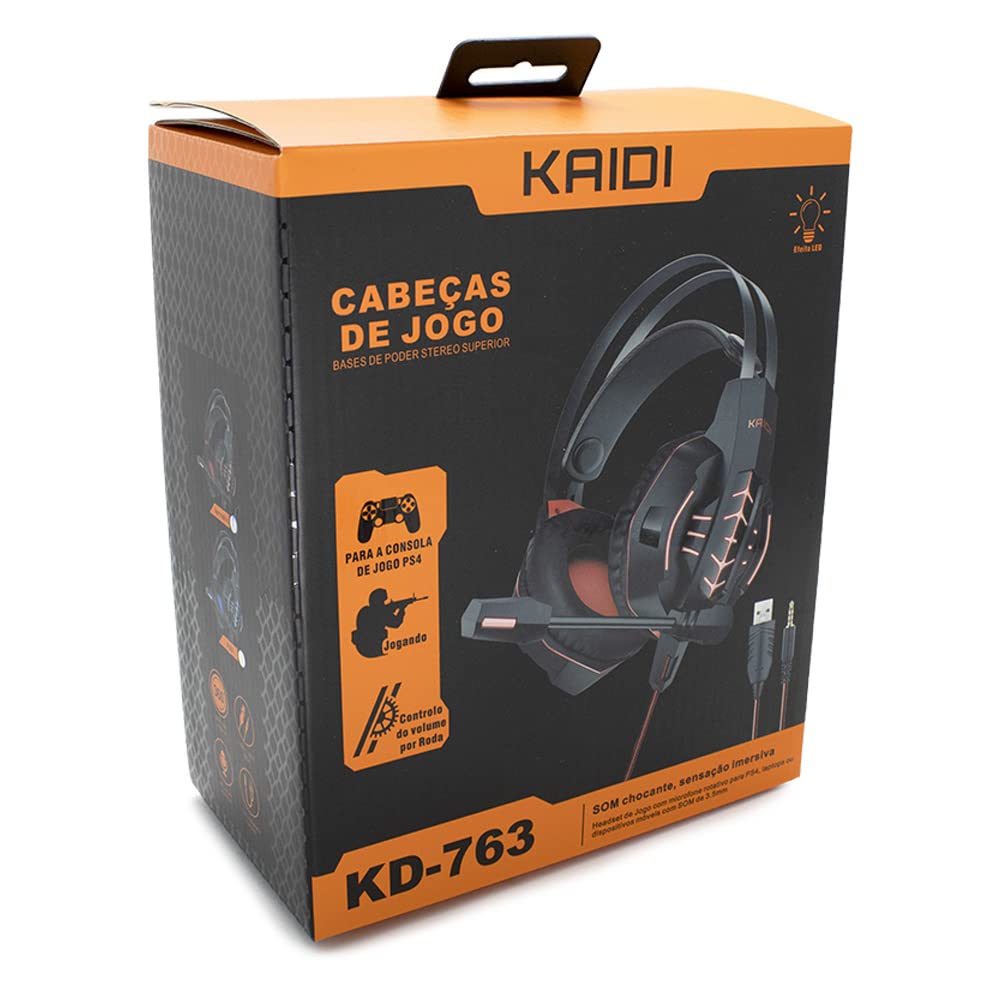
Slika 1.1: The KAIDI KD-763 PS4 Gaming Headset packaging, showing the headset, its features, and compatibility with PS4.
2. Sigurnosne informacije
- Izbjegavajte dugotrajno slušanje muzike na velikoj jačini zvuka kako biste spriječili oštećenje sluha.
- Ne izlažite slušalice ekstremnim temperaturama, vlazi ili direktnoj sunčevoj svjetlosti.
- Držite slušalice dalje od vode i drugih tečnosti.
- Ne pokušavajte rastavljati ili modificirati slušalice. To može poništiti garanciju i uzrokovati oštećenje.
- Čistite slušalice samo mekom, suhom krpom.
- Čuvati van domašaja djece.
3. Sadržaj paketa
Molimo Vas da provjerite sadržaj paketa nakon otvaranja. Ako bilo koji artikl nedostaje ili je oštećen, obratite se prodavaču.
- KAIDI KD-763 Gaming Headset
- Korisnički priručnik (ovaj dokument)
4. Vodič za postavljanje
- Connect to PS4 Controller: Locate the 3.5mm audio jack on your PS4 controller. Insert the 3.5mm connector from the KD-763 headset firmly into this port.
- Powering LED Lights (Optional): If your headset features LED lighting, connect the USB connector from the headset to an available USB port on your PS4 console or a compatible USB power adapter. The LED lights will illuminate once connected.
- Podešavanje veličine slušalica: Extend or retract the headband to ensure the earcups sit comfortably and securely over your ears. The over-ear design should fully enclose your ears for optimal sound isolation.
- Pozicija mikrofona: Adjust the flexible rotary microphone boom to a position near your mouth for clear voice pickup. Ensure it is not obstructing your vision.
- Configure PS4 Audio Settings:
- Idi na Postavke > Uređaji > Audio uređaji na vašem PS4.
- Set Input Device to "Headset (Controller)".
- Set Izlazni uređaj to "Headset (Controller)".
- Set Izlaz na slušalice to "All Audio" for full game and chat sound.
- Podesite Kontrola jačine zvuka (slušalice) na udoban nivo.
5. Uputstvo za upotrebu
5.1. Kontrola jačine zvuka
The KD-763 headset features an inline volume control wheel located on the cable. Rotate the wheel upwards to increase the volume and downwards to decrease it. Adjust to a comfortable listening level.
5.2. Upotreba mikrofona
The microphone is designed to capture your voice clearly. Ensure it is positioned correctly near your mouth. If your PS4 audio settings are configured correctly, your voice will be transmitted to other players in online games or chat parties.
To mute the microphone, check if there is a physical mute switch on the inline control. If not, you can mute the microphone through your PS4's quick menu (hold the PS button on your controller).
6. Održavanje
- čišćenje: Use a soft, dry, lint-free cloth to wipe the earcups and headband. Do not use liquid cleaners or abrasive materials.
- Skladištenje: Kada se ne koriste, slušalice čuvajte na čistom i suhom mjestu, dalje od direktne sunčeve svjetlosti i ekstremnih temperatura. Izbjegavajte zapetljavanje kabla.
- Održavanje kablova: Do not pull on the cable to disconnect the headset. Always grasp the plug. Avoid bending or twisting the cable excessively.
7. Otkrivanje problema
- Nema zvuka ili je jačina zvuka niska:
- Ensure the 3.5mm jack is fully inserted into the PS4 controller.
- Check the inline volume control wheel on the headset cable and turn it up.
- Verify PS4 audio settings (Postavke > Uređaji > Audio uređaji) are correctly configured for the headset.
- Test the headset with another device (e.g., smartphone) to rule out a headset issue.
- Mikrofon ne radi:
- Ensure the microphone boom is positioned correctly.
- Check PS4 audio settings (Postavke > Uređaji > Audio uređaji) to ensure Input Device is set to "Headset (Controller)".
- Confirm the microphone is not muted via an inline switch or the PS4 quick menu.
- Test the microphone with another application or device if possible.
- LED svjetla ne rade:
- Ensure the USB connector is firmly plugged into a powered USB port.
- Pokušajte s drugim USB portom.
8. Specifikacije
| Brand: | KAIDI |
| Model: | KD-763 |
| Vrsta slušalica: | Over-ear (Circumaurais) |
| impedansa: | 32 Ohma |
| Osjetljivost: | 110 dB |
| Povezivanje: | Wired (3.5mm audio jack + USB for LED) |
| Kompatibilni uređaji: | Gaming Consoles (e.g., PS4), devices with 3.5mm audio jack |
| Specifična upotreba: | Gaming |
| Vrsta kontrole: | Inline Volume Control Wheel |
| mikrofon: | Rotary/Swivel |
| LED efekat: | Yes (USB powered) |
9. Garancija i podrška
KAIDI products are designed and manufactured to the highest quality standards. For information regarding warranty coverage, terms, and conditions, please refer to the warranty card included with your purchase or visit the official KAIDI website.
For technical support, troubleshooting assistance, or to inquire about replacement parts, please contact KAIDI customer service through their official channels. Contact information can typically be found on the product packaging or the official KAIDI website.


