
1. Uvod
This user manual provides detailed instructions for the proper use and maintenance of your Zebra DS8178 Wireless 2D/1D Barcode Scanner. Please read this manual thoroughly before operating the device to ensure optimal performance and safety. The DS8178 is designed for efficient and reliable barcode scanning in various environments, offering both 1D and 2D barcode reading capabilities with wireless connectivity.
2. Sigurnosne informacije
Pridržavajte se sljedećih sigurnosnih mjera opreza kako biste spriječili ozljede ili oštećenje uređaja:
- Do not expose the scanner or cradle to extreme temperatures, moisture, or corrosive substances.
- Avoid direct eye exposure to the scanner's light source.
- Za punjenje koristite samo navedeni adapter za napajanje i USB kabel.
- Ne pokušavajte rastavljati ili modificirati uređaj. Za sve servisne radove obratite se kvalificiranom osoblju.
- Držite uređaj dalje od jakih magnetnih polja.
3. Sadržaj paketa
Provjerite da li se sve stavke nalaze u vašem paketu:
- Zebra DS8178 Wireless Barcode Scanner
- USB Communication/Charging Cradle
- USB kabel
- Kratki vodič (nije uključen u ovaj priručnik)
4. Proizvod je gotovview
Familiarize yourself with the components of your Zebra DS8178 scanner and its cradle.

Slika 4.1: Side view of the Zebra DS8178 Wireless Barcode Scanner, showing its ergonomic design.

Slika 4.2: Front view of the Zebra DS8178 Wireless Barcode Scanner, highlighting the scanning window and trigger button.

Slika 4.3: Front view of the USB Communication/Charging Cradle, featuring the pairing button.
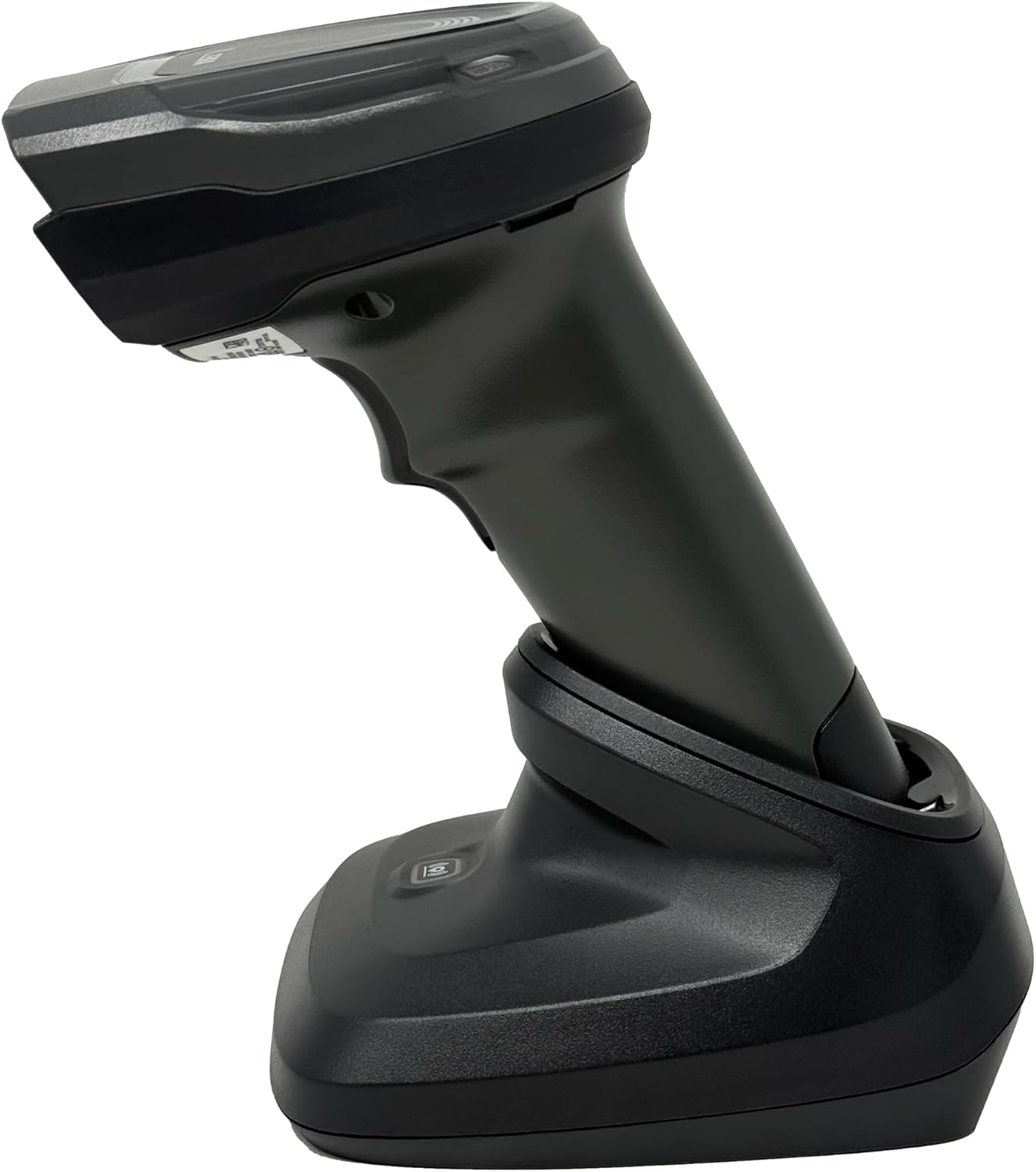
Slika 4.4: The Zebra DS8178 scanner securely docked in its USB cradle, ready for charging or communication.
4.1 Komponente skenera
- Prozor za skeniranje: Area through which barcodes are read.
- okidač: Aktivira skenirajući snop.
- LED indikatori: Provide status feedback (e.g., battery, scan success).
- Pretinac za baterije: Houses the removable/rechargeable battery.
4.2 Cradle Components
- Scanner Slot: Where the scanner docks for charging and communication.
- USB port: Connects the cradle to a host device (PC, laptop).
- Gumb za uparivanje: Initiates Bluetooth pairing with the scanner.
- LED indikatori: Show cradle status (e.g., power, connection).
5. Podešavanje
5.1 Punjenje skenera
- Connect the USB cable to the cradle's USB port.
- Drugi kraj USB kabla priključite na USB priključak sa napajanjem na računaru ili na USB adapter za zidnu utičnicu.
- Place the DS8178 scanner into the cradle. Ensure it is seated correctly.
- The scanner's LED indicator will show charging status. A full charge typically takes approximately 3-4 hours.
5.2 Connecting the Cradle to a Host Device
The cradle connects to your computer via a standard USB cable.
- Plug the USB cable into the USB port on the back of the cradle.
- Connect the other end of the USB cable to an available USB port on your desktop or laptop computer.
- The operating system should automatically detect and install the necessary drivers.
5.3 Bluetooth uparivanje
The DS8178 offers two primary Bluetooth pairing methods: via the cradle or direct to a host device.
5.3.1 Pairing via Cradle (Recommended for PC/Laptop)
- Ensure the cradle is connected to your host device (PC/Laptop) via USB.
- Place the DS8178 scanner into the cradle.
- The scanner will automatically pair with the cradle. Once paired, the scanner can be removed from the cradle and will communicate wirelessly with the host device through the cradle.
- A successful connection is indicated by a specific LED pattern on both the scanner and cradle (refer to the scanner's LED guide for details).
5.3.2 Direct Bluetooth Pairing (for Phones/Tablets or PC/Laptop without cradle)
- Power on the DS8178 scanner.
- Scan the "Pairing Barcode" (usually found in a quick start guide or on the scanner itself) to put the scanner into discoverable mode. Alternatively, press and hold the Bluetooth pairing button on the scanner (if available) or scan a specific Bluetooth pairing configuration barcode.
- On your phone, tablet, or computer, navigate to the Bluetooth settings.
- Traži available devices. The DS8178 should appear in the list (e.g., "Zebra DS8178").
- Select the scanner to initiate pairing. You may be prompted to confirm a passkey or scan a pairing barcode displayed on your screen.
- Once paired, the scanner's LED will indicate a successful connection.
6. Operacija
6.1 Skeniranje barkodova
- Point the scan window of the DS8178 scanner at the barcode you wish to read.
- Press and hold the trigger button. A red aiming pattern will appear.
- Center the aiming pattern over the barcode. For 1D barcodes, the aiming line should cross the entire barcode. For 2D barcodes, the aiming pattern should encompass the entire code.
- Once the barcode is successfully read, the scanner will emit an audible beep and/or the LED indicator will flash green.
- Otpustite okidač.
6.2 Cordless Range
The Zebra DS8178 offers a cordless range of up to 330 feet (100 meters) from its cradle or directly paired host device, depending on environmental conditions and line of sight. Obstructions such as walls or other electronic devices may reduce the effective range.
6.3 Načini skeniranja
- Način okidača: The scanner reads a barcode only when the trigger is pressed.
- Presentation Mode (Hands-Free): When placed in the presentation cradle, the scanner can be configured to automatically detect and read barcodes placed within its field of view without requiring a trigger press. This mode is ideal for high-volume scanning applications.
7. Održavanje
7.1 Čišćenje skenera
To maintain optimal scanning performance, keep the scan window clean.
- Koristite meku, čistu krpu koja ne ostavlja dlačice dampened with water or a mild cleaning solution (e.g., isopropyl alcohol).
- Pažljivo obrišite prozor za skeniranje i vanjski dio skenera.
- Ne koristite abrazivna sredstva za čišćenje, rastvarače ili jake hemikalije.
- Prije čišćenja provjerite je li skener isključen iz napajanja.
7.2 Njega baterija
The DS8178 features a 2500mAh removable and rechargeable battery. Proper battery care extends its lifespan.
- Prije prve upotrebe do kraja napunite bateriju.
- Izbjegavajte redovno potpuno pražnjenje baterije.
- Čuvajte skener na hladnom i suhom mjestu kada ga ne koristite duži period.
- If the battery performance significantly degrades, it may need replacement. Contact support for genuine replacement batteries.
8. Otkrivanje problema
| Problem | Mogući uzrok | Rješenje |
|---|---|---|
| Skener se ne uključuje. | Slaba ili prazna baterija. | Charge the scanner using the USB cradle and cable. |
| Skener se ne povezuje putem Bluetootha. | Nije u režimu uparivanja; van dometa; smetnje; Bluetooth glavnog uređaja isključen. | Ensure scanner is in pairing mode. Check host device Bluetooth settings. Move closer to the host device. Reduce interference. |
| Skener ne čita barkodove. | Barcode damaged/poor quality; scan window dirty; incorrect symbology enabled; scanner not aimed correctly. | Try scanning a different barcode. Clean the scan window. Ensure correct aiming. Check scanner configuration for enabled symbologies. |
| No data transmitted to host. | Not paired; application not in focus; incorrect interface settings. | Confirm successful Bluetooth pairing. Ensure the target application (e.g., text editor, POS software) is active and ready to receive input. |
9. Specifikacije
| Feature | Detalj |
|---|---|
| Model | DS8178 |
| Brand | Zebra (formerly Symbol) |
| Tehnologija povezivanja | Bluetooth, USB Cable, Wireless |
| Kompatibilni uređaji | Desktop, Laptop, Phones, Tablets |
| Izvor napajanja | Battery Powered, Corded Electric, Rechargeable |
| Kapacitet baterije | 2500mAh (Removable/Rechargeable) |
| Cordless Range | Do 330 stope (100 metara) |
| Mogućnost skeniranja | 1D i 2D barkodovi |
| Real Angle of View | 17 stepeni |
| UPC / GTIN | 649661651499 |
10. Garancija i podrška
This Zebra DS8178 Barcode Scanner comes with a 90-dnevna ograničena garancija. This warranty covers defects in materials and workmanship under normal use. It does not cover damage caused by misuse, accidents, unauthorized modifications, or external causes.
For technical support, warranty claims, or to purchase genuine replacement parts (such as batteries), please contact your reseller or visit the official Zebra support website. Please have your model number (DS8178) and any purchase information ready when contacting support.