
1. Uvod
Thank you for choosing the Vivolink VLQICHR QI Wireless Charger. This device provides a convenient and efficient way to charge your QI-compatible devices without the need for cables. Please read this manual carefully before using the product to ensure proper operation and to maximize its lifespan. Keep this manual for future reference.
2. Sigurnosne informacije
- Ne izlažite punjač vodi, vlazi ili ekstremnim temperaturama.
- Izbjegavajte ispuštanje ili izlaganje punjača jakim udarcima.
- Do not disassemble, repair, or modify the charger. This may void the warranty and pose safety risks.
- Keep the charger away from medical implants (e.g., pacemakers) to prevent potential interference.
- Use only certified power adapters and cables with the charger.
- Ensure there are no metal objects (e.g., coins, keys, credit cards) between the charging surface and your device during charging, as this can cause overheating or damage.
- Isključite punjač iz struje tokom oluje sa grmljavinom ili kada se ne koristi duži period.
3. Sadržaj paketa
Molimo Vas da provjerite paket za sljedeće stavke:
- Vivolink VLQICHR QI Wireless Charger
- USB Power Cable (Type-C or Micro-USB, depending on model)
- Korisnički priručnik (ovaj dokument)
4. Proizvod je gotovview
The Vivolink VLQICHR is a compact and efficient wireless charging solution. It features a charging surface where QI-compatible devices are placed for power transfer. An LED indicator typically signals charging status.
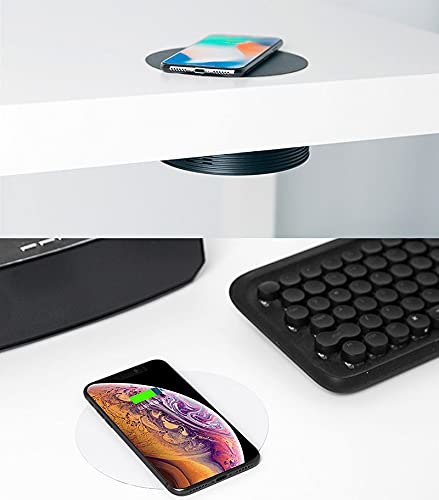
This image illustrates the Vivolink VLQICHR QI Wireless Charger in two common usage scenarios. The top portion shows a smartphone wirelessly charging on a pad seamlessly integrated into a desk surface. The bottom portion displays another smartphone charging on a separate, standalone wireless charging pad, highlighting the versatility of QI wireless charging technology.
5. Podešavanje
- Povežite se na napajanje: Plug the provided USB power cable into the charging port on the Vivolink VLQICHR wireless charger.
- Povežite se na izvor napajanja: Connect the other end of the USB cable to a compatible USB power adapter (not included) or a USB port on a computer. Ensure the power adapter meets the charger's power requirements (e.g., 5V/2A, 9V/1.67A for fast charging).
- Uključeno: Once connected, the LED indicator on the charger may light up briefly to confirm it is powered on and ready for use.
6. Uputstvo za upotrebu
- Postavite uređaj: Place your QI-compatible smartphone or other device directly onto the center of the Vivolink VLQICHR charging surface.
- Potvrdite punjenje: The LED indicator on the charger should change color or illuminate steadily to indicate that charging has begun. Your device's screen should also show a charging icon or notification.
- Optimalni plasman: If charging does not start, slightly adjust the position of your device on the charging pad. Some devices may have specific coil locations that require precise alignment.
- Punjenje završeno: Once your device is fully charged, remove it from the charging pad. The charger's LED indicator may change or turn off.
Napomena: Charging speed may vary depending on the device, power adapter, and environmental conditions. Thick phone cases may interfere with wireless charging; consider removing them for optimal performance.
7. Održavanje
- čišćenje: Disconnect the charger from the power source before cleaning. Use a soft, dry cloth to wipe the surface. Do not use harsh chemicals or abrasive cleaners.
- Skladištenje: Čuvajte punjač na hladnom i suvom mestu kada ga ne koristite.
- Održavanje kablova: Avoid bending or twisting the power cable excessively to prevent damage.
8. Otkrivanje problema
- Uređaj se ne puni:
- Uvjerite se da je punjač pravilno priključen na ispravan izvor napajanja.
- Verify your device is QI-compatible.
- Adjust the placement of your device on the charging pad to ensure proper alignment.
- Remove any thick phone cases or metal objects from your device.
- Pokušajte s drugim USB kabelom ili adapterom za napajanje.
- Sporo punjenje:
- Ensure you are using a power adapter that supports the charger's fast charging capabilities (e.g., Quick Charge 2.0/3.0 or Power Delivery).
- Check for proper device alignment.
- Zatvorite nepotrebne aplikacije na svom uređaju.
- LED indicator flashing:
- Refer to your device's specific LED indicator guide. Often, flashing indicates a foreign object detection (FOD) or improper device placement.
- Remove the device and any foreign objects, then place the device back on the charger.
9. Specifikacije
| Brand | Vivolink |
| Broj modela | VLQICHR |
| Proizvođač | Vivolink |
| ASIN | B08NHGFYVC |
| Input | (Typical: 5V/2A, 9V/1.67A - check product packaging for exact details) |
| Izlaz | (Typical: 5W, 7.5W, 10W, 15W - check product packaging for exact details) |
| Standard punjenja | QI Wireless Charging Standard |
Note: Specific input/output power ratings may vary. Please refer to the product packaging or the device itself for precise specifications.
10. Garancija i podrška
Specific warranty information for the Vivolink VLQICHR QI Wireless Charger is not provided in the available product data. For detailed warranty terms, technical support, or service inquiries, please refer to the documentation included with your purchase or contact Vivolink customer support directly through their official webweb-stranicu ili kontaktne kanale.