
1. Uvod
The Vgate VR800 OBD2 Scanner is a powerful and user-friendly diagnostic tool designed for automotive enthusiasts and professional mechanics alike. It provides comprehensive diagnostic functions for OBD-II/EOBD compliant vehicles, enabling users to quickly identify and resolve issues related to the Check Engine Light (CEL). This manual provides detailed instructions on how to set up, operate, and maintain your VR800 scanner to ensure optimal performance and accurate vehicle diagnostics.
2. Proizvod je gotovview
The Vgate VR800 is a handheld diagnostic device featuring a color LCD display, intuitive button layout, and a durable OBD-II connector cable. Its compact design allows for easy portability and use in various automotive environments.
2.1 Ključne komponente
- LCD ekran u boji: Provides clear and detailed diagnostic information.
- Navigacijski gumbi: Strelice gore, dolje, lijevo, desno za navigaciju menijem.
- Dugme OK: Potvrđuje odabire.
- Dugme I/M: Shortcut for I/M Readiness status.
- Question Mark (?) Button: Provides help and DTC lookup information.
- Dugme za povratak: Vraća se na prethodni ekran.
- OBD-II Connector: Connects the scanner to the vehicle's diagnostic port.
- USB port: For software updates and data printing.

3. Karakteristike
The Vgate VR800 OBD2 Scanner offers a comprehensive set of features for vehicle diagnostics:
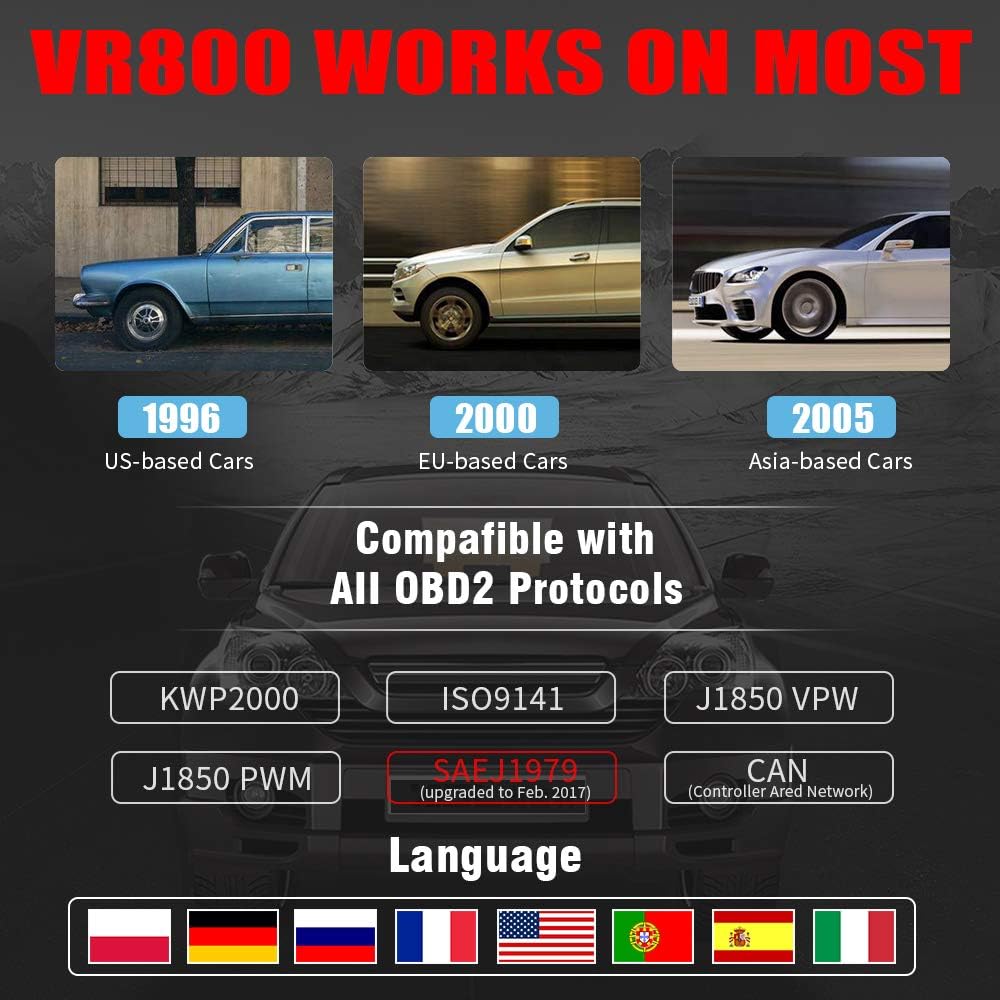
- All OBD2 Protocols Support: Compatible with ISO9141, KWP2000, J1850 PWM, J1850 VPW, and CAN protocols. Compliance with SAEJ1979 has been upgraded to the latest standards (February 2017).
- Široka kompatibilnost vozila: Works with most American vehicles manufactured after 1996, European vehicles after 2000, and Asian vehicles after 2005. Applicable to OBD-II/CAN/EOBD-compliant vehicles, including light-duty trucks (6.5T or less), SUVs, and minivans.
- Smog Check Helper (I/M Readiness): Features Red-Yellow-Green LEDs and a built-in speaker to indicate readiness status for emissions testing. Dedicated I/M and '?' shortcut keys provide quick access to readiness checks.
- Full OBD Service Modes: Quickly reads and checks Diagnostic Trouble Codes (DTCs), views freeze frame data, reads live PCM data stream, performs On-Board Monitor tests, and displays live O2 sensor test data.
- Built-in DTC Lookup Library: Allows accurate determination of the causes of the Check Engine Light.
- Accurate Battery Status Check: Reads real-time battery and voltage informacije.
- Podrška za više jezika: Available in English, French, German, Italian, Spanish, Russian, Polish, and Portuguese.
- Data Logging and Printing: Supports data logging and connection to a PC for printing diagnostic data files.



4. Podešavanje
Follow these steps to set up your Vgate VR800 OBD2 Scanner:
- Pronađite OBD-II priključak: OBD-II priključak se obično nalazi ispod instrumentne ploče na vozačevoj strani vozila. Ako ga ne možete pronaći, pogledajte uputstvo za upotrebu vašeg vozila.
- Povežite skener: Plug the VR800's OBD-II connector cable firmly into the vehicle's OBD-II port.
- Uključeno: The scanner will automatically power on once connected to the vehicle's OBD-II port. No external power source or batteries are required as it draws power directly from the vehicle.
- Početno podešavanje (ako se to zatraži): If this is your first time using the scanner or after a factory reset, you may be prompted to select a language. Use the navigation buttons to select your preferred language and press OK.

5. Uputstvo za upotrebu
Once the scanner is connected and powered on, you can begin diagnosing your vehicle.
5.1 Navigacija kroz meni
Koristite UP i DOLJE tipke sa strelicama za pomicanje kroz opcije izbornika. Pritisnite OK button to select an option. Press the Povratak dugme za povratak na prethodni ekran.
5.2 Reading Diagnostic Trouble Codes (DTCs)
- Iz glavnog menija izaberite Pročitajte DTC-ove.
- The scanner will display any active or pending DTCs. Each code will have a brief description.
5.3 Clearing DTCs
Warning: Clearing DTCs will erase all diagnostic trouble codes from the vehicle's computer and may reset readiness monitors. Ensure you have addressed the underlying issue before clearing codes.
- Iz glavnog menija izaberite Obriši DTC.
- Confirm your selection when prompted. The scanner will attempt to clear the codes.
5.4 Funkcija spremnosti I/M
The I/M Readiness function checks if the various emissions-related systems on the vehicle are operating correctly and if they have completed their self-tests.
- Pritisnite namjensko JA SAM button on the scanner.
- The display will show the status of various monitors (e.g., O2 Sensor, EVAP, Catalyst). A green light indicates ready, yellow indicates pending, and red indicates not ready or a fault.
5.5 Viewing Live Data
Live Data allows you to view real-time sensor data from the vehicle's engine control unit (ECU).
- Iz glavnog menija izaberite Live Data.
- Choose the specific data parameters you wish to view (e.g., engine RPM, vehicle speed, O2 sensor voltagi).
5.6 Pretraživanje DTC-a
If you have a DTC and need more information, use the built-in DTC lookup library.
- Iz glavnog menija izaberite DTC traženje ili pritisnite ? button when a DTC is displayed.
- Enter the DTC code (if not already displayed) to get a detailed description and possible causes.
5.7 Provjera statusa baterije
To check your vehicle's battery voltage and status:
- Iz glavnog menija izaberite Baterija.
- Skener će prikazati trenutni nivo napunjenosti baterijetage and an estimated charge percentage.
6. Održavanje
Proper maintenance ensures the longevity and accuracy of your Vgate VR800 scanner.
- čišćenje: Za čišćenje vanjske strane skenera koristite meku, suhu krpu. Nemojte koristiti abrazivna sredstva za čišćenje ili rastvarače.
- Skladištenje: Čuvajte skener na čistom, suhom mjestu, dalje od ekstremnih temperatura i direktne sunčeve svjetlosti.
- Ažuriranja softvera: Regularly check for software updates to ensure compatibility with the latest vehicle models and diagnostic protocols. Updates can typically be performed by connecting the scanner to a PC via the USB port and using the provided update software.
7. Otkrivanje problema
If you encounter issues while using your Vgate VR800 scanner, refer to the following common problems and solutions:
- Skener se ne uključuje:
- Ensure the OBD-II connector is securely plugged into the vehicle's port.
- Provjerite je li kontakt vozila u položaju UKLJUČENO (motor može biti isključen).
- Provjerite osigurač vozila za OBD-II priključak (pogledajte priručnik za vaše vozilo).
-
Ask a question about this manual
Ask about setup, troubleshooting, compatibility, parts, safety, or missing instructions. Manuals+ will review the question and use this page’s manual context to help answer it.