
Walfront Walfronti32ux1ar6d-11
Walfront PSG9080 80MHZ Programmable Signal Generator User Manual
Model: Walfronti32ux1ar6d-11
1. Uvod
This user manual provides detailed instructions for the Walfront PSG9080 80MHZ Programmable Signal Generator. It covers product features, setup, operation, maintenance, troubleshooting, and technical specifications. Please read this manual thoroughly before using the device to ensure proper and safe operation.
2. Proizvod je gotovview
The Walfront PSG9080 is a high-performance dual-channel arbitrary waveform generator designed for various applications including scientific research, electronic instrument testing, and educational purposes. It offers advanced features for precise signal generation and modulation.
2.1 Ključne karakteristike
- Programabilni izlaz: Allows free formulation of waveform types (sine, square, triangle, arbitrary), output time, and sequence for automated work.
- Real-time Firmware Updates: Firmware can be updated at any time to fix bugs or for special customization needs. Supports one-key firmware update via PC software.
- Fleksibilno napajanje: Can be powered by AC 85-264V or DC 5V2A mobile power supply, suitable for outdoor use.
- Voltage Control Adjustment: Output frequency, amplitude, and duty cycle can be controlled by an external analog voltage za voltage-controlled scanning.
- Modulation Function: Supports output of modulated waveforms in single or dual channels, enabling information addition to the carrier.
- Dual Channel Performance: Generates same or different function signals or arbitrary waveforms simultaneously with independently adjustable parameters.
- Adjustable Phase Difference: Phase difference between two channels is continuously adjustable from 0 to 359.9 degrees.
- Široki frekvencijski raspon: Signal frequency up to 80MHz, output signal within 1MHz to 25Vpp.
- Precise and Adjustable Pulse Width: Pulse width and period are digitally and accurately adjustable, enabling a wide range of pulse waveforms.
2.2 Product Components and Interfaces
Familiarize yourself with the various components and interfaces of the PSG9080 signal generator for effective operation.
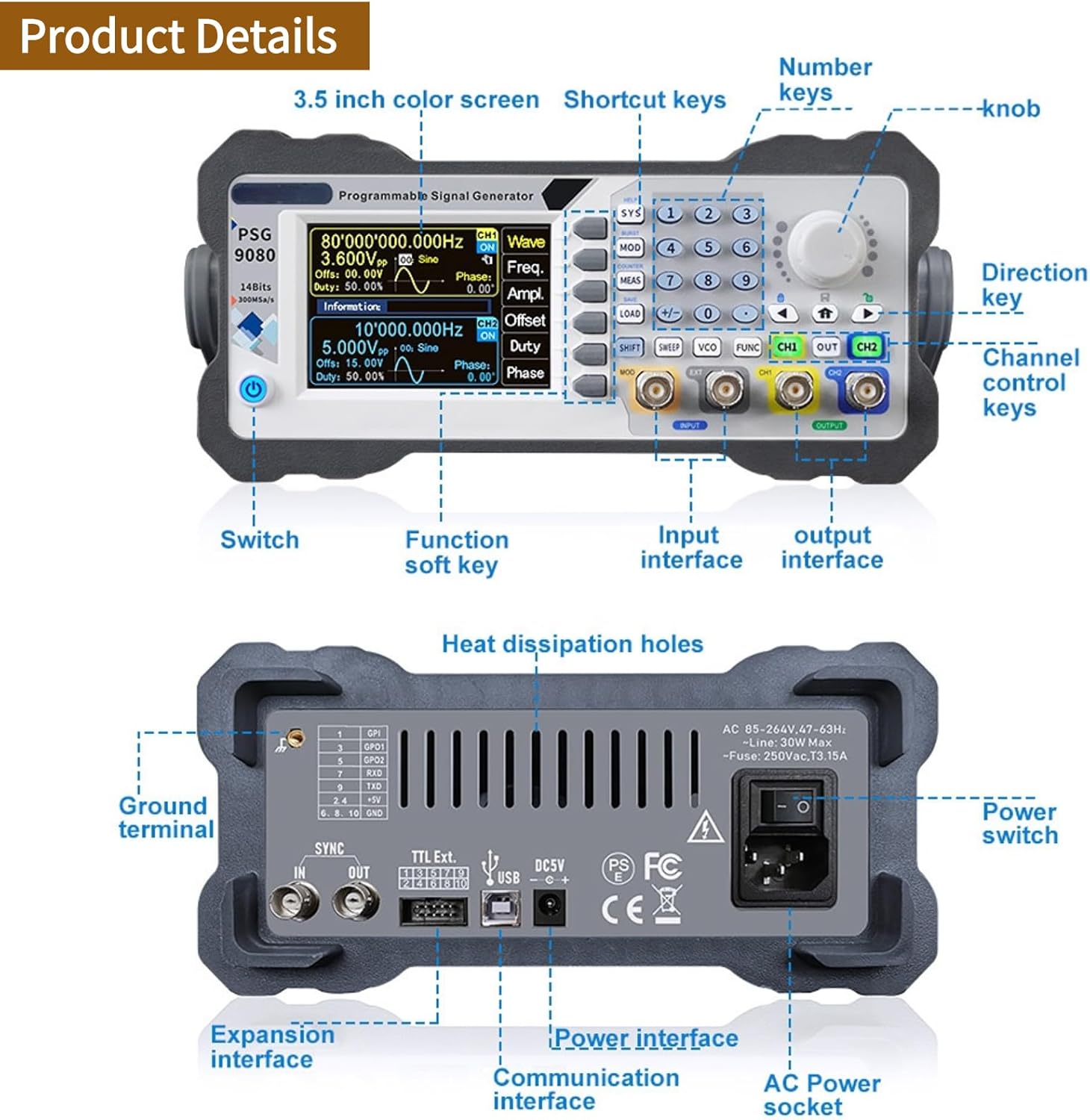
Figure 2.2.1: Front and Rear Panel Layout. This image illustrates the key controls and interfaces on both the front and rear panels of the PSG9080. The front panel includes the 3.5-inch color screen, number keys, knob, direction key, channel control keys, switch, function soft keys, input interface, and output interface. The rear panel features heat dissipation holes, ground terminal, expansion interface, TTL Ext. ports, USB, DC5V power interface, communication interface, AC power socket, and power switch.

Figure 2.2.2: Product and Accessories. This image displays the PSG9080 signal generator along with its standard accessories, including power cable (US 110V plug shown), USB cable, BNC cables, and a quick guide manual.
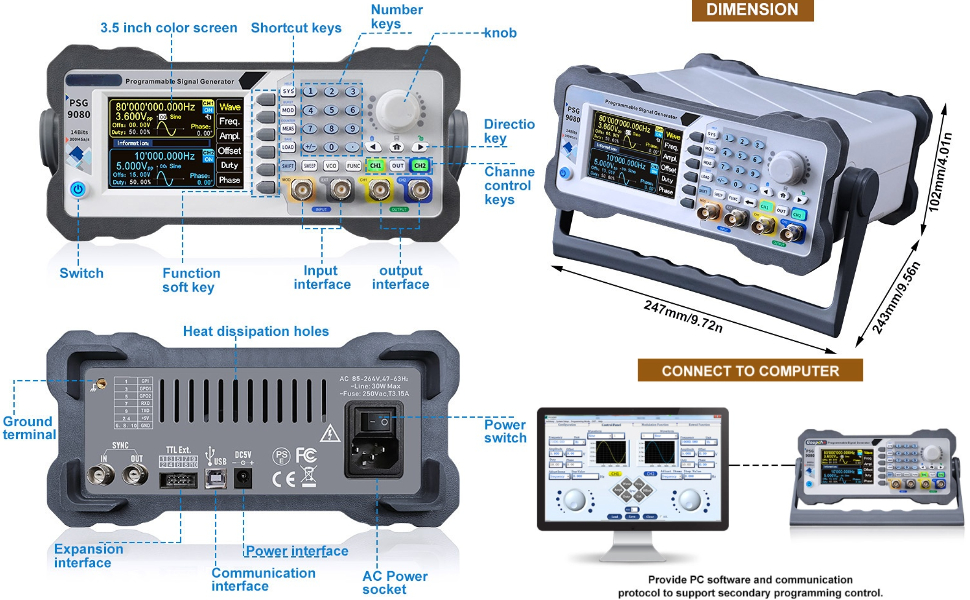
Figure 2.2.3: Computer Connectivity. This image demonstrates how the PSG9080 can be connected to a computer. The device provides PC software and communication protocols to support secondary programming control, enabling advanced functionality and automation.
3. Podešavanje
Follow these steps to set up your PSG9080 signal generator.
- Raspakivanje: Carefully remove the signal generator and all accessories from the packaging. Inspect for any signs of damage during transit.
- Priključak za napajanje: Connect the provided power cable to the AC power socket on the rear panel of the device. Plug the other end into a standard US 110V AC outlet. Alternatively, for outdoor use, connect a DC 5V2A mobile power supply to the DC 5V2A port.
- Početno uključivanje: Press the power switch on the rear panel to turn on the device. The display on the front panel should illuminate.
- Samotestiranje: The device will perform a brief self-test upon startup. Wait for the main interface to appear on the screen.
- Povezivanje izlaza: Connect BNC cables from the CH1 OUT and CH2 OUT ports on the front panel to your desired measurement or testing equipment (e.g., oscilloscope, spectrum analyzer).
- Connecting Inputs (Optional): If using external modulation or synchronization, connect the signal source to the MOD INPUT or EXT INPUT ports as required.
4. Operacija
This section details the operational aspects of the PSG9080, including waveform generation, modulation, and advanced settings.
4.1 Generisanje osnovnih talasnih oblika
- Odaberite kanal: Use the CH1 or CH2 buttons on the front panel to select the desired output channel.
- Select Waveform Type: Press the "Wave" soft key on the display to cycle through available waveform types (Sine, Square, Triangle, Arbitrary, etc.). Use the knob or number keys to select.
- Podesite frekvenciju: Press the "Freq" soft key. Use the knob or number keys to set the desired output frequency.
- Podesite Ampvisina: Pritisnite dugme "Ampl" soft key. Use the knob or number keys to set the peak-to-peak amplitude.
- Adjust Offset: Press the "Offset" soft key to set the DC offset.
- Adjust Duty Cycle (for Square/Pulse): Press the "Duty" soft key to adjust the duty cycle for relevant waveforms.
- Omogući izlaz: Ensure the respective CH1 OUT or CH2 OUT button is illuminated to enable the signal output.
4.2 Napredne funkcije
- modulacija: Press the "MOD" button to access modulation settings. The PSG9080 supports various modulation types (e.g., AM, FM, PM, FSK, ASK, PSK, PWM). Configure parameters such as modulation source, depth, and frequency.
- Funkcija pometanja: Press the "SWEEP" button to configure frequency sweep parameters, including start frequency, stop frequency, sweep time, and sweep mode (linear/logarithmic).
- Funkcija rafala: Press the "BURST" button to generate a specific number of waveform cycles. Set the burst count, gate mode, and trigger source.
- VCO (Voltage Kontrolirani oscilator): The device supports external voltage control. Connect an external analog voltage to the VCO input to control frequency, amplitude, or duty cycle.
- Postavke sistema: Press the "SYS" button to access system settings, including display brightness, sound, and interface configurations.
- Saving/Loading Settings: Use the "SAVE" and "LOAD" buttons to store and recall frequently used waveform configurations.

Figure 4.2.1: Dual Channel and Pulse Width Capabilities. This image highlights the PSG9080's dual-channel capabilities, allowing independent adjustment of parameters and continuous phase difference control (0 to 359.9 degrees). It also illustrates the precise and adjustable pulse width feature, crucial for generating accurate pulse waveforms.
5. Održavanje
Proper maintenance ensures the longevity and optimal performance of your PSG9080 signal generator.
- čišćenje: Redovno čistite vanjski dio uređaja mekom, suhom krpom. Ne koristite abrazivna sredstva za čišćenje ili rastvarače. Pazite da tekućine ne uđu u uređaj.
- ventilacija: Ensure the heat dissipation holes on the rear panel are not obstructed to prevent overheating. Operate the device in a well-ventilated area.
- Skladištenje: Kada se uređaj ne koristi duži period, čuvajte ga na hladnom i suhom mjestu, dalje od direktne sunčeve svjetlosti i ekstremnih temperatura.
- Ažuriranja firmvera: Periodically check the Walfront official website for new firmware updates. Keeping the firmware updated can improve performance and fix potential issues. Refer to the "Features" section for update instructions.
- Inspekcija kablova: Regularly inspect all cables (power, BNC, USB) for any signs of wear or damage. Replace damaged cables immediately.
6. Otkrivanje problema
This section provides solutions to common issues you might encounter with the PSG9080.
| Problem | Mogući uzrok | Rješenje |
|---|---|---|
| Uređaj se ne uključuje. | Power cable not connected properly; Power outlet faulty; Power switch off. | Ensure power cable is securely connected. Test the power outlet with another device. Confirm the power switch on the rear panel is in the ON position. |
| Nema izlaznog signala. | Output channel not enabled; Incorrect waveform parameters; Faulty BNC cable. | Press the CH1 OUT or CH2 OUT button to enable the output. Verify frequency, amplitude, and offset settings. Test with a different BNC cable. |
| Prikaz je prazan ili zamrznut. | Software error; Device malfunction. | Try restarting the device by turning it off and on again. If the problem persists, contact Walfront customer support. |
| Nije moguće ažurirati firmver. | Incorrect update procedure; PC connection issue. | Ensure you are following the one-key firmware update procedure correctly, connecting with the PC software. Check USB cable connection and PC driver installation. |
If you encounter issues not listed here or if the suggested solutions do not resolve the problem, please contact Walfront customer support for assistance.
7. Specifikacije
Detailed technical specifications for the Walfront PSG9080 80MHZ Programmable Signal Generator.
| Parametar | Vrijednost |
|---|---|
| Brand | Walfront |
| Broj modela | Walfronti32ux1ar6d-11 |
| Težina artikla | 3.72 funte |
| Zemlja porijekla | Kina |
| Veličina | US 110V |
| Voltage | 1 Volts (Input voltage range: AC 85-264V or DC 5V2A) |
| Stavka Količina pakovanja | 1 |
| Baterije su potrebne? | br |
| Datum prve dostupnosti | 8. oktobar 2020 |

Slika 7.1: Dimenzije proizvoda. This image provides the physical dimensions of the PSG9080 signal generator: 247mm/9.72in (length), 243mm/9.56in (width), and 102mm/4.01in (height).
8. Garancija i podrška
For warranty information, technical support, or service inquiries regarding your Walfront PSG9080 signal generator, please contact Walfront customer service directly. Refer to the product packaging or the official Walfront webstranicu za najnovije kontakt podatke i uslove garancije.
You can visit the Walfront Store for more information: Walfront Store on Amazon
Ask a question about this manual
Ask about setup, troubleshooting, compatibility, parts, safety, or missing instructions. Manuals+ will review the question and use this page’s manual context to help answer it.