1. Uvod
This manual provides detailed instructions for the installation, operation, and maintenance of the TSL LTS CMIP8342W-M Platinum Network Mini Bullet IP Camera. Please read this manual thoroughly before using the product to ensure proper setup and optimal performance. Keep this manual for future reference.
2. Proizvod je gotovview
The TSL LTS CMIP8342W-M is a 4MP High Definition Network Mini Bullet IP Camera designed for robust surveillance. It offers clear imaging up to 2560x1520 at 30 frames per second with a 4mm fixed lens. Key features include True WDR 120dB for balanced images in varying light conditions, Matrix IR 2.0 for night vision up to 100 feet, and support for H.265/H.264 video compression. The camera is WEATHERPROOF IP67 rated, making it suitable for both indoor and outdoor use, and includes a MicroSD slot for local storage up to 128GB. It supports both DC 12V and Power over Ethernet (PoE) for flexible power options. Advanced Video Content Analytics (VCA) features such as Line Crossing, Intrusion Detection, and Face Detection enhance its surveillance capabilities.
- rezolucija: 4MP - Image Sensor 1/3” sensor - True WDR 120dB
- Objektiv: 4mm @F1.6: horizontal FOV: 83°, vertical FOV: 45°, diagonal FOV: 99°
- Video kompresija: Main stream: H.265/H.264; Sub-stream: H.265/H.264/MJPEG; Third stream: H.265/H.264
- Brzina kadrova: 60Hz: 15fps (2048 x 1536), 30fps (1920 × 1080), 30fps (1280 x 720); 50Hz: 12.5fps (2048 x 1536), 25fps (1920 × 1080), 25fps (1280 x 720)
- Max. rezolucija: 2688 × 1520 - WEATHERPROOF IP67
3. Sigurnosne informacije
- Osigurajte napajanje voltage je ispravno prije povezivanja kamere.
- Ne izlažite kameru ekstremnim temperaturama, vlazi ili korozivnim okruženjima.
- Avoid pointing the camera lens directly at strong light sources for extended periods.
- Handle the camera with care. Do not drop or subject it to strong physical shocks.
- Koristite samo dodatnu opremu koju je odredio proizvođač.
- Instalaciju i servisiranje treba da obavlja kvalifikovano osoblje.
4. Sadržaj paketa
Prilikom otvaranja paketa provjerite da li su svi artikli prisutni i u dobrom stanju:
- TSL LTS CMIP8342W-M IP Camera
- Vijci za montažu i zidni tiplovi
- Vodootporni konektor za Ethernet kabel
- Vodič za brzi početak
- Šablon za bušenje (ako je primjenjivo)
Note: A power adapter (DC 12V) may be sold separately or included depending on the specific package. An Ethernet cable is required for network connection.
5. Podešavanje
5.1 Fizička instalacija
- Odaberite lokaciju za montažu: Select a location that provides the desired field of view and is within range of power and network connections. Ensure the surface is strong enough to support the camera.
- Montirajte kameru: Use the provided drill template to mark and drill holes. Secure the camera base to the wall or ceiling using the mounting screws and wall plugs.
- Podesite ugao kamere: Loosen the adjustment screws on the camera body to position the lens for optimal coverage. Tighten the screws once the desired angle is achieved.
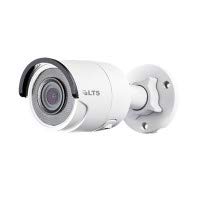
Slika 5.1: Prednja strana view of the TSL LTS CMIP8342W-M Platinum Network Mini Bullet IP Camera, showing the lens and IR illuminators.
5.2 Napajanje i mrežna veza
- Priključak za napajanje:
- PoE (napajanje preko Etherneta): If using a PoE-enabled switch or NVR, connect an Ethernet cable from the camera's RJ45 port directly to the PoE port. No separate power adapter is needed.
- Napajanje DC 12V: If not using PoE, connect a 12V DC power adapter (not included) to the camera's power input port.
- Mrežna veza: Connect an Ethernet cable from the camera's RJ45 port to your network switch or router. Use the waterproof connector for outdoor installations to protect the RJ45 connection.
- Instalacija MicroSD kartice (opciono): If local storage is desired, carefully open the MicroSD card slot cover (refer to the camera diagram in the quick start guide) and insert a MicroSD card (up to 128GB) with the contacts facing down. Close the cover securely.
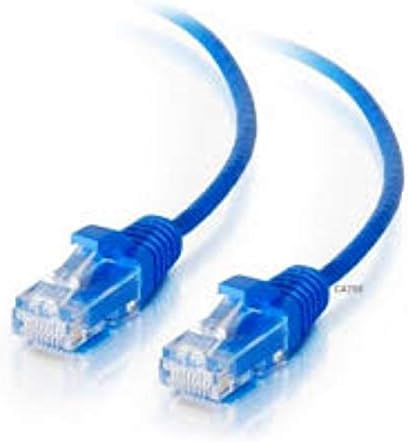
Slika 5.2: Bočna strana view of the TSL LTS CMIP8342W-M Platinum Network Mini Bullet IP Camera, illustrating the mounting bracket and cable connections.
5.3 Početna konfiguracija
- Otkrijte kameru: Use the manufacturer's IP camera search tool (e.g., SADP Tool) on a computer connected to the same network to find the camera's IP address.
- Aktivirajte kameru: For first-time use, you may need to activate the camera by setting a strong password.
- Pristup Web Interfejs: Otvori a web browser and enter the camera's IP address. Log in with the newly set password.
- Mrežne postavke: Configure network settings (e.g., static IP, DHCP) as needed for your network environment.
- Datum i vrijeme: Set the correct date and time, preferably using NTP (Network Time Protocol) for synchronization.
6. Operativni
6.1 Uživo View i Snimanje
Once configured, access the camera's live view kroz web interface, a compatible NVR, or a mobile application. From the live view, možete:
- Monitor real-time video feed.
- Manually start/stop recordings.
- Snimite snimke.
- Adjust image parameters (brightness, contrast, saturation).
6.2 Napredne funkcije
- True WDR 120dB: Enable Wide Dynamic Range in settings to improve image clarity in scenes with both very bright and very dark areas.
- Matrix IR 2.0: The camera automatically activates its infrared illuminators in low-light conditions for night vision.
- Detekcija pokreta: Configure motion detection zones and sensitivity. Set up actions such as recording, sending notifications, or triggering alarms upon detection.
- VCA (Video Content Analytics): Utilize Line Crossing Detection, Intrusion Detection, and Face Detection features by defining specific rules and areas in the camera's settings.
- Snimanje SD kartice: Configure continuous, scheduled, or event-triggered recording to the installed MicroSD card.
7. Održavanje
- čišćenje: Regularly clean the camera lens with a soft, dry cloth. For stubborn dirt, use a mild lens cleaning solution. Do not use harsh chemicals.
- Ažuriranja firmvera: Provjerite proizvođača website periodically for firmware updates. Updating firmware can improve performance, add new features, and fix bugs. Follow the provided instructions carefully during the update process.
- Upravljanje skladištem: If using a MicroSD card, regularly back up important recordings and format the card periodically to maintain optimal performance.
- Inspekcija kablova: Periodically inspect all cables and connections for wear, damage, or corrosion, especially in outdoor installations.
8. Otkrivanje problema
| Problem | Mogući uzrok | Rješenje |
|---|---|---|
| Nema napajanja za kameru | Loose power connection, faulty power adapter/PoE switch, power outage. | Check all power connections. Verify power adapter/PoE switch is functioning. Restore power. |
| Nema slike na ekranu | Network connection issue, incorrect IP address, camera not activated, software/browser issue. | Verify network cable is connected. Check camera's IP address. Ensure camera is activated and logged in. Try a different browser or client software. |
| Loša kvaliteta slike | Dirty lens, incorrect focus, low bandwidth, improper settings (WDR, exposure). | Clean the lens. Adjust focus if applicable. Check network bandwidth. Adjust image settings in the web interfejs. |
| Nije moguće pristupiti kameri putem mreže | Incorrect IP address, network configuration mismatch, firewall blocking. | Use the discovery tool to find the correct IP. Ensure camera and computer are on the same subnet. Check firewall settings on your computer or router. |
| SD kartica ne snima | SD card full, faulty SD card, incorrect recording schedule, SD card not formatted. | Check SD card status in settings. Replace faulty card. Verify recording schedule. Format the SD card via the camera's web interfejs. |
9. Specifikacije
| Feature | Specifikacija |
|---|---|
| Broj modela | CMIP8342W-M |
| Rezolucija video snimanja | 4 MP |
| Efektivna rezolucija mirovanja | 4 MP |
| Objektiv | 4mm @F1.6 |
| Frame Rate | 30 fps (max) |
| Noćni vid | 100 stopa |
| Low Light Technology | Noćna boja |
| True WDR | 120dB |
| Video Compression | H.265, H.265+, H.264, H.264+, MJPEG |
| MicroSD slot | Do 128 GB |
| Napajanje | DC 12V, PoE |
| Međunarodna ocjena zaštite | IP67 |
| Vrsta montaže | Zidni nosač |
| Form Factor | Bullet |
| Tehnologija povezivanja | Žičani (Ethernet) |
| Unutrašnja/vanjska upotreba | Unutarnji, vanjski |
| Vrsta upozorenja | Motion Only (VCA: Line Crossing, Intrusion Detection, Face Detection) |
10. Garancija i podrška
For warranty information and technical support, please refer to the official TSL webstranicu ili kontaktirajte ovlaštenog prodavača. Sačuvajte račun kao dokaz o kupovini za reklamacije.
Proizvođač: LTS
Brand: TSL