
Uvod
This manual provides comprehensive instructions for setting up, operating, and maintaining your Macally Bluetooth Keyboard. Designed for multi-device compatibility, this wireless keyboard features a built-in stand, a rechargeable battery, and 78 keys for efficient typing across various devices including tablets, smartphones, and computers.

Image: The Macally Bluetooth Keyboard in white, with a tablet securely docked in its integrated stand, showcasing svojim kompaktnim dizajnom i funkcionalnošću.
Šta je u kutiji
Upon unboxing your Macally Bluetooth Keyboard, please ensure all the following items are present:
- Macally Bluetooth Keyboard
- USB kabl za punjenje
- Korisnički priručnik (ovaj dokument)
If any items are missing or damaged, please contact Macally customer support.
Karakteristike proizvoda
The Macally Bluetooth Keyboard is designed for versatility and convenience, offering several key features:
- Povezivanje na više uređaja: Seamlessly switch between up to 3 Bluetooth-enabled devices (e.g., tablet, smartphone, computer).
- Integrisani stalak za uređaj: Features a built-in 10.5-inch slot to securely hold your smartphone or tablet.
- Kompaktan i prenosiv: Small enough to fit into most bags, making it ideal for on-the-go use.
- Punjiva baterija: Opremljen punjivom baterijom od 280 mAh za produženu upotrebu.
- Efficient Layout: Includes 78 quiet scissor-switch keys and 13 convenient shortcut/media keys for enhanced productivity.

Image: The keyboard demonstrating seamless Bluetooth connectivity with a 30ft wireless range, compatible with Apple, Windows, iOS, and Android operating systems.

Image: A visual representation of the keyboard's multi-device capability, showing it paired with a laptop, a desktop computer, and a smartphone simultaneously.

Image: The keyboard positioned on a desk, with both a tablet and a smartphone docked in its integrated 10.5-inch stand, highlighting its "setup anywhere" convenience.
Setup
Punjenje tastature
Before first use, fully charge your Macally Bluetooth Keyboard. Connect the provided USB charging cable to the keyboard's charging port and the other end to a USB power source (e.g., computer USB port, USB wall adapter). The charging indicator light will show the charging status.

Image: The keyboard with its charging cable connected, illustrating the rechargeable 280mAh battery and the included charging cable.
Bluetooth uparivanje
Slijedite ove korake da biste uparili tastaturu s uređajem:
- Ensure the keyboard is charged and powered on. The power switch is located on the top right of the keyboard.
- On your device (tablet, smartphone, computer), enable Bluetooth.
- Pritisnite i držite Fn tipka i jedna od tipki Bluetooth kanala (B1, B2, ili B3) simultaneously for a few seconds until the corresponding Bluetooth indicator light starts blinking rapidly. This indicates the keyboard is in pairing mode.
- On your device, search for "Macally Keyboard" or a similar name in the Bluetooth device list and select it to connect.
- Once connected, the indicator light will stop blinking and remain solid for a moment before turning off, indicating successful pairing.
To pair additional devices, repeat steps 3-5 using a different Bluetooth channel key (B1, B2, or B3).
Uputstvo za upotrebu
Prebacivanje između uređaja
Za prebacivanje između uparenih uređaja, jednostavno pritisnite Fn zajedno s odgovarajućim tasterom Bluetooth kanala (B1, B2, ili B3) for the desired device. The keyboard will quickly connect to the selected device.
Using Shortcut Keys
The keyboard features 13 dedicated shortcut/media keys for quick access to common functions. These keys are typically located on the top row (F1-F12 and an additional key). Functions may vary slightly depending on the operating system of your connected device.
Uobičajene funkcije prečica uključuju:
- Kontrole za reprodukciju medija (reprodukcija/pauza, sljedeća/prethodna pjesma)
- Kontrola jačine zvuka (isključivanje zvuka, pojačavanje/smanjivanje zvuka)
- Podešavanje svetline ekrana
- Home screen/desktop access
- Funkcija pretraživanja
Refer to your device's operating system documentation for specific compatibility and functionality of these keys.

Slika: Detaljna view of the keyboard's layout, emphasizing its 78 quiet scissor-switch keys and the 13 dedicated shortcut/media keys for efficient use.
Održavanje
To ensure the longevity and optimal performance of your Macally Bluetooth Keyboard, follow these maintenance guidelines:
- čišćenje: Za čišćenje površine tastature koristite meku, suhu krpu koja ne ostavlja dlačice. Za tvrdokornu prljavštinu, laganoampOperite krpu vodom ili blagim, neabrazivnim sredstvom za čišćenje. Izbjegavajte prekomjernu vlagu.
- Skladištenje: Kada se tastatura ne koristi duži period, čuvajte je na hladnom i suhom mjestu, dalje od direktne sunčeve svjetlosti i ekstremnih temperatura.
- Održavanje baterije: To preserve battery life, avoid fully discharging the keyboard frequently. Recharge it when the low battery indicator appears. If storing for a long time, charge it to about 50% every few months.
- Izbjegavajte prosipanje: Keep liquids away from the keyboard to prevent internal damage.
Rješavanje problema
If you encounter issues with your Macally Bluetooth Keyboard, try the following solutions:
| Problem | Moguće rješenje |
|---|---|
| Tastatura se ne uključuje. | Ensure the keyboard is charged. Connect it to a power source using the USB cable. |
| Unable to pair the keyboard. |
|
| Tastatura se često isključuje. |
|
| Ključevi ne reagiraju. |
|
If these solutions do not resolve the issue, please contact Macally customer support for further assistance.
Specifikacije
| Feature | Detalj |
|---|---|
| Broj modela | BTTABKEYBAT |
| Tehnologija povezivanja | Bluetooth |
| Broj ključeva | 78 |
| Vrsta baterije | 1 litijum-jonska baterija (uključena) |
| Težina artikla | 1.92 funte |
| Dimenzije paketa | 13.98 x 7.91 x 2.48 inča |
| Proizvođač | Mace Group Inc / Macally Peripherals |
| Kompatibilni uređaji | PC, Tablet, Apple devices, Windows Desktop/Laptop, Surface, Chromebook, Smartphones, TVs (any device with Bluetooth) |
| Preporučena upotreba | Office, School, Everyday Use, Personal, Education, Business |
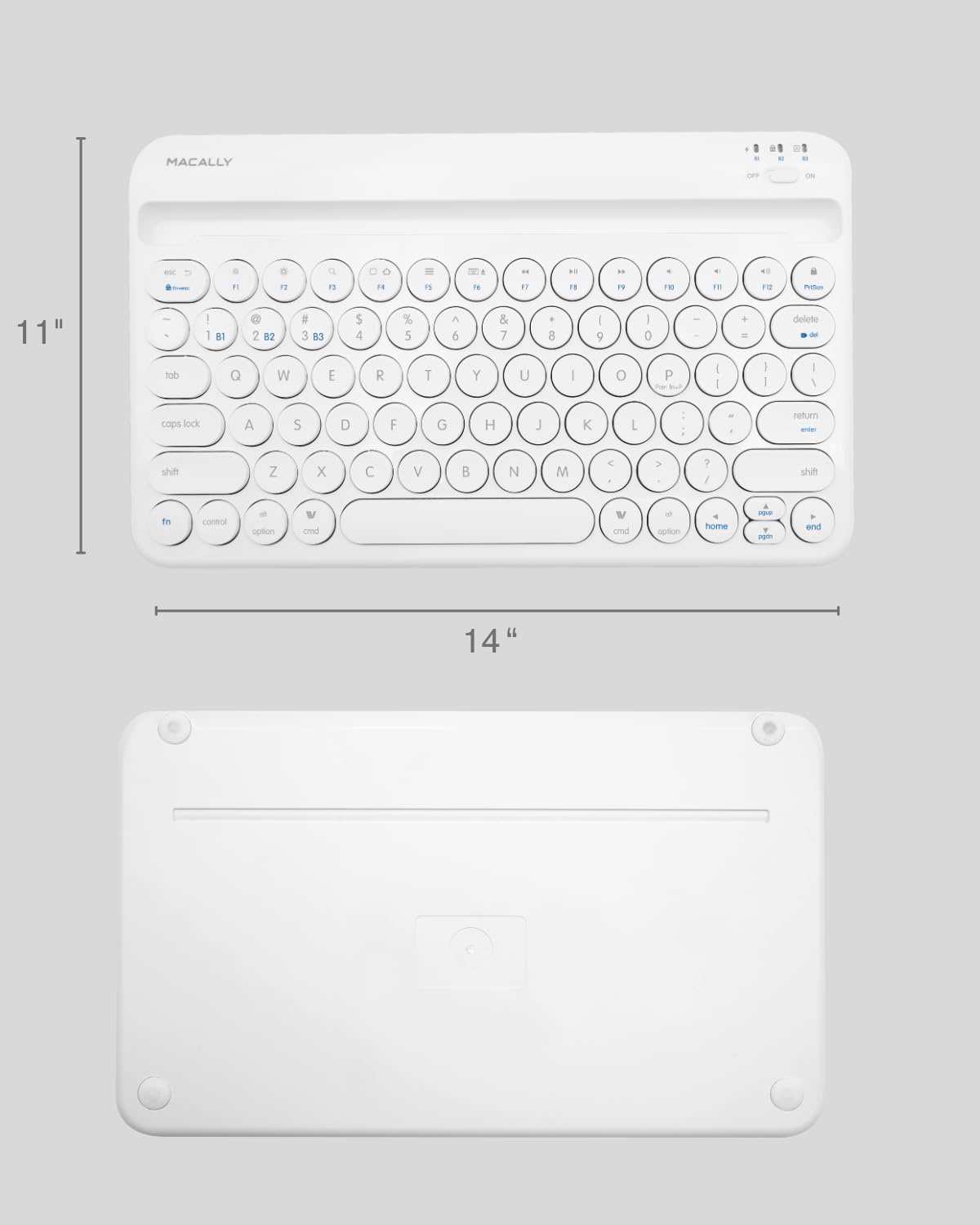
Image: The physical dimensions of the keyboard, measuring approximately 11 inches in width and 14 inches in length.

Image: The keyboard fitting easily into a backpack, demonstrating its compact size and suitability for travel and on-the-go use.
Garancija i podrška
Macally products are designed for quality and reliability. For information regarding product warranty, technical support, or service, please visit the official Macally webweb-mjesto ili kontaktirajte njihovu službu za korisnike. Sačuvajte račun kao dokaz o kupovini za reklamacije u slučaju garancije.
Više informacija i podrške možete pronaći na Macally trgovina na Amazonu.