
1. Uvod
The VGEBY YCX-003 MPPT Solar Charge Controller is designed to manage power flow from your solar panels to your battery bank and connected loads. It features an industrial-grade master chip for accurate monitoring and control, ensuring efficient charging and protection for your battery system. This controller automatically adapts to 12V or 24V systems and incorporates advanced Maximum Power Point Tracking (MPPT) technology for high charging efficiency.
Ključne funkcije uključuju:
- Maintaining optimal battery charge levels.
- Protection against over-charging and over-discharging.
- Prevention of reverse charging from battery to solar panels at night.
- Reverse polarity protection for both battery and solar panels.
- Automatic load cut-off and recovery based on battery voltage.
- Built-in thunder protection.
- Automatic temperature compensation for charging voltage.
2. Postavljanje i instalacija
Pravilna instalacija je ključna za siguran i efikasan rad vašeg solarnog regulatora punjenja. Molimo vas da pažljivo slijedite ove korake.
2.1 Dijagram ožičenja

Figure 1: Wiring connections for the solar charge controller.
2.2 Koraci povezivanja
Connect the components in the following order to prevent damage to the controller or other system components:
- Spojite bateriju: First, connect the battery to the controller's battery terminals. Ensure correct polarity (positive to positive, negative to negative). The controller will automatically detect the system voltage (12V ili 24V).
- Spojite solarni panel: Next, connect the solar panel to the controller's solar panel terminals. Ensure correct polarity.
- Spojite opterećenje: Finally, connect your DC loads to the controller's load terminals. Ensure correct polarity.
Važno: Always connect the battery first and disconnect the load first when disassembling the system.
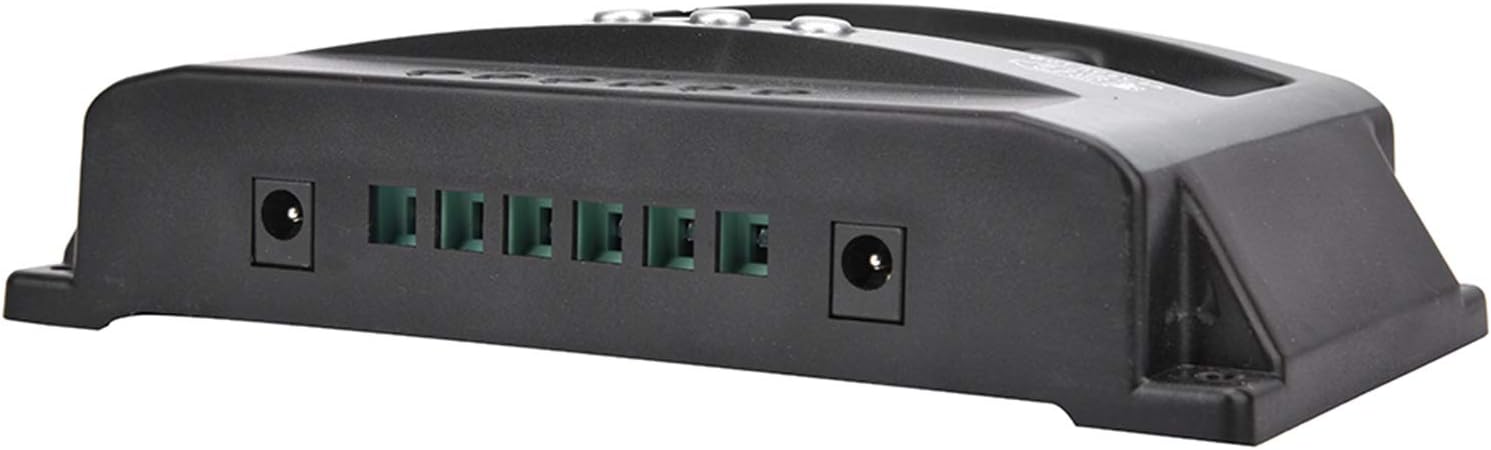
Figure 2: Connection terminals on the side of the controller.
3. Uputstvo za upotrebu
The VGEBY YCX-003 controller features a large LCD display and user-friendly buttons for monitoring and adjusting parameters.
3.1 LCD ekran i dugmad

Figure 3: Front panel with LCD display and control buttons.
The LCD display provides real-time information on battery voltage, charging current, discharge current, and system status. The buttons allow you to navigate through display modes and adjust certain charging and discharging parameters.
3.2 Podesivi parametri
The controller allows for adjustment of floating charge voltage, granični volumen pražnjenjatage, and discharge recovery voltage. Refer to the on-screen menu for specific adjustment procedures. These parameters are factory-set to default values suitable for most lead-acid batteries but can be customized if needed.
3.3 USB izlaz
The controller includes a 5V/2A USB output for charging small electronic devices. This output is active when the battery has sufficient charge.

Figure 4: USB charging capability.
4. Održavanje
To ensure the longevity and optimal performance of your VGEBY YCX-003 MPPT Solar Charge Controller, periodic maintenance is recommended.
- čistoća: Održavajte kontroler čistim i bez prašine i ostataka. Za čišćenje koristite suhu krpu.
- Veze: Periodically check all wiring connections to ensure they are secure and free from corrosion. Loose connections can lead to power loss or overheating.
- ventilacija: Ensure the controller is installed in a well-ventilated area to prevent overheating.
5. Otkrivanje problema
The VGEBY YCX-003 controller is designed with several built-in protection features. If the system is not operating as expected, check the following:
- Nema ekrana/napajanja: Provjerite spojeve baterije i osigurajte da baterija ima dovoljan napontage.
- Bez punjenja: Verify solar panel connections and ensure adequate sunlight. Check for reverse polarity on solar panel connections.
- Učitavanje ne radi: Check load connections and ensure the battery voltage is above the discharge recovery voltage. The controller automatically cuts off the load if battery voltage je prenisko.
- Error Codes/Warnings: The controller has built-in protections for overheating, overcurrent, short circuit, open circuit, and reverse connection. If a fault occurs, the controller will automatically recover once the issue is resolved. Consult the display for any specific indicators.
- Obrnuti polaritet: The controller has reverse polarity protection for both the battery and solar panels. If connected incorrectly, the controller will not operate until the polarity is corrected.
6. Tehničke specifikacije

Figure 5: VGEBY YCX-003 MPPT Solar Charge Controller.
| Feature | Specifikacija |
|---|---|
| Model | YCX-003 |
| System Voltage | 12V/24V Adaptive |
| Solar Panel Voltage | 12 V, 18 V, 24 V, 36 V |
| Floating Charge Voltage | 13.7 V (zadano, podesivo) |
| Discharge Cut-Off Voltage | 10.7 V (zadano, podesivo) |
| Discharge Recovery Voltage | 12.6 V (zadano, podesivo) |
| Struja pripravnosti | <10mA |
| USB izlaz | 5V / 2A Max |
| Opcije nazivne struje | 40A, 50A, 60A, 100A |
| Max. PV Voltage | 50V |
| Max. PV ulazna snaga | 750W (12V) / 1500W (24V) |
| Dimenzije | Približno 170 x 92 x 45 mm (6.7 x 3.6 x 1.8 inča) |
| Materijal | ABS + ROHS |
| Proizvođač | VGEBY |
7. Garancija i podrška
For warranty information or technical support, please refer to the documentation provided at the time of purchase or contact VGEBY customer service directly. Ensure you have your product model number (YCX-003) and purchase details available when seeking support.