
Uvod
This manual provides detailed instructions for the setup, operation, maintenance, and troubleshooting of your Macally BTWKEYMB-ES Extended Wireless Bluetooth Keyboard. Please read this manual thoroughly to ensure proper use and to maximize the performance of your device.
The Macally BTWKEYMB-ES is an elegant and ultra-thin (17 mm thick) wireless Bluetooth keyboard with a brushed metallic finish. It is specifically designed for Mac, iPad, iPhone, PC, and Android devices with Bluetooth capability. It features a stable and reliable radio connection, allowing for a clean, wireless workspace. This keyboard supports connection to up to three Bluetooth devices simultaneously, with direct switching via the Quick-Switch function. It includes 110 flat keys with a scissor-lift mechanism for sensitive and responsive typing, 21 function buttons for easy access to Mac functions, and a 17-key numeric keypad to boost productivity. The keyboard features a Spanish layout.

Odozgo view of the Macally BTWKEYMB-ES keyboard, showcasing its full Spanish QWERTY layout with numeric keypad and function keys.
Setup
1. Punjenje tastature
Before first use, ensure the keyboard is fully charged. Connect the included USB charging cable to the keyboard's charging port and to a USB power source (e.g., computer USB port, USB wall adapter). The charging indicator light will show the charging status.
2. Bluetooth uparivanje
- Turn on the keyboard using the power switch, usually located on the side or back.
- Press and hold one of the Bluetooth channel keys (e.g., B1, B2, B3) for a few seconds until the corresponding indicator light starts blinking rapidly. This indicates the keyboard is in pairing mode.
- On your device (Mac, PC, iPad, iPhone, Android), go to Bluetooth settings.
- Traži available Bluetooth devices. The keyboard should appear as "Macally BTWKEYMB-ES" or similar.
- Select the keyboard from the list to initiate pairing. Follow any on-screen prompts, such as entering a code displayed on your screen.
- Once paired, the indicator light for that channel will stop blinking and remain solid, indicating a successful connection.
3. Quick-Switch Pairing (Multi-Device Connection)
The keyboard supports connecting up to three devices. To connect additional devices, repeat the Bluetooth pairing steps using a different Bluetooth channel key (B2 or B3). Once multiple devices are paired, you can switch between them instantly by simply pressing the corresponding Bluetooth channel key (B1, B2, or B3).

The Macally BTWKEYMB-ES keyboard in a workspace setting, connected wirelessly to a desktop monitor and a tablet, demonstrating its multi-device capability.
Uputstvo za upotrebu
Funkcijski tasteri
The keyboard features 21 function keys (F1-F12 and additional media/system control keys) that provide quick access to various functions on your Mac or other compatible devices. These include brightness control, mission control, media playback, volume control, and more. For specific functions, refer to your device's operating system documentation.
Numerička tipkovnica
The integrated 17-key numeric keypad allows for efficient data entry and calculations. Ensure Num Lock is enabled if necessary for your operating system.
Iskustvo kucanja
The scissor-lift key mechanism provides a comfortable and responsive typing experience with a satisfying tactile feedback. The Spanish layout includes specific characters and key placements relevant to the Spanish language.
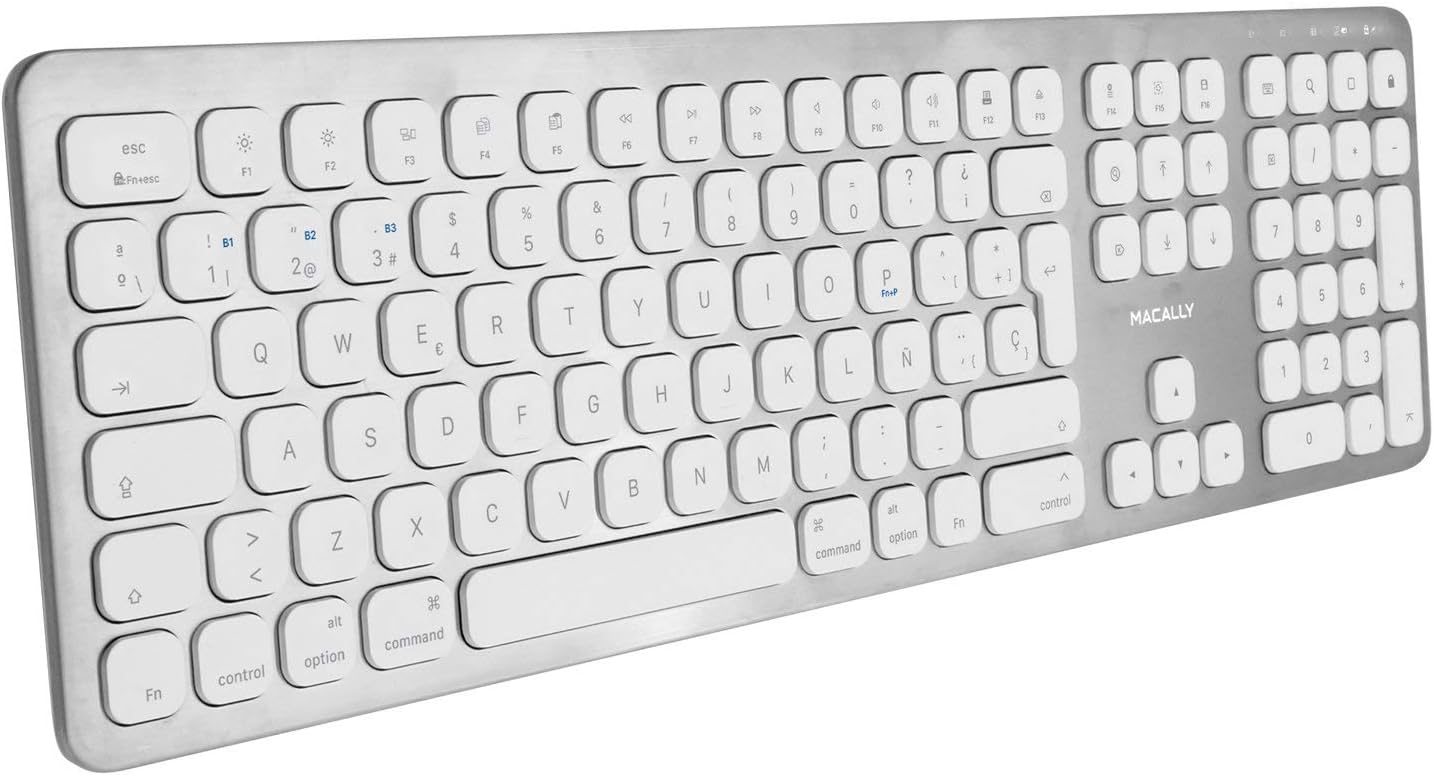
Nadzemni pod uglom view of the Macally BTWKEYMB-ES keyboard, providing a clear look at all keys and the overall layout.
Održavanje
Čišćenje
Da biste očistili tastaturu, prvo je isključite. Koristite meku krpu koja ne ostavlja dlačice, lagano natopljenuampened with water or a mild cleaning solution. Avoid using harsh chemicals, abrasive cleaners, or excessive moisture. Do not spray liquid directly onto the keyboard. For dust and debris between keys, use compressed air.
Skladištenje
When not in use for extended periods, store the keyboard in a cool, dry place away from direct sunlight and extreme temperatures. Ensure the keyboard is turned off to conserve battery life.
Rješavanje problema
Tastatura se ne povezuje/uparuje
- Provjerite je li tastatura uključena i potpuno napunjena.
- Provjerite je li Bluetooth omogućen na vašem uređaju.
- Move the keyboard closer to your device to ensure it's within Bluetooth range.
- Pokušajte odvojiti tastaturu od Bluetooth postavki vašeg uređaja, a zatim je ponovo upariti.
- Restart both the keyboard (turn off and on) and your device.
- Provjerite da li drugi Bluetooth uređaji uzrokuju smetnje.
Tasteri ne odgovaraju
- Provjerite je li tastatura ispravno povezana putem Bluetootha.
- Ensure the battery is not critically low. Charge the keyboard if needed.
- Očistite tastaturu kako biste uklonili sve nečistoće koje bi mogle blokirati tipke.
- Test the keyboard with another device to determine if the issue is with the keyboard or the original device.
Kašnjenje ili odloženi unos
- Smanjite udaljenost između tastature i uređaja.
- Minimizirajte smetnje od drugih bežičnih uređaja (Wi-Fi rutera, drugih Bluetooth uređaja).
- Provjerite da li su operativni sistem i upravljački programi za Bluetooth vašeg uređaja ažurirani.
Specifikacije
| Broj modela | BTWKEYMB-ES |
| Tehnologija povezivanja | Bluetooth |
| Posebna karakteristika | Punjiva |
| Kompatibilni uređaji | Računar, pametni telefon, tablet |
| Broj ključeva | 110 |
| Raspored tipkovnice | QWERTY (Spanish) |
| Number of Buttons (Function) | 21 |
| Proizvođač | Macally |
Informacije o garanciji
Specific warranty details for the Macally BTWKEYMB-ES keyboard are typically provided with the product packaging or on the manufacturer's official webstranica. Molimo pogledajte ove izvore za sveobuhvatne uslove i odredbe garancije.
Podrška
For technical support, frequently asked questions, or additional assistance, please visit the official Macally support website. Contact information for customer service may also be found on the product packaging or the manufacturer's website.