
1. Uvod
The LogiLink UA0363 is a USB-C to 3.5mm audio adapter designed to provide audio output for smartphones, tablets, and laptops that lack a dedicated 3.5mm audio jack. This adapter integrates a high-quality Digital-to-Analog Converter (DAC) and a hardware equalizer to deliver enhanced audio performance. It supports standard 3.5mm headphones and headsets with microphone functionality.
2. Značajke proizvoda
- Supports most mobile phones and laptops with a USB-C interface.
- Integrated 3-level hardware equalizer (EQ), selectable via a control button.
- Integrated microphone support.
- LED display for sampling rate and EQ modes.
- Supports most 3.5mm 3-pin headphones with 16-600 ohms impedance.
- Slušalice Amplifier: Maxim MAX97220AA.
- DAC: BES Technik BES3100.
- Podržava sampling frequencies of 44, 48, and 96 kHz with 24-bit resolution.
- USB powered, no external power supply required.
- Compliant with USB 2.0 specifications.
- Signal-to-Noise Ratio (SNR): Approximately 100 dB (A).
3. Podešavanje
- Connect the LogiLink UA0363 adapter to the USB-C port of your smartphone, tablet, or laptop. Ensure it is fully inserted.
- Plug your 3.5mm headphones or headset into the 3.5mm jack on the adapter.
- The device is plug-and-play and should be recognized automatically by most operating systems.

Image: The LogiLink UA0363 adapter connected to a smartphone, ready for headphone use.
4. Uputstvo za upotrebu
4.1 Osnovna reprodukcija zvuka
Once connected, audio from your device will be routed through the UA0363 adapter to your headphones. Use your connected device's volume controls to adjust the audio output level.
4.2 Equalizer (EQ) Function
The adapter features a built-in 3-level hardware equalizer. To cycle through the available EQ modes, press the control button located on the adapter. An LED display on the adapter indicates the currently active EQ mode and the sampling rate.
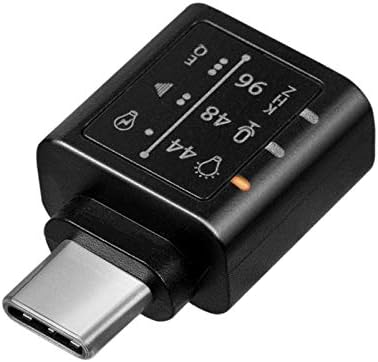
Slika: Detaljna view of the adapter's indicators for sampling frequency and equalizer settings.
4.3 Funkcija mikrofona
If your connected headphones or headset include a microphone, its functionality will be supported through the UA0363 adapter. Ensure your device's audio input settings are configured to use the USB audio device's microphone.
5. Održavanje
- Keep the adapter clean and dry. Use a soft, dry cloth for cleaning.
- Izbjegavajte izlaganje adaptera ekstremnim temperaturama, vlazi ili direktnoj sunčevoj svjetlosti.
- Do not attempt to disassemble or modify the adapter, as this will void the warranty.
- Adapter čuvajte na sigurnom mjestu kada ga ne koristite kako biste spriječili fizička oštećenja.
6. Otkrivanje problema
6.1 Nema zvučnog izlaza
- Ensure the UA0363 adapter is fully and securely inserted into your device's USB-C port.
- Verify that your headphones are fully plugged into the adapter's 3.5mm jack.
- Check your device's audio output settings to confirm that the USB audio device is selected as the primary output.
- Test the adapter with a different pair of headphones or another compatible USB-C device to isolate the issue.
- Provjerite da li je zvuk na povezanom uređaju isključen ili postavljen prenisko.
6.2 Poor Audio Quality or Distortion
- Provjerite audio izvor (npr. muziku file, streaming servis) je visokog kvaliteta.
- Try cycling through the different EQ settings on the adapter to see if a different profile improves the sound.
- Check for any loose connections between the adapter, device, and headphones.
- Avoid using the adapter near sources of strong electromagnetic interference.
6.3 Mikrofon ne radi
- Confirm that your headphones or headset are equipped with a working microphone.
- Check your device's audio input settings to ensure the USB audio device's microphone is selected as the input source.
- Ensure the microphone on your headset is not muted.
7. Specifikacije
| Feature | Specifikacija |
|---|---|
| Broj modela | UA0363 |
| Konektori | USB-C Male, 3.5mm Jack Female |
| DAC Chip | BES Technik BES3100 |
| Slušalice Amplifier | Maxim MAX97220AA |
| Podržano Sampling stope | 44 kHz, 48 kHz, 96 kHz |
| Rezolucija | 24-bitni |
| Impedance Support | 16-600 oma |
| Odnos signala i buke (SNR) | Pribl. 100 dB (A) |
| Izvor napajanja | Pokreće se USB |
| Usklađenost sa USB -om | USB 2.0 |
| Posebne karakteristike | Integrated Microphone Support, 3-level Hardware Equalizer, LED Indicators |
| Dimenzije (D x Š x V) | 17 x 10 x 26 mm |
| Boja | Crna |
8. Garancija i podrška
For warranty information, technical support, and further assistance, please refer to the official LogiLink website or contact your authorized retailer. Keep your purchase receipt for warranty claims.