
1. Uvod
This manual provides instructions for the Yunir AKB69680403 Universal TV Remote Control. This remote is designed as a replacement and is compatible with most LG LCD, LED, and Plasma televisions. It offers stable performance and includes all essential functions of an original remote without requiring any programming or setup.

Image 1.1: The Yunir AKB69680403 remote control in hand, demonstrating its ergonomic design.
The remote control features a compact size and an easy-to-grip design, ensuring comfortable use. Its dedicated menu navigation keys and direct channel access simplify TV operation.
2. Podešavanje
2.1 Instalacija baterije
The AKB69680403 remote control requires AAA batteries (not included) for operation. Follow these steps to install the batteries:
- Pronađite poklopac odeljka za baterije na poleđini daljinskog upravljača.
- Pritisnite zasun prema dolje i skinite poklopac.
- Umetnite dvije (2) AAA baterije, pazeći da pozitivni (+) i negativni (-) terminali budu pravilno poravnati s oznakama unutar odjeljka.
- Vratite poklopac pretinca za baterije na mjesto dok ne klikne sigurno.
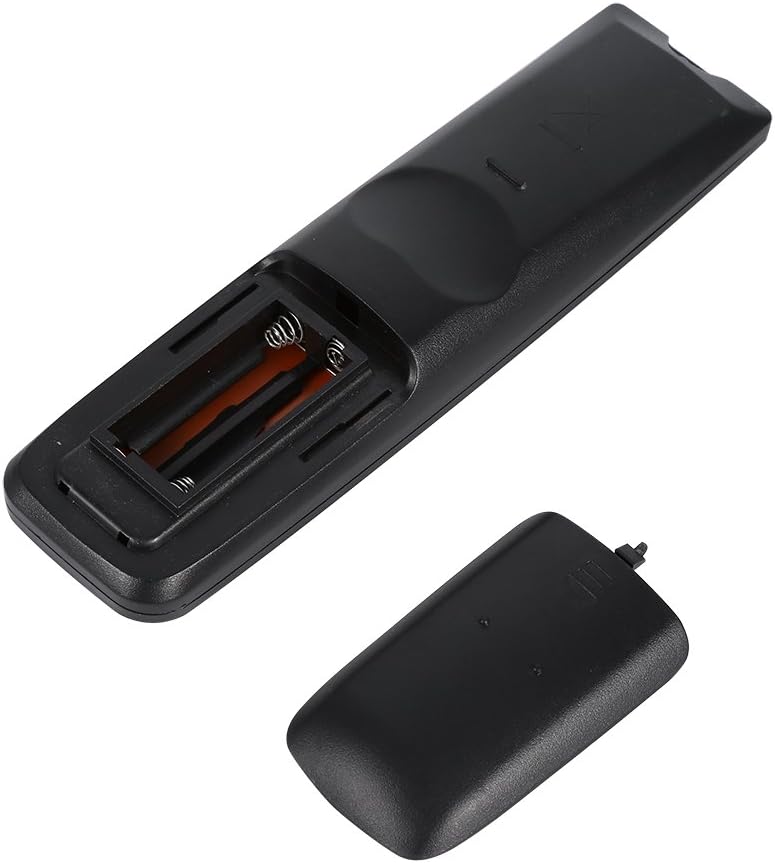
Slika 2.1: View of the remote control's open battery compartment, ready for AAA battery insertion.
Napomena:
- Always use new batteries of the same type.
- Nemojte miješati stare i nove baterije ili različite vrste baterija.
- Izvadite baterije ako daljinski upravljač nećete koristiti duži period kako biste spriječili curenje.
3. Uputstvo za upotrebu
The Yunir AKB69680403 remote control is designed for immediate use with compatible LG TVs without any prior programming. Simply point the remote at your television and begin operation.

Slika 3.1: Gotovoview of the remote control's buttons and layout.
3.1 Funkcije dugmadi
- SNAGA: Uključuje ili isključuje TV.
- ULAZ: Odabire ulazni izvor (HDMI, AV, itd.).
- UŠTEDU ENERGIJE: Activates or deactivates energy-saving modes.
- TV/RAD: Prebacuje se između TV i Radio načina rada.
- AV NAČIN RADA: Selects audio/video modes.
- Brojčani gumbi (0-9): Direktno bira kanale.
- LISTA: Prikazuje listu kanala.
- Q.VIEW: Vraća se na prethodno viewed channel.
- VOL +/-: Podešava nivo jačine zvuka.
- CH +/-: Mijenja kanale gore ili dolje.
- MUTE: Isključuje ili uključuje zvuk televizora.
- PAGE ^/v: Navigates through pages in menus or lists.
- Smjerni tasteri (gore, dolje, lijevo, desno) i OK: Navigacija kroz menije i potvrđivanje odabira.
- MENI: Otvara glavni meni televizora.
- TEKST: Pristupa uslugama teleteksta.
- T.OPT: Opcije teleteksta.
- INFO: Prikazuje informacije o trenutnom programu ili ulazu.
- VODIČ: Otvara elektronski programski vodič.
- MARK/FAV: Marks content or accesses favorite channels.
- POVRATAK/IZLAZ: Vraća na prethodni ekran ili izlazi iz menija.
- Dugmad u boji (crvena, zelena, žuta, plava): Koristi se za određene funkcije unutar menija ili aplikacija, kao što je naznačeno na TV ekranu.
Some buttons, such as the number buttons, are fluorescent to assist with operation in low-light conditions.
4. Održavanje
4.1 Čišćenje
Da biste održali izgled i funkcionalnost daljinskog upravljača:
- Obrišite daljinski upravljač mekom, suhom krpom.
- Za tvrdokornu prljavštinu, lagano dampNamočite krpu vodom ili blagim rastvorom za čišćenje, a zatim odmah obrišite suhom krpom.
- Do not use abrasive cleaners, alcohol, or solvents, as these can damage the surface or internal components.
4.2 Njega baterija
- Zamijenite baterije kada daljinski upravljač postane spor ili nekonzistentan.
- Istrošene baterije odlažite odgovorno u skladu sa lokalnim propisima.
5. Otkrivanje problema
Ako imate problema s daljinskim upravljačem, pogledajte sljedeće uobičajene probleme i rješenja:
- Daljinski upravljač ne reaguje:
- Provjerite jesu li baterije pravilno umetnute s ispravnim polaritetom.
- Zamijenite baterije novima.
- Provjerite da nema prepreka između daljinskog upravljača i infracrvenog senzora televizora.
- Make sure you are within the effective operating range and pointing the remote directly at the TV.
- Some functions do not work:
- While this remote is broadly compatible, some specific advanced functions of your original TV remote might not be supported.
- Verify that your TV model is an LG LCD, LED, or Plasma TV.
6. Specifikacije
| Feature | Detalj |
|---|---|
| Naziv proizvoda | Daljinski upravljač za TV |
| Model | AKB69680403 |
| Kompatibilnost | Most LG LCD, LED, or Plasma TVs |
| Izvor napajanja | 2 x AAA baterije (nisu uključene) |
| Materijal | ABS |
| Boja | Crna |
| Dimenzije (D x Š x V) | 17.9 x 4.7 x 2 cm (7.05 x 1.85 x 0.79 inča) |
| Težina artikla | 2.46 unce |
| Proizvođač | Tonysa |

Image 6.1: The remote control displaying its physical dimensions.
7. Garancija i podrška
Specific warranty information for this product is not provided in the available data. For any product-related inquiries, technical support, or warranty claims, please contact the retailer or manufacturer directly. Keep your purchase receipt as proof of purchase.