
1. Uvod
This manual provides detailed instructions for the safe and effective use of your Elecom LBT-TWS05BK True Wireless Bluetooth Earphones. Please read this manual thoroughly before using the product and retain it for future reference.
The Elecom LBT-TWS05BK earphones are designed for stable connectivity, superior comfort, and high usability, delivering rich audio performance. They feature an ergonomic design, advanced communication technology, and convenient smart features.
2. Sigurnosne informacije
Da biste osigurali siguran rad i spriječili oštećenja, molimo vas da se pridržavate sljedećih mjera opreza:
- Ne izlažite slušalice ili kućište za punjenje ekstremnim temperaturama, vlazi ili tekućinama.
- Izbjegavajte ispuštanje ili izlaganje uređaja jakim udarima.
- Ne pokušavajte rastavljati ili modificirati proizvod. To će poništiti garanciju.
- Čuvati van domašaja djece i kućnih ljubimaca.
- Slušajte na umjerenim nivoima jačine zvuka kako biste spriječili oštećenje sluha.
- Be aware of your surroundings when using the earphones, especially in traffic or dangerous situations.
3. Sadržaj paketa
Provjerite da li se u paketu vašeg proizvoda nalaze svi artikli:
- Elecom LBT-TWS05BK True Wireless Bluetooth Earphones (Left and Right)
- Futrola za punjenje
- USB kabel za punjenje (tip A na tip C)
- Ear Caps (XS, S, M, L sizes; M size pre-installed)
- Uputstvo za upotrebu
4. Proizvod je gotovview
Familiarize yourself with the components of your Elecom LBT-TWS05BK earphones.

Slika: Krupni plan view of the Elecom LBT-TWS05BK true wireless earbuds, showcasing their sleek black design and the ELECOM branding.

Image: The Elecom LBT-TWS05BK earbuds placed inside their compact charging case, ready for storage or charging.
The earphones feature a compact design with a 6.0mm diameter external magnetic dynamic driver for clear sound. The charging case is designed for single-handed operation with a push-button lid.
5. Podešavanje
5.1. Punjenje slušalica i futrole
- Connect the supplied USB Type-A to Type-C cable to the charging case's USB Type-C port and a USB power source.
- The LED indicators on the charging case will show the charging status. Four LEDs indicate a full charge.
- Stavite slušalice u kutijicu za punjenje. Punjenje će se početi automatski.
- A 15-minute charge provides approximately 1 hour of music playback. A full charge of the earphones allows for about 5 hours of continuous music playback or 4.5 hours of talk time. The charging case can recharge the earphones up to 2.5 times, providing a total of about 17.5 hours of use.
5.2. Početno uparivanje
The Elecom LBT-TWS05BK supports auto-pairing and Google Fast Pair for compatible Android devices.

Image: An illustration demonstrating the Google Fast Pair feature, where simply opening the charging case near a compatible smartphone prompts a pairing notification. Also shows the one-push open mechanism of the case.
- Provjerite je li Bluetooth na vašem pametnom telefonu omogućen.
- Otvorite kućište za punjenje. Slušalice će automatski ući u način rada za uparivanje.
- For Android devices with Google Fast Pair, a notification will appear on your screen. Tap to connect.
- For other devices, go to your device's Bluetooth settings and select "LBT-TWS05BK" from the list of available devices.
- Once paired, the earphones will automatically connect to the last paired device when removed from the case.
5.3. Postavljanje slušalica
The earphones feature an ergonomic design for optimal fit and stability.
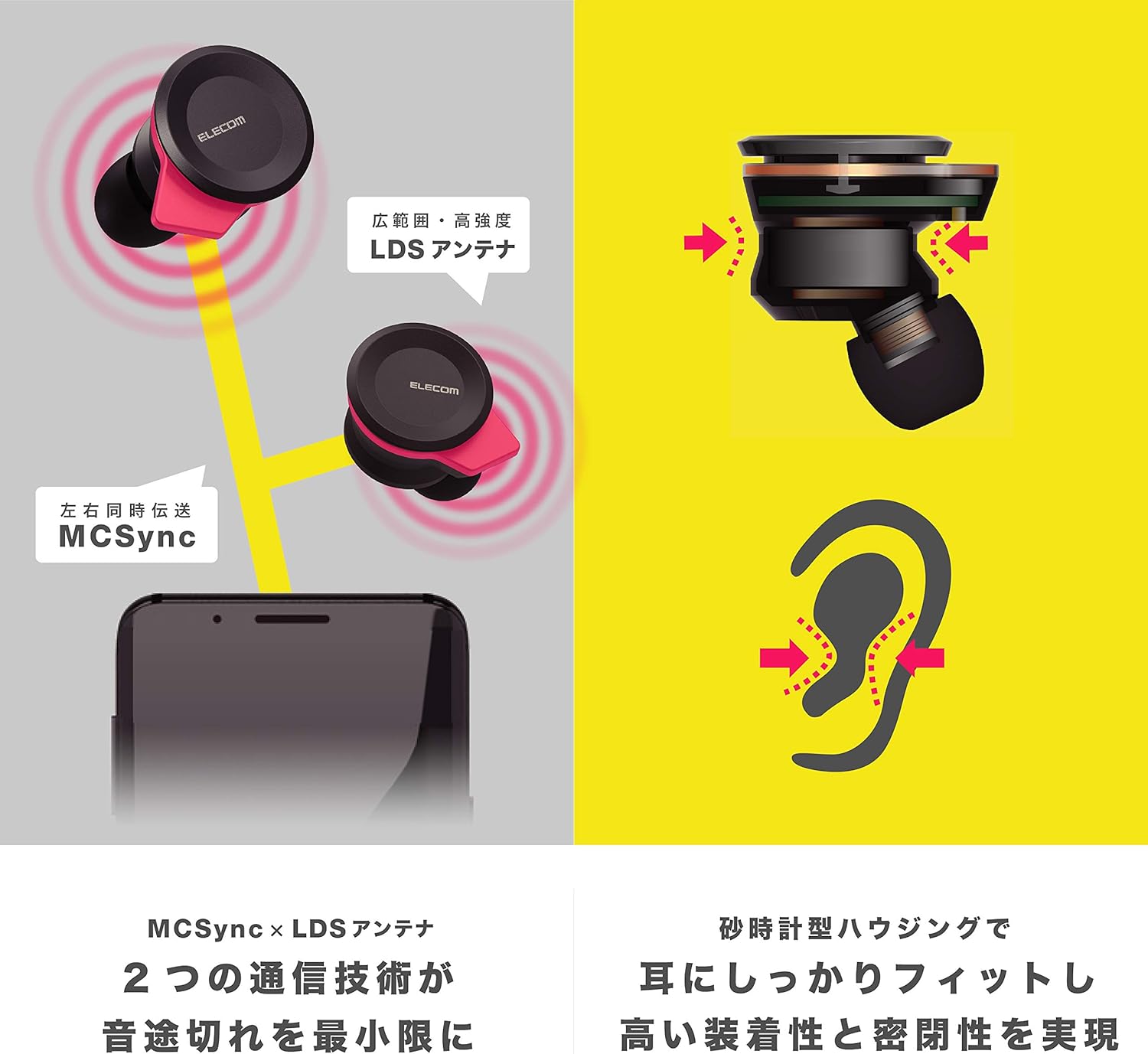
Image: An illustration showing the ergonomic hourglass shape of the earbud designed to fit securely in the ear, alongside a diagram explaining the MCSync and LDS antenna technologies for stable communication.
- Select the ear caps that provide the best seal and comfort from the four included sizes (XS, S, M, L). The M size is pre-installed.
- Nežno umetnite slušalicu u ušni kanal.
- Adjust the earbud so that the hourglass shape is firmly seated between your ear tragus and anti-tragus for a stable fit.
6. Uputstvo za upotrebu
The Elecom LBT-TWS05BK earphones offer various functions for audio playback, calls, and smart assistant interaction.
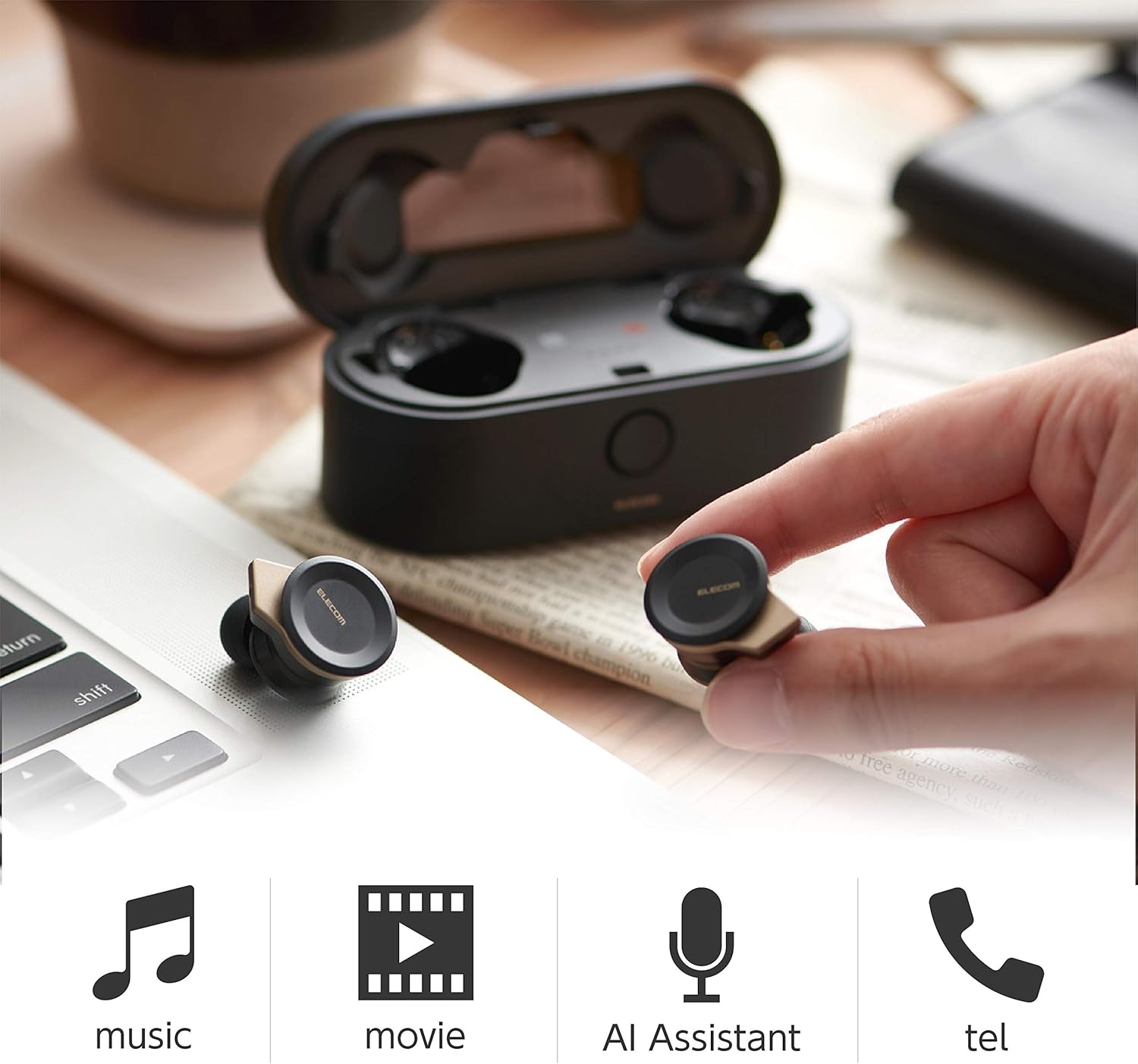
Image: The Elecom LBT-TWS05BK earbuds displayed with icons representing their versatile uses: music playback, movie watching, AI assistant activation, and phone calls.
6.1. Uključivanje/isključivanje
- Uključeno: Remove the earphones from the charging case. They will power on automatically.
- Iskljuciti: Place the earphones back into the charging case. They will power off automatically.
6.2. Reprodukcija muzike
Use the buttons on the earphones to control music playback (specific button functions may vary, refer to quick start guide for exact mapping):
- Pusti/pauza: Jednokratni pritisak na bilo koju slušalicu.
- Sljedeća pjesma: Dvaput pritisnite desnu slušalicu.
- Prethodni zapis: Dvaput pritisnite lijevu slušalicu.
- Kontrola jačine zvuka: Adjust via your connected device or voice assistant.
6.3. Upravljanje pozivima
The right earbud supports calls and voice AI functions.
- Odgovori/Završi poziv: Single press on the right earbud.
- odbiti poziv: Pritisnite i držite desnu slušalicu 2 sekunde.
6.4. Voice AI Activation
Compatible with voice AI assistants like Siri and Google Assistant.
- Activate Voice AI: Triple press on the right earbud.
6.5. External Sound Capture Function
This function allows you to hear surrounding sounds while wearing the earphones.
- Aktiviraj/Deaktiviraj: Pritisnite i držite lijevu slušalicu 2 sekunde.
7. Održavanje
Pravilno održavanje osigurava dugotrajnost i performanse vaših slušalica.
- čišćenje: Za čišćenje slušalica i kućišta za punjenje koristite meku, suhu krpu. Nemojte koristiti abrazivna sredstva za čišćenje ili rastvarače.
- Kapice za uši: Remove and clean ear caps regularly with water and mild soap. Ensure they are completely dry before reattaching.
- Skladištenje: Kada se ne koriste, slušalice čuvajte u kutijici za punjenje kako biste ih zaštitili od prašine i oštećenja.
- Održavanje baterije: Izbjegavajte često potpuno pražnjenje baterije. Redovno je punite kako biste održali njeno zdravlje.
8. Otkrivanje problema
If you encounter issues with your Elecom LBT-TWS05BK earphones, refer to the following common solutions:
- Nema problema sa zvukom/vezom:
- Ensure earphones are charged and powered on.
- Provjerite je li Bluetooth omogućen na vašem uređaju.
- Pokušajte ponovo upariti slušalice sa svojim uređajem.
- Ensure earphones are within the 10m transmission distance.
- Slušalice se ne pune:
- Provjerite je li kabel za punjenje sigurno spojen i na kućište i na izvor napajanja.
- Provjerite da li kućište za punjenje ima dovoljno baterije.
- Provjerite da li su slušalice pravilno postavljene u kućište za punjenje.
- Loš kvalitet zvuka:
- Ensure ear caps provide a good seal in your ear.
- Očistite sve nečistoće iz mlaznica slušalica.
- Približite se povezanom uređaju kako biste poboljšali jačinu signala.
- Voice AI/Calls Not Working on Left Earbud:
- Note that calls and voice AI functions are only compatible with the right earbud.
9. Specifikacije
| Feature | Specifikacija |
|---|---|
| Broj modela | LBT-TWS05BK |
| Communication Method | Bluetooth Standard Version 5.0 |
| Izlaz | Bluetooth klasa snage 1 |
| Maksimalna udaljenost prijenosa | Pribl. 10m |
| Frekvencijski opseg | 2.4GHz |
| Metoda modulacije | FHSS (Frekvencijski skakajući raspršeni spektar) |
| Podržani Bluetooth Profiles | A2DP, AVRCP, HFP, HSP |
| A2DP Compatible Codec | SBC, AAC |
| A2DP Compatible Content Protection | SCMS-T |
| Maximum Registration Capacity | 8 uređaja |
| Multipoint (Simultaneous Standby) | Nije kompatibilno |
| Driver Type | 6.0mm diameter external magnetic dynamic driver (ETEMDriver) |
| Communication Technology | MCSync (MultiCast Synchronization), LDS Antenna |
| Mikrofon | High-quality MEMS microphone with HDVoice |
| Vrijeme neprekidnog razgovora | Pribl. 4.5 sati |
| Continuous Music Playback Time | Pribl. 5 sati |
| Total Playback Time (with charging case) | Pribl. 17.5 sati |
| Port za punjenje | USB Type-C |
| Brzo punjenje | 15 min charge for 1 hour playback |
| Težina | 61 grama (ukupna težina pakovanja) |
| Materijal | Plastika |
| Nivo vodootpornosti | Otporan na vodu |
| Kompatibilni uređaji | Smartphones, Tablets, iOS Devices, Android Devices |
10. Garancija i podrška
For warranty information and customer support, please refer to the official ELECOM webweb-mjesto ili kontaktirajte lokalnog prodavača. Sačuvajte dokaz o kupovini za slučaj reklamacije.