
1. Uvod
This manual provides essential information for the proper use and care of your ProGrade Digital microSDXC UHS-II V60 memory card. This 256GB card is engineered for high-performance applications, including aerial and action cameras, as well as DSLR and mirrorless cameras. It offers UHS-I DDR-104 and U3 speed class ratings for broad compatibility, with read speeds up to 250MB/s and write speeds up to 130MB/s, facilitating efficient capture and transfer of high-resolution photos and 4K video.

Slika 1.1: Prednja strana view of the ProGrade Digital 256GB microSDXC V60 memory card, highlighting its capacity and speed ratings.
2. Ključne karakteristike
- Performanse velike brzine: Features fast write speeds of up to 130MB/s and read speeds of up to 250MB/s, enabling quick capture of high-resolution content and rapid data transfer.
- Svestrana kompatibilnost: Designed for aerial cinematographers, action camera users, and photographers using DSLR or mirrorless cameras. Includes a V60 speed rating for consistent performance in demanding recording scenarios.
- Authenticity and Quality: Each card features a laser-etched custom serial number, ensuring authenticity and quality control. Cards undergo meticulous inspection at the ProGrade Digital Lab.
- Data Recovery Support: Compatible with ProGrade Digital Refresh Pro software (available separately) for advanced data recovery and card maintenance, helping to restore lost photos and videos and optimize card performance.
- Optimized Workflow: Supports efficient data transfer to workstations, reducing waiting times for content offloading.

Image 2.1: A sports car on a road, illustrating the high speed and performance capabilities of the memory card.
3. Postavljanje i instalacija
To begin using your ProGrade Digital microSD Card, follow these steps:
- Identificiraj slot: Locate the microSD card slot on your device (e.g., camera, drone, smartphone, tablet). If your device uses a standard SD card slot, use the included microSD to SD adapter.
- Umetnite karticu: Gently insert the microSD card into the slot with the gold contacts facing down (or as indicated by your device's manual). Ensure it clicks into place. If using the adapter, insert the microSD card into the adapter first, then insert the adapter into the device's SD card slot.
- Format kartice: For optimal performance and to ensure compatibility, it is recommended to format the card using your device's internal formatting function before first use. Refer to your device's instruction manual for specific formatting procedures. Note: Formatting will erase all data on the card.
- Potvrdite prepoznavanje: After formatting, check your device's display or settings to confirm that the microSD card is recognized and shows the correct storage capacity.
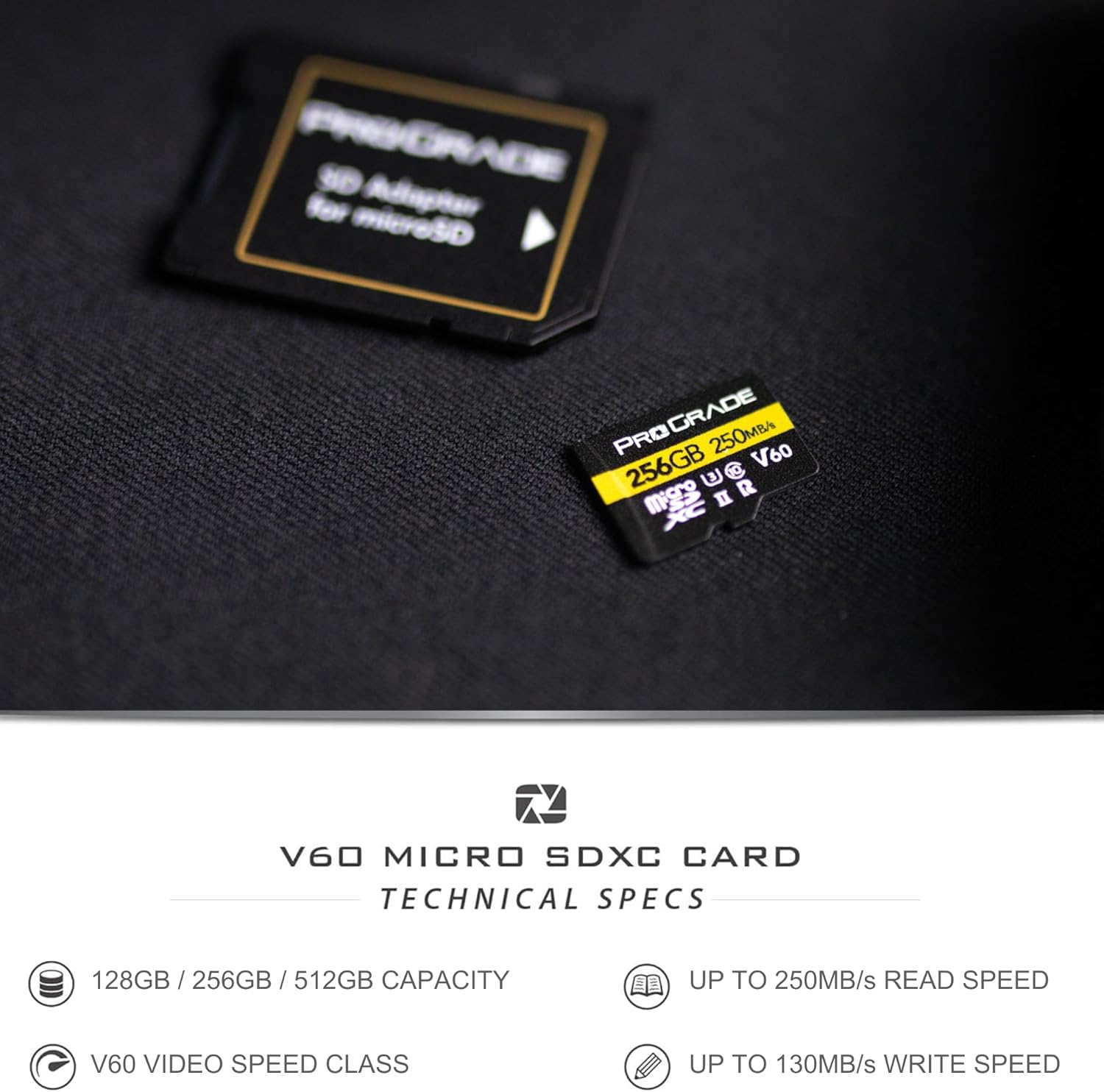
Image 3.1: The ProGrade Digital microSD card shown with its accompanying SD adapter, illustrating how it can be used in devices with standard SD card slots.
4. Uputstvo za upotrebu
Once the microSD card is installed and formatted, you can begin using it to store data.
4.1. Recording Photos and Videos
- Ensure the card is properly inserted and recognized by your camera or device.
- Select your desired recording settings (e.g., resolution, frame rate, compression). The V60 speed class supports high-bitrate 4K video recording.
- Begin recording as per your device's operational instructions. The card's high write speed ensures smooth capture of continuous bursts and high-resolution video.

Image 4.1: A person operating a drone, demonstrating the card's use in aerial photography and videography.

Image 4.2: A photographer with a camera and tripod, representing the card's suitability for professional photography with DSLR and mirrorless cameras.
4.2. Prijenos podataka
- To transfer data to a computer, remove the microSD card from your device.
- Insert the microSD card into a compatible card reader (or the included SD adapter and then into an SD card reader).
- Connect the card reader to your computer. The card will appear as a removable drive.
- Prevucite i ispustite files or use your operating system's file management tools to copy data. The high read speed of 250MB/s will facilitate quick transfers.

Image 4.3: A visual representation of a digital workflow, showing how the card optimizes data transfer and content creation on computers.
5. Održavanje i njega
Proper care extends the life and performance of your memory card:
- fizička zaštita: Store the card in its protective case when not in use to prevent damage from dust, moisture, and static electricity.
- Izbjegavajte ekstremne uslove: Do not expose the card to extreme temperatures, direct sunlight, or strong magnetic fields.
- Čisti kontakti: Ako je potrebno, nježno očistite zlatne kontakte mekom krpom koja ne ostavlja dlačice. Izbjegavajte direktno dodirivanje kontakata prstima.
- Sigurno uklanjanje: Always safely eject the card from your computer or device before physically removing it to prevent data corruption.
- Refresh Pro Software: Consider using ProGrade Digital Refresh Pro software (available separately) to maintain optimal card performance and monitor card health. Flash memory can degrade over time, and this software can help refresh the card's internal memory.
6. Otkrivanje problema
Ako imate problema s microSD karticom, pokušajte sljedeća rješenja:
- Kartica nije prepoznata:
- Provjerite je li kartica u potpunosti i ispravno umetnuta u uređaj ili adapter.
- Try the card in a different compatible device or card reader to rule out a device issue.
- Check if the card's contacts are clean and free of debris.
- Spore performanse:
- Ensure your device and card reader support UHS-II speeds to fully utilize the card's capabilities.
- The card may be nearly full; transfer data to free up space.
- Consider using ProGrade Digital Refresh Pro software to optimize card performance.
- Oštećenje podataka/Greške:
- Uvijek sigurno izbacite karticu prije vađenja.
- If data is corrupted, ProGrade Digital Refresh Pro software may be able to recover files.
- Reformat the card (after attempting data recovery) if errors persist.
If problems persist, contact ProGrade Digital customer support for further assistance.
7. Specifikacije
| Feature | Detalj |
|---|---|
| Brand | ProGrade Digital |
| Naziv modela | secure-digital-cards |
| Vrsta Flash memorije | Micro SDXC |
| Kapacitet | 256 GB |
| Brzina čitanja | Do 250 MB/s |
| Brzina pisanja | Do 130 MB/s |
| Klasa brzine SD-a | Klasa 10 |
| Video klasa brzine | V60 |
| UHS klasa brzine | U3 |
| Hardversko sučelje | microSDXC |
| Kompatibilni uređaji | Camera, smartphone, tablet, personal computer |
| Boja | Crna |
| Težina artikla | 11 grama |
| Dimenzije proizvoda | 5 x 5 x 1 cm |
| UPC | 850009524881 |
8. Garancija i podrška
8.1. Ograničena garancija
This ProGrade Digital microSD Card comes with a Limited Warranty. For specific terms and conditions of the warranty, please refer to the warranty documentation included with your product or visit the official ProGrade Digital website.
8.2. Korisnička podrška
For technical assistance, troubleshooting, or warranty claims, please contact ProGrade Digital customer support. You can find contact information on the official ProGrade Digital webweb-mjestu ili putem prodavača gdje ste kupili proizvod.
Online resursi:
- Posjetite ProGrade Digital Store on Amazon za informacije o proizvodima i ažuriranja.
- Check the official ProGrade Digital website for FAQs, support articles, and contact details.