
BEBIRD R1 Ultra
BEBIRD R1 Ultra Ear Wax Removal Tool Camera Instruction Manual
Brand: BEBIRD
Model: R1 Ultra
Uvod
The BEBIRD R1 Ultra is an advanced visual ear cleaning device designed for comprehensive ear care. It features a high-resolution camera and various attachments to assist in the safe and effective removal of earwax, as well as visual inspection of the ear canal, nose, and throat. This manual provides essential information for the proper setup, operation, and maintenance of your device.
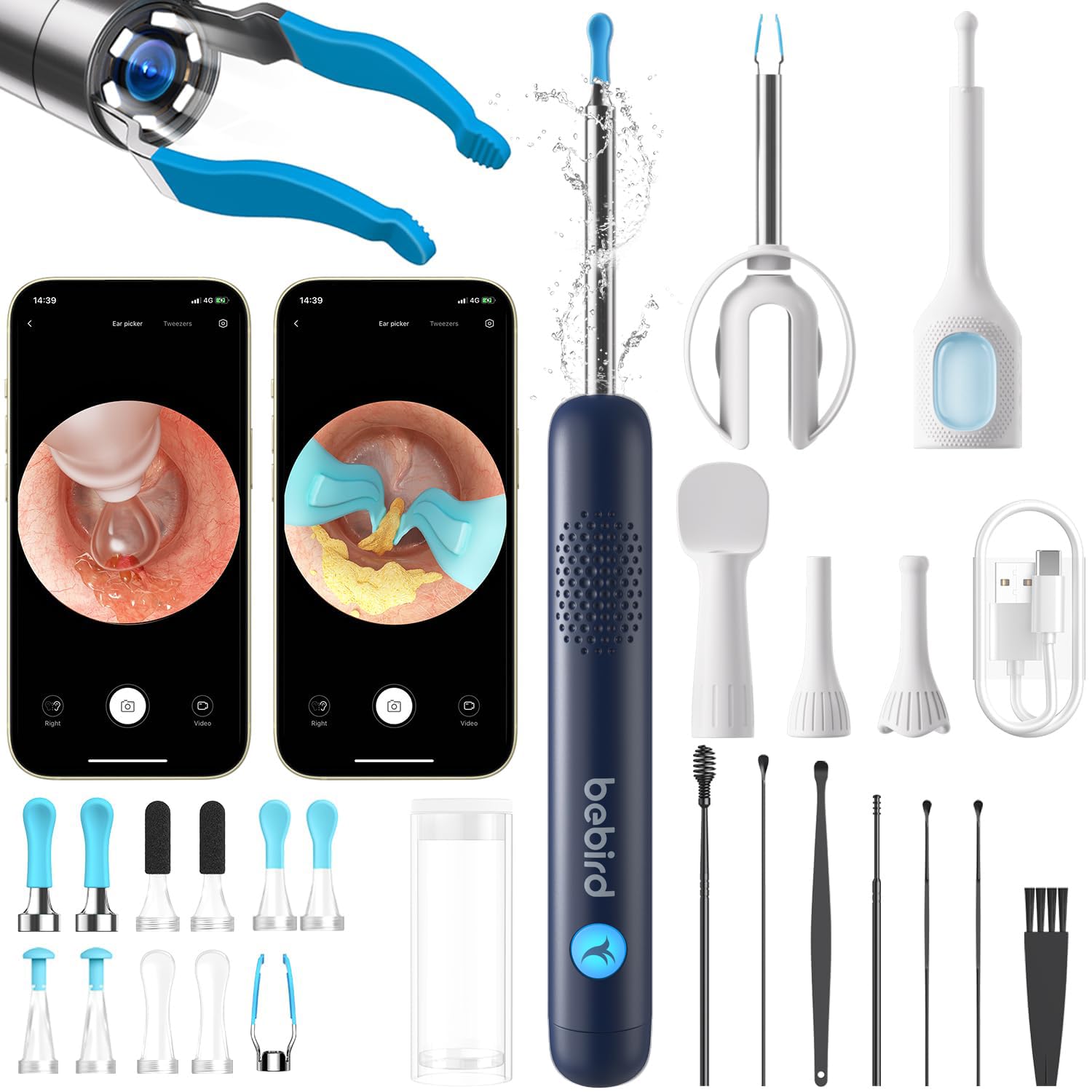
Image: The BEBIRD R1 Ultra device, showcasing its sleek design and integrated camera tip.
Važne informacije o sigurnosti
- Posavjetujte se sa profesionalcem: If you experience ear pain, discharge, or significant hearing loss, consult a medical professional before using this device.
- Nježna upotreba: Always use the device gently and avoid inserting it too deeply into the ear canal to prevent injury to the eardrum or ear canal.
- djeca: Use with children should always be supervised by an adult. The device includes a safety stopper to prevent over-insertion.
- čistoća: Ensure all tips are thoroughly cleaned and disinfected before and after each use to prevent infections.
- Izvor napajanja: Use only the specified charging method and cable provided with the device.
- Otpornost na vodu: The device features an IP67 waterproof lens, but the main body is not fully submersible. Avoid exposing the main unit to excessive moisture.
Sadržaj paketa
Your BEBIRD R1 Ultra package includes the following items:
- BEBIRD R1 Ultra Device with 10-megapixel lens
- Various ear scoop tips (for wet and dry earwax)
- Painless ear tweezers attachment
- Visual ear dropper attachment
- Canal inspection covers (Ear, Nasal, Throat/Oral)
- Kabl za punjenje
- Uputstvo za upotrebu

Image: The BEBIRD R1 Ultra device and its comprehensive set of interchangeable tips and accessories.
Vodič za postavljanje
- Napunite uređaj: Before first use, fully charge the BEBIRD R1 Ultra using the provided charging cable. The indicator light will show charging status.
- Preuzmite aplikaciju: Traži the "Bebird" app on your smartphone's app store (iOS or Android) and install it.
- Uključeno: Press and hold the power button on the device to turn it on. The LED light at the tip will illuminate.
- Povežite se putem Wi-Fi mreže:
- Open your phone's Wi-Fi settings.
- Locate and connect to the Wi-Fi network named "bebird-XXXX" (where XXXX is a unique identifier). No password is usually required.
- Once connected, open the Bebird app. The device should automatically connect to the app.
- Attach a Tip: Select the appropriate tip for your intended use (e.g., ear scoop, tweezers, inspection cover) and gently screw it onto the device's head.

Image: Illustration of the one-tap Wi-Fi pairing process between the BEBIRD device and a smartphone.
Uputstvo za upotrebu
General Use & Visual Inspection
- Ensure the device is connected to the app and a suitable inspection cover is attached.
- Gently insert the device into the area you wish to inspect (ear canal, nostril, or mouth). Observe the live feed on your smartphone screen.
- The 10-megapixel lens provides a clear, magnified view for detailed examination.
- Use the app's features to capture photos or record videos of your examination for personal records or to share with a healthcare professional.

Image: Demonstrates the multi-functional use of the BEBIRD R1 Ultra for oral, nasal, and ear examinations.
Earwax Removal
- Select the appropriate ear scoop tip (for wet or dry wax) or the ear tweezers. Ensure the safety stopper is correctly positioned to prevent over-insertion.
- With the device powered on and connected to the app, carefully guide the tip into the ear canal while observing the live view na vašem ekranu.
- Gently scoop, grip, or scrape the earwax. Avoid aggressive movements or pushing wax deeper into the canal.
- For stubborn earwax, consider using the visual ear dropper with a wax-softening solution (consult a doctor for recommendations).

Image: Various ear cleaning methods using the BEBIRD R1 Ultra, including scooping, tweezing, and using a sponge or dropper.
Using the Visual Dropper
- Attach the visual ear dropper tip to the device.
- Press the sleeve button to draw medication liquid into the dropper.
- Carefully insert the dropper into the ear canal, guided by the live camera view.
- Press the button to administer the medication precisely to the target area.

Image: Step-by-step guide on how to use the precision dropper for ear cleaning and medication application.
Video demonstracije
Video: Demonstration of the BEBIRD C3 Ear Camera Otoscope with Light, showing its functionality for ear inspection.
Video: Krajview of the Bebird R1 Ultra's capabilities for ear, nose, and throat examination.
Video: Illustrates the process of visually guided earwax cleaning using the device.
Video: A general demonstration of the Bebird Ear Wax Removal Tool with Camera.
Održavanje
Cleaning the Tips
- After each use, carefully remove the attached tip by unscrewing it.
- Clean the tip with rubbing alcohol or an appropriate disinfectant. Ensure no debris remains.
- Allow the tip to air dry completely before reattaching or storing.
- The IP67 waterproof lens allows for easy cleaning of the camera tip itself with a damp cloth, but avoid submerging the main device body.
Skladištenje
- Store the BEBIRD R1 Ultra and its accessories in a clean, dry place, away from direct sunlight and extreme temperatures.
- Čuvati van domašaja djece.
Rješavanje problema
| Problem | Mogući uzrok | Rješenje |
|---|---|---|
| Uređaj se ne uključuje | Niska baterija | U potpunosti napunite uređaj. |
| Nije moguće povezati se na Wi-Fi | Incorrect Wi-Fi network selected or device not powered on. | Ensure the device is on and select the correct "bebird-XXXX" network. Restart both the device and your phone's Wi-Fi. |
| Blurry image on app | Camera lens is dirty or focus issue. | Clean the camera lens gently with a soft cloth. The device has a fixed focus, ensure proper distance. |
| Tips breaking easily | Excessive force or improper storage. | Use gentle pressure. Store tips properly to prevent damage. Replace worn or damaged tips. |
Specifikacije
- Model: BEBIRD R1 Ultra
- Rezolucija kamere: 10 Megapixels (1080P HD)
- povećanje: 3X
- Objektiv: 3-layer anti-distortion lenses
- Ocjena vodootpornosti: IP67 (lens only)
- Povezivanje: Wi-Fi (20fps WIFI Chip for seamless visuals)
- Žiroskop: 9-Axis Gyroscope for steady image orientation
- Dimenzije: 2 x 2 x 2 inches; 2.2 ounces (device only, approximate)
- Proizvođač: Heifeng Zhizao (Shenzhen) Technology Co., Ltd
- Prvo dostupno: 16. maja 2020
- baterije: 1 9V batteries required (as per product specifications, typically refers to internal rechargeable battery for this type of device).

Image: Details on the BEBIRD R1 Ultra's 10-megapixel camera, 1080P HD resolution, and IP67 waterproof lens.
Garancija i podrška
The BEBIRD R1 Ultra typically comes with a 1 godine garancije from the date of purchase. Please refer to your product packaging or the official BEBIRD webstranicu za specifične uslove i odredbe garancije.
Korisnička podrška
For any questions, technical assistance, or warranty claims, please contact BEBIRD customer support through the following methods:
- Preko Amazona:
- Go to "Your Orders" on Amazon.
- Locate your BEBIRD R1 Ultra order.
- Select "Get product support" or "Chat" to contact the seller.
- Službeno Webstranica: Visit the official BEBIRD website for further support options and contact information.

Image: A family utilizing the BEBIRD R1 Ultra for home ear care, highlighting its user-friendly design.
Ask a question about this manual
Ask about setup, troubleshooting, compatibility, parts, safety, or missing instructions. Manuals+ will review the question and use this page’s manual context to help answer it.