
ToLuLu Webcam
ToLuLu 1080P HD WebCam Korisnički priručnik
Model: Webcam
1. Uvod
Thank you for choosing the ToLuLu 1080P HD Webcam. This manual provides detailed instructions for the proper setup, operation, and maintenance of your webcam. Designed for professional-quality video calls, recording, conferencing, and gaming, this webcam delivers crisp images and clear video at 30 frames per second. It features automatic light correction, HDR technology, and a built-in noise-reduction microphone to ensure optimal performance in various lighting conditions.
2. Šta se nalazi u kutiji
- ToLuLu 1080P HD Webcam
- Uputstvo za upotrebu
- Zaštita privatnosti
- Stalak za stativ
3. Proizvod je gotovview
The ToLuLu 1080P HD Webcam is equipped with a full HD glass lens and an integrated digital stereo microphone. It features a flexible clip for mounting on various displays and a standard tripod thread for the included tripod stand. A privacy cover is also provided for enhanced security.

Image 3.1: ToLuLu 1080P Webcam with included privacy cover and tripod.

Slika 3.2: Webcam with privacy cover and tripod stand. The privacy cover can be closed when the webkamera nije u upotrebi.
4. Upute za postavljanje
- Montaža Webkamera:
The webcam features an adjustable universal clip. You can place it securely on top of your laptop screen, desktop monitor, or any flat surface. For alternative placement, attach the webcam to the included tripod stand using the standard tripod thread at the bottom of the clip. - Povezivanje na Vaš računar:
Spojite USB kabel iz webcam to an available USB port on your computer (laptop, desktop, Mac, PC). The webcam is designed for plug-and-play functionality, meaning no additional drivers are typically required for most operating systems. - Početno priznanje:
Vaš računar bi trebao automatski prepoznati i instalirati webcam. A notification may appear indicating that the device is ready for use. - Konfiguracija softvera:
Open your preferred video conferencing or streaming application (e.g., Zoom, Skype, OBS, YouTube, Facetime). Navigate to the video and audio settings within the application and select the "ToLuLu Webcam" kao vaš video ulazni uređaj i njegov integrirani mikrofon kao vaš audio ulazni uređaj.

Image 4.1: Connecting the webkamera putem USB-a za plug-and-play podešavanje.
5. Uputstvo za upotrebu
- Kvalitet videa: The 1080P Full HD glass lens delivers clear video at 30 frames per second. The webcam features automatic light correction and HDR technology, which adjusts color and brightness for natural lighting, even in dim or poorly backlit environments.
- Kvalitet zvuka: The built-in digital stereo microphone includes automatic noise reduction, ensuring your voice is captured clearly from up to 10 feet away.
- Široki ekran View: The fixed-focus lens provides a 110-degree wide-angle view, suitable for individual use or group video conferencing.
- Zaštita privatnosti: Use the included privacy cover to physically block the camera lens when not in use. This protects your privacy and prevents unauthorized access to your video feed.

Image 5.1: Comparison illustrating the clarity of the 1080P Full HD webNarandžasta.

Slika 5.2: webcam's 110-degree wide-angle view, suitable for multiple participants.
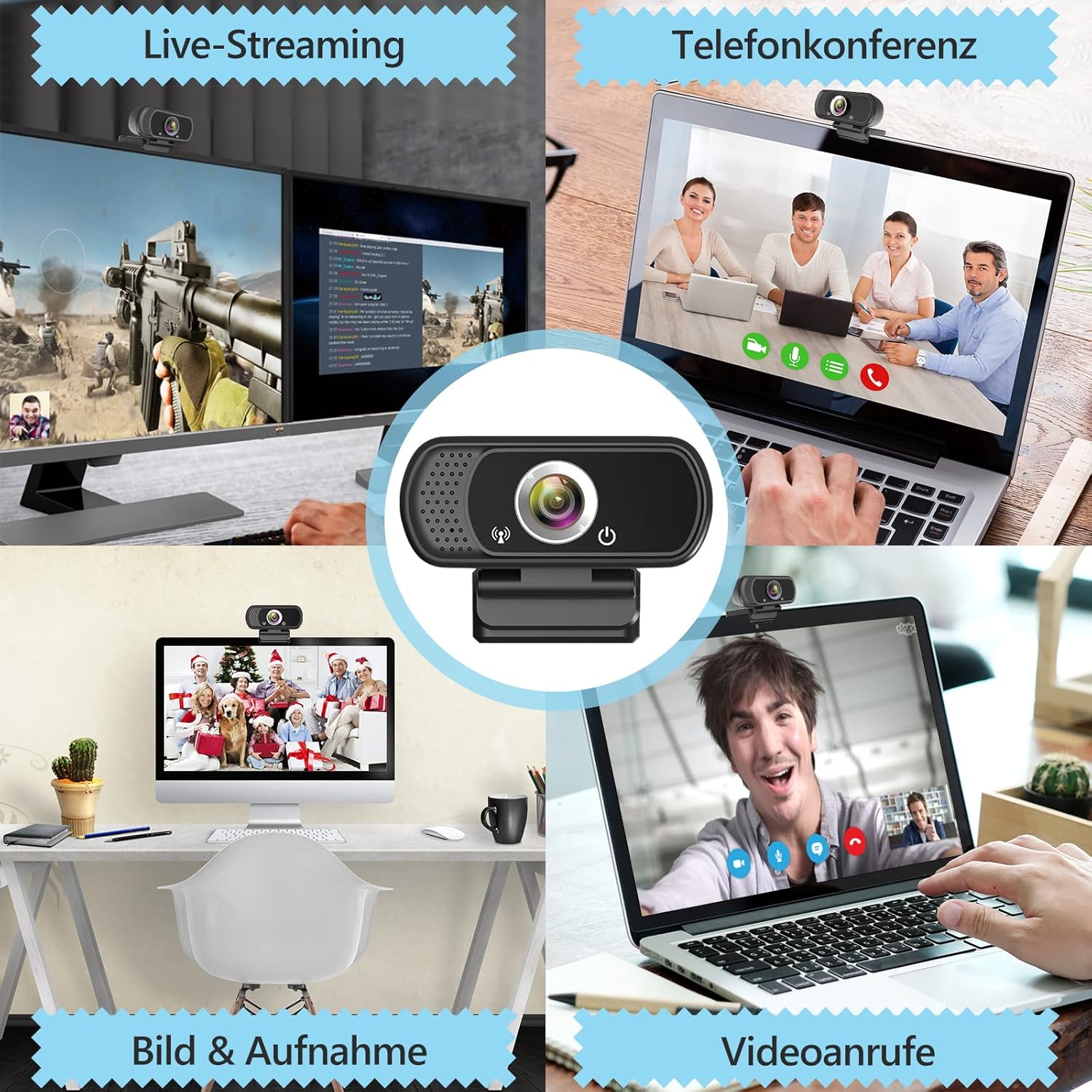
Slika 5.3: Primjeramples of webcam use in live streaming, teleconferencing, and video calls.
6. Kompatibilnost
The ToLuLu 1080P HD Webcam offers broad compatibility with various operating systems and applications:
- Operativni sistemi: Windows 2000, XP, 7, 8, 10 and above; macOS 10.6 and above; Chrome OS 29.0.1547 or above; Android V5.0 or above; Smart TV.
- Hardware Platforms: Mac, PC, Laptops, Desktops, Smart TVs.
- Kompatibilne aplikacije: Skype, OBS, YouTube, Facebook, Twitch, Facetime, Zoom, Xbox One, Hangouts, and more.

Slika 6.1: webcam is compatible with multiple operating systems and popular communication platforms.
7. Održavanje
- Čišćenje sočiva: Koristite meku krpu koja ne ostavlja dlačice, posebno dizajniranu za optička sočiva, da biste nježno obrisali webcam lens. Avoid abrasive materials or harsh chemicals, which can scratch or damage the lens.
- Generalno čišćenje: Obrišite tijelo webkamera sa mekim, damp cloth. Ensure no moisture enters the device.
- Skladištenje: Kada se ne koristi, pohranite webcam in a clean, dry place. Utilize the privacy cover to protect the lens from dust and scratches.
- Održavanje kablova: Izbjegavajte pretjerano savijanje ili uvrtanje USB kabela kako biste spriječili unutarnja oštećenja.
8. Otkrivanje problema
| Problem | Mogući uzrok | Rješenje |
|---|---|---|
| WebKamera nije detektovana / Nema slike | USB connection issue, driver conflict, or incorrect software selection. |
|
| Loš kvalitet slike (mutna, tamna, zrnasta) | Insufficient lighting, dirty lens, or software settings. |
|
| Microphone not working / Poor audio quality | Microphone not selected, system audio settings, or environmental noise. |
|
| Povremeni problemi s vezom | Loose USB connection, USB port power issues, or system resource conflicts. |
|
9. Specifikacije
| Feature | Detalj |
|---|---|
| Rezolucija video snimanja | 1080p Full HD (1920 x 1080) pri 30 sličica u sekundi |
| Lens Type | Full HD Glass Lens, Fixed Focus |
| Polje of View | 110 Degrees Widescreen |
| Mikrofon | Built-in Digital Stereo Microphone with Automatic Noise Reduction |
| Light Correction | Automatic Light Correction, HDR Technology |
| Povezivanje | USB Plug & Play (1.8m / 6 feet USB cable) |
| Montaža | Adjustable Universal Clip, Tripod Ready |
| Operativni sistemi | Windows 2000/XP/7/8/10+, macOS, Chrome OS, Android, Smart TV |
| Dimenzije (DxŠxV) | 3.8 x 3.1 x 2.5 inča |
| Težina artikla | 6.3 unce |
10. Garancija i podrška
ToLuLu is committed to providing quality products and customer satisfaction.
- Politika povrata: This product is eligible for return within 30 days for an exchange or refund, subject to the retailer's return policy.
- tehnička podrška: ToLuLu offers lifetime professional technical team support for this product.
For further assistance or inquiries, please refer to the contact information provided with your purchase or visit the official ToLuLu support channels.
Ask a question about this manual
Ask about setup, troubleshooting, compatibility, parts, safety, or missing instructions. Manuals+ will review the question and use this page’s manual context to help answer it.