
1. Uvod i krajview
Thank you for choosing the Macally BTNUMKEYPRO Bluetooth Numeric Keypad. This manual provides detailed instructions for setting up, operating, and maintaining your new device. This slim, rechargeable 35-key wireless numeric keypad is designed to enhance data entry efficiency and is compatible with a wide range of devices, including Mac, Windows, iOS, and Android systems.
Ključne karakteristike uključuju:
- Simple Bluetooth Setup: Easy pairing for wireless convenience.
- Poboljšana produktivnost: 35 scissor switch keys, including 6 shortcut keys and 4 arrow keys, for efficient data entry.
- Izdržljiv dizajn: Slim aluminum body for aesthetics and longevity.
- Dugotrajna punjiva baterija: Built-in 300mAh battery, rechargeable via USB-C (cable included), with an ON/OFF switch to conserve power.
- Quality Typing Experience: Scissor switch keys provide semi-silent, tactile, and responsive keystrokes.
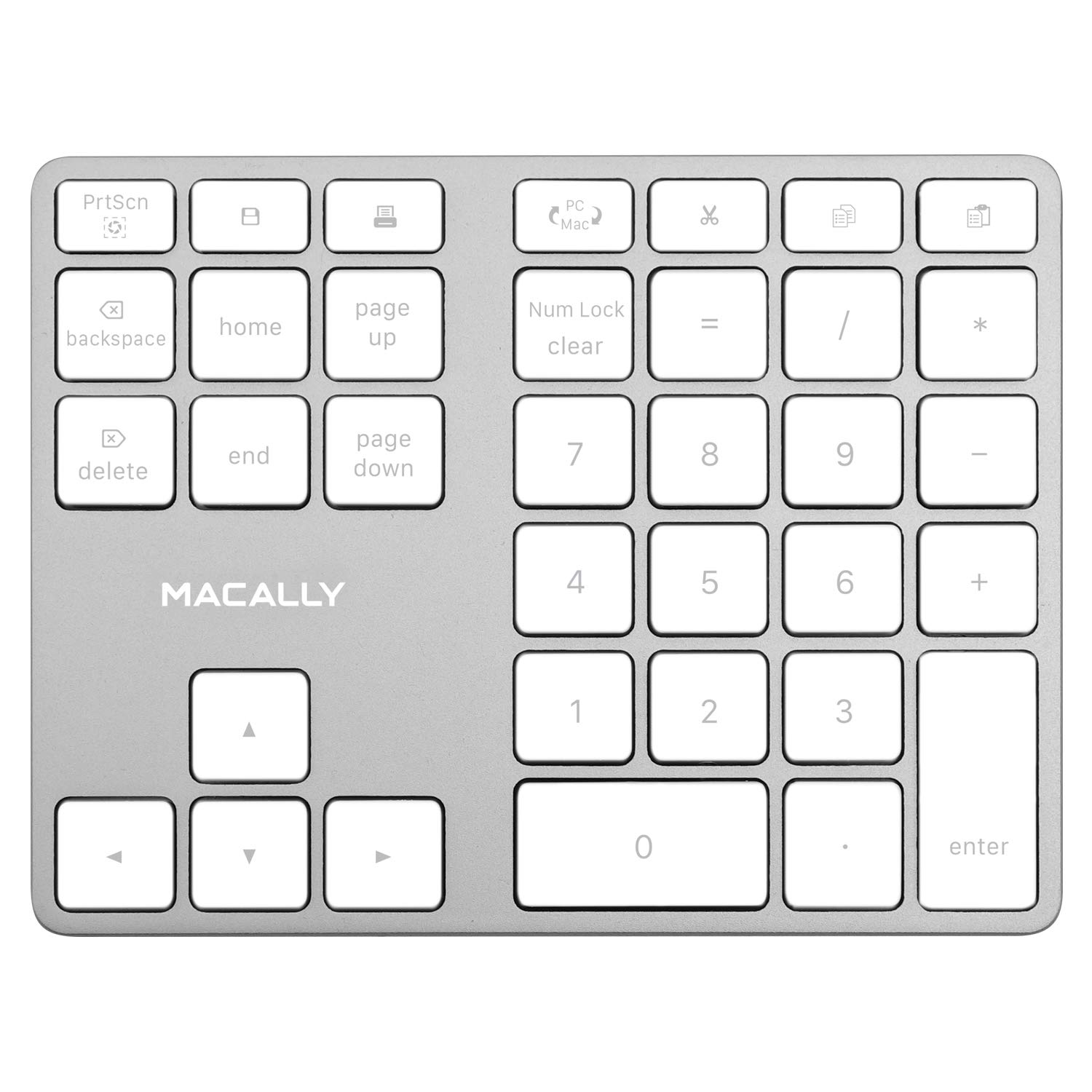
Image 1.1: The Macally BTNUMKEYPRO Bluetooth Numeric Keypad.
2. Upute za postavljanje
2.1 Punjenje tastature
Before initial use, fully charge the numeric keypad. Connect the included USB-C cable to the keypad's charging port and the other end to a USB power source (e.g., computer USB port, USB wall adapter). The charging indicator light will show the charging status.

Image 2.1: Connecting the USB-C charging cable to the keypad.
2.2 Bluetooth uparivanje
- Provjerite je li tastatura napunjena.
- Locate the ON/OFF switch on the side or back of the keypad and slide it to the 'ON' position.
- Press and hold the Bluetooth pairing button (often indicated by a Bluetooth symbol) until the LED indicator starts blinking, signifying it is in pairing mode.
- Na računaru, tabletu ili pametnom telefonu omogućite Bluetooth.
- Traži available Bluetooth devices. The keypad should appear as "Macally BTNUMKEYPRO" or similar.
- Odaberite tastaturu s popisa da biste započeli uparivanje. Slijedite upute na ekranu da biste dovršili povezivanje.
- Once successfully paired, the LED indicator on the keypad will stop blinking and remain solid or turn off, depending on the model.

Image 2.2: The keypad connected wirelessly via Bluetooth.
Video 2.1: Official product video demonstrating the Aluminum 35-Key Rechargeable Bluetooth Numeric Keypad's features and use.
3. Uputstvo za upotrebu
3.1 Key Layout and Functions
The BTNUMKEYPRO features a 35-key layout designed for efficient data entry. This includes a standard numeric pad, 6 dedicated shortcut keys, and 4 arrow keys.
- Numeričke tipke (0-9): Standard number input.
- Aritmetički operatori (+, -, *, /): Za proračune.
- Decimalna tačka (.): For fractional numbers.
- Unesite ključ: Confirms input or moves to the next field.
- Prečice: Dedicated keys for common functions such as Home, End, Page Up, Page Down, Delete, and Clear. Refer to the keypad's keycaps for specific labels.
- Tipke sa strelicama: For navigation within documents or spreadsheets.

Image 3.1: The 35-key layout optimized for data entry.
3.2 Upravljanje napajanjem
To conserve battery life, slide the ON/OFF switch to the 'OFF' position when the keypad is not in use for extended periods. The keypad also features an automatic sleep mode to save power during short periods of inactivity.
4. Održavanje
4.1 Čišćenje
To clean the keypad, gently wipe the surface with a soft, damp cloth. Avoid using harsh chemicals, abrasive cleaners, or excessive moisture, as these can damage the device. Ensure the keypad is powered off before cleaning.
4.2 Njega baterija
The keypad uses a built-in rechargeable lithium-ion battery. For optimal battery longevity:
- Izbjegavajte često potpuno pražnjenje baterije.
- Store the keypad in a cool, dry place when not in use for extended periods.
- Charge the battery regularly, even if the keypad is not used daily.
5. Otkrivanje problema
5.1 Keypad Not Connecting via Bluetooth
- Provjerite snagu: Ensure the keypad is turned ON and has sufficient battery charge.
- Ponovo uđite u način rada za uparivanje: Turn the keypad OFF, then ON again, and re-enter Bluetooth pairing mode by holding the pairing button.
- Bluetooth uređaj: Verify that Bluetooth is enabled on your computer or device and that it is discoverable.
- Zaboravi uređaj: If previously paired, remove or "forget" the keypad from your device's Bluetooth settings and attempt to pair again.
- Udaljenost: Ensure the keypad is within the effective Bluetooth range (approximately 30 feet or 10 meters) of your device.
- smetnje: Udaljite se od drugih bežičnih uređaja koji mogu uzrokovati smetnje.
5.2 Keys Not Responding or Double-Typing
- Napunite bateriju: A low battery can sometimes cause erratic key behavior. Fully charge the keypad.
- Ponovno uparivanje Bluetootha: Disconnect and re-pair the Bluetooth connection.
- Čisti ključevi: Ensure no debris is lodged under the keys. Gently clean around the affected keys.
- Testirajte na drugom uređaju: If possible, test the keypad with another compatible device to determine if the issue is with the keypad or the original device's settings.
5.3 Keypad Not Turning On
- Charge Keypad: Connect the keypad to a power source using the USB-C cable and allow it to charge for at least 30 minutes.
- Provjerite kabl: Ensure the USB-C charging cable is not damaged and is properly connected.
6. Specifikacije
| Feature | Detalj |
|---|---|
| Brand | Macally |
| Broj modela | BTNUMKEYPRO |
| Tehnologija povezivanja | Bluetooth |
| Broj ključeva | 35 |
| Tip prekidača | Scissor Switch |
| Izvor napajanja | Punjiva baterija (300mAh) |
| Dimenzije proizvoda (D x Š x V) | 5.7" x 4.5" x 0.47" |
| Materijal kućišta | Aluminijum |
| Kompatibilni uređaji | MacBook, iPad, iPhone, iOS, Laptop, Windows, Android, PC |
| Minimum Required Operating System | Mac OS X 10.6 Snow Leopard, Windows 7 |
| Boja | Srebro |
7. Garancija i podrška
Macally products are designed for reliability and performance. This product comes with a standard manufacturer's warranty against defects in materials and workmanship. For specific warranty terms and conditions, please refer to the warranty card included with your product or visit the official Macally website.
If you encounter any issues or require technical assistance, please contact Macally customer support through their official website or the contact information provided in your product packaging. Please have your model number (BTNUMKEYPRO) and proof of purchase ready when contacting support.