
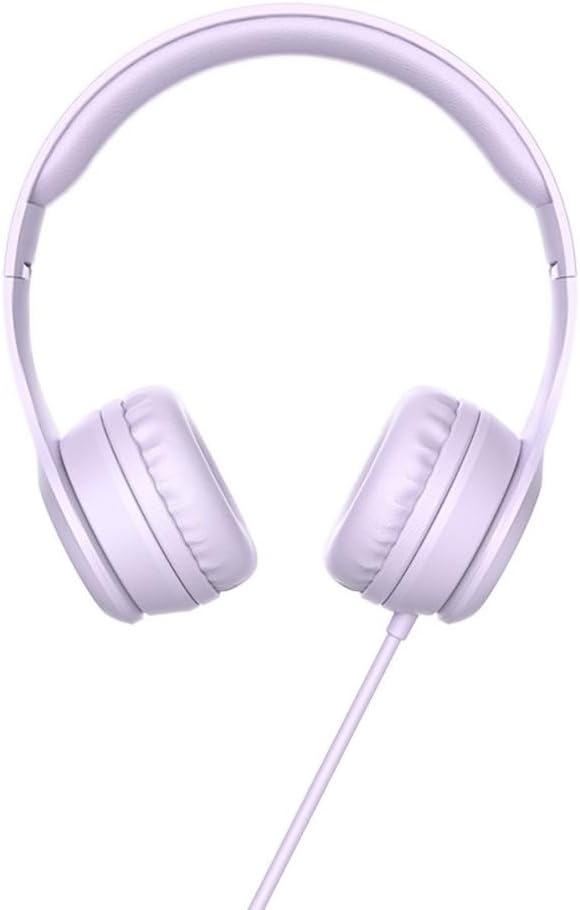
Hoco W21 Graceful Charm Wired Headphones User Manual
Model: W21 Purple | Brand: HOCO
1. Uvod
Thank you for choosing the Hoco W21 Graceful Charm Wired Headphones. This manual provides detailed instructions for the proper use, setup, and maintenance of your new headphones. Please read this manual thoroughly before using the product to ensure optimal performance and longevity.
2. Značajke proizvoda
- govornik: 40mm drivers for clear audio.
- Snaga: Rated power of 10mW; maximum input power of 50mW.
- Povezivanje: Standard Ø3.5mm audio plug for universal compatibility.
- kabel: High elastic braided cable with a length of 1.2m for durability and flexibility.
- mikrofon: Integrated controller with a microphone for hands-free communication.
- Kontrola: One-button operation control for easy management of calls and music.
3. Sadržaj paketa
Molimo Vas da provjerite sadržaj paketa nakon raspakivanja:
- Hoco W21 Graceful Charm Wired Headphones
- Korisnički priručnik (ovaj dokument)

4. Podešavanje
- Raspakujte slušalice: Pažljivo izvadite slušalice iz njihovog pakovanja.
- Identify the Audio Plug: Locate the Ø3.5mm audio plug at the end of the headphone cable.
- Povežite se na uređaj: Insert the Ø3.5mm audio plug into the headphone jack of your mobile phone, tablet, or any compatible audio device. Ensure the plug is fully inserted for proper audio output.
- Podesi uklapanje: Place the headphones over your ears. Adjust the headband to ensure a comfortable and secure fit. The earcups are designed to sit over the ear.

5. Uputstvo za upotrebu
The Hoco W21 headphones feature a convenient one-button inline control for managing audio and calls.
5.1 Reprodukcija muzike
- Pusti/pauza: Pritisnite dugme jednom da biste reprodukovali ili pauzirali trenutnu numeru.
- Sljedeća pjesma: Pritisnite dugme brzo dva puta da biste prešli na sljedeću pjesmu.
- Prethodni zapis: Pritisnite dugme brzo tri puta da biste se vratili na prethodnu numeru.
5.2 Upravljanje pozivima
- Odgovori/Završi poziv: Pritisnite dugme jednom da biste odgovorili na dolazni poziv ili prekinuli tekući poziv.
- odbiti poziv: Pritisnite i držite dugme otprilike 2 sekunde da biste odbili dolazni poziv.

6. Održavanje
Proper maintenance will extend the life of your headphones.
- čišćenje: Koristite meku, suhu krpu za čišćenje slušalica i trake za glavu. Nemojte koristiti jake hemikalije ili abrazivne materijale.
- Skladištenje: When not in use, store the headphones in a clean, dry place away from extreme temperatures and direct sunlight. Avoid tangling the cable.
- Izbjegavajte vlagu: Ne izlažite slušalice vodi ili prekomjernoj vlazi. Nisu vodootporne.
- Pažljivo rukujte: Avoid dropping the headphones or subjecting them to strong impacts. Do not pull the cable forcefully.

7. Otkrivanje problema
| Problem | Mogući uzrok | Rješenje |
|---|---|---|
| Nema zvuka ili je mala jačina zvuka |
|
|
| Mikrofon ne radi |
|
|
| Izobličenje zvuka |
|
|
8. Specifikacije
| Broj modela | W21 Purple |
| Brand | HOCO |
| Prečnik zvučnika | 40mm |
| Nazivna snaga | 10mW |
| Maksimalna ulazna snaga | 50mW |
| Audio utikač | Ø3.5mm |
| Vrsta kabla | High elastic braid |
| Dužina kabla | 1.2m |
| Mikrofon | Controller with mic |
| Wire Control | One-button operation control |
| Dimenzije proizvoda | 19.4 x 17.3 x 7.4 cm |
| Težina proizvoda | 109 g |
| Boja | Ljubičasta |
9. Garancija i podrška
Hoco products are manufactured to high quality standards. For information regarding warranty coverage and customer support, please refer to the warranty card included with your purchase or visit the official Hoco webSačuvajte račun kao dokaz o kupovini u slučaju bilo kakvih reklamacija.
For technical assistance or further inquiries, please contact your retailer or the authorized service center in your region.