
1. Uvod
Hvala na kupoviniasing the Moukey MAMP1 220W Bluetooth Dual Channel Power Amplifier. Ovo amplifier is designed to provide powerful and versatile audio amplification for various applications, including karaoke, home theater systems, and general audio playback. It features multiple input options, Bluetooth 5.0 connectivity, and intuitive controls for an enhanced audio experience. Please read this manual thoroughly before use to ensure proper operation and to maximize the product's performance.
2. Sigurnosna uputstva
Da biste spriječili strujni udar, požar ili oštećenje uređaja, molimo vas da se pridržavate sljedećih sigurnosnih mjera opreza:
- Ne izlažite ovaj uređaj kiši ili vlazi.
- Ne otvarajte casing. Unutra nema dijelova koje korisnik može sam servisirati. Za sve servisne radove obratite se kvalifikovanom osoblju.
- Osigurajte napajanje voltage odgovara zahtjevima navedenim na uređaju.
- Place the unit on a stable, flat surface with adequate ventilation. Do not block ventilation openings.
- Držite uređaj dalje od izvora toplote, direktne sunčeve svjetlosti i prekomjerne prašine.
- Disconnect the power plug from the outlet if the unit will not be used for an extended period.
- Ne rukujte uređajem mokrim rukama.
3. Sadržaj paketa
Provjerite da li su sve stavke prisutne u paketu:
- Moukey MAMP1 Power AmpLifier Unit
- Daljinski upravljač
- FM antena
- Korisnički priručnik (ovaj dokument)
4. Proizvod je gotovview
4.1 Front Panel Controls and Functions
The front panel provides access to all primary controls and input ports for easy operation.

Image: Detailed diagram of the Moukey MAMP1 front panel, highlighting each control and port with corresponding numbers.
- Prekidač: Uključuje ili isključuje jedinicu.
- USB / SD Slot: Za reprodukciju zvuka files from USB drives (max 32GB) or SD cards (max 16GB).
- Dugme za način rada: Ciklično se mijenjaju načini unosa (Bluetooth, USB, SD, AUX, FM).
- BT dugme: Direktno prebacuje u Bluetooth način rada.
- Prev Button: Preskače na prethodnu pjesmu/stanicu.
- Dugme za reprodukciju/pauzu: Reprodukuje ili pauzira reprodukciju zvuka.
- Dalje dugme: Preskače na sljedeću pjesmu/stanicu.
- Led displej: Shows current mode, track information, or frequency.
- Folder / Track: Navigates through folders or tracks on USB/SD.
- Glavno dugme za jačinu zvuka: Podešava ukupnu jačinu zvuka na izlazu.
- Priključak za slušalice: 3.5mm output for monitor headphones.
- Microphone 1 Input: 6.35 mm priključak za povezivanje mikrofona.
- Microphone 2 Input: 6.35mm jack for a second microphone connection.
- Dugme za jačinu zvuka mikrofona: Podešava jačinu zvuka povezanih mikrofona.
- Echo dugme: Kontrolira efekat odjeka za mikrofone.
- bas dugme: Podešava niskofrekventni audio izlaz.
- Visokotonsko dugme: Podešava visokofrekventni audio izlaz.
- Dugme za balans: Podešava balans lijevog/desnog kanala.
- AUX ulazni priključak: 3.5 mm ulaz za eksterne audio uređaje.
- Birač ulaza: Rotary switch to select between CD, AUX, DVD, and MP3/W inputs.
4.2 Priključci stražnje ploče
Na zadnjoj ploči nalaze se glavni audio ulazni i izlazni priključci.

Slika: Stražnja strana view of the Moukey MAMP1 amplifier, koji prikazuje sve ulazne i izlazne portove.

Image: Detailed diagram of the Moukey MAMP1 rear panel, highlighting each connection point.
- Audio Input for DVD (RCA): Connect DVD players or other audio sources.
- Audio Input for CD (RCA): Connect CD players or other audio sources.
- Line Out Jack (RCA): For connecting to another amppodizač ili uređaj za snimanje.
- Priključak za FM antenu: Spojite priloženu FM antenu za radio prijem.
- Speaker Output Jacks: Connect passive speakers (4-16 Ohm impedance).
- Ulaz za kabel za napajanje: Povežite kabl za napajanje naizmeničnom strujom.
5. Podešavanje
5.1 Postavljanje
Postavite amplifier on a flat, stable surface. Ensure there is sufficient space around the unit for proper ventilation to prevent overheating.
5.2 Priključak za napajanje
Connect the power cable to the Power Cable Input on the rear panel of the amplifier, then plug the other end into a suitable AC power outlet (115V AC).
5.3 Priključivanje zvučnika
The MAMP1 amplifier supports two sets of passive speakers with an impedance of 4-16 Ohms. Use appropriate speaker wire to connect your speakers to the Speaker Output Jacks on the rear panel.

Image: Diagram illustrating how to connect speakers to the amplifier's binding posts.
- Rotate and loosen the speaker knob on the binding post.
- Insert the bare wire (remove approximately 10mm of insulation) into the hole. Ensure correct polarity (+ to + and - to -).
- Tighten the knobs to secure the wires firmly.
5.4 Input Device Connection
Connect your audio sources (CD player, DVD player, tuner, etc.) to the corresponding RCA Audio Input jacks on the rear panel. For microphones, use the 6.35mm jacks on the front panel. For 3.5mm AUX devices, use the front panel AUX Input Jack.
6. Uputstvo za upotrebu
6.1 Uključivanje/isključivanje napajanja
Pritisnite Prekidač za napajanje na prednjoj ploči da biste uključili amplifier on or off. The LED display will illuminate when the unit is powered on.
6.2 Odabir ulaza
Koristite Dugme za način rada on the front panel or the remote control to cycle through available input sources (Bluetooth, USB, SD, AUX, FM). Alternatively, use the Birač ulaza knob on the front panel for RCA inputs (CD, AUX, DVD, MP3/W).
6.3 Kontrola jačine zvuka
- Glavni volumen: Rotirajte Glavno dugme za jačinu zvuka to adjust the overall output level of the amplifier.
- Jačina zvuka mikrofona: Koristite Gumb za jačinu zvuka mikrofona to control the volume of connected microphones independently.
6.4 Kontrola tona
Adjust the audio characteristics using the Bass Knob i Treble Knob to suit your preference. The Ručica za balans allows adjustment of the left and right channel output levels.

Image: Close-up of the Moukey MAMP1 showing the Bass and Treble adjustment knobs.
6.5 Echo Control
Okrenite Echo Knob to add or reduce the echo effect on the microphone inputs, suitable for karaoke applications.
6.6 Bluetooth uparivanje
Za povezivanje Bluetooth uređaja:
- Pritisnite BT dugme or cycle through modes until "BLUE" appears on the LED display.
- Omogućite Bluetooth na svom pametnom telefonu, tabletu ili računaru.
- Traži "Moukey MAMP1" in your device's Bluetooth settings and select it to pair.
- Once paired, you can stream audio wirelessly. Playback will temporarily pause during phone calls to protect privacy.
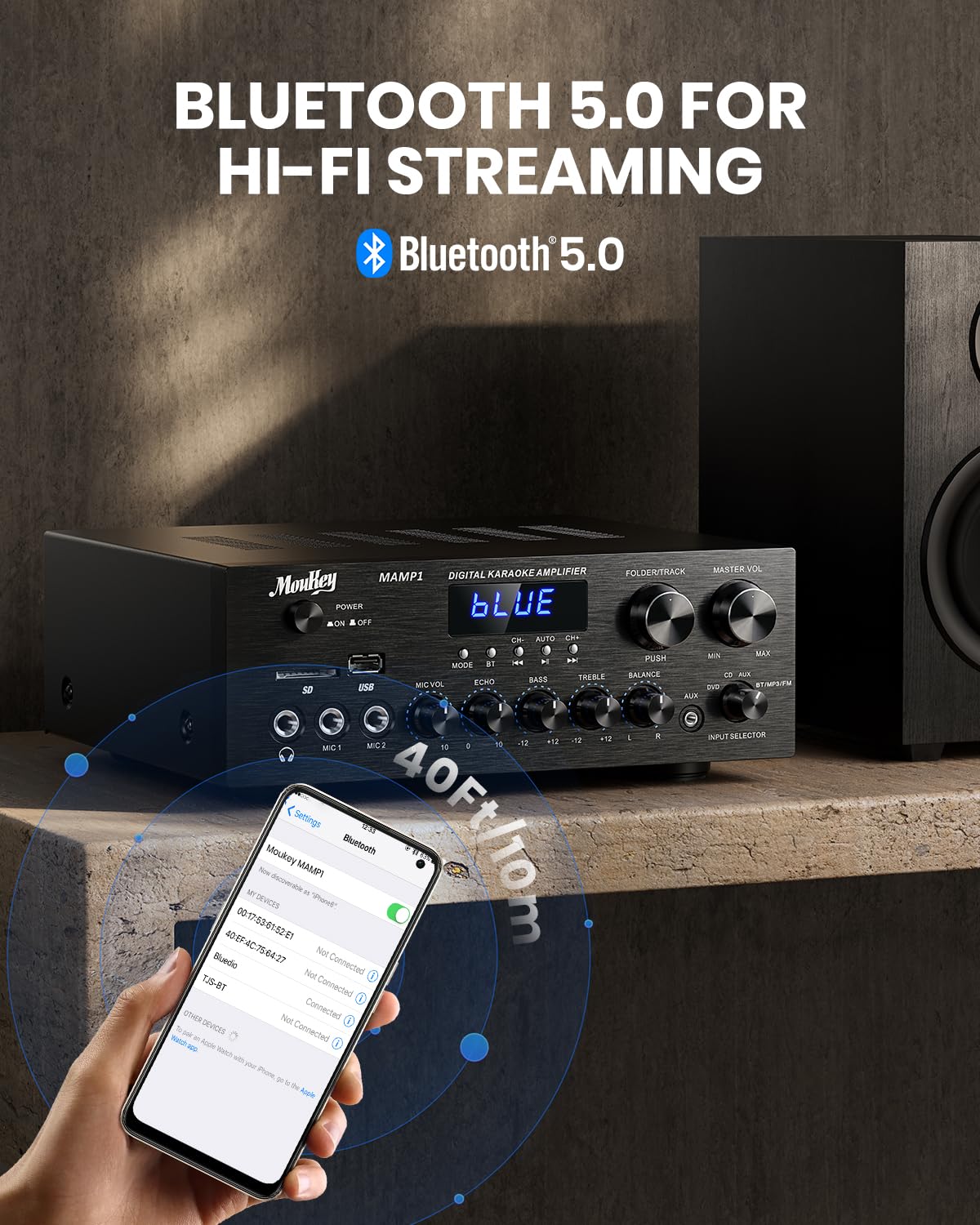
Image: The Moukey MAMP1 amplifier displaying "BLUE" on its screen, indicating Bluetooth mode, with a smartphone showing pairing options.
6.7 Reprodukcija sa USB-a/SD kartice
Insert a USB drive (max 32GB) or SD card (max 16GB) into the respective slot on the front panel. The amplifier will automatically switch to USB/SD mode and begin playback. Use the Prev, Pusti/Pauza, Sledeći, i Folder/Track dugmad za kontrolu reprodukcije.
6.8 FM radio
Ensure the FM antenna is connected to the rear panel. Select FM mode using the Dugme za način rada. Koristite Prev i Sledeći buttons to tune to radio stations. The LED display will show the current frequency.
7. Održavanje
Da biste održali performanse i izgled vašeg ampdizalica:
- čišćenje: Koristite meku, suhu krpu za brisanje vanjske strane uređaja. Ne koristite tekuća sredstva za čišćenje ili abrazivne hemikalije.
- ventilacija: Osigurajte da su ventilacijski otvori čisti od prašine i ostataka.
- Skladištenje: Ako uređaj skladištite duži period, isključite ga iz struje i čuvajte ga na hladnom i suhom mjestu.
8. Otkrivanje problema
If you encounter issues with your Moukey MAMP1 ampspasilac, pogledajte sljedeću tabelu za uobičajene probleme i rješenja:
| Problem | Mogući uzrok | Rješenje |
|---|---|---|
| Nema struje | Kabl za napajanje nije priključen; Utičnica je neispravna; Prekidač za napajanje je isključen. | Ensure power cable is securely connected. Try a different power outlet. Press the power switch to ON. |
| Nema izlaza zvuka | Incorrect input selected; Volume too low; Speakers not connected; Speaker wires loose; Mute function active. | Select the correct input source. Increase Master Volume. Check speaker connections and polarity. Ensure mute is off. |
| Bluetooth se ne povezuje | Amplifier not in Bluetooth mode; Device too far; Device already paired to another unit. | Osigurati amplifier is in Bluetooth mode ("BLUE" on display). Move device closer to amplifier. Disconnect from other devices. |
| Mikrofon ne radi | Microphone not connected; Mic volume too low; Echo knob set to minimum. | Connect microphone securely. Increase Microphone Volume. Adjust Echo knob. |
| Problemi s reprodukcijom s USB-a/SD kartice | Nepodržano file format; USB drive/SD card corrupted; Capacity exceeded. | Osigurajte zvuk files are in supported formats (e.g., MP3). Try a different USB drive/SD card. Check capacity limits (USB max 32G, SD max 16G). |
Ako problem i dalje postoji nakon isprobavanja ovih rješenja, obratite se korisničkoj podršci.
9. Specifikacije
| Feature | Specifikacija |
|---|---|
| Brand | Moukey |
| Model | MAMP1 |
| Izlazna snaga | 220 Watts |
| Kanali | 2 |
| Voltage | 115 volti (AC) |
| Impedansa zvučnika | 4-16 Ohma |
| Bluetooth verzija | 5.0 |
| Bluetooth domet | Over 12 meters (40 feet) |
| Podrška za USB/SD kartice | USB: Max 32GB, SD: Max 16GB |
| Dimenzije (D x Š x V) | 25 cm x 21.3 cm x 9.5 cm (približno 10 x 4 x 8 inča) |
| UPC | 715802779039 |
| Zemlja porijekla | Kina |

Image: The Moukey MAMP1 amplifier with its dimensions labeled.
10. Garancija i podrška
This Moukey MAMP1 Power AmpLifier dolazi sa a 1 godine garancije od datuma kupovine. Ova garancija pokriva nedostatke u proizvodnji i izradi pri normalnoj upotrebi.
Garancija ne pokriva:
- Damage caused by accident, abuse, misuse, flood, fire, or other natural causes.
- Damage caused by unauthorized modification or repair.
- Damage caused by improper installation or connection.
- Cosmetic damage, such as scratches, dents, and broken plastic on ports.
For warranty claims or technical support, please contact the retailer where you purchased the product or visit the official Moukey website for contact information. Please have your purchase receipt and product model number (MAMP1) ready when contacting support.