
ZZIPP TXZZ580
ZZIPP TXZZ580 UHF 48-Channel Wireless Microphone System User Manual
Model: TXZZ580
Uvod
This manual provides detailed instructions for the proper setup, operation, and maintenance of your ZZIPP TXZZ580 UHF 48-Channel Wireless Microphone System. Please read this manual thoroughly before using the product to ensure optimal performance and longevity.
Product Overview
Šta je u kutiji
- Two Handheld Microphones (Transmitters)
- Receiver Unit
- Adapter za napajanje za prijemnik
- Audio kabl za povezivanje
- Uputstvo za upotrebu
Ključne karakteristike
- UHF bežična tehnologija
- 48 kanala koji se mogu birati
- Manual and IR Configuration
- Designed for Karaoke and other vocal applications
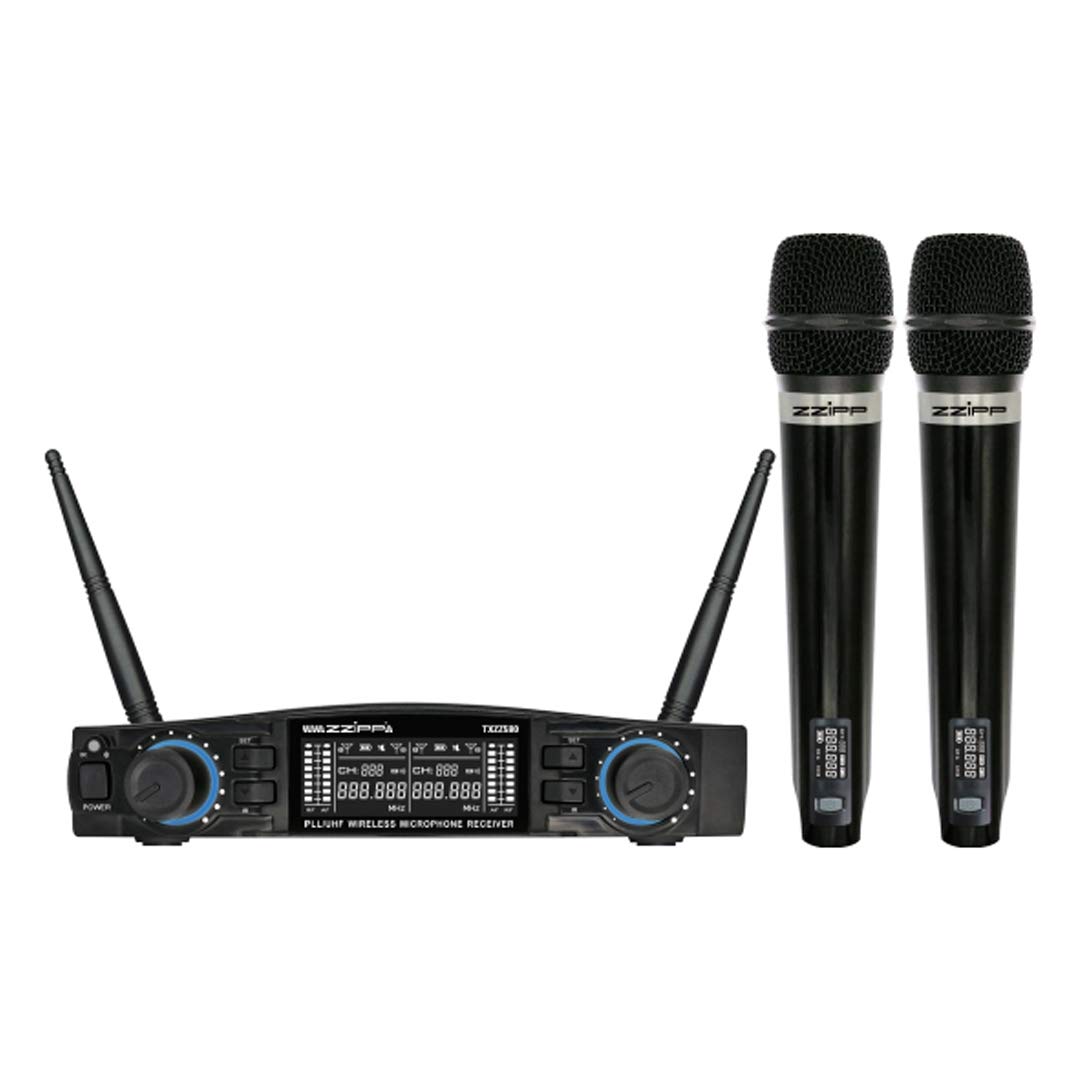
Slika 1: Gotovoview of the ZZIPP TXZZ580 Wireless Microphone System, showing the receiver unit and two handheld microphones.
Setup
- Raspakujte komponente: Pažljivo izvadite sve predmete iz ambalaže.
- Položaj prijemnika: Place the receiver unit on a stable surface, away from potential sources of interference such as computers, Wi-Fi routers, or other wireless devices. Ensure good line-of-sight to the area where the microphones will be used.
- Priključite napajanje: Connect the provided power adapter to the receiver's DC input and then plug it into a suitable power outlet.
- Povežite audio izlaz: Connect the receiver's audio output (e.g., 3.5mm Jack) to the input of your mixer, amplifier, or sound system using the supplied audio cable.
- Install Batteries in Transmitters: Open the battery compartment of each handheld microphone and insert the required batteries (typically AA, not always included). Observe correct polarity.
- Uključeno: Turn on the receiver unit and then each handheld microphone.
- Channel Synchronization (Manual/IR):
- Ručna konfiguracija: Refer to the receiver's display and controls to manually select a desired channel for each microphone. Ensure each microphone is set to a unique channel to avoid interference.
- IR sinhronizacija: For automatic synchronization, align the IR sensor on the microphone with the IR sensor on the receiver. Activate the IR sync function on the receiver, and the microphone will automatically pair to the selected channel.
- Test zvuk: Speak into each microphone to test the audio output through your sound system. Adjust volume levels as needed.
Uputstvo za upotrebu
Uključivanje/isključivanje
- Prijemnik: Press the power button on the front panel to turn the unit on or off.
- mikrofoni: Press and hold the power button on the microphone handle until the display illuminates (on) or turns off (off).
Odabir kanala
The system offers 48 UHF channels. If you experience interference, change the operating channel. This can be done manually on the receiver and then synchronized with the microphone via IR, or directly on the microphone if it supports manual channel adjustment.
Kontrola jačine zvuka
Adjust the output volume for each microphone using the dedicated volume knobs on the receiver's front panel. Further volume adjustments can be made on your connected mixer or amplifier.
Savjeti za korištenje
- Maintain a clear line of sight between the microphones and the receiver for optimal signal quality.
- Avoid placing the receiver near large metal objects or other electronic devices that may cause interference.
- Regularly check microphone battery levels to prevent unexpected power loss during use.
- For best sound quality, hold the microphone approximately 2-6 inches from your mouth.
Održavanje
Zamjena baterije
When the microphone's battery indicator shows low power, replace the batteries immediately. Always use fresh batteries of the correct type (e.g., AA). Remove batteries if the microphones will not be used for an extended period to prevent leakage.
Čišćenje
Clean the receiver and microphones with a soft, dry cloth. Do not use liquid cleaners or solvents, as these can damage the finish or internal components. For microphone grilles, a soft brush can be used to remove debris.
Skladištenje
Store the system in a cool, dry place, away from direct sunlight and extreme temperatures. If possible, use the original packaging or a protective case for transport and storage.
Rješavanje problema
| Problem | Mogući uzrok | Rješenje |
|---|---|---|
| Nema zvuka iz mikrofona |
|
|
| Interferencija ili statički elektricitet |
|
|
| Kratak radni domet |
|
|
Specifikacije
- Brand: ZZIPP
- Model: TXZZ580
- Boja: Crna
- Bežični tip: UHF
- Broj kanala: 48
- Povezivanje: 3.5 mm Jack
- Izvor napajanja: Corded Electric (for receiver)
- Posebna karakteristika: Manual and IR Configuration
- Preporučena upotreba: Karaoke
- Uključene komponente: Two Handheld Microphones, Receiver
Garancija i podrška
Za informacije o garanciji, tehničku podršku ili upite o servisiranju, molimo pogledajte dokumentaciju koju ste dobili uz kupovinu ili se obratite prodavaču. Sačuvajte dokaz o kupovini za potrebe reklamacije.
Ask a question about this manual
Ask about setup, troubleshooting, compatibility, parts, safety, or missing instructions. Manuals+ will review the question and use this page’s manual context to help answer it.