
1. Uvod
The Fenton FPC8T is a versatile and portable wireless speaker designed for various audio applications. It features 100W of power, Bluetooth connectivity for wireless audio streaming, an integrated MP3 player, and dynamic LED lighting effects. This speaker is equipped with an extendable handle and wheels for easy transport, making it suitable for outdoor use, parties, or public speaking. A wired microphone and remote control are included for enhanced functionality, including a vocal echo effect.
2. Sigurnosna uputstva
- Prije upotrebe uređaja pažljivo pročitajte sva uputstva.
- Držite uređaj dalje od vode, vlage i ekstremnih temperatura.
- Ne otvarajte casing; unutra nema dijelova koje korisnik može sam servisirati. Za sve servisne radove obratite se kvalifikovanom osoblju.
- Za punjenje koristite samo navedeni adapter za napajanje.
- Osigurajte odgovarajuću ventilaciju kako biste spriječili pregrijavanje.
- Izbjegavajte stavljanje teških predmeta na zvučnik.
- Ne izlažite bateriju prekomjernoj toploti ili direktnoj sunčevoj svjetlosti.
3. Sadržaj paketa
Provjerite da li su sve stavke prisutne u paketu:
- Fenton FPC8T Portable Speaker
- Žični mikrofon
- Daljinski upravljač
- USB kabl za punjenje
- Korisnički priručnik (ovaj dokument)

Image: The Fenton FPC8T portable speaker shown with its wired microphone and remote control, illustrating the main components included in the package.

Slika: Krupni plan view of the wired microphone, featuring an on/off switch and a standard audio jack connector.

Image: The remote control for the FPC8T speaker, showing buttons for mute, mode, repeat, track control, volume adjustment, EQ, and numeric input.
4. Proizvod je gotovview
The Fenton FPC8T is designed for portability and ease of use. It features a robust casing, an integrated battery, and a control panel for managing audio sources and settings.
4.1. Kontrolna tabla
The top panel of the speaker houses all essential controls and input ports.

Slika: Detaljna view of the FPC8T's control panel, showing knobs for microphone volume and echo, a master volume knob, an LED display, media control buttons, USB and Micro-SD card slots, an AUX input, and a microphone input jack.
- MIC VOL: Podešava jačinu zvuka mikrofona.
- ECHO: Adjusts the echo effect level for the microphone.
- OBIM: Glavna kontrola jačine zvuka za sve audio izvore.
- UPUTE: Switches between Bluetooth, USB, Micro-SD, and AUX input modes.
- Pusti/pauza: Controls playback for USB/Micro-SD and Bluetooth.
- Prethodna/Sljedeća: Skips tracks for USB/Micro-SD and Bluetooth.
- USB port: Za povezivanje USB fleš diskova.
- Micro-SD slot: For inserting Micro-SD cards.
- AUX ulaz: 3.5 mm priključak za povezivanje eksternih audio uređaja.
- MIC IN: 6.3 mm priključak za spajanje žičanog mikrofona.
- DC 5V IN: Priključak za punjenje zvučnika.
- CHARGE/FULL Indicator: Prikazuje status punjenja.
4.2. Karakteristike prenosivosti
The FPC8T is designed for easy movement.
- Produžna ručka: Allows for comfortable pulling of the speaker.
- Točkovi: Facilitate smooth transport.
- Integrisana baterija: Provides power for use without a mains connection.
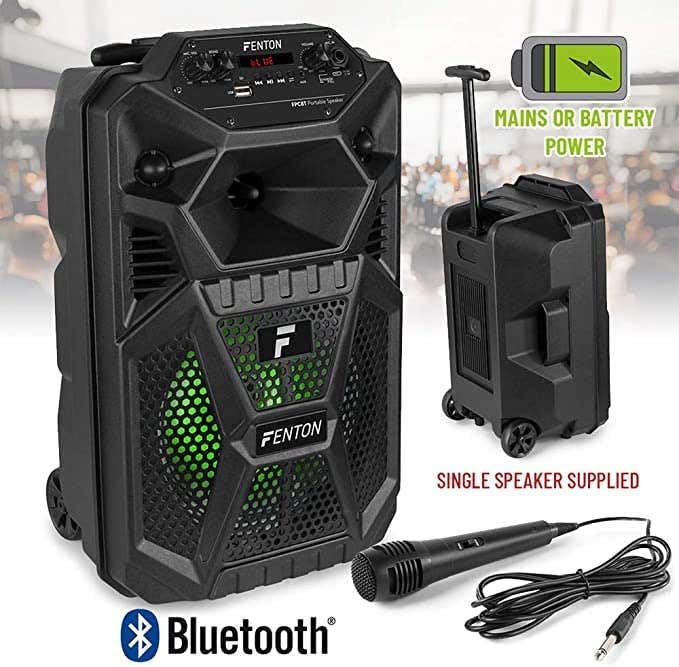
Image: The Fenton FPC8T speaker with icons indicating its battery and mains power capabilities, Bluetooth connectivity, and included microphone and remote control. The speaker is shown with its extendable handle and wheels.
5. Podešavanje
5.1. Punjenje baterije
Prije prve upotrebe, potpuno napunite internu bateriju zvučnika.
- Connect the USB charging cable to the DC 5V IN port on the speaker.
- Drugi kraj USB kabla priključite na kompatibilni USB adapter za napajanje (nije uključen) ili na USB priključak s napajanjem.
- The CHARGE indicator light will illuminate during charging. It will turn FULL when the battery is fully charged.
5.2. Uključivanje / isključivanje napajanja
Locate the power switch on the control panel.
- To power on, slide the switch to the 'ON' position.
- Da biste isključili napajanje, pomaknite prekidač u položaj 'ISKLJUČENO'.
5.3. Spajanje mikrofona
The included wired microphone can be connected for vocal use.
- Insert the microphone's 6.3mm jack into the MIC IN port on the control panel.
- Adjust the MIC VOL and ECHO knobs to your desired levels.
6. Uputstvo za upotrebu
6.1. Bluetooth režim
Bežično strimujte zvuk sa svog pametnog telefona, tableta ili drugih uređaja koji podržavaju Bluetooth.
- Power on the speaker. The speaker will automatically enter Bluetooth mode or you can press the 'MODE' button until 'BLUE' appears on the display.
- Omogućite Bluetooth na svom uređaju i potražite dostupne uređaje.
- Select 'FPC8T' from the list of devices to pair. A confirmation sound will indicate successful pairing.
- Start playing music on your device. The audio will stream through the FPC8T speaker.
- Adjust the volume using the 'VOLUME' knob on the speaker or your connected device.

Image: The Fenton FPC8T speaker positioned next to a smartphone, illustrating its Bluetooth connectivity for wireless music playback.
6.2. USB/Micro-SD Playback
Pustite MP3 audio files directly from a USB flash drive or Micro-SD card.
- Insert a USB flash drive into the USB port or a Micro-SD card into the Micro-SD slot.
- The speaker will automatically switch to USB/Micro-SD mode and begin playing audio. If not, press the 'MODE' button to select the correct source.
- Use the Play/Pause and Previous/Next buttons on the control panel or remote control to manage playback.
6.3. AUX ulaz
Povežite eksterne audio uređaje pomoću 3.5 mm audio kabla.
- Connect one end of a 3.5mm audio cable (not included) to the AUX IN port on the speaker.
- Drugi kraj priključite na priključak za slušalice ili audio izlaz vašeg eksternog uređaja (npr. MP3 plejera, laptopa).
- Press the 'MODE' button until 'AUX' appears on the display.
- Reprodukujte zvuk sa vašeg eksternog uređaja.
6.4. Microphone Usage and Echo Effect
Use the wired microphone for announcements or karaoke.
- Ensure the microphone is connected to the MIC IN port.
- Podesite dugme 'MIC VOL' da biste kontrolisali izlazni nivo mikrofona.
- Turn the 'ECHO' knob clockwise to increase the echo effect for vocals, or counter-clockwise to reduce it.
6.5. LED svjetlosni efekti
The speaker features integrated LED lights that enhance the listening experience.
- The LED lights automatically activate when the speaker is powered on.
- The lights will cycle through various colors and patterns, synchronizing with the music.

Image: The Fenton FPC8T speaker displaying active green LED lighting behind its front grille, indicating the light effects feature.

Image: The Fenton FPC8T speaker displaying active red LED lighting behind its front grille, showcasing another color option of the light effects.

Image: The Fenton FPC8T speaker displaying active blue LED lighting behind its front grille, demonstrating a third color in its light effects sequence.
6.6. Funkcije daljinskog upravljača
The included remote control provides convenient access to various functions.
| Dugme | Funkcija |
|---|---|
| MUTE | Isključuje ili uključuje zvuk audio izlaza. |
| MODE | Switches between input sources (Bluetooth, USB, Micro-SD, AUX). |
| REPE | Repeats the current track or all tracks. |
| SCAN | Scans for radio stations (if applicable, not explicitly mentioned for this model). |
| Pusti/Pauza | Reprodukuje ili pauzira trenutnu numeru. |
| Prethodno/Sljedeće | Preskače na prethodnu ili sljedeću pjesmu. |
| EQ | Ciklično se kreće kroz unaprijed postavljene postavke ekvilajzera. |
| VOL- / VOL+ | Decreases or increases the master volume. |
| 0-9 | Direct track selection (for USB/Micro-SD). |
| PLAY RECO / RECO | Playback or record function (if applicable, not explicitly mentioned for this model). |
7. Održavanje
7.1. Čišćenje
- Uvijek isključite uređaj i iskopčajte ga iz izvora napajanja prije čišćenja.
- Za brisanje vanjskih površina koristite meku, suhu krpu.
- Do not use liquid cleaners, aerosols, or abrasive chemicals, as these may damage the finish or internal components.
7.2. Održavanje baterije
- Da biste produžili vijek trajanja baterije, izbjegavajte često potpuno pražnjenje baterije.
- If the speaker will not be used for an extended period, charge it to approximately 50% and store it in a cool, dry place. Recharge every 3-6 months to prevent deep discharge.
8. Otkrivanje problema
If you encounter issues with your Fenton FPC8T speaker, refer to the following common problems and solutions:
| Problem | Mogući uzrok | Rješenje |
|---|---|---|
| Nema struje | Baterija je prazna; Prekidač za napajanje je isključen. | Charge the speaker; Ensure the power switch is in the 'ON' position. |
| Nema zvuka | Volume is too low; Incorrect input mode selected; Device not paired (Bluetooth); Cable not connected (AUX/MIC). | Increase volume; Press 'MODE' to select correct input; Re-pair Bluetooth device; Check cable connections. |
| Bluetooth uparivanje nije uspjelo | Zvučnik nije u režimu uparivanja; Uređaj je previše udaljen; Smetnje. | Provjerite je li zvučnik u Bluetooth načinu rada; Približite uređaj; Isključite ostale Bluetooth uređaje. |
| Mikrofon ne radi | Microphone not connected; MIC VOL is low; Microphone switch is off. | Ensure microphone is fully plugged in; Increase MIC VOL; Check if the microphone's own switch is 'ON'. |
| USB/Micro-SD ne reprodukuje | Netačno file format; Drive/card not inserted correctly; Corrupted files. | Osigurati files are MP3 format; Re-insert drive/card; Try different fileili uređaj za pohranu. |
9. Specifikacije
| Feature | Specifikacija |
|---|---|
| Izlazna snaga | 100 W |
| Veličina woofera | 8 inča |
| Baterija | 3.7 V - 1.5 Ah (Integrated) |
| Povezivanje | Bluetooth, USB, Micro-SD, AUX (3.5mm), Microphone (6.3mm) |
| Posebne karakteristike | LED Light Effects, Microphone Echo Effect, Extendable Handle, Wheels |
| Dimenzije (D x Š x V) | 19.5 x 22 x 34 cm (7.68 x 8.66 x 13.39 inča) |
| Težina | 3.45 kg (7.6 lbs) |
| Power Input | 5V preko USB-a |
| Kompatibilni uređaji | Laptop, pametni telefon, tablet |
10. Garancija i podrška
This product is covered by a standard manufacturer's warranty. Please refer to the warranty card included in your package or contact your retailer for specific warranty terms and conditions. For technical support or service inquiries, please contact the Fenton customer service department or visit their official website.