
1. Uvod i krajview
The Escort EDM 1111A is a versatile digital multimeter designed for accurate measurement of various electrical parameters. This device is essential for electricians, technicians, and hobbyists for testing circuits, components, and power sources. It features a clear digital display and a rotary dial for selecting different measurement functions.

The Escort EDM 1111A Digital Multimeter with red and black test leads connected, ready for use.
Ključne funkcije uključuju:
- DC Voltage (DCV) measurement
- AC Voltage (ACV) measurement
- DC Current (DCA) measurement
- AC Current (ACA) measurement
- Mjerenje otpora (Ω).
- Capacitance (CX) measurement
- Diode and Transistor (hFE) testing
2. Podešavanje
2.1 Instalacija baterije
The Escort EDM 1111A requires a DC 9V 006P battery for operation. To install or replace the battery:
- Provjerite je li multimetar isključen.
- Pronađite odjeljak za baterije na stražnjoj strani uređaja.
- Carefully slide open or unscrew the battery cover.
- Insert a new 9V 006P battery, observing the correct polarity (+/-).
- Vratite poklopac baterije na sigurno.

Pozadi view of the Escort EDM 1111A Digital Multimeter, showing the battery compartment cover and the product label.
2.2 Spajanje mjernih kabela
The multimeter comes with two test leads, typically one red (positive) and one black (negative/common). Proper connection is crucial for accurate and safe measurements.
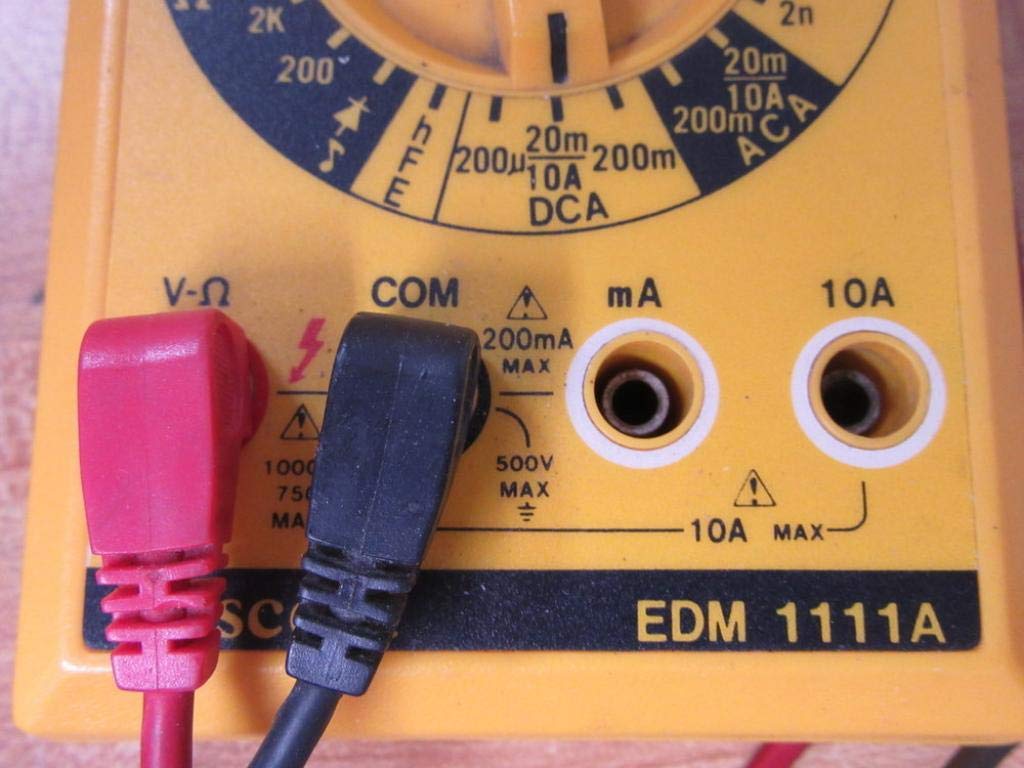
- Za većinu volumenatage, resistance, and low current measurements, connect the black lead to the 'COM' (Common) jack.
- Connect the red lead to the 'V-Ω-mA' jack for voltage, otpor i miliamptrenutna mjerenja.
- For high current measurements (up to 10A), connect the red lead to the '10A' jack. Always ensure the correct jack is used to prevent damage to the meter or circuit.

A closer look at the input jacks (V-Ω, COM, mA, 10A) and the lower portion of the rotary dial, indicating current measurement ranges.

The red and black test probes (leads) used with the Escort EDM 1111A Digital Multimeter, featuring pointed tips for electrical contact.
3. Uputstvo za upotrebu
Before taking any measurements, ensure the test leads are correctly connected and the rotary dial is set to the appropriate function and range.

Detaljno view of the rotary selector dial on the Escort EDM 1111A Digital Multimeter, displaying various measurement functions such as DCV, ACV, Ω, DCA, ACA, and CX.
3.1 Mjerenje DC Voltage (DCV)
- Set the rotary dial to the desired DCV range (e.g., 200m, 2, 20, 200, 1000). Choose a range higher than the expected voltage.
- Connect the red lead to the positive (+) side of the circuit and the black lead to the negative (-) side.
- Pročitajte voltage vrijednost na ekranu.
3.2 Mjerenje AC Voltage (ACV)
- Set the rotary dial to the desired ACV range (e.g., 200m, 2, 20, 200, 750). Choose a range higher than the expected voltage.
- Spojite mjerne kablove preko AC voltažetage source. Polarity does not matter for AC voltage.
- Pročitajte voltage vrijednost na ekranu.
3.3 Mjerenje otpora (Ω)
- Prije mjerenja otpora provjerite je li strujno kolo ili komponenta bez napona.
- Set the rotary dial to the desired Ω range (e.g., 200, 2K, 20K, 200K, 2M, 20M, 200M).
- Spojite mjerne kablove preko komponente koju treba mjeriti.
- Očitajte vrijednost otpora na zaslonu.
3.4 Measuring DC Current (DCA)
- Osigurajte da je strujni krug bez napona.
- Set the rotary dial to the desired DCA range (e.g., 200µ, 2m, 20m, 200m, 10A).
- Važno: For currents up to 200mA, use the 'V-Ω-mA' jack for the red lead. For currents up to 10A, use the '10A' jack.
- Break the circuit and connect the multimeter in series with the load. The current must flow through the multimeter.
- Ponovo uključite strujni krug i očitajte trenutnu vrijednost.
3.5 Measuring AC Current (ACA)
- Osigurajte da je strujni krug bez napona.
- Set the rotary dial to the desired ACA range (e.g., 200µ, 2m, 20m, 200m, 10A).
- Važno: For currents up to 200mA, use the 'V-Ω-mA' jack for the red lead. For currents up to 10A, use the '10A' jack.
- Prekinite strujni krug i spojite multimetar serijski s opterećenjem.
- Ponovo uključite strujni krug i očitajte trenutnu vrijednost.
3.6 Measuring Capacitance (CX)
- Prije testiranja provjerite je li kondenzator potpuno ispražnjen.
- Set the rotary dial to the CX range (e.g., 2n, 20n, 200n, 2µ, 20µ).
- Spojite mjerne kablove preko priključaka kondenzatora.
- Očitajte vrijednost kapacitivnosti na ekranu.
3.7 Diode and Transistor (hFE) Testing
Refer to the specific markings on the dial for diode and transistor testing functions. Typically, diode test mode allows checking the forward voltage drop of a diode, and hFE mode is used for measuring the DC current gain of transistors.
4. Održavanje
4.1 Zamjena baterije
Replace the 9V 006P battery when the low battery indicator appears on the display or if the multimeter fails to power on. Follow the instructions in Section 2.1.
4.2 Čišćenje
Za čišćenje multimetra koristite meku,amp krpu. Ne koristite abrazivna sredstva za čišćenje ili rastvarače, jer mogu oštetiti casing or display. Ensure the device is turned off and disconnected from any circuits before cleaning.
4.3 Skladištenje
When not in use for extended periods, store the multimeter in a cool, dry place, away from direct sunlight and extreme temperatures. Consider removing the battery to prevent leakage, which could damage the internal components.
5. Otkrivanje problema
| Problem | Mogući uzrok | Rješenje |
|---|---|---|
| Nema ekrana ili ekran je taman | Prazan ili prazna baterija | Replace the 9V 006P battery. |
| Netačna očitavanja | Incorrect range selected Poor lead connection Oštećeni mjerni kablovi Incorrect input jack used | Odaberite odgovarajući raspon. Ensure leads are firmly connected. Inspect and replace damaged leads. Verify leads are in the correct V-Ω-mA or 10A jack. |
| Prikazano je "OL" (preopterećenje) | Mjerenje prelazi odabrani raspon | Prebacite se na veći raspon. |
| Nema zvučnog signala za kontinuitet | Continuity function not selected Otvoreno kolo | Ensure dial is on continuity/diode test. Check the circuit for breaks. |
6. Specifikacije
| Parametar | Vrijednost |
|---|---|
| Model | EDM 1111A |
| Dimenzije proizvoda (D x Š x V) | 8 x 4 x 2 inča |
| Težina artikla | 1.84 funti |
| Izvor napajanja | DC 9V 006P Battery |
| Measurement Type | Multimetar |
| Proizvođač | Pratnja |
| Datum prve dostupnosti | 21. novembra 2019 |
| DC Voltage Rasponi | 200mV, 2V, 20V, 200V, 1000V |
| AC Voltage Rasponi | 200mV, 2V, 20V, 200V, 750V |
| Opsezi jednosmjerne struje | 200µA, 2mA, 20mA, 200mA, 10A |
| Rasponi naizmjenične struje | 200µA, 2mA, 20mA, 200mA, 10A |
| Rasponi otpora | 200Ω, 2KΩ, 20KΩ, 200KΩ, 2MΩ, 20MΩ, 200MΩ |
| Capacitance Ranges | 2nF, 20nF, 200nF, 2µF, 20µF |
7. Informacije o garanciji
For specific warranty details regarding your Escort EDM 1111A Digital Multimeter, please refer to the documentation provided at the time of purchase or contact the manufacturer directly. Warranty terms typically cover defects in materials and workmanship under normal use.
8. Korisnička podrška
If you encounter any issues or have questions not covered in this manual, please contact Escort customer support. Have your product model number (EDM 1111A) and serial number (if applicable, found on the back label) ready when contacting support for faster assistance.
The product label on the back of the Escort EDM 1111A, indicating 'DIGITAL MULTIMETER DC 9V 006P BATTERY', serial number, and 'MADE IN TAIWAN R.O.C.'.