
ProfiCare PC-BSR 3042
ProfiCare PC-BSR 3042 Uputstvo za upotrebu robotskog usisivača
Model: PC-BSR 3042
1. Uvod
Thank you for choosing the ProfiCare PC-BSR 3042 Robot Vacuum Cleaner. This manual provides essential information for the safe and efficient operation, maintenance, and troubleshooting of your new appliance. Please read these instructions thoroughly before first use and keep them for future reference.
The ProfiCare PC-BSR 3042 is designed to independently clean various hard floor surfaces and short-pile carpets, effectively removing dirt, dust, crumbs, and pet hair. Its extra-flat design allows for cleaning under furniture, and its quiet operation ensures minimal disturbance.
2. Sigurnosna uputstva
Uvijek se pridržavajte sljedećih sigurnosnih mjera opreza kako biste spriječili ozljede ili oštećenje uređaja:
- Prije upotrebe uređaja pažljivo pročitajte sva uputstva.
- Ovaj uređaj je namijenjen samo za upotrebu u zatvorenom prostoru.
- Do not allow children to play with the appliance. Supervise children and individuals with reduced physical, sensory, or mental capabilities when the appliance is in use.
- Do not immerse the appliance, power adapter, or remote control in water or other liquids.
- Use only the original power adapter supplied with the appliance.
- Do not use the appliance to pick up flammable or combustible materials, hot ashes, or sharp objects.
- Ensure the dustbin and filter are correctly installed before operation.
- Držite kosu, široku odjeću, prste i sve dijelove tijela dalje od otvora i pokretnih dijelova.
- The appliance features automatic stair detection. However, always exercise caution near stairs or elevated surfaces.
- If the appliance is damaged, do not operate it. Contact customer support for assistance.
3. Sadržaj paketa
Molimo Vas da provjerite da li su svi artikli prisutni i u dobrom stanju:
- ProfiCare PC-BSR 3042 robotski usisivač
- Adapter za napajanje
- Daljinski upravljač
- Side Brushes (2 pre-installed, 2 extra)
- HEPA filter (unaprijed instaliran)
- Cleaning Brush for Filter
- Uputstvo za upotrebu
4. Proizvod je gotovview
Familiarize yourself with the components of your robot vacuum cleaner.
Slika 4.1: Top view of the robot vacuum cleaner, showing the main power button, HEPA filter indicator, and remote sensor area.

Slika 4.2: The multi-function remote control for operating the robot vacuum cleaner.
Komponente glavne jedinice:
- Dugme za napajanje: Located on the top surface for manual start/stop.
- Odjeljak za kantu za prašinu: Houses the removable dustbin and HEPA filter.
- Bočne četke: Two rotating brushes for sweeping debris into the vacuum's path.
- Port za punjenje: Za povezivanje strujnog adaptera.
- Infracrveni senzori: For obstacle detection and stair avoidance.
- Pogonski točkovi: Rubberized and spring-mounted for smooth movement across various surfaces.
Funkcije daljinskog upravljača:
- Start / Pauza: Pokreće ili pauzira čišćenje.
- Strelice za smjer: Manually guides the robot.
- FOCUS (Spot Cleaning): Usmjerava robota da intenzivno čisti određeno područje.
- RANDOM (Random Cleaning): Robot cleans in a random pattern.
- AUTO (Systematic Cleaning): Robot cleans in a systematic pattern.
- ODGOVORI: Locates the robot.
5. Podešavanje
5.1. Punjenje baterije
- Connect the power adapter to the charging port on the side of the robot vacuum cleaner.
- Uključite adapter za napajanje u zidnu utičnicu.
- Allow the robot to charge for approximately 5 hours before its first use. The charging indicator light will show the charging status.
5.2. Ugradnja bočnih četki
The robot comes with two side brushes pre-installed. If replacement is needed:
- Okrenite robotski usisivač naopako.
- Align the new side brush with the brush post and press down until it clicks into place. Ensure the brushes are securely attached.
5.3. Priprema prostora za čišćenje
- Remove any large obstacles, loose cables, or delicate items from the floor.
- Ensure doors to areas you want cleaned are open, and doors to areas you want to avoid are closed.
6. Upravljanje robotskim usisivačem
6.1. Pokretanje ciklusa čišćenja
You can start the robot in two ways:
- Ručni start: Pritisnite dugme za napajanje na vrhu robota.
- Pokretanje daljinskim upravljačem: Press the "Start/Pause" button on the remote control.
The robot will begin cleaning in its default mode (Systematic or Random, depending on the last setting).
6.2. Odabir načina čišćenja
Use the remote control to select a specific cleaning program:
- AUTO (Systematic Cleaning): The robot cleans in a structured, back-and-forth pattern to cover the entire area efficiently.
- RANDOM (Random Cleaning): Robot se kreće nasumično, mijenjajući smjer kada naiđe na prepreke.
- FOCUS (Spot Cleaning): Robot čisti koncentrisano područje u spiralnom uzorku, idealnom za jako zaprljana mjesta.
6.3. Pausing and Resuming
Press the "Start/Pause" button on the robot or remote control to pause the cleaning cycle. Press it again to resume.
6.4. Stopping the Robot
To stop the robot completely, press and hold the power button on the robot until it turns off, or press the "Start/Pause" button on the remote and then the power button on the robot.
6.5. Funkcija tajmera
The remote control includes a timer function to schedule cleaning times. Refer to the remote control section in this manual for detailed instructions on setting the timer.
6.6. Stair Detection
The robot is equipped with infrared sensors that automatically detect stairs and prevent it from falling. Ensure these sensors are kept clean for optimal performance.
7. Održavanje
Redovno održavanje osigurava optimalne performanse i produžava vijek trajanja vašeg robotskog usisivača.
7.1. Pražnjenje i čišćenje kante za prašinu

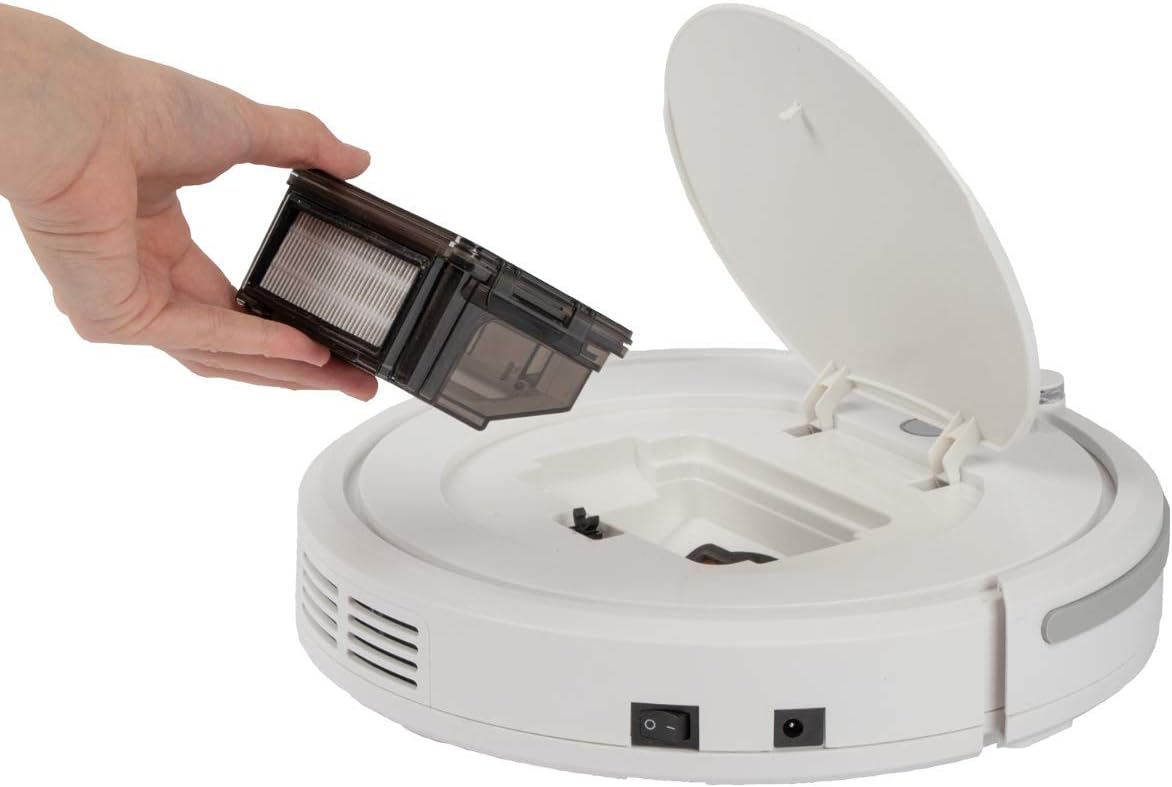
Slika 7.1: Removing the dustbin for emptying and cleaning.
- Turn off the robot vacuum cleaner.
- Otvorite gornji poklopac robota.
- Grasp the handle of the dustbin and lift it out.
- Otvorite kantu za smeće i ispraznite njen sadržaj u kantu za smeće.
- Po potrebi isperite posudu za prašinu vodom, pazeći da je potpuno suha prije ponovne ugradnje.
7.2. Čišćenje HEPA filtera
The HEPA filter is located inside the dustbin. Clean it regularly to maintain suction power.
- Uklonite kantu za prašinu kao što je gore opisano.
- Pažljivo uklonite HEPA filter iz posude za prašinu.
- Use the provided cleaning brush to remove dust and debris from the filter. Do not wash the HEPA filter with water unless specified by the manufacturer.
- Reinsert the clean HEPA filter into the dustbin and then place the dustbin back into the robot.
7.3. Čišćenje bočnih četki
Periodically check and clean the side brushes for tangled hair or debris.
- Turn off the robot and flip it over.
- Lagano povucite bočne četke prema gore da biste ih uklonili.
- Remove any hair or debris wrapped around the brushes or brush posts.
- Reattach the brushes by pressing them down onto their posts until they click.
7.4. Cleaning Sensors and Wheels
Wipe the infrared sensors (located around the bumper and underneath the robot) and the drive wheels with a clean, dry cloth to ensure proper navigation and movement.
8. Otkrivanje problema
If you encounter issues with your robot vacuum cleaner, refer to the following table for common problems and solutions.
| Problem | Mogući uzrok | Rješenje |
|---|---|---|
| Robot se ne uključuje. | Baterija je slaba ili ispražnjena. | Charge the robot for 5 hours. |
| Robot se neočekivano zaustavlja. | Battery is low; Obstacle detected; Wheels/brushes jammed. | Charge the robot; Remove obstacles; Clean wheels and brushes. |
| Loše performanse čišćenja. | Dustbin full; Filter clogged; Side brushes worn or dirty. | Ispraznite kantu za prašinu; Očistite/zamijenite filter; Očistite/zamijenite bočne četke. |
| Robot se ne puni. | Power adapter not connected; Faulty adapter/port. | Ensure secure connection; Try a different outlet; Contact support. |
| Robot pada niz stepenice. | Senzori na stepenicama su prljavi ili blokirani. | Clean the stair sensors thoroughly. |
9. Specifikacije
Technical details for the ProfiCare PC-BSR 3042 Robot Vacuum Cleaner:

Slika 9.1: Dimensions of the robot vacuum cleaner.
| Feature | Detalj |
|---|---|
| Broj modela | 330420 |
| Vrsta baterije | Ni-MH |
| Battery Voltage | 14.4 V |
| Kapacitet baterije | 1500 mAh |
| Vrijeme rada baterije | Do 90 minuta |
| Vrijeme punjenja baterije | Pribl. 5 sati |
| Nivo buke | Pribl. 61 dB |
| Dimenzije (promjer x visina) | 290 mm x 75 mm |
| Težina | 1.9 kg |
| Filter Type | HEPA filter |
| Programi za čišćenje | 3 (Random, Systematic, Spot) |
| Posebne karakteristike | Automatic stair detection, Mechanical furniture barrier, Remote control, Timer function |
| Surface Recommendation | Hard floors, short-pile carpets |
10. Garancija i podrška
10.1. Garancija proizvođača
This product is covered by a manufacturer's warranty. Please refer to the warranty card included in your package or contact ProfiCare customer service for specific terms and conditions. Spare parts availability is typically 2 years from the date of purchase.
10.2. Korisnička podrška
For technical assistance, troubleshooting beyond this manual, or warranty claims, please contact your retailer or the ProfiCare customer support team. Contact information can usually be found on the product packaging or the official ProfiCare website.
Ask a question about this manual
Ask about setup, troubleshooting, compatibility, parts, safety, or missing instructions. Manuals+ will review the question and use this page’s manual context to help answer it.