
HOCO BS31 - Army green
Hoco BS31 Bright Sound Sports Wireless Speaker - Instruction Manual
1. Uvod
Thank you for choosing the Hoco BS31 Bright Sound Sports Wireless Speaker. This manual provides essential information for the proper setup, operation, and maintenance of your device. Please read it thoroughly before use to ensure optimal performance and longevity.
2. Proizvod je gotovview i karakteristike
The Hoco BS31 is a compact and portable wireless speaker designed for versatile audio playback. It features robust connectivity options and a durable design, making it suitable for various environments.
- Wireless V4.2 JLAC6928B for stable and efficient connection.
- Integrated 53mm speaker for clear audio output.
- Class A polymer battery with 500mAh capacity for extended playback.
- Multiple playback modes: Wireless (Bluetooth), TF card, and AUX input.
- Compact and lightweight design, weighing only 140g.
- Supports A2DP, AVRCP, HFP, HSP protocols for broad compatibility.

Slika: Front view of the Hoco BS31 speaker in army green, showcasing its compact design and front controls.

Image: The Hoco BS31 speaker held in a hand, demonstrating its small, palm-sized, and portable nature.
3. Sadržaj paketa
Molimo Vas da provjerite paket za sljedeće stavke:
- Hoco BS31 Wireless Speaker
- USB kabl za punjenje
- Uputstvo za upotrebu
4. Kontrole i interfejsi
Familiarize yourself with the speaker's buttons and ports for proper operation.
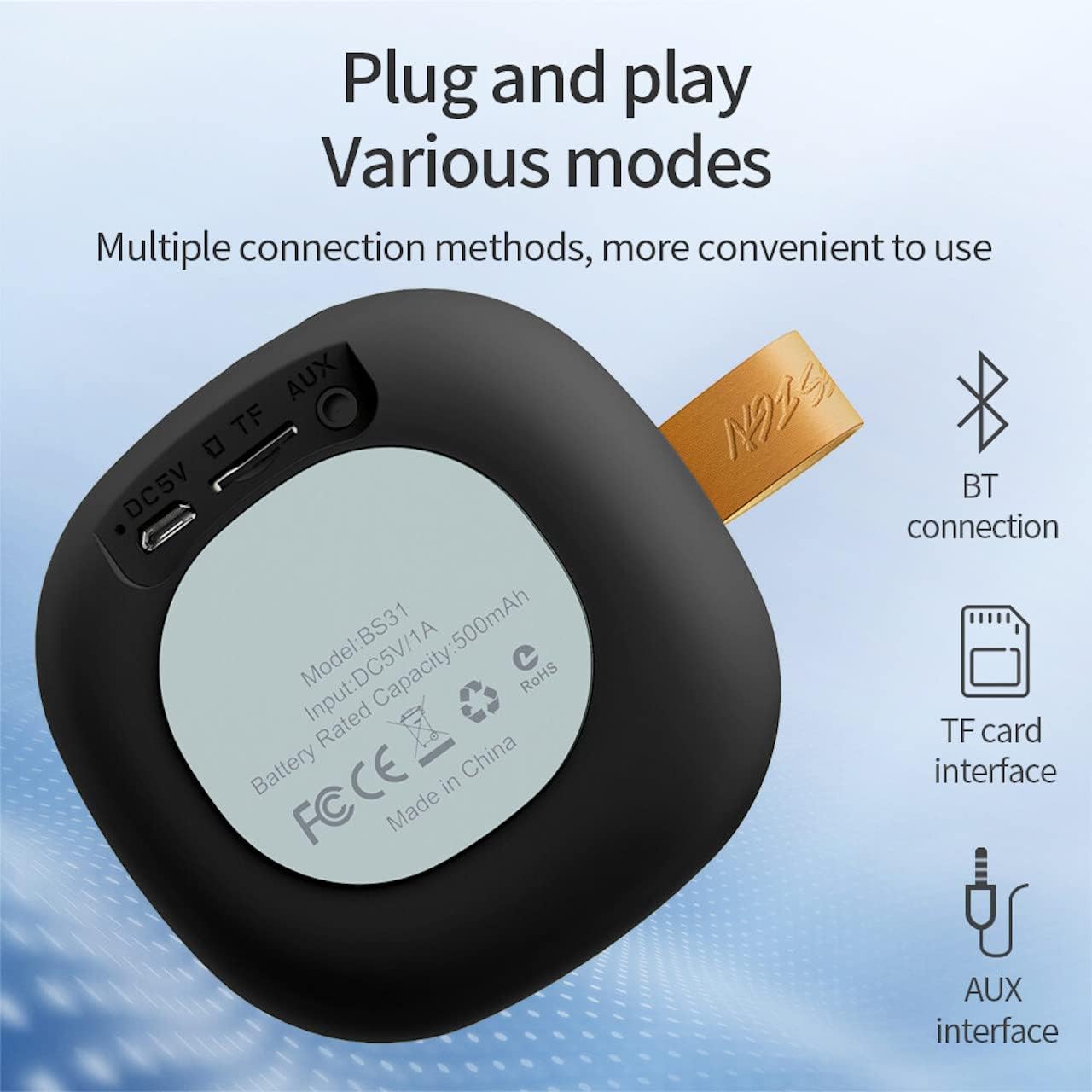
Image: A diagram illustrating the functions of the control buttons on the Hoco BS31 speaker.
- Dugme za napajanje (⏻): Press and hold to switch on/off. Short press to play/pause music or answer/end calls.
- Previous Song / Volume Up (⏮): Short press for previous song. Long press to increase volume.
- Next Song / Volume Down (⏭): Short press for next song. Long press to decrease volume.
- Mode Button (⏸): Short press to switch between Bluetooth, TF card, and AUX modes.

Slika: Stražnja strana view of the Hoco BS31 speaker, highlighting the DC 5V charging port, TF card slot, and AUX input.
- DC 5V priključak: Za punjenje zvučnika pomoću priloženog USB kabla.
- Utor za TF karticu: Umetnite TF (MicroSD) karticu za direktnu reprodukciju muzike.
- AUX priključak: Povežite eksterne audio uređaje pomoću 3.5 mm audio kabla.
5. Podešavanje
5.1. Punjenje zvučnika
Before first use, fully charge the speaker. Connect the provided USB charging cable to the DC 5V port on the speaker and the other end to a USB power adapter (not included) or a computer's USB port. The charging time is approximately 2 hours. The indicator light will show charging status (e.g., red for charging, off when fully charged).
5.2. Uključivanje / isključivanje napajanja
To power on the speaker, press and hold the Power button (⏻) until you hear an audible prompt. To power off, press and hold the Power button again until the speaker shuts down.
6. Uputstvo za upotrebu
6.1. Bluetooth uparivanje
- Ensure the speaker is powered on and in Bluetooth pairing mode (indicated by a flashing blue light or audible prompt). If not, short press the Mode button (⏸) to switch to Bluetooth mode.
- Na svom mobilnom uređaju (pametnom telefonu, tabletu itd.) omogućite Bluetooth i potražite dostupne uređaje.
- Select "Hoco BS31" from the list of found devices.
- Once paired, the speaker will indicate a successful connection (e.g., solid blue light or audible prompt).
- You can now play audio from your device through the Hoco BS31 speaker.
6.2. Način rada TF kartice
Umetnite TF (MicroSD) karticu sa MP3 audio zapisom files into the TF card slot. The speaker will automatically detect the card and switch to TF card playback mode. Use the Previous/Next Song buttons to navigate tracks.
6.3. AUX mod
Connect one end of a 3.5mm audio cable (not included) to the AUX port on the speaker and the other end to the audio output jack of your external device (e.g., MP3 player, computer). The speaker will automatically switch to AUX mode. Control playback from your external device.

Image: Visual representation of the Hoco BS31's multiple connection methods, including Bluetooth, TF card, and AUX.
6.4. Music Playback and Call Functions
- Pusti/pauza: Kratko pritisnite dugme za napajanje (⏻).
- Sljedeća pjesma: Short press the Next Song button (⏭).
- Prethodna pjesma: Short press the Previous Song button (⏮).
- Povećavanje glasnoće: Long press the Previous Song button (⏮).
- Smanjivanje jačine zvuka: Long press the Next Song button (⏭).
- Odgovori/Završi poziv: Short press the Power button (⏻) when a call comes in.
- odbiti poziv: Press and hold the Power button (⏻) when a call comes in.

Image: The Hoco BS31 speaker positioned next to a smartphone, demonstrating its use for music playback.
7. Održavanje i njega
- Zvučnik držite suhim. Ne izlažite ga vodi ili prekomjernoj vlazi.
- Očistite zvučnik mekom, suhom krpom. Ne koristite abrazivna sredstva za čišćenje ili rastvarače.
- Avoid extreme temperatures. Do not store the speaker in very hot or cold environments.
- Do not attempt to disassemble or repair the speaker yourself. This will void the warranty and may cause damage.
- Redovno punite zvučnik, čak i ako ga ne koristite, kako biste održali bateriju u ispravnom stanju.
8. Otkrivanje problema
| Problem | Mogući uzrok | Rješenje |
|---|---|---|
| Zvučnik se ne uključuje. | Niska baterija. | Punite zvučnik najmanje 30 minuta. |
| Nije moguće upariti s Bluetooth uređajem. | Zvučnik nije u načinu uparivanja; Bluetooth uređaja isključen; previše udaljeni. | Ensure speaker is in pairing mode. Turn Bluetooth on/off on device. Move devices closer. |
| Nema zvuka. | Volume too low; incorrect mode; device not playing. | Increase speaker/device volume. Check correct mode (BT, TF, AUX). Ensure audio is playing on source device. |
| TF kartica nije prepoznata. | Card inserted incorrectly; unsupported format; corrupted card. | Ponovo umetnite TF karticu. Provjerite files are MP3 format. Try a different TF card. |
9. Specifikacije
| Feature | Detalj |
|---|---|
| Model | BS31 |
| Veličina zvučnika | 53mm |
| Dimenzije | 86 x 86 x 44 mm |
| Težina | 140g |
| Bežična verzija | V4.2 (JLAC6928B) |
| Podržani protokoli | A2DP, AVRCP, HFP, HSP |
| Kapacitet baterije | 500mAh (Class A polymer battery) |
| Charging Voltage | DC 5V |
| Vrijeme punjenja | Približno 2 sata |
| Muzika/Vrijeme poziva | Približno 3 sata |
| Mogućnosti povezivanja | Wireless (Bluetooth), TF card, AUX |
| Maksimalna izlazna snaga | 5 Watts |
10. Garancija i podrška
Hoco products are manufactured to high quality standards. For warranty information and technical support, please refer to the warranty card included with your product or visit the official Hoco website.
Službeno Webstranica: www.hocotech.com
Ask a question about this manual
Ask about setup, troubleshooting, compatibility, parts, safety, or missing instructions. Manuals+ will review the question and use this page’s manual context to help answer it.