
Uvod
The CHOUBENBEN Universal Remote Control utilizes advanced intelligent cooling transmission technology. It is designed to directly control the majority of LG brand air conditioner models without complex setup procedures. This remote offers functions such as original timing, electrical heating, swing, and fan control, serving as an effective replacement for your original A/C remote control.
Uputstva za postavljanje
Instalacija baterije
The remote control requires two AAA 1.5V batteries (not included). To install:
- Otvorite poklopac odeljka za baterije na poleđini daljinskog upravljača.
- Umetnite dvije AAA baterije, pazeći na ispravan polaritet (+ i -) kao što je naznačeno unutar odjeljka.
- Čvrsto zatvorite poklopac odeljka za baterije.

Slika: Stražnja strana view of the remote control, highlighting the battery compartment. This is where you will insert the two AAA batteries.
One-Button Direct Search (Initial Pairing)
If the remote does not work immediately with your LG Air Conditioner, follow these steps to find the correct operating code:
- Ensure your A/C unit is powered on. Point the remote control directly at the A/C unit.
- Press and hold the "Power" button on the remote control continuously.
- Release the "Power" button immediately when you hear a "DI" sound from the A/C unit, indicating it has turned on or off automatically.
- Test other functions (e.g., temperature, mode) to confirm the setup is complete and working correctly.

Slika: Front view of the CHOUBENBEN Universal Remote Control, showing its buttons and display. This is the remote used for the one-button direct search.
Uputstvo za upotrebu
Osnovne funkcije
The remote control provides standard functions for your LG Air Conditioner:
- Uključivanje/isključivanje: Pritisnite Snaga button to turn the A/C unit on or off.
- Podešavanje temperature: Koristite TEMP ▲ i TEMP ▼ buttons to increase or decrease the temperature. Note that the display is in Celsius only.
- Odabir načina rada: Pritisnite Mode button to cycle through available modes (e.g., Cool, Heat, Fan, Dry, Auto).
- Brzina ventilatora: Adjust the fan speed using the dedicated Fan dugme.
- Ljuljaška: Activate or deactivate the air swing function.
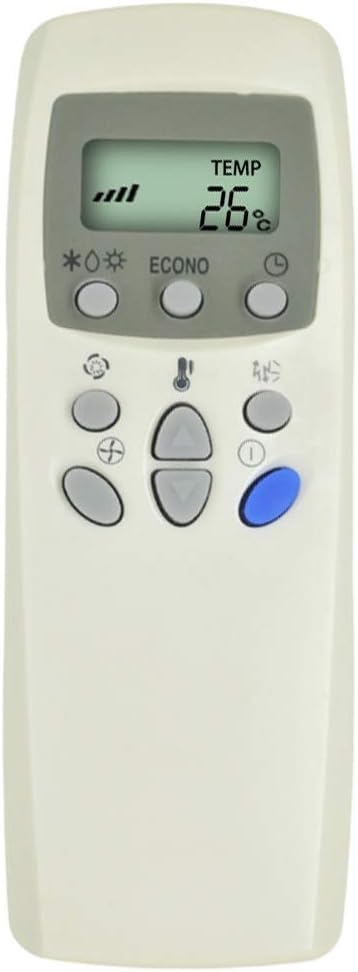
Image: Close-up of the remote control's front, showing the LCD display and various function buttons for temperature, mode, and fan speed.
Environmental Mode
This feature helps optimize energy consumption and environmental protection:
- Entering Environmental Mode: Press and hold the "Mode" button for 10 seconds. After releasing, the remote will operate only in cooling mode (adjustable temperature between 26-30 degrees Celsius) or heating mode (adjustable temperature between 18-22 degrees Celsius). This indicates entry into environmental mode.
- Exiting Environmental Mode: Press and hold the "Mode" button for 10 seconds again. After releasing, all functions will return to normal operation, indicating the withdrawal from environmental mode.
Vremenska operacija
The remote supports original timing functions for both turning the A/C on and off:
- Timing - On: When the remote is off, press and hold the "Timing On" button for approximately 4 seconds. The LCD will display a flashing icon (e.g., "2" "1H"). Use the "TEMP ▲" or "TEMP ▼" buttons to adjust the desired timing duration. Press the "Timing On" button again to confirm and exit.
- Timing - Off: When the remote is on, press and hold the "Timing Off" button for approximately 4 seconds. The LCD will display a flashing icon (e.g., "2" "1H"). Use the "TEMP ▲" or "TEMP ▼" buttons to adjust the desired timing duration. Press the "Timing Off" button again to confirm and exit.
Napomene:
- This product utilizes the original timing function. To set the time, the remote must be in the "on" stage if the product cannot operate in the "off" stage.
- The calculation method for timing is consistent with the original remote control.
Održavanje
Da biste osigurali dugotrajnost i pravilno funkcionisanje vašeg daljinskog upravljača:
- čišćenje: Obrišite daljinski upravljač mekom, suhom krpom. Ne koristite tekuća sredstva za čišćenje ili abrazivne materijale.
- Zamjena baterije: Replace batteries when the remote's range decreases or the display becomes dim. Always replace both batteries at the same time with new AAA 1.5V batteries.
- Skladištenje: Daljinski upravljač čuvajte na hladnom i suhom mjestu, dalje od direktne sunčeve svjetlosti i ekstremnih temperatura.
- Izbjegavajte kapi: Zaštitite daljinski upravljač od fizičkih udara, jer to može oštetiti unutrašnje komponente.
Rješavanje problema
If you encounter issues with your remote control, consider the following:
- Daljinski ne reaguje:
- Check if the batteries are correctly installed and have sufficient power. Replace if necessary.
- Ensure there are no obstructions between the remote and the A/C unit's receiver.
- Confirm the remote is pointed directly at the A/C unit.
- Re-attempt the "One-button direct search" pairing process.
- Ograničeni raspon:
- Zamijenite baterije.
- Ensure the remote is within the operable distance of more than 8 meters.
- Problemi s prikazom:
- If the screen is dim or blank, replace the batteries.
Resume Factory Settings
To restore the remote control to its factory default settings:
- Hold down the "Fan" button for approximately 10 seconds. Most air conditioner control states will be restored to factory settings, indicated by the screen displaying full brightness.
Specifikacije
| Feature | Opis |
|---|---|
| Brand | CHOUBENBEN |
| Broj modela | 2019101803 |
| Kompatibilni uređaji | LG klima uređaj |
| Tehnologija povezivanja | Infracrveni |
| Maksimalni domet | 8 metara |
| Vrsta baterije | 2 x AAA 1.5V (nije uključeno) |
| Display | Samo Celzijus |
Garancija i podrška
For warranty information or technical support regarding your CHOUBENBEN Universal Remote Control, please refer to the purchase documentation or contact the seller directly. Specific warranty terms may vary depending on the retailer and region of purchase.