
1. Uvod
The Okaysou AirMic4S Air Purifier is designed to provide clean and fresh air in your home or office. It features an advanced filtration system to capture and reduce airborne particles, odors, and harmful gases, contributing to a healthier indoor environment.

Figure 1.1: Okaysou AirMic4S Air Purifier, illustrating its capability to filter various airborne contaminants including dust, pollen, dander, smoke, and VOCs.
This manual provides detailed instructions for the setup, operation, maintenance, and troubleshooting of your AirMic4S Air Purifier. Please read it thoroughly before use and keep it for future reference.
2. Sigurnosne informacije
Da biste smanjili rizik od požara, strujnog udara ili povrede, molimo vas da se pridržavate sljedećih sigurnosnih mjera opreza:
- Uvijek isključite pročišćivač zraka iz struje prije premještanja, čišćenja ili zamjene filtera.
- Nemojte koristiti uređaj sa oštećenim kablom ili utikačem.
- Držite kabl za napajanje dalje od zagrejanih površina.
- Ne blokirajte otvore za zrak niti postavljajte uređaj na meku površinu gdje bi otvori mogli biti blokirani.
- Ne potapajte jedinicu u vodu ili druge tečnosti.
- Ovaj uređaj nije namijenjen za upotrebu od strane osoba (uključujući djecu) sa smanjenim fizičkim, senzornim ili mentalnim sposobnostima, ili nedostatkom iskustva i znanja, osim ako im je dat nadzor ili upute o korištenju uređaja od strane osobe odgovorne za njihovu sigurnost .
- Use only genuine Okaysou replacement filters to maintain optimal performance and warranty.
3. Proizvod je gotovview
The Okaysou AirMic4S features a compact design with powerful air purification capabilities. It utilizes a multi-stagsistem za filtriranje za efikasno čišćenje zraka.

Slika 3.1: Prednja strana view of the Okaysou AirMic4S Air Purifier, showcasing njegovim elegantnim dizajnom.
3.1 Ključne komponente
- Rešetka za usis zraka: Located on the lower section, designed to capture hair and large particles.
- Kontrolna tabla: Top-mounted touch panel for all functions.
- Izlaz zraka: Gornja rešetka za ispuštanje prečišćenog zraka.
- Odjeljak filtera: Sadrži višenamjenske objektetage filter.
3.2 Sistem filtracije
The AirMic4S employs an advanced 3-stage H13 True HEPA filtration system:
- Predfilter koji se može prati: The first defense, capturing large particles like hair and fur.
- H13 True HEPA filter: Captures pollen, dander, dust, smell, and smoke particles as small as 0.3 microns.
- Filter sa aktivnim ugljem: Effectively absorbs stubborn and unwanted odors, harmful gases, and VOCs.

Figure 3.2: Illustration of the advanced 3-stage H13 True HEPA filtration system, detailing the washable pre-filter, H13 True HEPA filter, and active carbon filter.
4. Podešavanje
Follow these steps to set up your Okaysou AirMic4S Air Purifier:
- Raspakujte jedinicu: Pažljivo izvadite pročišćivač zraka iz ambalaže.
- Uklonite ambalažu filtera: Before first use, unscrew the bottom cover (twist counter-clockwise) and remove the plastic packaging from the filter.
- Ponovna instalacija filtera: Vratite filter u uređaj, pazeći da je pravilno postavljen.
- Secure Bottom Cover: Replace the bottom cover and twist clockwise to secure it.
- plasman: Place the air purifier on a firm, level surface. Ensure there is adequate space around the unit for proper airflow (at least 6 inches from walls or furniture).
- Priključak: Priključite kabl za napajanje u odgovarajuću električnu utičnicu.
5. Uputstvo za upotrebu
The AirMic4S features an intuitive touch control panel for easy operation.

Figure 5.1: The control panel of the AirMic4S, showing buttons for power, fan speed, timer, filter reset, and night light/sleep mode.
5.1 Funkcije kontrolne table
- Dugme za napajanje (⑁): Pritisnite da uključite ili isključite jedinicu.
- Fan Speed Button (✴): Ciklično mijenja brzine ventilatora (niska, srednja, visoka).
- Timer Button (⌛): Sets the operating timer for 2, 4, or 8 hours. The unit will automatically turn off after the selected time.
- Night Light Mode (🌙): Aktivira ili deaktivira funkciju noćnog svjetla.
- Sleep Mode (🌛): Activates a quiet operation mode (as low as 24dB) for undisturbed sleep.
- Filter Reset Indicator (📄): Lights up when it's time to replace the filter. Press and hold to reset after filter replacement.
5.2 Opći rad
- Uključeno: Press the Power button to start the air purifier. It will typically start on a low fan speed.
- Podesite brzinu ventilatora: Press the Fan Speed button repeatedly to cycle through the desired fan speeds (Low, Medium, High).
- Postavi tajmer: Press the Timer button to select 2H, 4H, or 8H. The corresponding indicator will light up.
- Aktivirajte način rada za spavanje: Press the Sleep Mode button to enter ultra-quiet operation. The night light may dim or turn off in this mode.
- Control Night Light: Use the Night Light button to toggle the light on or off independently.
- Iskljuciti: Ponovo pritisnite dugme za napajanje da biste isključili uređaj.
6. Održavanje
Redovno održavanje osigurava optimalne performanse i produžava vijek trajanja vašeg pročišćivača zraka.
6.1 Zamjena filtera
The filter replacement indicator will illuminate when it's time to change the filter. Filter lifespan varies based on usage and air quality.
- Isključite pročišćivač zraka iz električne utičnice.
- Turn the unit upside down and twist the bottom cover counter-clockwise to remove it.
- Uklonite stari filter.
- Insert a new genuine Okaysou filter into the unit.
- Replace the bottom cover and twist clockwise to secure it.
- Plug in the unit. With the unit powered on, press and hold the Filter Reset button for 3-5 seconds until the indicator light turns off.
Okaysou offers 4 optional replacement filters tailored to specific needs:
- Original Filter: Best for general use, absorbing odors, dander, pollen, smoke.
- Customized Blue Filter (G-Defense Filter): Best for humid environments to absorb harmful substances.
- Customized Green Filter (Toxin Absorber Filter): Best for areas with high levels of toxins, vehicle exhaust, VOCs.
- Yellow Odor Remover Filter: Best for powerfully reducing odors from ash, wildfire, cooking.

Figure 6.1: Various optional replacement filters available for the AirMic4S, each designed for specific air purification needs.
6.2 Čišćenje jedinice
- Obrišite vanjski dio pročišćivača zraka mekom, suhom krpom.
- The washable pre-filter can be gently cleaned with a soft brush or vacuum cleaner to remove large dust and hair particles. Ensure it is completely dry before reinstallation.
- Nemojte koristiti abrazivna sredstva za čišćenje ili rastvarače.
7. Otkrivanje problema
If you encounter issues with your AirMic4S Air Purifier, refer to the following table for common problems and solutions:
| Problem | Mogući uzrok | Rješenje |
|---|---|---|
| Jedinica se ne uključuje. | Nije uključeno; napajanje je isključenotage; filter nije pravilno instaliran. | Ensure unit is securely plugged in. Check power supply. Verify filter is unwrapped and correctly seated, and bottom cover is secured. |
| Protok zraka je slab ili bučan. | Filter je prljav ili začepljen; otvori za usis/izsis zraka su blokirani. | Clean or replace the filter. Ensure nothing is obstructing the air inlets or outlets. |
| Miris i dalje postoji. | Filter needs replacement; strong external odor source. | Replace the filter, especially if using the Original filter for strong odors. Consider using an Odor Remover filter. Ensure the room is adequately ventilated. |
| Filter Reset light remains on after replacement. | Resetovanje filtera nije ispravno izvršeno. | With the unit powered on, press and hold the Filter Reset button for 3-5 seconds until the light turns off. |
If the problem persists after trying these solutions, please contact Okaysou customer support.
8. Specifikacije
| Feature | Detalj |
|---|---|
| Broj modela | AirMic 4S |
| Dimenzije proizvoda | 8.7"D x 8.7"Š x 11.89"H |
| Težina | 6.6 funti |
| Nazivna snaga | 25 vati |
| Nivo buke | 24 dB (režim spavanja) |
| Područje pokrivenosti | Up to 300 sq. ft. (5x per hour in 150 sq.ft, 3x per hour in 300 sq.ft, 2x per hour in 580 sq.ft) |
| Vrsta filtracije | H13 True HEPA (3-Stage) |
| Ozone Free | 100% bez ozona |
| Certifikati | CARB, CE, RoHS, ETL Listed |
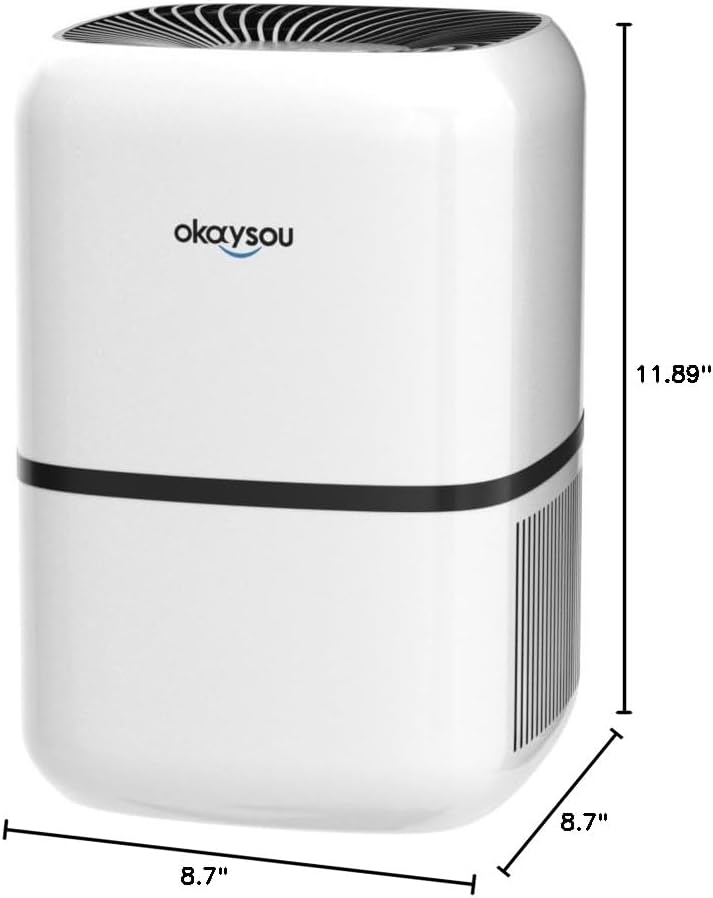
Slika 8.1: Dimenzionalno view of the Okaysou AirMic4S Air Purifier, showing its height, depth, and width.
9. Garancija i podrška
The Okaysou AirMic4S Air Purifier comes with a 5 godine garancije. Okaysou also provides lifetime US-based customer support.
For warranty claims, technical assistance, or any questions regarding your product, please contact Okaysou customer support through their official channels or refer to the contact information provided with your purchase.
You can also visit the official Okaysou store on Amazon for more information and support: Okaysou Amazon Store