
Uvod
This manual provides detailed instructions for the safe and efficient use of your FONESTAR DOTS-N Bluetooth TWS Speaker. Please read this manual thoroughly before operating the device and retain it for future reference.
The FONESTAR DOTS-N is a portable Bluetooth TWS speaker featuring Bluetooth 4.2 and NFC connectivity. It offers powerful sound with enhanced bass, playback controls, and hands-free calling. Equipped with a rechargeable Li-Ion battery providing up to 10 hours of autonomy, it also includes a 3.5mm auxiliary input. Its compact design makes it suitable for home use.
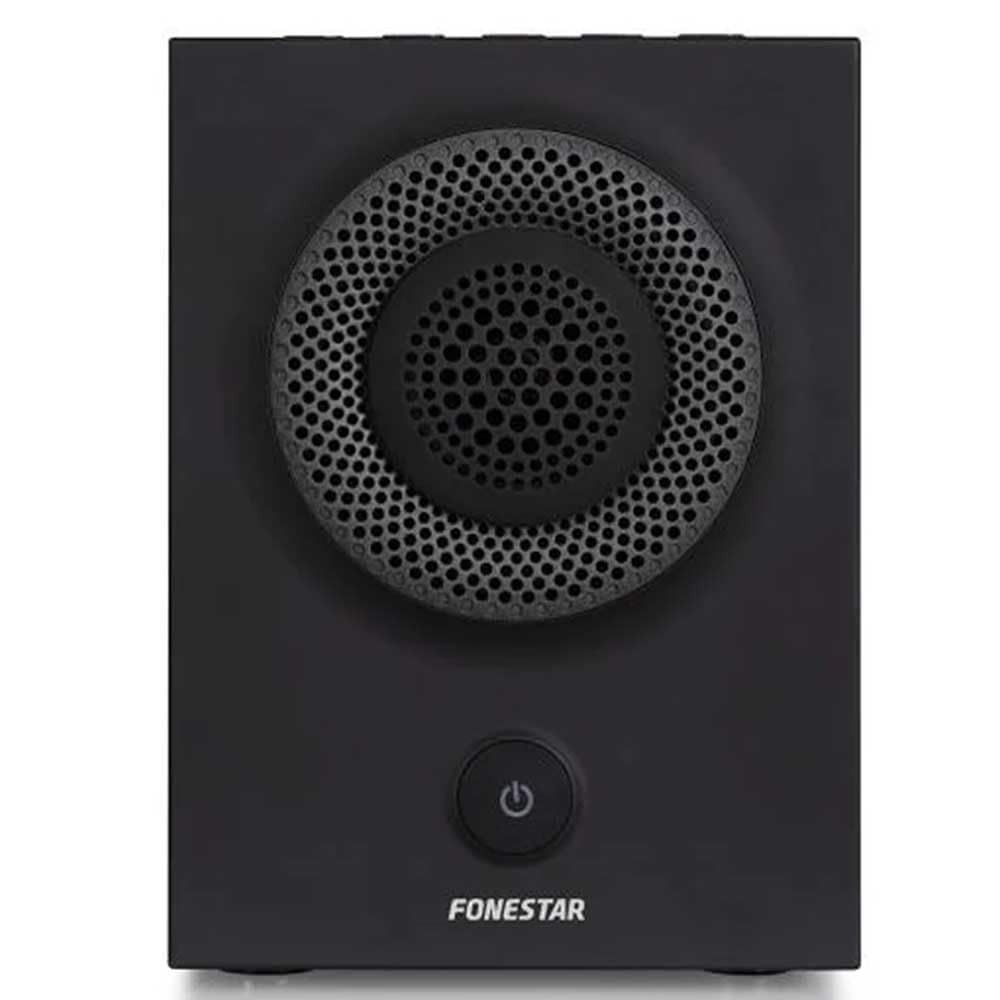
Slika 1: Prednja strana view of the FONESTAR DOTS-N Bluetooth TWS Speaker.
Setup
1. Raspakivanje
Pažljivo izvadite sve komponente iz ambalaže. Provjerite da li su prisutne sve dolje navedene stavke:
- FONESTAR DOTS-N Bluetooth TWS Speaker
- USB na Micro USB kabl za punjenje
- 3.5 mm stereo audio kabel
- Korisnički priručnik (ovaj dokument)
2. Punjenje zvučnika
Before first use, fully charge the speaker. Connect the Micro USB end of the charging cable to the speaker's charging port and the USB-A end to a compatible USB power adapter (not included) or a computer's USB port.
- Indikatorska lampica punjenja će svijetliti tokom punjenja.
- Vrijeme punjenja je otprilike 3 sata za potpuno punjenje.
- Indikatorska lampica će se promijeniti ili ugasiti nakon što je punjenje završeno.
3. Uključivanje / isključivanje napajanja
To power on the speaker, press and hold the power button (usually indicated by a ⏻ symbol) for a few seconds until you hear an audible prompt or see an indicator light. To power off, repeat the process.
Uputstvo za upotrebu
1. Bluetooth uparivanje
Zvučnik podržava Bluetooth 4.2 za bežični audio streaming.
- Ensure the speaker is powered on and in pairing mode (usually indicated by a flashing LED). If not, press the Bluetooth pairing button or power button briefly to enter pairing mode.
- Na pametnom telefonu, tabletu ili drugom uređaju koji podržava Bluetooth, idite na postavke Bluetootha.
- Traži available devices and select "FONESTAR DOTS-N" from the list.
- Once paired, the speaker will emit an audible confirmation, and the LED indicator will typically become solid.
2. NFC Pairing (Near Field Communication)
For devices with NFC, pairing can be done quickly:
- Ensure NFC is enabled on your device and the speaker is powered on.
- Tap your NFC-enabled device gently against the NFC area on the speaker (refer to product diagram for exact location, if available).
- Potvrdite zahtjev za uparivanje na svom uređaju.
3. Funkcija pravog bežičnog stereo sistema (TWS)
The TWS function allows you to pair two FONESTAR DOTS-N speakers together for a stereo sound experience.
- Ensure both DOTS-N speakers are powered on and not connected to any other Bluetooth device.
- On one speaker (this will be the primary speaker), press and hold the TWS button (if available) or a designated button for TWS pairing.
- Primarni zvučnik će tražiti sekundarni zvučnik. Nakon povezivanja, oba zvučnika će ispuštati zvuk potvrde.
- Now, connect your Bluetooth device to the primary speaker as described in the "Bluetooth Pairing" section. Audio will play in stereo through both speakers.
4. Pomoćni ulaz (AUX)
For non-Bluetooth devices, use the included 3.5mm stereo audio cable.
- Spojite jedan kraj 3.5 mm audio kabela na AUX-in priključak na zvučniku.
- Drugi kraj priključite na priključak za slušalice ili audio izlaz vašeg uređaja.
- The speaker will automatically switch to AUX mode or may require manual selection via a mode button.
5. Playback Control and Hands-Free Calls
The speaker features integrated controls for music playback and managing calls:
- Pusti/pauza: Press the Play/Pause button (often combined with the power button or a dedicated button).
- Pojačavanje/stišavanje glasnoće: Koristite dugmad za jačinu zvuka (+ / -) on the speaker.
- Sljedeći / Prethodni zapis: Long press or double-press the volume buttons, or use dedicated track skip buttons if present.
- Odgovori/Završi poziv: Press the Play/Pause button during an incoming call to answer, and again to end the call.
- odbiti poziv: Pritisnite i držite dugme Reprodukuj/Pauziraj tokom dolaznog poziva.
Održavanje
1. Čišćenje
- Uvijek isključite zvučnik prije čišćenja.
- Za brisanje vanjskih površina koristite meku, suhu krpu koja ne ostavlja dlačice.
- Ne koristite abrazivna sredstva za čišćenje, voskove ili rastvarače jer mogu oštetiti završnu obradu.
- Izbjegavajte ulazak vlage u bilo kakve otvore.
2. Skladištenje
- Čuvajte zvučnik na hladnom i suhom mjestu, dalje od direktne sunčeve svjetlosti i ekstremnih temperatura.
- Ako skladištite bateriju duži period, punite je do otprilike 50% svakih nekoliko mjeseci kako biste je održali u ispravnom stanju.
3. Održavanje baterije
- Ne izlažite bateriju prekomjernoj toploti, vatri ili direktnoj sunčevoj svjetlosti.
- Izbjegavajte često potpuno pražnjenje baterije, jer to može smanjiti njen vijek trajanja.
- Koristite samo priloženi kabel za punjenje ili njegov certificirani ekvivalent.
Rješavanje problema
| Problem | Mogući uzrok | Rješenje |
|---|---|---|
| Zvučnik se ne uključuje. | Baterija je prazna. | Napunite zvučnik pomoću priloženog USB kabla. |
| Nije moguće uparivanje putem Bluetootha. | Zvučnik nije u režimu uparivanja; uređaj je previše udaljen; smetnje. | Ensure speaker is in pairing mode. Move device closer (within 10m). Turn off other Bluetooth devices. |
| Nema zvuka ili je jačina zvuka niska. | Volume too low on speaker or source device; incorrect input mode. | Increase volume on both speaker and source device. Check if the correct input (Bluetooth/AUX) is selected. |
| Uparivanje TWS-a nije uspjelo. | Speakers are already paired to another device; incorrect TWS pairing procedure. | Provjerite da li su oba zvučnika isključena s drugih uređaja. Pažljivo slijedite korake za uparivanje TWS-a. |
| Izobličenje zvuka. | Previsoka jačina zvuka; slaba baterija; slab signal. | Reduce volume. Charge the speaker. Move source device closer to the speaker. |
Tehničke specifikacije

Figure 2: Dimensions of the FONESTAR DOTS-N Bluetooth TWS Speaker.
| Naziv modela | DOTS-N |
| Brand | FONESTAR |
| Tehnologija povezivanja | Bluetooth 4.2, NFC, 3.5mm AUX |
| bežični domet | Do 10 metara (33 stope) |
| Način audio izlaza | Stereo (sa TWS-om) |
| Vrsta zvučnika | 3" Coaxial Woofer with Tweeter, 3" Subwoofer, 4" Passive Radiator |
| Maksimalna izlazna snaga zvučnika | 12 vati RMS |
| Frekvencijski odziv | 80 - 20,000 Hz |
| Odnos signala i šuma | ≥ 75 dB |
| Izvor napajanja | Napajanje baterijama (punjiva litij-ionska) |
| Kapacitet baterije | 2200 mAh, 7.4 V |
| Autonomija baterije | Do 10 sati (pri 50% volumena) |
| Vrijeme punjenja | Približno 3 sata |
| Kontrolni metod | Taktilno (Dodir) |
| Posebne karakteristike | High-res audio, Bluetooth, Integrated microphone, USB port (for charging) |
| Kompatibilni uređaji | Pametni telefoni, tableti |
| Preporučena upotreba | For home |
| Boja | Crna |
| Dimenzije (Š x V x D) | 125 x 175 x 158 mm (približno 4.9 x 6.9 x 6.2 inča) |
| Težina artikla | 1.82 kg (približno 4.01 lbs) |
| Vodootporan | br |
Note: Specifications are subject to change without prior notice. Battery autonomy may vary depending on usage, volume level, and music type.
Informacije o garanciji
FONESTAR products are designed and manufactured to the highest quality standards. This product is covered by a limited warranty against manufacturing defects from the date of purchase. The specific terms and duration of the warranty may vary by region and retailer.
Please retain your proof of purchase (receipt or invoice) as it will be required for any warranty claims. The warranty does not cover damage caused by misuse, accident, unauthorized modification, or normal wear and tear.
For detailed warranty terms and conditions, please refer to the warranty card included with your product or contact your local FONESTAR distributor or retailer.
Korisnička podrška
If you encounter any issues that are not resolved by the troubleshooting guide, or if you require further assistance, please contact FONESTAR customer support or your authorized retailer.
Prilikom kontaktiranja podrške, molimo vas da budete spremni da pružite sljedeće informacije:
- Product Model: FONESTAR DOTS-N
- Datum kupovine
- Opis broja
- Vaše kontakt informacije
For the most up-to-date support information, including contact details and FAQs, please visit the official FONESTAR website.