
Uvod
Thank you for choosing the Ksix Fitness Band GPS. This manual provides essential information for setting up, operating, and maintaining your device. Please read it carefully to ensure optimal performance and longevity of your fitness band.
The Ksix Fitness Band GPS is designed to monitor your physical activity comprehensively, featuring integrated GPS for route tracking, a dynamic 24-hour heart rate monitor, and a multi-sport mode to enhance your training sessions.
Product Overview
The Ksix Fitness Band GPS is a versatile smartband equipped with advanced features to support your fitness journey. Its lightweight design and 1.3-inch TFT color screen offer a comfortable and clear user experience.
- Integrisani GPS: Records your route during outdoor activities.
- 24-Hour Dynamic Heart Rate Monitor: Neprekidno prati vaš otkucaj srca.
- Multi-Sport Mode: Monitors various types of workouts.
- Otpornost na vodu: IP68 rated, waterproof up to 3 meters for 1 hour.
- Povezivanje: Bluetooth 4.0 for seamless connection with your smartphone.
- Kompatibilnost: Works with Android 4.4 and later, and iOS 8.0 and later.
- Trajanje baterije: Up to 7-8 hours with GPS and real-time heart rate monitoring, and up to 30 days in standby mode.

Image 1: Ksix Fitness Band GPS displaying time and date.
Vodič za postavljanje
1. Punjenje uređaja
Before first use, fully charge your Ksix Fitness Band GPS. Connect the charging cable to the designated port on the device and a USB power source. The screen will indicate charging status.
2. Installing the Hi Move App
- Traži "Hi Move" in your smartphone's app store (Google Play Store for Android or Apple App Store for iOS).
- Preuzmite i instalirajte aplikaciju.
- Otvorite aplikaciju i slijedite upute na ekranu da biste kreirali račun i postavili svoj profesionalni...file.
3. Uparivanje sa vašim pametnim telefonom
- Provjerite je li Bluetooth omogućen na vašem pametnom telefonu.
- Open the Hi Move app.
- Idite na odjeljak za uparivanje uređaja unutar aplikacije.
- The app will search for available devices. Select "Ksix Fitness Band GPS" from the list.
- Confirm the pairing request on both your smartphone and the fitness band, if prompted.
- Once paired, the time and date on your fitness band will synchronize with your phone.
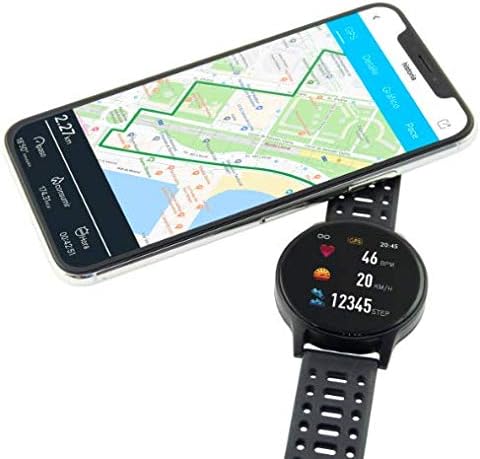
Image 2: Ksix Fitness Band GPS connected to a smartphone displaying a GPS-tracked route.
Uputstvo za upotrebu
Kretanje kroz interfejs
The fitness band features a touch-sensitive screen. Swipe left/right or up/down to navigate through different functions and menus. Tap to select an option or confirm an action.
GPS praćenje
For accurate GPS tracking, ensure you are in an open outdoor area with a clear view of the sky. Start your activity from the multi-sport mode, and the device will automatically attempt to acquire a GPS signal. Your route will be recorded and can be viewed in the Hi Move app after synchronization.
Praćenje otkucaja srca
The fitness band continuously monitors your heart rate. Wear the band snugly on your wrist, about one finger's width above your wrist bone, for accurate readings. You can view your current heart rate on the device and detailed historical data in the Hi Move app.
Multi-Sport Mode
Access the multi-sport mode from the main menu to select specific activities such as running, walking, cycling, etc. Selecting an activity will initiate tracking of relevant metrics like duration, distance, calories burned, and heart rate. End the activity when finished to save the data.

Image 3: Ksix Fitness Band GPS showing a person running, highlighting features like pedometer, multi-sport mode, heart rate monitoring, and distance tracking.
Održavanje
Čišćenje
Regularly clean your fitness band and strap to prevent skin irritation and maintain device hygiene. Use a soft, damp krpu za brisanje uređaja. Izbjegavajte upotrebu jakih hemikalija ili abrazivnih materijala.
Otpornost na vodu
The device is IP68 waterproof, meaning it can withstand immersion in water up to 3 meters deep for a maximum of 1 hour. It is suitable for swimming in shallow water but not recommended for diving, high-pressure water activities, or prolonged immersion. Ensure the charging port is dry before charging.
Skladištenje
When not in use for extended periods, store the fitness band in a cool, dry place. Avoid extreme temperatures and direct sunlight.
Rješavanje problema
- Uređaj se ne uključuje: Ensure the device is fully charged. Connect it to the charger and wait a few minutes.
- Ne može se upariti sa pametnim telefonom:
- Provjerite je li Bluetooth omogućen na vašem telefonu.
- Make sure the fitness band is within Bluetooth range of your phone.
- Restart both your phone and the fitness band.
- Try unpairing and re-pairing the device through the Hi Move app.
- Netačna očitanja otkucaja srca:
- Ensure the band is worn snugly on your wrist, not too loose or too tight.
- Očistite senzor na zadnjoj strani uređaja.
- Izbjegavajte pretjerano kretanje tokom mjerenja.
- GPS ne prima signal:
- Pobrinite se da se nalazite na otvorenom vanjskom prostoru sa čistim view neba.
- Sačekajte nekoliko minuta da uređaj primi signal.
- Ensure the device's firmware is up to date via the Hi Move app.
- Data not syncing to app:
- Ensure the fitness band is connected to your phone via Bluetooth.
- Open the Hi Move app and manually initiate a sync if available.
- Provjerite internetsku vezu vašeg telefona.
Specifikacije
| Broj modela | BXBZGPS01 |
| Brand | Ksix |
| Veličina ekrana | 1.3 inča |
| Tip ekrana | TFT Color |
| Kapacitet baterije | 230 mAh (litijum-jonska) |
| Battery Life (GPS + HR) | 7-8 sata |
| Trajanje baterije (stanje pripravnosti) | Do 30 dana |
| Otpornost na vodu | IP68 (up to 3 meters for 1 hour) |
| Povezivanje | Bluetooth 4.0 |
| Kompatibilnost | Android 4.4+ / iOS 8.0+ |
| Težina | 38 grama |
| Materijal | Plastika, PVC |
| Boja | Crna |
Garancija i podrška
For warranty information and technical support, please refer to the documentation provided with your purchase or visit the official Ksix webSačuvajte dokaz o kupovini za slučaj reklamacije.
Proizvođač: KSIX
Kontakt: Please refer to the Ksix official webstranicu za kontakt podatke za korisničku podršku.